


 Video Converter Ultimate
 Gravador de ecrã
 Reparo de vídeo
 Secure Download
Como converter arquivos de vídeo RMVB para FLV no Windows e Mac
According to our research, there are over a hundred of video formats on market. They are developed for different purposes. RMVB, for example, is perfect for distributing movies on the internet since the file size is small but the quality is superior. Anime and Asian movie studios prefer to deliver videos using this format. However, it is not widely accepted by video players or mobile devices. Therefore, this article will share the best RMVB to FLV converters.

Parte 1: Melhor Conversor RMVB para FLV para PC
FVC Free FLV Converter is one of the best RMVB to FLV converters for PC. It enables you to convert RMVB movies to FLV format without losing quality. More importantly, the converter is absolutely free of charge without any limit.
Main Features of the Best RMVB to FLV Converter
- 1. Converta em lote RMVB para FLV rapidamente.
- 2. Produza vídeos de alta qualidade após a conversão.
- 3. Nenhum pagamento, registro, marca d'água ou outro limite.
Free DownloadFor Windows 7 or laterSecure Download
Free DownloadFor MacOS 10.7 or laterSecure Download
Como converter RMVB para FLV no PC
Etapa 1: abrir arquivos RMVB
Run the best RMVB to FLV converter after you install it on your PC. Click the Add File(s) button in the home interface to add the RMVB files. Then you can view the movies with the built-in media player.

Etapa 2: definir FLV como formato de saída
Click and unfold the Output format option at the bottom and select FLV from the General Video list. Click the Gear icon if you want to change resolution and other options.

Etapa 3: converter RMVB em FLV
Next, hit the Open Folder button and select a specific directory to save the output. Finally, click on the Convert button to initiate converting RMVB to FLV immediately.

Parte 2: 3 principais conversores de RMVB para FLV online
Top 1: FVC Free Online Video Converter
FVC Free Online Video Converter is one of the best RMVB to FLV converter online. It is free to use without file size limit. Moreover, the batch converting feature is convenient if you have a lot of RMVB movies.
Main Features of the Best RMVB to FLV Converter Online
- 1. Converta RMVB para FLV online gratuitamente.
- 2. Fácil de usar.
- 3. Suporte a conversão de lote.
How to Convert RMVB to FLV Online
Step 1: Open https://www.free-videoconverter.net/free-online-video-converter/ in a browser. Click Add Files to Convert to download the launcher.
Download the Desktop Version to convert files in batch.
Step 2: Press the Add File button and upload the RMVB files that you intend to convert. Next, choose FLV at the bottom.

Step 3: Click the Convert button and wait for the process to finish. Then download the FLV files.
2 principais: CloudConvert
CloudConvert é um aplicativo conversor de arquivos baseado em nuvem. Ele permite que você processe arquivos RMVB de até 1 GB por conversão gratuitamente. Além disso, você pode enviar vídeos de uma variedade de fontes, como o Google Drive.
Main Features of CloudConvert RMVB to FLV Converter
- 1. Converta RMVB do computador ou online.
- 2. Fornece opções personalizadas básicas.
- 3. Corte o vídeo durante a conversão.
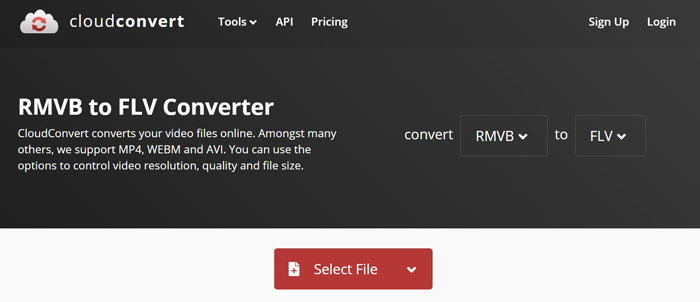
How to Convert RMVB to FLV Online
Step 1: Open https://cloudconvert.com/rmvb-to-flv in your browser. Click the Select File button to upload RMVB files.
Step 2: Hit the Convert button after video uploading.
Step 3: When it finishes, download the FLV files.
3 principais: FreeConvert
O FreeConvert é semelhante ao CloudConvert. É também um conversor RMVB para FLV da web. O tamanho máximo do arquivo é 1 GB por padrão, mas você pode se inscrever com seu e-mail pessoal ou pagar por planos para obter mais capacidade.
Main Features of FreeConvert RMVB to FLV Converter
- 1. Converta RMVB para FLV online.
- 2. Forneça configurações avançadas.
- 3. Exclua os vídeos após a conversão.
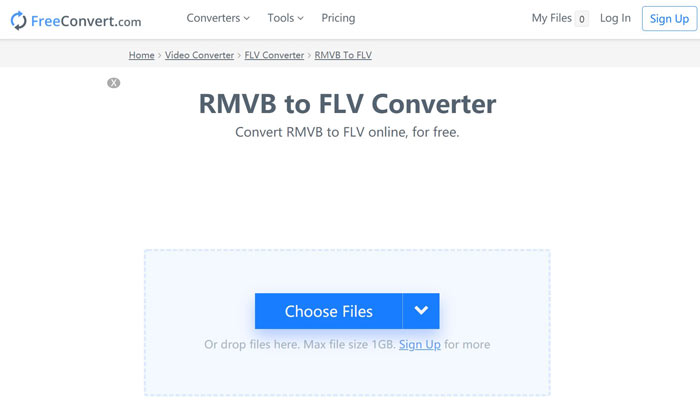
How to Convert RMVB to FLV by FreeConvert
Step 1: Open a browser and visit https://www.freeconvert.com/rmvb-to-flv.
Step 2: Click Choose Files button and upload RMVB files from your computer.
Step 3: When prompted, click Convert To FLV button. Then download the FLV files after converting.
RMVB vs. FLV
RMVB, uma variação mais recente do formato Real Media (.RM) padrão, é um formato de arquivo de vídeo Real Media compactado usando uma taxa de bits variável. É um formato popular para filmes e animes asiáticos. Os arquivos RMVB são menores em tamanho e têm taxas de bits mais baixas, mas melhor qualidade.
O Adobe Flash Player usou o FLV para fornecer conteúdo de vídeo, como filmes e programas de TV. Atualmente, a Adobe não desenvolve mais o player e recomenda que os usuários o desinstalem por motivos de segurança. No entanto, você ainda pode usar o formato FLV em muitos programas que não são da Adobe/Macromedia.
Parte 3: Perguntas frequentes sobre o conversor RMVB para FLV
O que é o formato de arquivo RMVB?
RMVB é o Real Media Video comprimido por uma taxa de bits variável. Ele é otimizado para o conteúdo dos vídeos. RMVB é uma variação mais recente do formato de arquivo Real Media padrão.
O Windows Media Player pode abrir arquivos RMVB?
Although the latest version of WMP has include a lot of codecs, RMVB cannot be opened in Windows Media Player. You have to convert RMVB to MP4 or other popular video formats. Or you can make use of RMVB players to open your RMVB files.
O VLC pode converter arquivos RMVB?
Sim, o VLC pode abrir e converter arquivos RMVB, mas leva muito tempo para concluir o trabalho. Além disso, a qualidade da saída é ruim.
Conclusão
Agora, você deve aprender pelo menos os quatro principais conversores de RMVB para FLV para Windows e Mac. Os aplicativos conversores de vídeo da web são uma maneira conveniente de transformar arquivos RMVB em formato FLV sem instalar. No entanto, o FVC Free FLV Converter é mais estável e produz uma melhor qualidade de saída. Mais perguntas? Fique à vontade para deixar uma mensagem abaixo.
-
 MP4 para FLV | 3 principais conversores gratuitos (online / Mac / Windows)
 Esta postagem é o guia detalhado para a conversão de MP4 para FLV. Você pode usar os 3 principais conversores gratuitos para mudar de MP4 para FLV online, no computador Windows ou Mac com facilidade.
-
 O que é o arquivo VOB e como transformar o arquivo VOB em GIF gratuitamente
 Quer saber mais sobre os arquivos VOB e como compartilhá-los depois de copiados? ou Por que você precisa converter VOB para GIF? Então leia este artigo com atenção.
-
 2 métodos fáceis de compactar vídeos FLV para upload rápido
 Se você não conseguir fazer upload dos vídeos FLV ou se demorar para compartilhar os arquivos, você pode aprender mais detalhes sobre 2 maneiras fáceis de compactar vídeos FLV a partir do artigo.

