


 Video Converter Ultimate
 Gravador de ecrã
 Reparo de vídeo
 Secure Download
Como converter vídeos em Flash (FLV) para reproduzir no PSP de maneira fácil e rápida
O arquivo FLV é um arquivo de vídeo salvo no formato de contêiner Adobe Flash Video (FLV). Você sempre pode encontrar o vídeo FLV embutido na internet como YouTube, Hulu, Vimeo e outros sites. Às vezes, você deseja converter seus arquivos FLV favoritos para jogar no PSP. Neste post, vamos compartilhar 3 soluções eficazes para converter os arquivos FLV para formatos compatíveis com PSP em seu PC com Windows e Mac.

Parte 1. Como mudar o vídeo em Flash para PSP Free Online
FVC Free Online Video Converter is a free online FLV to PSP converter tool that helps convert any videos including FLV to MP4, WMV, AVI, MOV, MP3, etc. The whole conversion is proceeded without downloading any software package, with no registration or ads. You can view the detailed steps to change the Flash video to PSP supported format like MP4 online for free.
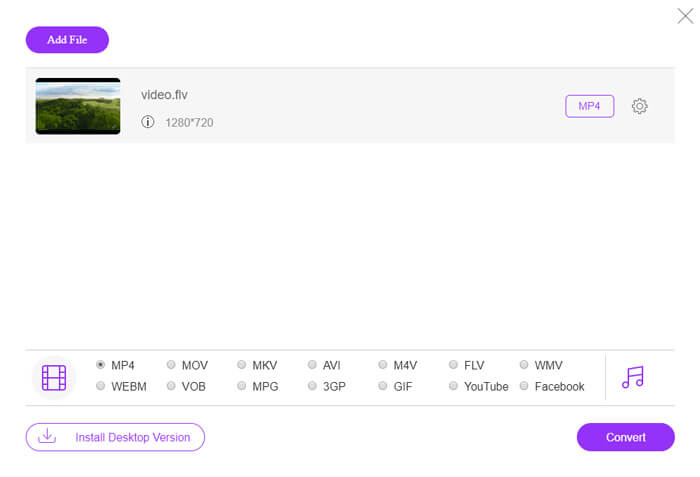
Step 1. Visit the official website of FVC Free Online Video Converter. You can click Add Files to Convert button to download and install the launcher. After that, you can select the FLV video file from local computer.

Step 2. Since MP4 is the recommended video format for PSP, you can move to the bottom area and check MP4 as the output format. If you want to adjust more settings, you can click the gear icon to adjust video encoder, resolution, frame rate, bitrate, and other audio settings like audio encoder, channel, sample rate, and bitrate.
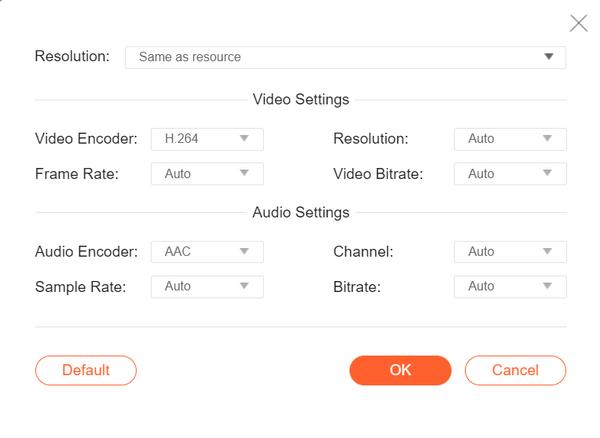
Step 3. Finally, you can click the Convert button to start converting your FLV videos to PSP MP4 files.
Parte 2. Maneira profissional de converter FLV para PSP gratuitamente
A professional tool like FVC Free FLV to PSP Converter will help convert your flash video for playing on PSP. This free FLV converter can batch convert the FLV files to MP4, AVI, WMV, MOV, and more. Moreover, you can edit the FLV videos with the built-in video editing software before editing.

- Converta em lote FLV para MP4, MKV, AVI, WMV, etc. a uma velocidade 50x mais rápida.
- Converta formatos FLV para PSP suportados no Windows 10/8/7 / Vista / XP e Mac OS X.
- Compactar, mesclar e adicionar outros efeitos de vídeo aos arquivos FLV.
- Adicione temas especiais aos vídeos em flash, como férias, família, aniversário.
Free DownloadFor Windows 7 or laterSecure Download
Free DownloadFor MacOS 10.7 or laterSecure Download
Etapa 1. Adicionar arquivo FLV
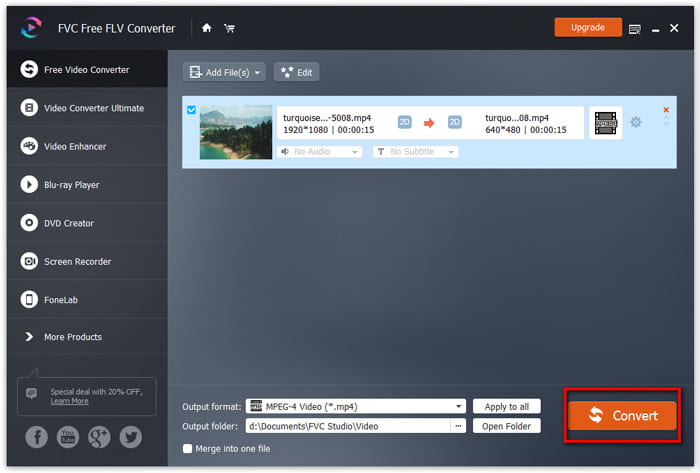
Free download, install and launch FVC Free FLV Converter. Click Add File(s) button to import your flash video file. You can also drag and drop multiple FLV files into the program at one time.

Etapa 2. Editar o arquivo FLV
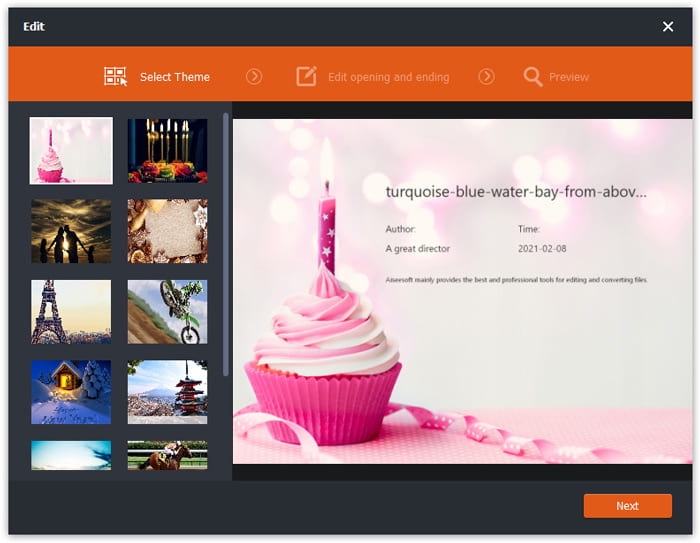
Click the Edit button to start editing your FLV file. You can select a certain theme, edit the title, author, time at the opening and ending of the FLV video clip.
Etapa 3. Definir o formato de saída para PSP
Then go to the Output format area, scroll down to find and enter the PSP list. You can choose PSP Video MPEG (*mp4), PSP Video h.264 (*.mp4), or other format as the output format. There are various options you can choose from the PSP list.

Etapa 4. Converter FLV em PSP
Finally, go to the Output folder area and choose the destination where the converted FLV file will be saved. You can click the Convert button to start converting FLV video to PSP for free.
Parte 3. Como converter gratuitamente FLV para PSP com VLC
More than a media player, VLC Media Player can also work as an FLV to PSP video converter with multiple features. With VLC, you can convert the Flash videos to PSP videos for free on Windows computer or Mac. Moreover, it handles a wide range of supported video formats for conversion. It is free and without any limitations. Follow the step-by-step guide to convert your favorite FLV video for playing on PSP.
Step 1. Install and open VLC Media Player on your computer. Simply click the Media menu and select Convert/Save button.
Step 2. Click Add button to add the FLV files you want to convert, and click Convert/Save button to continue.
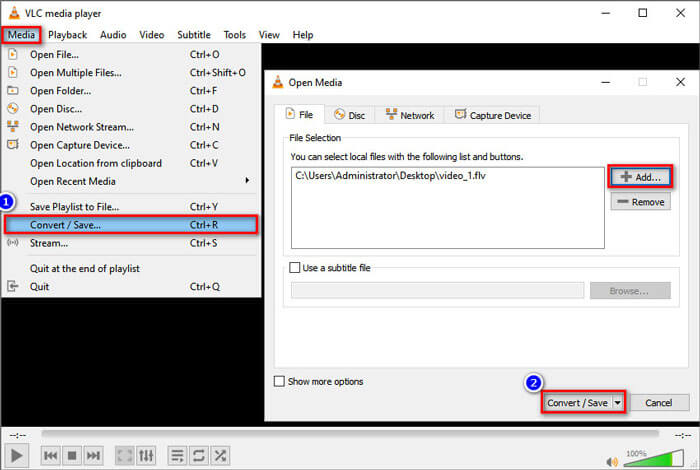
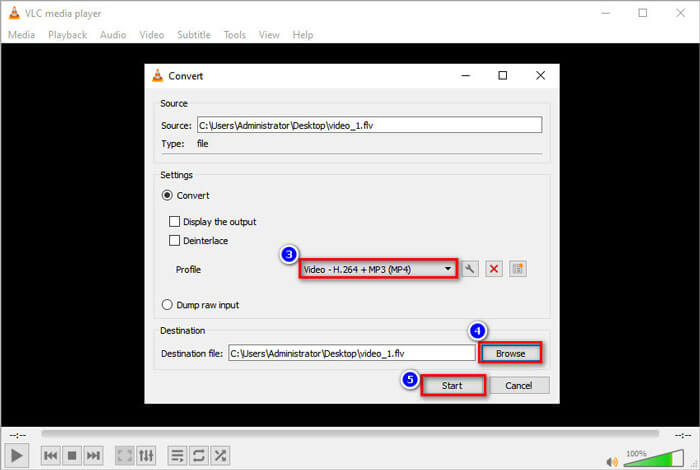
Step 3. In the Settings area, you can check Convert button and click the drop-down arrow next to Profile to select Video - H.264 + MP3 (MP4) as the output format.
Step 4. Then you can move to the Destination area and click the Browse button to set the output folder.
Step 5. Finally, you can click the Start button to start converting your FLV to PSP video in VLC.
Parte 4. Perguntas frequentes sobre a conversão de FLV em PSP
O que é um arquivo FLV?
FLV é o formato de arquivo de vídeo em flash desenvolvido pela Adobe. Ele pode armazenar vídeo, áudio, texto, subscrito e muito mais. É o formato padrão para vídeo em sites como YouTube, Hulu, etc.
Como abro um vídeo FLV?
Both Windows Media Player and QuickTime do not support FLV, so you have to use a third-party media player to open FLV, like VLC. There are many FLV players you can try to play FLV video, like FVC Free Video Player, FLV Media Player, DivX Player, RealPlayer, KMPlayer, and more.
Que tipo de arquivos de vídeo o PSP pode reproduzir?
PSP suporta MP4, H.264, AVI, Motion JPEG e DivX. MP4 é o formato de vídeo recomendado para o PSP.
Conclusão
Neste artigo, falamos principalmente sobre três métodos para converter o vídeo Flash para PSP. Espero que todos eles te ajudem muito. Você pode experimentar o conversor FVC Free FLV para PSP e alterar facilmente seus arquivos FLV para formatos compatíveis com PSP como MP4, AVI e muito mais em alta velocidade.
-
 4 Métodos de trabalho 100% para converter arquivos de vídeo FLV para o formato MP3
 Como converter um FLV para um arquivo MP3? Tudo que você precisa fazer é ler este artigo com atenção, encontrar seu método favorito e seguir nosso guia passo a passo para obter o que deseja.
-
 2 métodos fáceis de compactar vídeos FLV para upload rápido
 Se você não conseguir fazer upload dos vídeos FLV ou se demorar para compartilhar os arquivos, você pode aprender mais detalhes sobre 2 maneiras fáceis de compactar vídeos FLV a partir do artigo.
-
 Guia concreto para enviar seus vídeos FLV para o YouTube
 Carregar FLV para o YouTube, mas falhou? Você pode resolver esse problema sozinho e converter FLV em codecs compatíveis com o YouTube seguindo nosso guia passo a passo.
