


 Video Converter Ultimate
 Gravador de ecrã
 Reparo de vídeo
 Secure Download
Os arquivos MKV podem ser reproduzidos no PS3? Esta é a melhor maneira de reproduzir arquivos MKV no PS3
Play Station 3 is not only a video game console, it can be used as a media player to watch video files on Sony PS3 from USB Drive. If you collected lots of MKV movies and want to play them on your PS3. You can read this article to learn how to play MKV files on PS3.

Parte 1. Como converter e reproduzir arquivos MKV no PS3
Since PS3 doesn't support MKV format, you have to convert VOB to PS3 compatible formats if you would like to play MKV on PS3 freely. To convert MKV videos to PS3 supported video files, Video Converter Ultimate is highly recommended. It's a professional video converter designed for users to convert between various video and audio formats, such as MKV to MP4, MOV to MP4, WMV to PS3, etc. it provides optimized video profiles for PS3. You can convert any video format to PS3 supported formats within a few clicks.
Além disso, o programa também possui recursos de edição de vídeo, permitindo cortar o tamanho do quadro, adicionar marca d'água, aplicar efeitos de vídeo, carregar legendas, mesclar vários vídeos em um único arquivo, cortar partes indesejadas do vídeo e muito mais. Basta baixar e instalar o software em seu computador e experimentar.
Free DownloadFor Windows 7 or laterSecure Download
Free DownloadFor MacOS 10.7 or laterSecure Download
Etapa 1. Adicionar arquivos MKV
Instale e inicie o conversor MKV para PS3 e clique no botão Adicionar arquivos para carregar os arquivos .mkv do seu computador. Para economizar seu tempo, você pode adicionar vários arquivos MKV de uma vez e convertê-los simultaneamente.

Etapa 2. Escolha PS3 como formato de saída
After loading your MKV files, open the Convert All to menu, choose the Device category, and scroll down to find the PS3 output format under the Game tab.
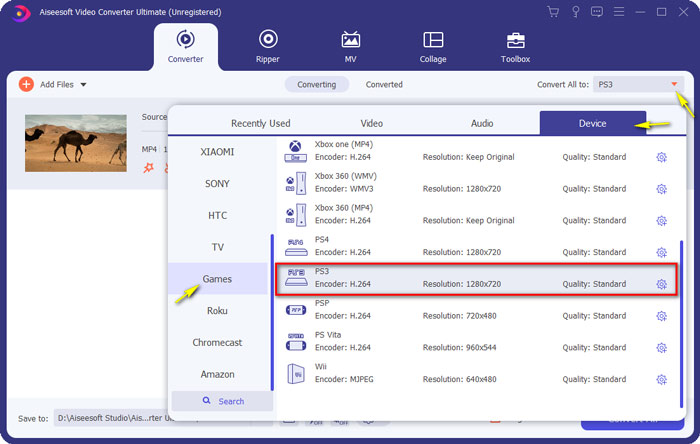
Etapa 3. Inicie a conversão de MKV para PS3
Then, go to the Save to field and specify the destination folder for saving your converted file. Finally, click Convert All button to start converting your MKV files to PS3 format.

Etapa 4. Reproduza arquivos MKV convertidos no PS3
When the conversion ends, you can put the converted videos into a VIDEO folder, and then copy them to a USB drive. Then, plug the USB drive into PS3, and head to VIDEO and find your device. Hit Triangle button to view all contents. Then, choose the video file you want to play and press X to start enjoying. Now you can watch your favorite MKV files on your PS3 anytime and anywhere.
Parte 2. Reproduza vídeos MKV com PS3 Alternative
If you are looking for a free and direct way to watch MKV files on your computer, use FVC Free Video Player. Since it is a web-based solution, so you can play your MKV files smoothly without downloading any software on your computer.
Key Features of FVC Free Video Player
1. Suporte de reprodução para vídeos 4K, HD e SD de todos os formatos.
2. Ele também reproduz arquivos de áudio, como MP3, AAC, etc. com qualidade sem perdas.
3. Totalmente gratuito para usar, sem necessidade de registro ou download.
4. Interface limpa e intuitiva.
5. Serviço baseado na Web, acessível em qualquer navegador.

Parte 3. Perguntas frequentes sobre como reproduzir arquivos MKV no PS3
Quais arquivos de vídeo o PS3 pode reproduzir?
A seguir estão os tipos de arquivos compatíveis com PS3: MPEG, MP4, AVI, AVCHD, DivX, etc.
Posso jogar MKV no PS3 sem converter?
MKV vem em muitos padrões e apenas H.264 / MPEG-4 AVC pode ser suportado no PS3. Se os seus arquivos MKV vierem em outros formatos, você terá que convertê-los para formatos compatíveis com o PS3 para facilitar a reprodução.
Como reproduzir arquivos MKV no PlayStation 3 a partir de USB?
Como o PS3 não pode decodificar arquivos MKV diretamente, você deve converter MKV para o arquivo de vídeo que o PS3 suporta. Depois de obter o arquivo convertido, conecte sua unidade flash USB a uma das duas portas USB localizadas na frente de seu PlayStation 3. Ligue o PS3, vá para Vídeo e selecione sua unidade USB. Em seguida, pressione o botão triângulo e escolha Exibir tudo. Agora você pode selecionar o vídeo que deseja reproduzir ou visualizar. Finalmente, pressione o botão X.
Conclusão
All in all, I hope all PS3 users will figure out how to play MKV videos on PS3 successfully after reading this article. Aside from PS3, you can play your MKV files in Windows Media Player, FVC Free Video Player, or other MKV media players.
-
 VLC Player não reproduz MKV, como consertar
 O VLC player suporta arquivos MKV? Por que o VLC não reproduz MKV? Este post compartilha 4 dicas úteis para você consertar o VLC player que não reproduz arquivos MKV.
-
 Como reproduzir arquivos MKV no iPad 2021
 Como reproduzir arquivos MKV no iPad 2? Posso converter MKV em MP4 para jogar no iPad Pro / Air / 2? Esta postagem compartilha 2 maneiras fáceis de jogar MKV no iPad.
-
 MKV para MOV - Como converter MKV para MOV
 Como faço para converter MKV para MOV no Mac? O iMovie consegue ler MKV? O que significa o formato MOV? Esta postagem mostra 2 maneiras simples de ajudá-lo a converter MKV em MOV com conversores de vídeo profissionais e online gratuitos.
