


 Video Converter Ultimate
 Gravador de ecrã
 Reparo de vídeo
 Secure Download
Como converter M2TS para MP4 sem reduzir a qualidade
“Quando coloco os vídeos da minha câmera Sony no computador, eles são arquivos M2TS, que não podem ser compartilhados no Facebook ou YouTube. Onde posso encontrar um conversor de vídeo para converter os arquivos para MP4 e assistir no meu computador? ”
Sometimes you want to play M2TS files on some portable devices, or upload them to YouTube or Facebook. It’s wise to convert them to a common video format like MP4. In this post, we will share you 5 free ways to convert M2TS to MP4 on Windows and Mac.

Parte 1. Melhor maneira de converter M2TS em MP4 gratuitamente
Not all media players support M2TS files. To better enjoy M2TS video from HD camcorders, you’d better change M2TS to commonly used MP4 for for playback. FVC Free M2TS Converter is an all-in-one M2TS converter and editor. You can not only convert M2TS files to MP4, MKV, AVI, MOV, etc., but also edit the M2TS files like compress, merge, theme, and more.
Free DownloadFor Windows 7 or laterSecure Download
Free DownloadFor MacOS 10.7 or laterSecure Download
Step 1.By clicking the Free Download button, you can quickly download Free M2TS Converter. Then install and launch it on your Windows computer. Click Add File(s) button to import the M2TS file into the program.
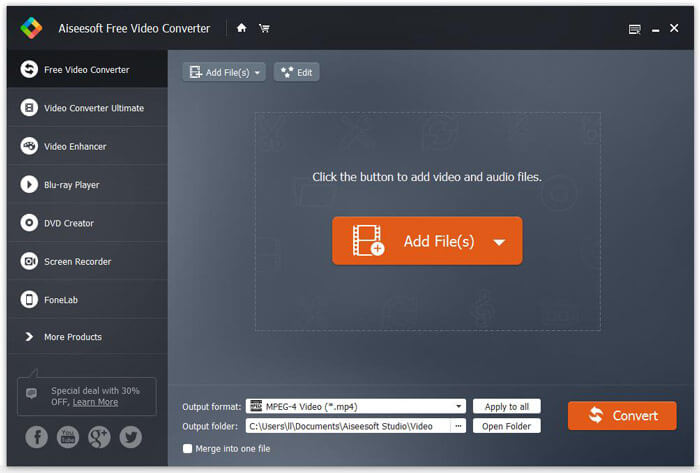
Step 2.Click the drop down button of Output format, and choose MPEG-4 Video (*.mp4) as the output format. You can also set the output folder to save the converted file.

Step 3.If you want to add a specific them for the video, you can click the Edit button on the top menu to choose a proper theme. After all settings are set, you can click Convert button to start changing M2TS file to MP4.

Parte 2. Como mudar M2TS para MP4 online
If you want to convert M2TS to MP4 online for free, FVC Free Online Video Converter will be a great choice. As a free online multimedia converter, it supports converting nearly all mainstream videos and audio to MP4, FLV, MKV, MOV, M4V, MTS, TS, M2TS, WMV, ASF, VOB, MP3, AAC, etc. Besides it’s quite easy to use.
Step 1. Go to the website of FVC Free Online Video Converter. Click Add Files to Convert on the top. Then download and install FVC launcher.

Step 2. Select the video you want to convert. If you want a MP4 video, just click MP4. Then Convert.

Step 3. You can just save the MP4 video to the desktop. After that, the conversion will start automatically.
Parte 3. Como converter M2TS para MP4 com ConvertFiles
ConvertFiles é o conversor M2TS para MP4 baseado na web que suporta mais de 200 formatos de vídeos, áudio, imagens, documentos, apresentações e arquivos. Siga as etapas simples abaixo para começar a converter o arquivo M2TS em MP4 online.
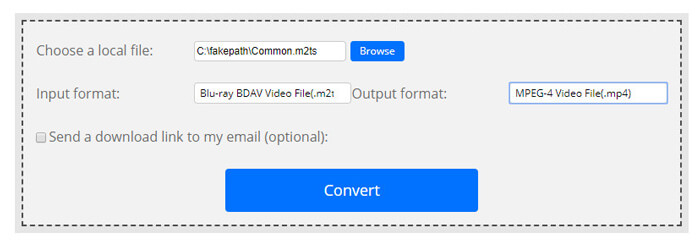
Step 1.Go to the official page of ConvertFiles. Click Browse button to upload your local M2TS file.
Step 2.Click the Input format box and select HDV Video File(.m2ts), and click Output format box to select MPEG-4 Video File(.mp4) as the output format.
Step 3.Click the Convert button to start transforming M2TS to MP4 for free. The conversion may take within minutes. After that, you can click the download link to download the converted MP4 file.
Às vezes, a conversão pode falhar devido ao formato de entrada inválido. Para obter uma alta taxa de sucesso, você pode tentar o Free M2TS Converter.
Parte 4. Como transformar M2TS em MP4 com VLC
VLC Media Player é um reprodutor multimídia de código aberto para Windows, Mac, Linux, iOS e Android. Ele também funciona como um ótimo conversor de M2TS para MP4 para converter arquivos M2TS para MP4, MOV, AVI e muito mais. Além do mais, você pode editar os arquivos M2TS como cortar, cortar, girar, adicionar efeitos de imagem e muito mais.
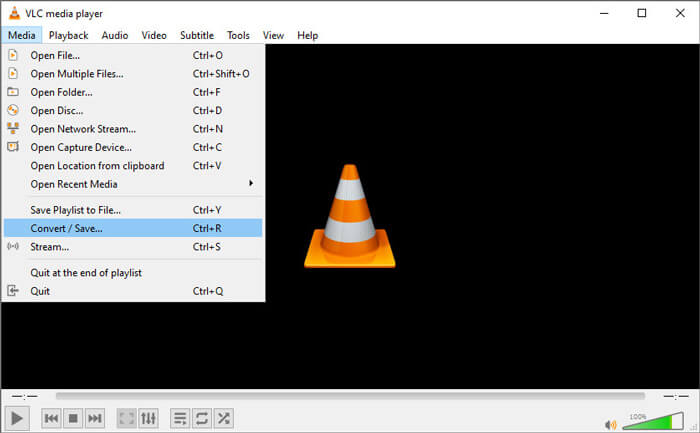
Step 1.Download and run VLC Media Player on your computer. Click Media > Convert / Save... to move on. Then click Add... button to add your M2TS file.
Step 2.Click Convert / Save button to enter the Convert window. Click the Profile drop down button to select Video - H.264 + MP3 (MP4) as the output format.
Step 3.Click Browse button to choose a destination folder. Then click the Start button to start converting M2TS to MP4.
Parte 5. Como exportar MP4 de M2TS com travão de mão
HandBrake é outro transcodificador de vídeo gratuito e de código aberto que pode converter vídeo de quase qualquer formato. Você pode tentar o Handbrake para converter o arquivo M2TS para MP4 com as seguintes etapas.
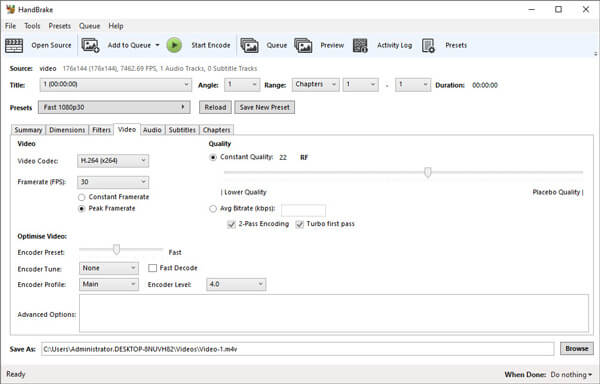
Step 1.Free download, install and launch HandBrake on your Windows/Mac. Click Open Source on the left corner to import the M2TS file from your local folder.
Step 2.You can adjust the settings to the M2TS file. Select MP4 from the drop down button of Format in Summary tab. In the Video tab, you can adjust video codec, video quality, framerate, and optimize video.
Step 3.Click Browse button to set the destination folder. Then click Start Encode button to start converting M2TS to MP4 for free.
Parte 6. Perguntas frequentes sobre a conversão de M2TS em MP4
What is the difference between M2TS and MP4?
M2TS significa Sistema de Transporte MPEG-2. É um formato de arquivo contêiner de áudio de disco Blu-ray e usado para multiplexação de vídeo, áudio e outros fluxos. Geralmente, os arquivos M2TS são maiores do que os arquivos MP4 com a mesma qualidade. Os arquivos MP4 são suportados em quase todos os reprodutores de mídia, mas os arquivos M2TS só podem ser reproduzidos em alguns reprodutores.
How do I play M2TS files on my PC?
Você pode abrir arquivos M2TS diretamente em alguns aplicativos de reprodutores de mídia populares, incluindo Windows Media Player, VLC Media Player, 5K Player, SMPlayer, Splash, etc. Você também pode reproduzir arquivos M2TS com o software Sony Picture Motion Browser.
Can VLC play M2TS files?
sim. Você pode reproduzir arquivos M2TS com o VLC Media Player no Windows e Mac. Basta executar o VLC media player e clicar em Media to Open File para reproduzir o arquivo M2TS no VLC. Se isso não funcionar para o problema do codec, você deve primeiro converter M2TS para o formato de vídeo compatível com VLC.
Conclusion
Com os 5 métodos gratuitos acima, você pode converter arquivos M2TS para MP4 com facilidade. Após comparação, o FVC Free M2TS Converter deve ser o melhor conversor de M2TS para MP4. Com a tecnologia de aceleração de hardware, ele exporta arquivos MP4 em alta qualidade em minutos. Você pode experimentar este conversor grátis de uma vez.
-
 Guia abrangente sobre como converter TS para MP4
 O que são arquivos TS e deseja converter TS para MP4? Neste post, iremos compartilhar métodos gratuitos e online para converter TS para MP4.
-
 Como converter arquivos MTS para MP4
 Não sei como converter arquivos MTS para MP4? Neste guia, você encontrará 6 maneiras fáceis e gratuitas de alterar o formato MTS para MP4 no Windows ou Mac sem perda de qualidade.
-
 2 maneiras simples de converter MTS para MP3 gratuitamente
 Precisa extrair o áudio MP3 de um arquivo MTS, mas não sabe como? Este post compartilha 2 maneiras fáceis de ajudá-lo a converter MTS / M2TS para MP3 com alta qualidade de áudio.
