


 Video Converter Ultimate
 Gravador de ecrã
 Reparo de vídeo
 Secure Download
Maneira simplificada de gravar Blu-ray no OBS Studio e outras ferramentas possíveis
Blu-ray disk stores the highest quality a disk can be stored. It can save a video up to 1080 pixels. Same as in audio, it produces a crystal-clear sound rather than CDs. And also, no need to worry about storing high-volume storage on Blu-ray because it has a lot of space. As we proceed, OBS Studio is a free downloadable open-source program. It supports platforms like Windows, macOS, and Linux. In addition, it is perfect for recording audio video on your screen computer. Some users find it troublesome to record Blu-ray in a studio. So, stay still and read the article to know how to record Blu-ray movies with OBS and what expert recorder you should use for taking high-quality video output.

Parte 1. Como gravar filmes Blu-ray com OBS Studio
Conhecido por ser uma ferramenta poderosa sem streaming, OBS Studio recebe atualizações regulares por causa de seus influentes patrocinadores Youtube, Twitch, Facebook, API.video, own3d.pro e muitas outras plataformas. Não precisa se preocupar com streaming por causa dessas plataformas principais. Por outro lado, constrói seu nome como a ferramenta mais complexa para registro e menos orientação. Mas se você quiser um streaming simples, não precisa mergulhar em configurações complicadas. Além disso, torne difícil em gerenciável lendo este artigo para as etapas e detalhes sobre OBS Studio.
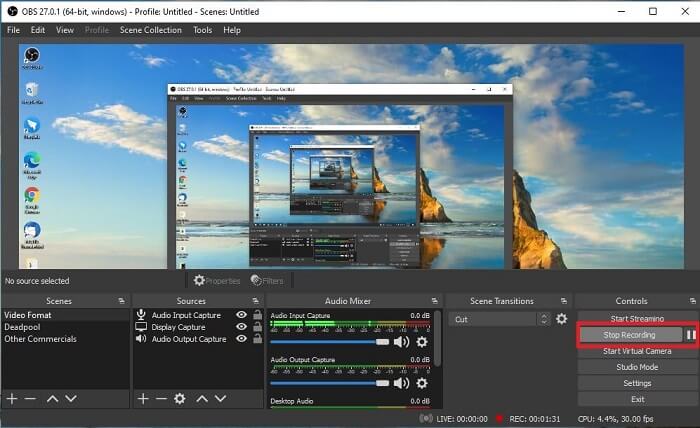
Aqui estão algumas etapas sobre como usar o OBS Studio:
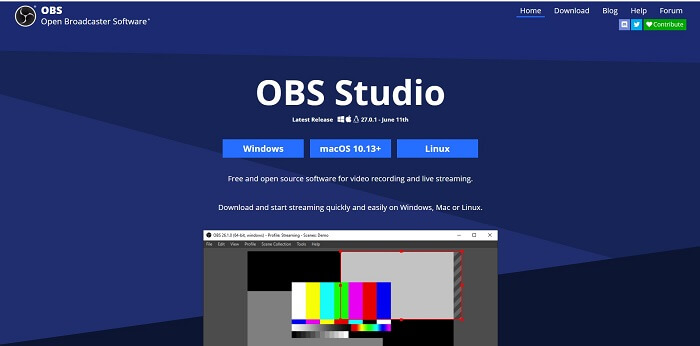
Step 1. Go to your browser. Then choose what OS you are currently using, then download, set it up, install it, and then click Finish to launch the tool.
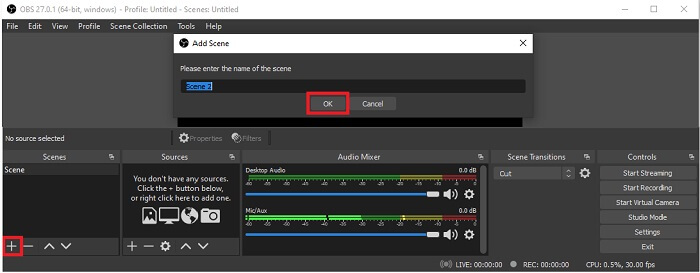
Step 2. Go to the Scenes panel, click the Add icon to add a scene then name it Click OK to proceed.
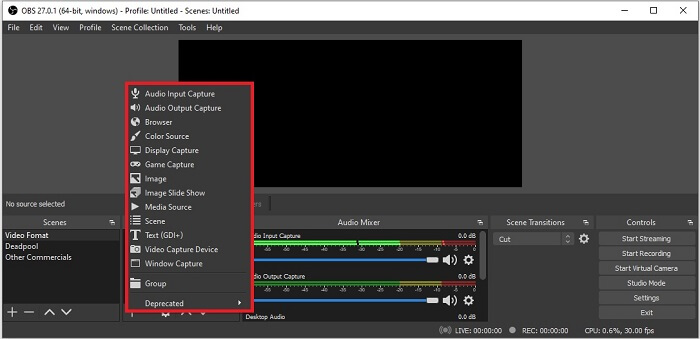
Step 3. Proceed to the source panel. Click the Plus icon then different options will show. Here are some basic options that are enlisted here. The Audio Input Capture to record your voice in the microphone. Next, Audio Output capture to record the sound coming out to your system. And the Display capture to record the entire screen. Lastly, Game Capture to record your montages. Click OK to save. Once all done gathering all the sources needed, adjust the volume in the Audio Mixer tab.
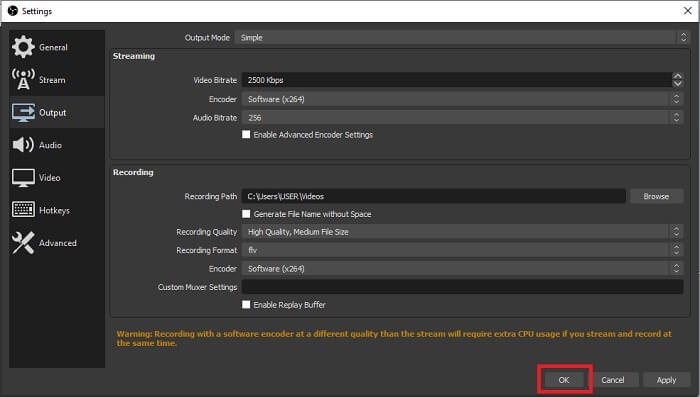
Step 4. Click the Settings button under the Control Panel on the lower right side of the interface. Go to the Output tab, set the format, and adjust the options based on your needs. Set the other options and click OK to save.
Step 5. Click the Start Recording button and start recording. Same as if recording is already finished click the bottom right side where you click the start to record. You may check the recorder in the file explorer.
Prós
- Seu terno para gravar qualquer vídeo e streaming ao vivo.
- Ele não oferece um teste gratuito. Porque é grátis.
- Oferece várias opções de escolha.
Contras
- Não é a melhor escolha para um iniciante porque há muito o que configurar.
- Ele não oferece suporte para edição de vídeo, portanto, você precisará instalar outra ferramenta para editar. E a ferramenta em si tem 85,6 MB, o maior armazenamento que um gravador de tela possui.
Parte 2. Método online para capturar Blu-rays com alternativa OBS
O estúdio OBS é de fato uma boa escolha para gravação e streaming. Mas a ferramenta tem muito em sua interface, então é um incômodo para o novo usuário registrar. Aqui está uma ferramenta online alternativa que você pode usar.
FVC Free Screen Recorder (ferramenta online)
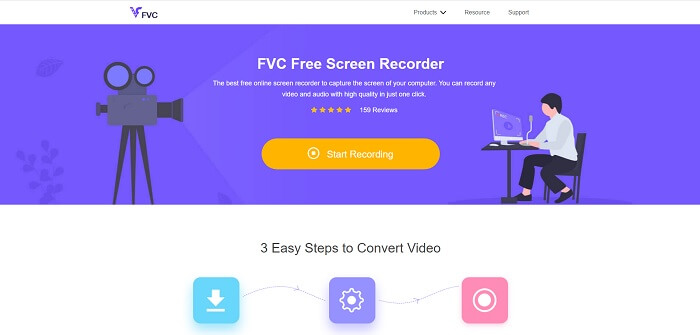
An open-free tool that is less hassle for the user to manage is the FVC Free Screen Recorder. It functions the same as record Blu-ray on OBS studio, easier to use because of its manageable floating toolbar. This on-point detailed tool helps you to record any set of video audio platforms that is available. And with clear sounds and high-definition video output that you may save in the Blu-ray. Instead, to download a large file then use it one time, why don't you try this online tool? Now let's take a tour of how this tool operates. Here are some steps on how to use this online tool.
Step 1. Open your browser and visit https://www.free-videoconverter.net/free-screen-recorder/. Then, click the Start Recording button to launch the online tool. A floating bar will pop up on your screen after launching the tool.
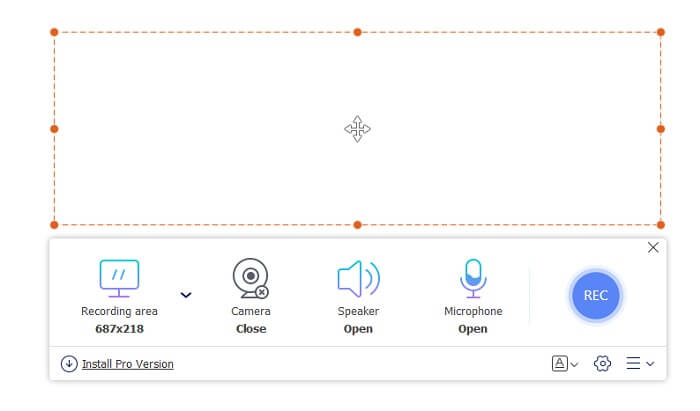
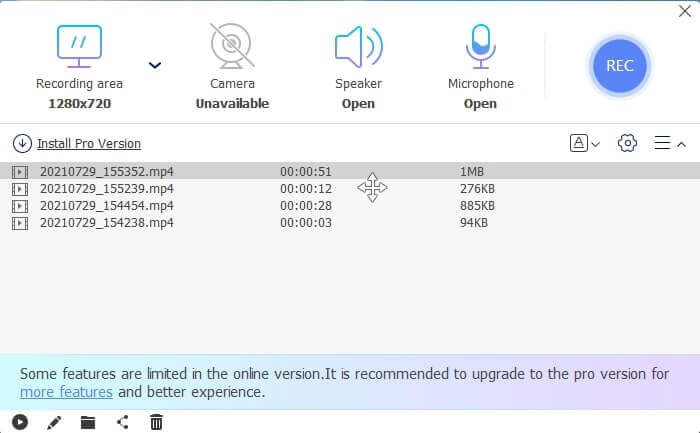
Step 2. In the floating toolbar, there are 4 different panels you may choose. You may adjust the frame size or click the full screen. Next, click the Speaker icon on the system volume. Also, you may add your voice and face if you click to open the Microphone and Webcam. But if you didn't intend to add it you may click it to close. Then click the round REC button to start recording.
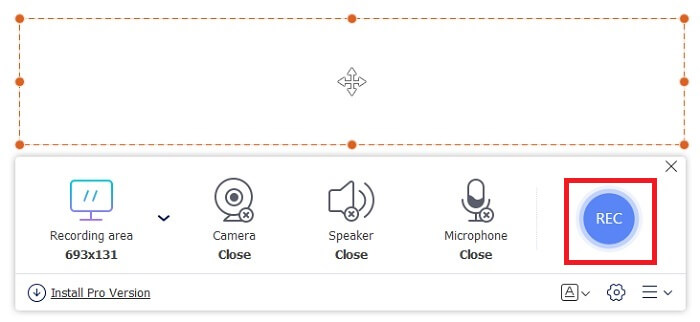
Step 3. When recording is done, Click the square button to stop recording. All the recordings you capture are listed in the history dropdown. Click the first recorded video because that is the latest.
Prós
- Código aberto e gratuito online. Sem download, sem complicações.
- Melhor gravador de tela para serviços online que suporta todas as plataformas.
- Fácil de usar por causa de suas instruções imediatas da ferramenta.
Contras
- É necessária uma conexão com a Internet para que a ferramenta funcione.
- Os recursos premium não são suportados gratuitamente.
Parte 3. Melhor substituição OBS para gravar filmes Blu-ray
Outro melhor disco Blu-ray no OBS Studio é este gravador de tela FVC. Se você deseja gravar online e offline e disponível para todas as plataformas, então isto é para você.
Gravador de tela FVC
Ao contrário do OBS Studio, esta ferramenta é amigável com uma barra de ferramentas gerenciável. O FVC Screen Recorder é uma das melhores alternativas para gravação. Inclui recursos como o OBS, que são mais precisos e fáceis de entender. Por exemplo, tela de gravação, webcam, áudio e som do sistema e muito mais. Essa ferramenta também tem seu recurso de bloqueio que o obs não tem. Exceto que esta ferramenta é paga para usar. Além disso, se você se beneficiar desse gravador de tela, estará fazendo a escolha certa.
Siga as etapas abaixo sobre como usar esta ferramenta em toda a sua extensão.
Step 1. Click the download button to install the software then set up your desired preference click finish to proceed. Then the tool will launch.
Free DownloadFor Windows 7 or laterSecure Download
Free DownloadFor MacOS 10.7 or laterSecure Download
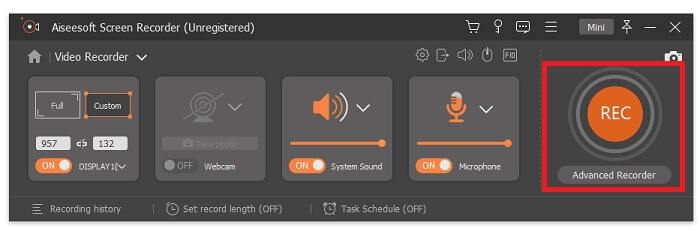
Step 2. Click the Video Recorder. Then 4 different panels will show. In the first panel, you may adjust the frame size to change the aspect ratio or click the Full to record the whole display. The second-panel Webcam is intended to record your face while screen recording. The next panel is System Sound to records the audio of the system. Lastly, a microphone for inputting your sounds to the video. Click the disk shape button to start recording.
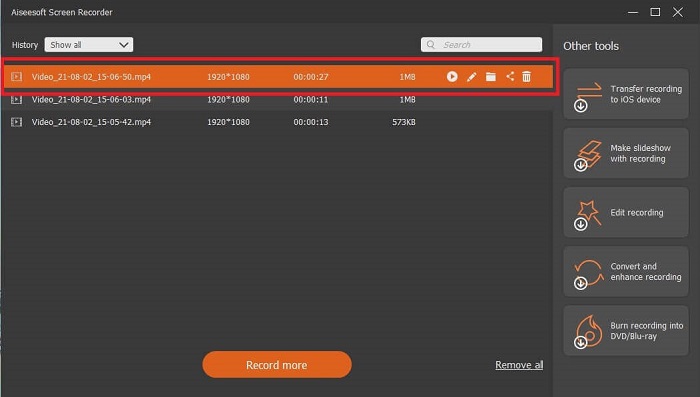
Step 3. If the video recording is finished click the square button to stop. Click the Play button to play the recorded video.
Prós
- Ele possui esse recurso exclusivo do que chamamos de tela de bloqueio para evitar perturbações durante a gravação.
- Pode gravar por 24 horas sem qualquer disfunção de áudio e vídeo.
- Fácil de armazenar e usar devido ao seu formato de dados compactado e informações fáceis de executar.
Contras
- Para adquiri-lo, é necessário pagar um mês, um ano ou toda a vida.
- Precisa ser baixado do site para usá-lo.
Leitura Adicional
1. Record Screen Video with VLC Media Player
2. Record Screen with Audio on Mac Using QuickTime
Parte 4. Perguntas frequentes sobre gravação de Blu-ray no OBS Studio
Qual é a diferença entre Blu-ray, DVDs e CDs?
A principal diferença entre cada formato de disco óptico é a saída e o armazenamento que ele pode armazenar sozinho. Ele afirma que um CD pode armazenar até 700 MB de um arquivo, um DVD pode armazenar até 4,7 GB de dados, enquanto o Blu-ray pode armazenar até 25 GB. Em alguns casos, um Blu-ray de camada dupla pode suportar 50 GB de dados. Ele também tem uma camada de disco tripla e uma camada quádrupla.
OBS é uma ferramenta gratuita? É seguro baixar?
Sim, OBS Studio é uma ferramenta gratuita e sem taxas ocultas. Além disso, você pode baixá-lo em todas as plataformas diferentes. Outro Sim, está protegido contra malware, vírus, worms, sequestradores de navegador e muito mais.
Quais codecs de vídeo suportam Blu-ray?
For video: MPEG-2, MPEG-4 AVC, and SMPTE VC-1.
For audio: Linear PCM (LPCM), Dolby Digital® (DD), Dolby Digital® Plus (DD+), Dolby® TrueHD, DTS Digital Surround®, and DTS-HD®.
Conclusão
Afinal, no final das contas, os gravadores de tela são úteis devido à sua capacidade. OBS é uma boa escolha para gravação, mas por causa de várias opções, faz com que o usuário adivinhe e pergunte se está fazendo certo. Mas por causa da lista online e offline que suporta todas as várias plataformas. Agora você tem o poder de escolha. Para escolher o que é melhor para você.
Como o gravador de tela FVC. É uma ferramenta amigável e imediata que ajuda o usuário a gravar a qualquer hora e em qualquer lugar. Mesmo sendo uma ferramenta paga para usar. Ainda assim, vale a pena cada centavo gasto. Lembre-se de não se estressar com o difícil de usar, se o fácil de usar fizer melhor.
-
 Açao! Análise do gravador de tela - contras, prós e sua melhor alternativa
 O Action Screen Recorder é o software de gravação de jogo desejado para capturar vídeos de jogos? Basta aprender mais detalhes com a revisão e sua alternativa com o artigo.
-
 3 melhores gravadores de chamadas do Facebook para computadores, iOS e Android
 Quando você deseja gravar chamadas do Facebook para salvar coisas valiosas, existem muitos gravadores de chamadas do Facebook para escolher. Aqui você pode aprender as 3 melhores ferramentas para gravar vídeo chamadas do Facebook para PC, iOS e Android.
-
 Os 6 principais gravadores WAV gratuitos disponíveis para Windows e Mac
 O melhor software de gravação WAV que compartilhamos neste artigo tem uma variedade de recursos úteis, que o ajudam a capturar áudio e voz como profissionais.
