


 Video Converter Ultimate
 Gravador de ecrã
 Reparo de vídeo
 Secure Download
O melhor gravador de voz OGG ajuda a gravar OGG em todas as plataformas
OGG is the best audio file format rather than the MP3. This open-source audio format is preserved by Xiph.org. This type of format is used by the gaming industry as their audio format. Because it sounds better and it compresses a file a lot smaller. However, users tend to find it hard because some of the recorders don't support this format because the standard audio format is the MP3. The list below are the best OGG recorders that support this format. To dig into more detailed steps & information. Read carefully to understand the features of the different tools that will suit your demand as a user and maybe in the future as their customer.

Parte 1. Melhor software de gravador OGG para usuários de PC e Mac
Na lista abaixo estão os melhores gravadores OGG que estão disponíveis em todas as diferentes funções com etapas e informações.
FVC Free Audio Recorder

A tool that specialized in recording an audio format. FVC Free Audio Recorder is known as the best online tool you may search over the web. This open-source tool can help you to record audio recordings that you may need anywhere with an internet connection. Also, it is a good choice to be your OGG recorder. To provide more comprehensive details about this amazing tool, continue reading and follow the steps on how to do the audio recording.
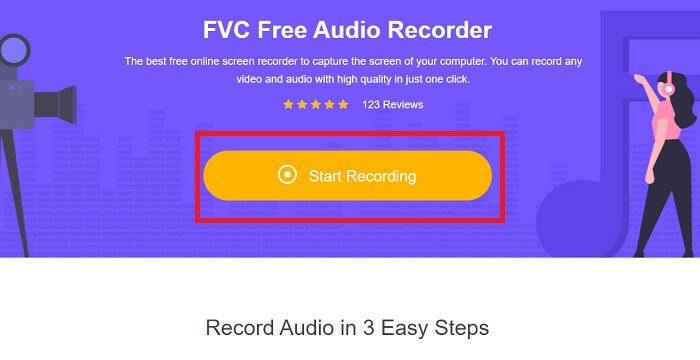
Step 1. Click this link to proceed to the webpage of the tool. Click the Start Recording and launch the tool.
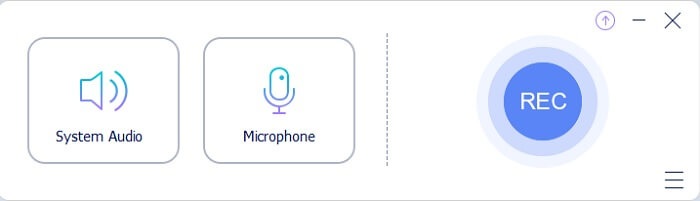
Step 2. A floating toolbar like this will appear on the display.
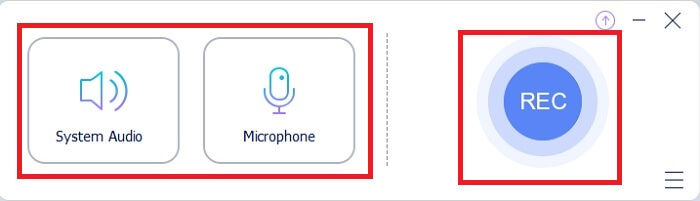
Step 3. Turn On the Speaker to add the system sound and Mic to add your voice. Click the Round button to start recording.
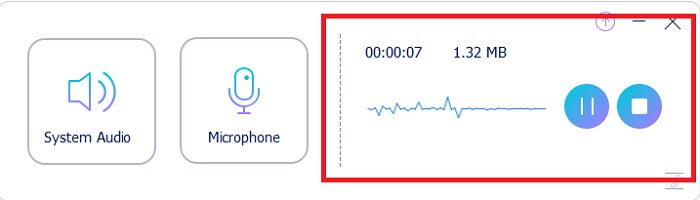
Step 4. After clicking the record button. You encounter this display which means it has already started.
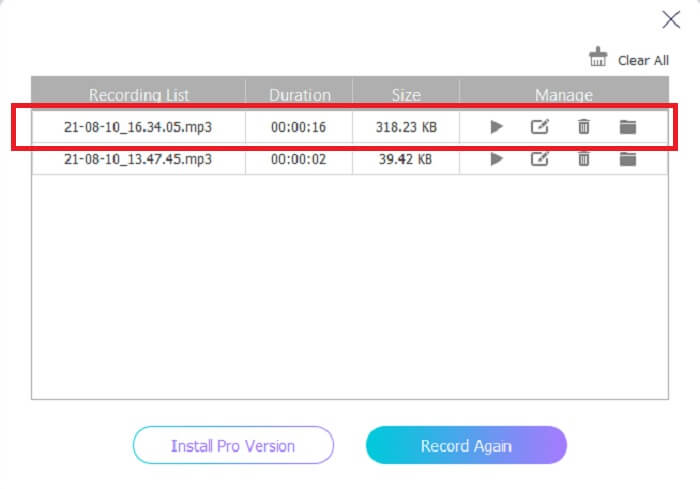
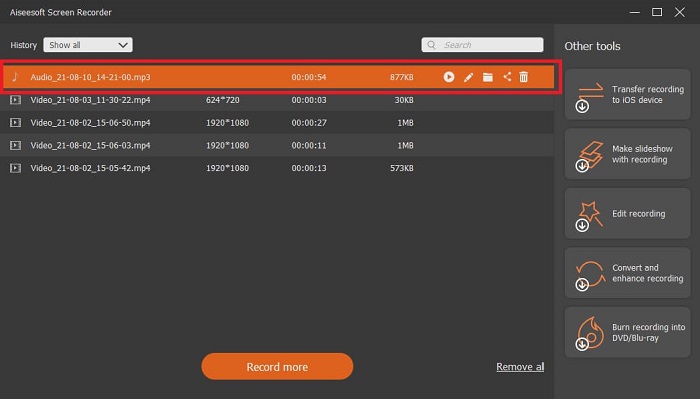
Step 5. If recording is finished, click the Stop button and it automatically saves into your device.The history list of your recording in your screen. Enjoy the recording output at its finest.
Prós
- Fácil de usar devido às suas instruções imediatas.
- Ele produz um formato de áudio compactado, portanto, também é fácil de armazenar.
- Código aberto para que esteja disponível para qualquer pessoa que queira usar a ferramenta.
Contras
- Ele precisa de uma conexão com a Internet antes de poder ser usado.
- Não tem cancelamento de ruído como o premium.
Parte 2. Outros gravadores OGG úteis para todos os sistemas operacionais
1. Gravador de tela FVC
If you think that the tool above is a smart tool, To give you a more specific example, if Galileo Galilei is the father of modern science, then this tool is the father of the modern recording system. FVC Screen Recorder is the best recorder whether it is an audio or video format. It gives you the one-of-the-best output and yet you will never break a sweat to use the tool itself. Unlike the other tools, this tool is a program to give the user the best experience you can ever imagine. So now, if you are one of the users who finds it hard to record your audio. Then follow these simple steps provided below and follow the steps thoroughly.
Step 1. Download the tool according to your operating system specification. This will only take a few seconds to be downloaded then installed. Change the Preference based on your wants and click Finish to proceed.
Free DownloadFor Windows 7 or laterSecure Download
Free DownloadFor MacOS 10.7 or laterSecure Download
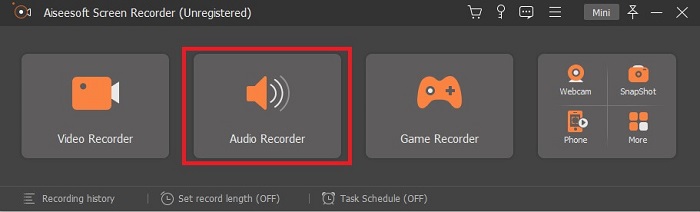
Step 2. In the toolbar click the Audio Recorder.
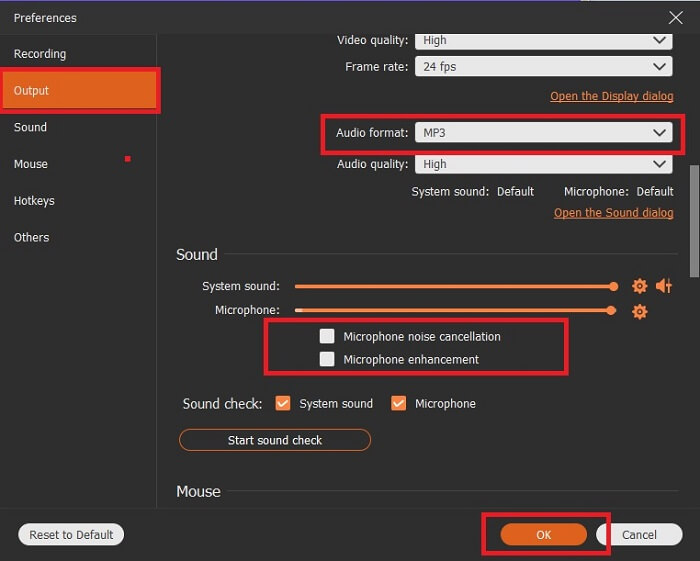
Step 3. Find the Gear icon to adjust the other options. Proceed to the Output to change it to MP3, WMAformat or whatever format you want. By scrolling down the wheel mouse. Other options you may use while recording it include Noise cancelling and Microphone enhancement. Click the OK to proceed.
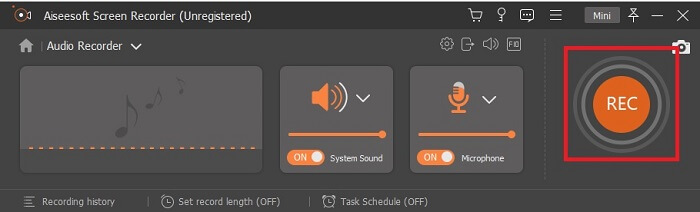
Step 4. After adjusting the settings. In the toolbar, open your Speaker and Microphone to add the audio output to your recording. After all, click the Round-shape button to start recording.
Step 5. If you want to end the recording, click the Square button to Stop. Click Save and Next to proceed. Then play your OGG voice recorder on any media platform.
Prós
- Você pode gravar a qualquer hora em qualquer lugar com esta ferramenta com áudio cristalino.
- Proporciona uma ótima experiência para o usuário que já utiliza esta ferramenta.
- Gravação tudo-em-um.
Contras
- Pague para usar.
- Necessita de 2,4 MB de armazenamento.
2. Screencast-O-Matic
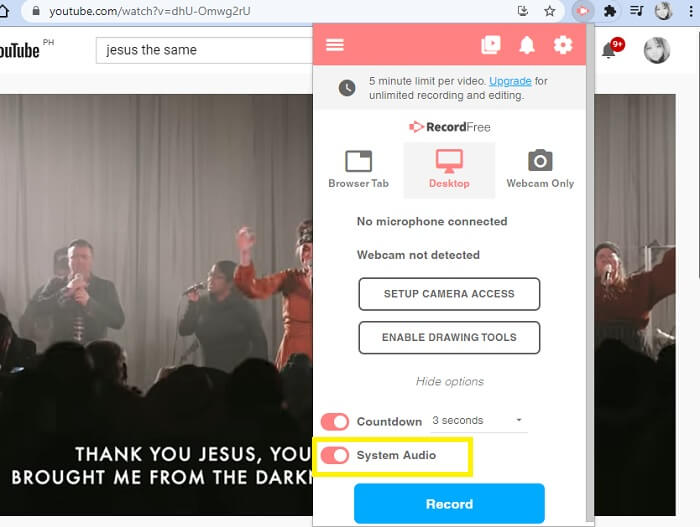
Outra melhor ferramenta de gravação de tela que fará o trabalho. Screencast-O-Matic é uma das melhores ferramentas que você encontrará na web. Isso torna sua gravação fácil e eficiente. Ele também tem sua ferramenta online se você visitar o site online, mas levará um ou dois minutos para que o processo seja concluído a ferramenta online em si. Portanto, se você não é fã de esperar na fila, esta não é a melhor escolha para você. Mas se você gosta de esperar vale a pena até o fim.
Prós
- É mais fácil de usar do que o Camtasia.
- Trabalhe como uma organização em vez de um indivíduo com a senha de segurança.
- Muito envolvente e é um bom gravador.
Contras
- A interface da ferramenta está no ponto, mas é monocromática, portanto, espere que tenha uma cor suave, o que a torna menos interessante de usar.
- Só permite ao usuário gravar no máximo 15 minutos na versão gratuita.
3. ShareX
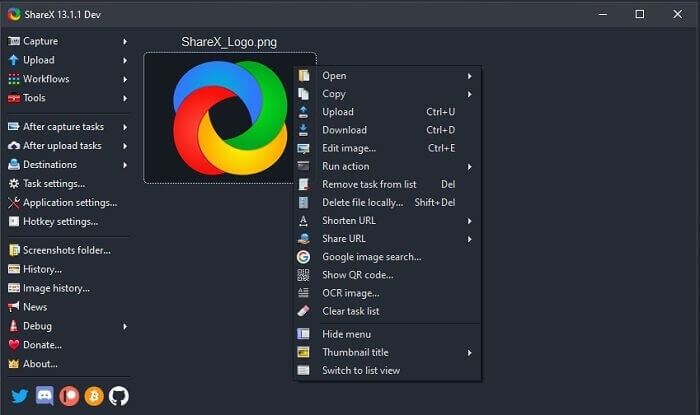
One of the tools you may encounter on the web if you’re searching for a screen recorder. It is only available for Windows OS only. It only means that if you’re a Mac user or Linux then this tool will not work on your OS because it doesn’t support those programs. Share can easily be placed at the top 20 best screen recorders that are available over the web. Because it supports over 80 destinations you may transfer the final output.
Prós
- Ferramenta personalizável.
- Fornece ferramentas de edição próprias, se necessário.
- Altere as teclas de atalho para tornar a gravação mais fácil.
Contras
- Esmagador para alguém novo nesta ferramenta. É um saco aprender a usar essa ferramenta.
- Não disponível para usuários de mac.
Parte 3. Gráfico de comparação
| Recursos | FVC Free Audio Recorder | Gravador de tela FVC | Screencast-O-Matic | ShareX |
| Gravação de áudio |  | | | |
| Cancelamento de ruído |  | | | |
| Aprimoramento de microfone | | | | |
| Complexidade da ferramenta | Instruções de gravação on-line no local. | Fácil de usar, pois já está indicado na ferramenta qual a finalidade e como ela atua. | É uma ferramenta fácil de usar e com menos detalhes. | A complexidade da ferramenta é difícil para o novo usuário. |
| Plataformas Disponíveis | Todos os sistemas operacionais. | Todos os sistemas operacionais. | PC com Windows, Mac e Chromebook. | Windows 7 SP1 ou posterior. |
| Formato de áudio disponível | MP3 e OGG | MP3, WMA, AAC, M4A, FLAC, OGG, Opus e muitos mais. | Não é possível gravar áudio separadamente. | MP3 e WAV |
| Faixa de preço | Ferramenta online grátis | Por 1 mês: $25,00 Por um ano: $31.20 Licença vitalícia: $55.20 | Tem uma versão gratuita. Para o solo premium. Deluxe $1.65 / mês Premier $4,00 / mês Para planos de equipe. Você pode definir equipe deluxe ou premier da equipe. | programa gratuito e de código aberto. |
Parte 4. FAQs sobre OGG Recorder
Como fazer um arquivo OGG com um gravador de som?
Use um gravador de áudio como na lista acima. Para obter informações mais detalhadas, leia o artigo acima para obter informações e etapas sobre como gravar com o formato de saída de áudio para OGG.
Qual é o melhor formato de áudio? MP3 ou OGG?
OGG é o melhor formato de arquivo de áudio. Mas os usuários tendem a usar o MP3 porque é mais padrão do que o OGG. No entanto, OGG contém metadados com menos armazenamento e melhor saída de áudio, por exemplo, o nome do artista e os dados da faixa.
Por que meu formato OGG não pode ser reproduzido em meu reprodutor de mídia?
Some of the media players don't support this type of format. So, you may use FVC Free Online Video Converter as your converter. This will allow the user to convert the OGG file into MP3 or another audio format you may like so that it can be played. Or you may use FVC Free Video Player or other OGG players to play this type of format, because this tool plays almost all the different types of audio-video format.
Conclusão
No final da discussão, agora você adquiriu um novo conhecimento apenas lendo-o e selecionando a ferramenta que se adapta à sua demanda. Diferentes opções estão listadas neste artigo com etapas e algumas informações sobre a ferramenta. Basta seguir os passos e dar tempo para a leitura, de modo que você possa entendê-la. Você deve escolher sabiamente.
But to set an example, FVC Screen Recorder fits the demand of the user. As a user you must prioritize your needs and wants in a recorder. For example, if the recorder is easy to use, best for recording audio, available to almost all the platforms, if it is pay-to-use it needs to be cheap yet the quality output is the best. All of the said examples are all here in FVC Screen Recorder. Don’t settle for less because you deserve more.
-
 Análise do Snagit 2025 – Prós, Contras e a Melhor Alternativa
 Qual é a melhor alternativa ao Snagit? Existe uma ferramenta de captura de tela como o Snagit? Esta postagem revisará o Snagit e compartilhará a melhor alternativa ao Snagit para capturar a tela.
-
 Gravação de tela QuickTime - Grave vídeo com áudio em Mac e PC
 A tela de gravação com áudio no Mac é muito útil. O player embutido, QuickTime Player, pode fazer isso. Leia sua postagem e saiba como capturar tela com som no Mac e no PC.
-
 DU Recorder Review 2025: Segurança, preço, funções, uso e classificações
 DU Recorder é um gravador de tela e áudio para iPhone e Android. Vale a pena baixar? É seguro? Leia a análise completa para ver se o aplicativo é certo para você.
