


 Video Converter Ultimate
 Gravador de ecrã
 Reparo de vídeo
 Secure Download
4 Gravadores FLAC fáceis de usar que podem gerar saída de áudio de alta qualidade
Music is one of the most hooked ways of communication as it provides a means by which people can express and impart their emotions, intentions, and meanings. The power it holds will depend on the overall quality of the music. Throughout time, people are more familiar with the usual MP3 format. But there is more than that, don't settle for less. If you want to be elevated and even high-quality music that is compatible with your devices, Free Lossless Audio Codec (FLAC) suits you. It is an audio coding format for lossless compression of your digital audio tracks. It has the same price as the equivalent of MP3 in online stores but sounds far away better. Of course, you'll be needing a FLAC recorder to have that. To give you a hint, here is the essential information you can pay attention to.

Parte 1. Os 2 principais gravadores FLAC práticos que podem ser acessados online
Em termos de gravação FLAC, é um trunfo se você usar um gravador adequado e capaz de fazer a operação perfeitamente para você. Que seja o freeware e o software do gravador FLAC, você deve selecionar o melhor dos melhores, pois não nos contentamos com menos aqui. Para guiá-lo, este artigo oferece uma avaliação completa das ferramentas que você pode usar.
1. Gravador de áudio grátis FVC
FVC Free Audio Recorder is an audio recording tool that allows users to record audio with ease. It works on Windows PC or Mac computers efficiently. That is why no matter what operating system you have, you can still use it. You record system sound, a voice from a microphone, or both. It makes your recording work much easier and keeps the high quality of sound at the same time. Below are the steps to follow:
Step 1. To use this freeware and ensure it is functioning well on your browser, get the launcher and follow the process until the tool is activated.
Step 2. After that, click the Start Recording button which will cause a pop up interface to appear.
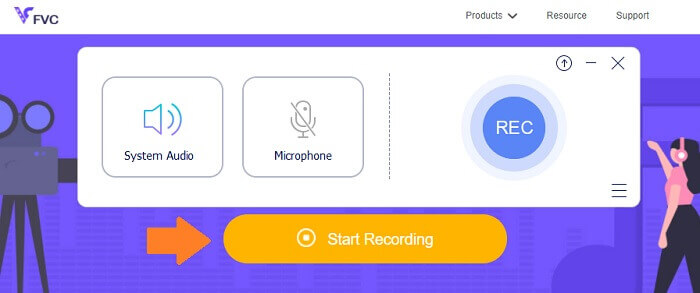
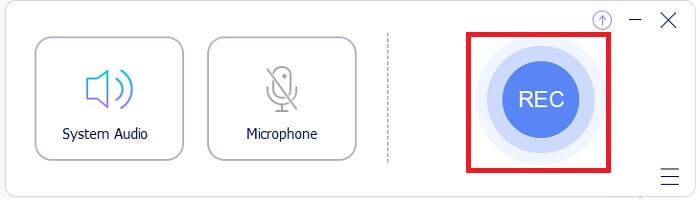
Step 3. On the interface, click the REC button to start the recording.
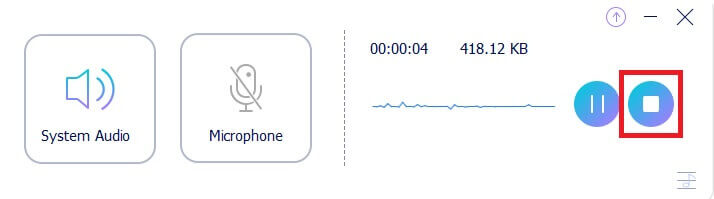
Step 4. If you want to pause the recording, you click the Pause button beside the stop button. When done recording click the stop button. It's the square icon on a circle. Refer to the photo below for better understanding.
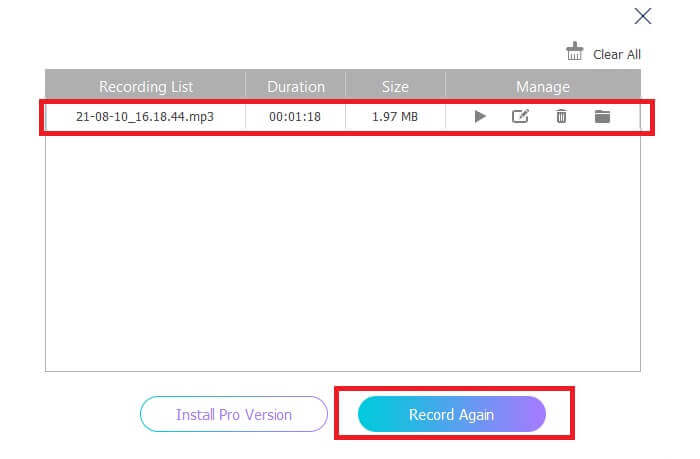
Step 5. After recording, check the file recording from the pop-up window after recording.
2. Gravador de áudio online gratuito da Apowersoft
Apowersoft Free Online Audio Recorder is great audio recorder freeware that offers you extensive features. It allows you to record audio on Windows or Mac computers straight away with a wide range of input and output formats that suits your needs. This freeware has an easy-to-use function as it lets you record any sound in lossless quality. It features a FLAC audio recorder which is better than the customary audio recording software. Overall, this is best used when you want to elevate your recording from the usual into a better quality format. To start with, here is the detailed step for you to follow:
Step 1. To use this freeware and ensure it is functioning well on your browser, first-time users need to download and install the launcher. After that click the 'Start Recording' button which will cause a pop-up interface to appear.
Step 2. On the interface, click the 'Record' denoted by a red-colored button to start the recording. If you want to pause recording for a while, just press the red button located at the center of the interface. In the same way, if you want to stop the recording, just press the red button located at the bottom center part of the interface.
Step 3. If you want to pause recording for a while, just press the red button located at the center of the interface. In the same way, if you want to stop the recording, just press the red button located at the bottom center part of the interface. After recording, head down to the recording list panel to see your recording files and see the file type. That's it, you're done.
Parte 2. Software profissional de gravadores FLAC para Windows e Mac
1. Gravador de tela FVC
FVC Screen Recorder is a tool that has a full-feature function that allows you to record not only video but also audio and other formats. With that, you can record all the audio that you need losslessly and effortlessly as it is a tool that is easy to use. With that, you can achieve the best sound quality of the output that you need, may it be of any format that you want. FVC Screen Recorder has an adjustable bitrate that can be really helpful in producing high-audio quality. The tool raises the standard in bringing out the best on your audio recording. Meanwhile, read through to see how the tool works.
Step 1. Get the app downloaded on your PC and install the app according to the process.
Free DownloadFor Windows 7 or laterSecure Download
Free DownloadFor MacOS 10.7 or laterSecure Download
Step 2. Launch the app and choose the Audio Recorder.
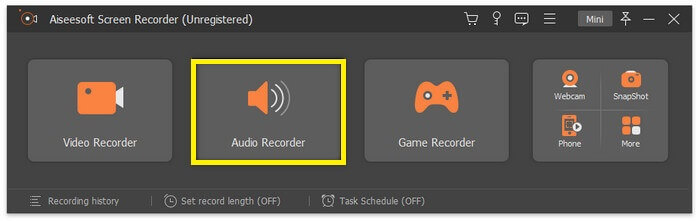
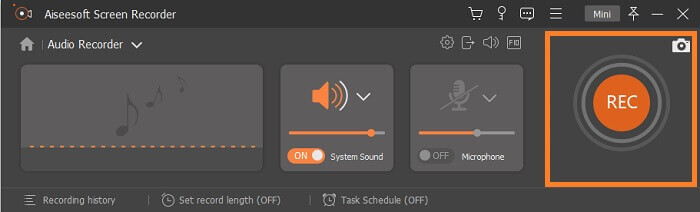
Step 3. From there, enable the system sound before recording. Then click REC to begin recording.
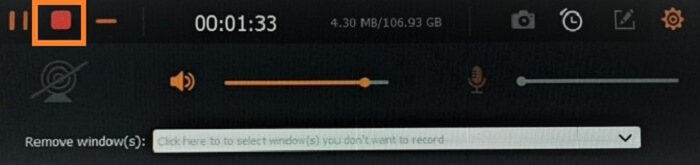
Step 4. Once the recording is done, click the Stop button. It is the square icon from the floating bar.
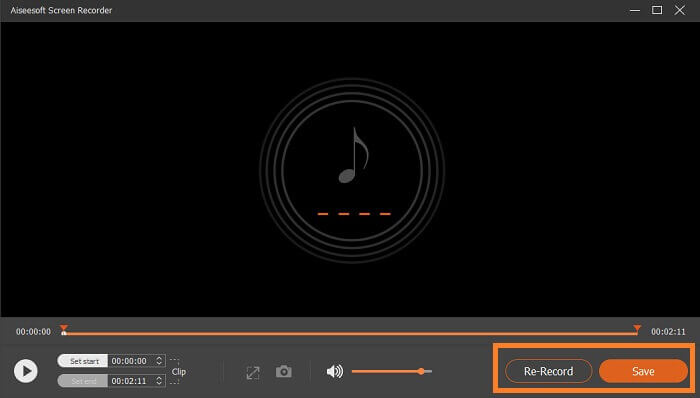
Step 5. Another will then appear, choose if you are going to Save it or Re-Record it. Afterwards, you will see the window where you can playback the file. Double click the name of the file and play.
Further Reading
2. Registrador Total
A Total Recorder is a versatile tool that can be used as a FLAC converter, editor, and recorder. With its feature, you convert your FLAC file into other supported formats that are available and vice-versa. Furthermore, it supports multiple conversion of files at the same time with the use of its built-in batch conversion engine. Besides, what made it more interesting is that it allows you to easily edit, add or delete tag data.
Parte 3. FAQs sobre FLAC Recorder
O FLAC é o melhor formato de áudio entre os outros?
Certamente, sim! O formato de arquivo de áudio FLAC é o melhor dos melhores formatos para qualidade de som. Uma vez que suporta compressão sem perdas de suas faixas de áudio digital. Observe que os arquivos FLAC são aproximadamente maiores do que o formato de arquivo MP3. Eles têm metade do tamanho de um CD, por isso podem ter o mesmo aumento na qualidade de áudio dos CDs. Esses tipos de arquivos são considerados de alta resolução porque às vezes são melhores ou iguais à qualidade de um CD. É por isso que se você está buscando qualidade, alta resolução e saída excelente, é melhor considerar o uso de um gravador de áudio FLAC com a ajuda de freeware e software.
O que exatamente é FLAC?
FLAC or Free Lossless Audio Codec made an appearance in 2001 as an open-source alternative to other lossless formats emerging at the time. It is a musical file format that works the same as CDs and it is considered as the best of the best audio file format that is compatible with almost all devices. Similarly, FLAC is often being compared to MP3 files for which is which. It may not be that popular to people nowadays, but it has more than the usual that surely will put it on the top of the podium.
Posso converter outros arquivos de áudio em arquivos FLAC?
Sim, isso é possível! Se você deseja atualizar seu arquivo de áudio normal em um arquivo FLAC, pode fazê-lo. Você pode usar várias ferramentas que estão disponíveis online, mas eu recomendo que você use FVC Audio Converter. É um conversor de áudio baseado na web que permite converter arquivos de áudio online de um formato para outro em apenas um minuto. Além disso, o que o torna mais conveniente é que ele suporta todos os tipos de formatos de áudio para que você possa facilmente converter seu áudio para o formato de sua preferência sem passar por um complicado processo de conversão.
Conclusão
As can be seen, the listed freeware and paid software are some of the finest you can find online. There are tons of apps like them that you can use as an alternative but only a few actually work. Most free online tools actually can harm your PC because of the unauthorized download together with the file produced. So if you want to make sure of the security and reliability go for the list that we have here. If you are torn on which to choose, you can begin with FVC Free Audio Recorder.
-
 Melhor gravador de tela XviD para Starter em 2021 (online e offline)
 O XviD é conhecido por compactar arquivos de vídeo. É um software de código aberto que executa o formato ISO MPEG-4. Continue para ler e obter mais detalhes.
-
 [Go-To-Guide] Grave Blu-ray no OBS Studio e ferramentas alternativas
 Saiba como gravar Blu-ray no OBS Studio e outros substitutos com estas etapas e dicas úteis e simples. Continue lendo e vamos mergulhar nos detalhes.
-
 Processo para ripar e gravar DVD com VLC para digitalizar o formato reproduzível
 O VLC oferece suporte a vários formatos de arquivo compactados de áudio e vídeo, incluindo a gravação em DVDs. Apenas mantenha a bola rolando para mais discussão e detalhes até o final.
