


 Video Converter Ultimate
 Gravador de ecrã
 Reparo de vídeo
Descubra os melhores conversores de vídeo para MP3 na Web, desktop e telefones celulares
Music is one of the best forms of entertainment that the world can give to us. To support our love for music, especially the artist we listen to them every day. In some cases, there will be a time that you badly wanted to listen to your favorite music but there is no internet. No worries you are now saved by downloading the music video. But the file size of the music video you download is a lot larger than the audio file only. To solve this case let us investigate these different tools you can use to convert video to MP3 format to save space. Also, you can rely on this article because it provides strong evidence to solve this case so keep up the pace and let's get started.

Parte 1. Melhor conversor de vídeo para MP3 para Windows e Mac com tabela de comparação
FVC Free MP3 Converter
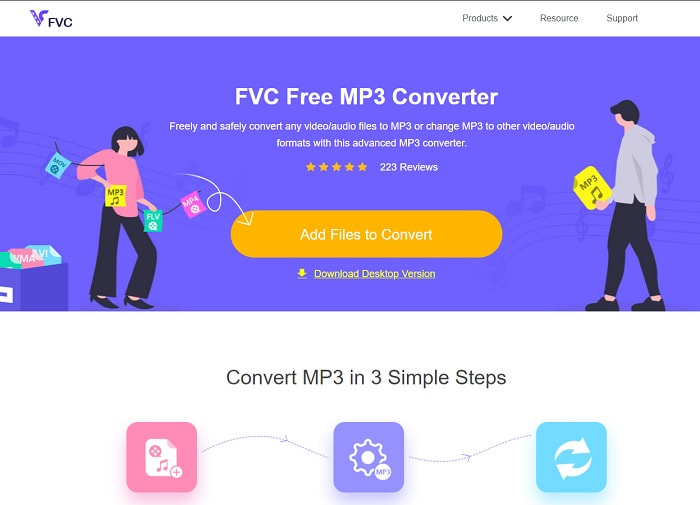
If you're looking for a free video to MP3 converter then FVC Free MP3 Converter provides that. Although this tool provides a lot of features similar to the mobile converter and other web converts. It is still reigning the king of converters on the web for producing a fast and accurate converting feature. But this tool has a small range of formats which might limit your capabilities to convert at will. Moreover, it is still a good converter at least. To know more about the tool, then keep on going by reading these steps below on how to use this tool.
Step 1. Click the hyperlink above that addresses the main web tool.
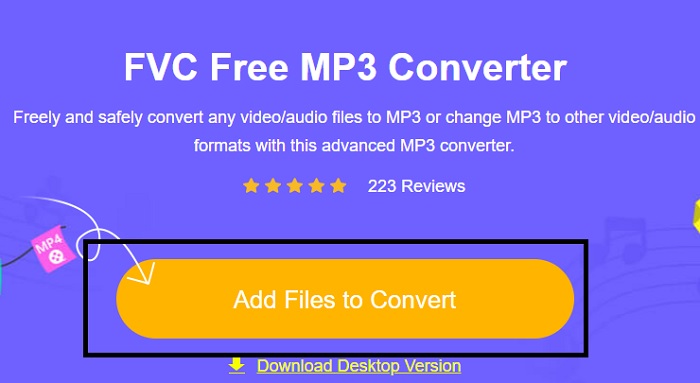
Step 2. After that, click the Add Files to Convert to open and launch the tool.
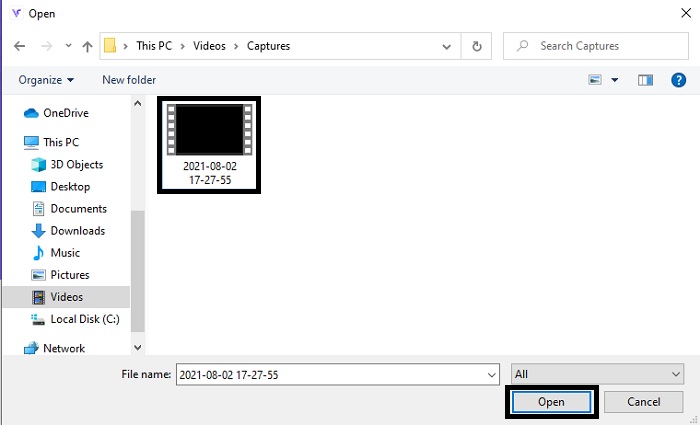
Step 3. Locate the video file you want to convert and click open to insert the file.
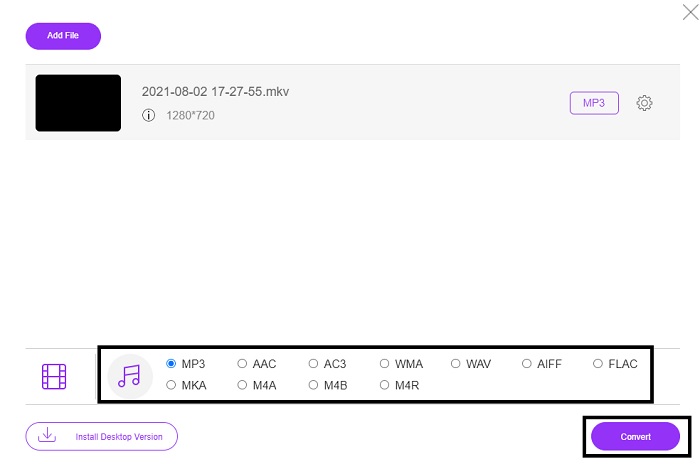
Step 4. Choose from here what audio format you want it to be. If you're ready to start the conversion click the Convert.
Step 5. If you want to listen to the converted file. You can click this folder to show the screen on the file.
FVC Video Converter Ultimate
If the first tool doesn't give you the conversion you want then you can use this FVC Video Converter Ultimate, an all-time favorite converter. Unlike any converter you already use or not, this converter is very unique in all different variations. It is stated that nothing can overpass this tool in converting process, editing, creating, enhancing, and etc. But maybe you're thinking that this tool is not user friendly and your guess is wrong. It is definitely easy to use and even if you are not a pro in converting you can still manage to create a magnificent output. So, as it was said, let us investigate how to convert video to MP3 with the help of the best converter you ask for.
Step 1. First and foremost, download this desktop-based tool onto your drive. Change the set-up if you want and click the finish to save the changes.
Free DownloadFor Windows 7 or laterSecure Download
Free DownloadFor MacOS 10.7 or laterSecure Download
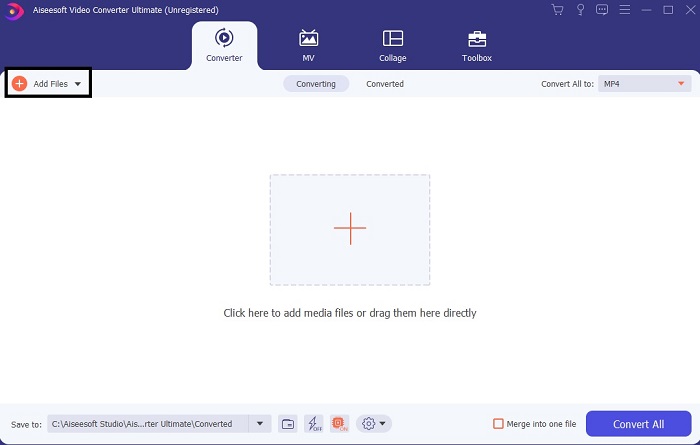
Step 2. The interface like this will show into your screen. Press the Add Files or the plus sign to insert the file into the interface.
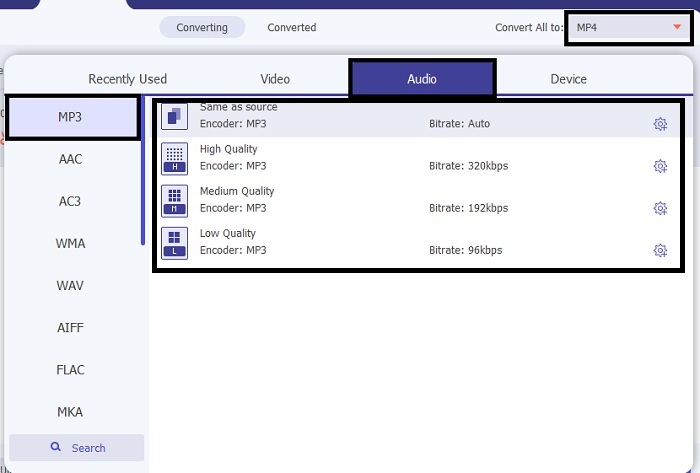
Step 3. After choosing the file you want to be converted, click the drop-down menu next to the Convert All to option and choose from more than 500 formats.
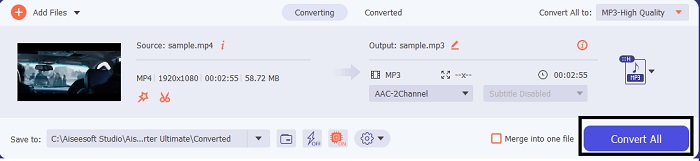
Step 4. Then click the Convert All to start the conversion of video to MP3.
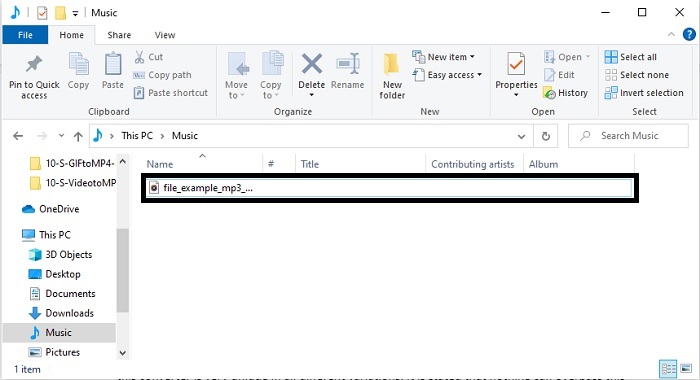
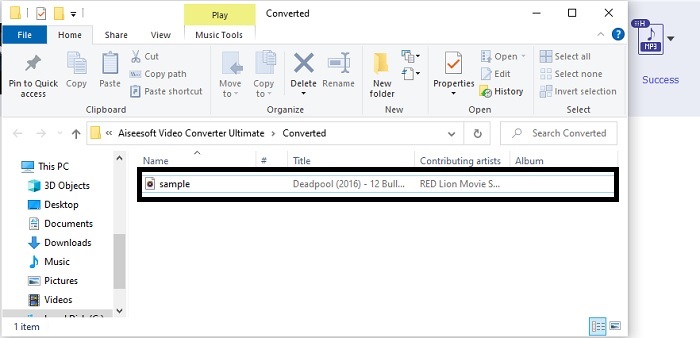
Step 5. If everything is done, a file manager will show into your screen. Click the file you converted to listen and enjoy the file.
Etapas adicionais para aumentar seu áudio antes de converter com a ajuda do FVC Video Converter Ultimate
Edit the audio on one of the features in FVC Video Converter Ultimate. Before you convert the video file it is better to enhance the audio so later you can listen to it much better. So, to know how to do it, then you must follow the step-by-step procedure on how to boost the sounds with the Volume Booster.
Step 1. If you already installed the tool, go to the Toolbar and there click the Volume Booster.
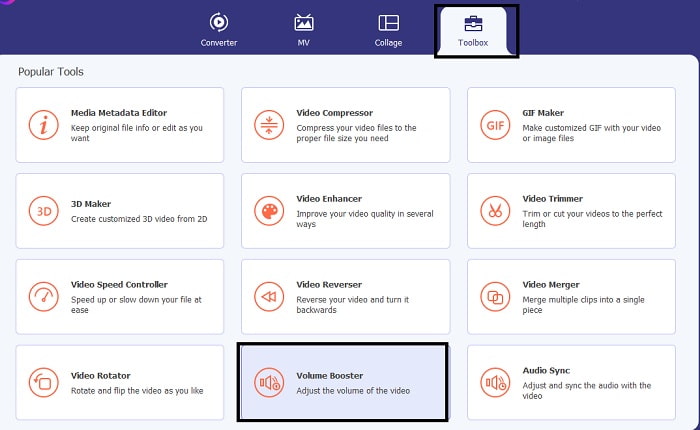
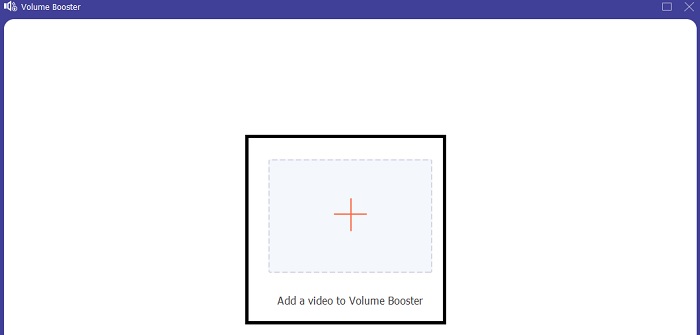
Step 2. Select the video file you want to be enhanced and click Open to insert it.
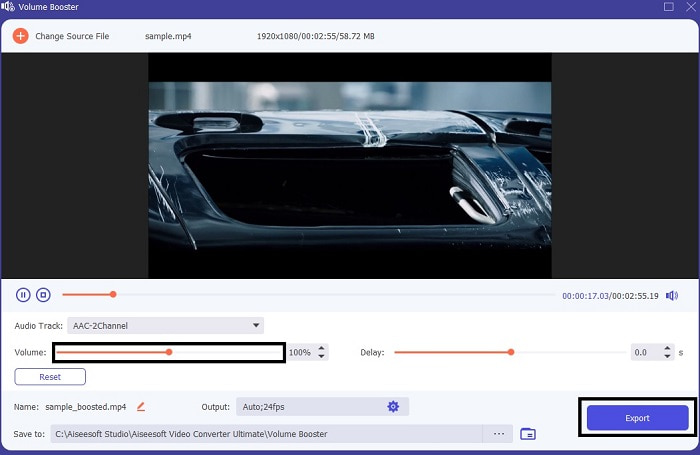
Step 3. Adjust the volume slides according to your wants. Then click the cog icon and change the output settings if it is done click OK to save the changes. Click the export to save the final output and enjoy.
Comparação do FVC Free Video Converter e Video Converter Ultimate
Embora ambas as ferramentas forneçam o que você precisa, porque são as melhores em sua própria especialidade. Decidir o que usar pode ser difícil. Mas para resolver este caso, aqui está o gráfico de comparação entre as duas ferramentas. Vamos investigar seus pontos fracos e seus pontos fortes como ferramentas individuais.
| Recursos | FVC Free MP3 Converter | Video Converter Ultimate |
| Conversão de áudio |  | |
| Recursos de edição |  | |
| Fácil de baixar ou acessar | | |
| Amigo do usuário | | |
| Suportado pelo programa | Ferramenta baseada na web | Ferramenta baseada em desktop |
| Software Disponível | Em todos os softwares | Em todos os softwares |
| Faixa de preço | Sua ferramenta online gratuita | Por 1 mês: $25,00 Por um ano: $31.20 Licença vitalícia: $55.20 |
Parte 2. Aplicativos de vídeo para MP3 para dispositivos iPhone e Android
1. Conversor de vídeo para MP3
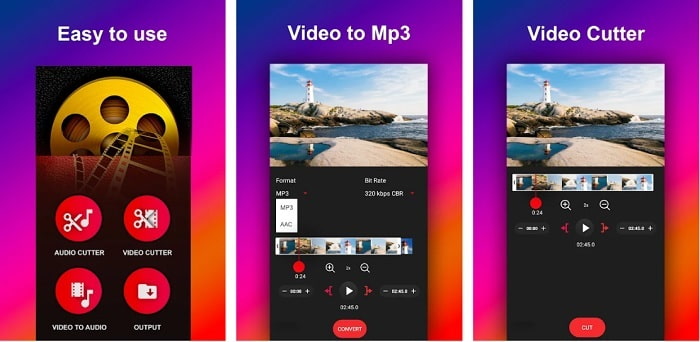
If you're looking for the video to mp3 converter on android you might like to try this Video to MP3 Converter. This tool is especially made to be used on converting any media file to MP3 or AAC file format. Also, you can change the bitrate and cut to this tool as well. Despite the fact of having a high-quality output the file you converted will not be directly saved to the music directory. Which is a bit annoying to us, instead of listening to it promptly you'll need to locate it after the conversion process.
2. MP4 para MP3 - Converter vídeo para áudio, cortar toques
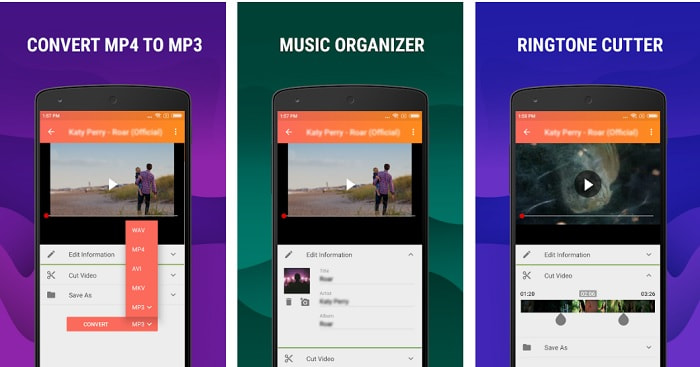
Although the first tool in this list provides the MP3 conversion you like. Still MP4 to MP3 - Convert Video to Audio, Cut Ringtones can overpass it somehow. Also, this is an android user tool only so if you are an iOS user then you can't use this app. But the ratings of this tool are 4.0 stars on the Play Store and the user's volume of users who use this is very low. They all have the same concern that after you convert in this app the file is nowhere to be found just like the first one also. Moreover, some users still use this as their personal MP3 converter because you can convert multiple files at once.
Related:
3. O Conversor de Áudio
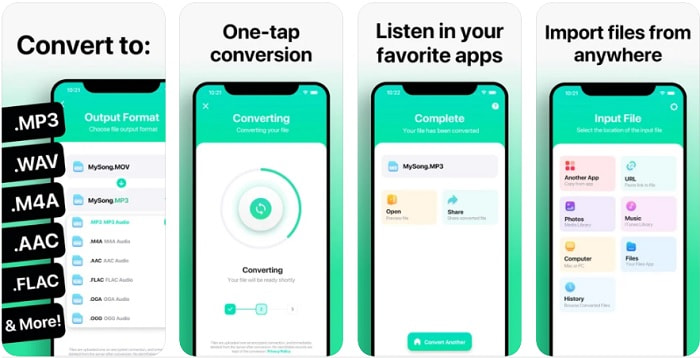
If your iOS users may be thinking that you can't do the conversion of audio on your phone that provides a strong conversion as well. Then you are wrong, because The Audio Converter provides the best converting process and more. Converting video to MP3 on iPhone is easy to do with the help of this tool. But the downside of this tool is that if you convert to its free version there is a size limit. So, if you want to convert a bigger file you must pay the toll to be subscribed. In some cases, if you want to cancel the subscription there is no cancel button to stop it. Beware of this tool because there might be an unwanted charge over your card if you use this payment method.
Parte 3. Gráfico de comparação
| Recursos | FVC Free MP3 Converter | FVC Video Converter Ultimate | Conversor de vídeo para MP3 | MP4 para MP3 – Converter vídeo para áudio, cortar toques | O conversor de áudio |
| Conversor de áudio | | | | | |
| Formatos Suporta | MP3, AAC, AC3, WMA, WAV, AIFF, FLAC, MKA, M4A, M4B, M4R | Mais de 500 formatos de mídia disponíveis | MP3 e AAC | MP3 | MP3 e AAC |
| Acessibilidade da ferramenta | Ferramenta baseada na web | Ferramenta baseada em desktop | Aplicativo baseado em telefone Android | Aplicativo baseado em telefone Android | Aplicativo baseado em telefones iOS |
| Faixa de preço | Sua ferramenta online gratuita | Por 1 mês: $25,00 Por um ano: $31.20 Licença vitalícia: $55.20 | Aplicativo Android para download gratuito | $6,49 – $19,99 por item | Passe Premium$3.99 Passe Vitalício$6.99 |
Parte 4. Perguntas frequentes sobre vídeo para MP3
Por que meus vídeos não podem ser reproduzidos no meu computador?
There is a chance that the video format is not supported over to your default media player. So, in this case you might like to use this FVC Free Video Player to play your video. It supports more than 200+ known formats so watch any video file here without worrying that it will not be played.
O MP3 é o melhor formato de áudio?
Although MP3 is known as the universal audio format because it is used in all places to play, record, and save audio files. But there is a better audio format than MP3 and that is AAC even though this tool is better. It still has a larger file size than the MP3 but no need to worry because it is not that huge like AVI. To change MP3 files, you can use this MP3 to AAC web converter instead of any unsafe and low in compression tool.
Qual é a desvantagem do áudio?
Audio files are much less than the video file but they are less interactive especially they don't give the audience some visual sight. So, if you are doing a podcast, you better choose the best audio recorder and that is the FVC Screen Recorder. This tool provides the best in editing your recording and also it supports many more audio formats than other tools you can download or use online. If recording is your problem, then there is only one solution and that solution is FVC Screen Recorder. Click here to get more professional MP3 recorders.
Conclusão
And now that we've reached the end of this article the problem before is now solved. Although we will now go separate ways and leave this case on you. The search will be over as you choose the perfect tool that you can depend on just like the FVC Video Converter Ultimate. Each time you use this tool you can always expect a fast, reliable, and secure converting process. Also, if you encounter a problem within your audio and want to enhance it you can enhance this too. Moreover, we hope that you still continue investigating the FVC Video Converter Ultimate as this tool presents the finest conversion. With the help of these accurate evidences, we presented only for you. If you are now satisfied let's now say the case is close.
-
 [2021] As 6 principais maneiras gratuitas e online de converter M2TS para MP3
 Um arquivo M2TS pode ser convertido para MP3? Nesta postagem, listamos as 6 principais formas gratuitas e online de ajudá-lo a converter M2TS para MP3, AAC, AIFF e mais formatos de áudio.
-
 4 Métodos de trabalho 100% para converter arquivos de vídeo FLV para o formato MP3
 Como converter um FLV para um arquivo MP3? Tudo que você precisa fazer é ler este artigo com atenção, encontrar seu método favorito e seguir nosso guia passo a passo para obter o que deseja.
-
 4 métodos principais para converter OGG em MP3 sem perder qualidade
 Como converter seus arquivos OGG em formato MP3 para ouvir no computador ou dispositivo móvel? Aqui nós compartilhamos 5 maneiras mais fáceis de fazer isso no desktop ou online.
