


 Video Converter Ultimate
 Gravador de ecrã
 Reparo de vídeo
Produza uma obra-prima com a ajuda do GIF Speed Changer
It's going to tick midnight, and you want to greet your friend on their birthday. As a great friend, you want to be remembered on their special day even if you're not around, so you are finding the perfect GIF that matches your long message. Still, the GIF available on your phone or your desktop is not that exciting to look at, that's why you're having trouble with what to do, and you're thinking about how to change the speed of a GIF. Read the article below to be enlightened - especially in the very crucial situations - on what to do and the ways possible to resolve the problem above.

Parte 1. Como acelerar um GIF profissionalmente [pago]
O Video Converter Ultimate é um software totalmente empacotado e gratuito para download que tem a capacidade de ajustar a velocidade de GIFs com o uso da ferramenta Video Speed Controller. Além disso, também oferece muitas ferramentas para ajudá-lo a converter e editar GIFs. Além disso, todas as ferramentas são fáceis de usar e possuem modelos disponíveis para melhorar a visão cinematográfica do seu GIF. O Video Converter Ultimate está disponível para Windows e Mac.
Prós
- Ofereça ferramentas fáceis de usar e outros recursos.
- Produza uma saída de alta qualidade.
Contras
- Precisa adquirir outros recursos para ter acesso total.
Step 1: You can save the software by clicking on the Free Download button. Then you can customize and install the program.
Free DownloadFor Windows 7 or laterSecure Download
Free DownloadFor MacOS 10.7 or laterSecure Download
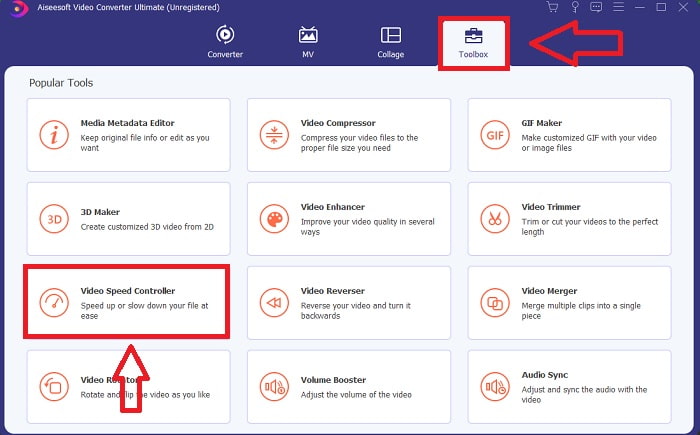
Step 2: After installing the software, go to the Toolbox feature and select Video Speed Controller.
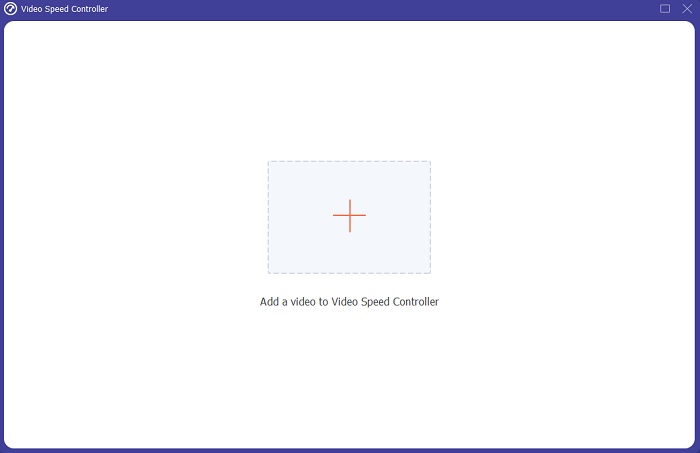
Step 3: By pressing the + button in your preference, you may add any GIF file and continue modifying the video clip.
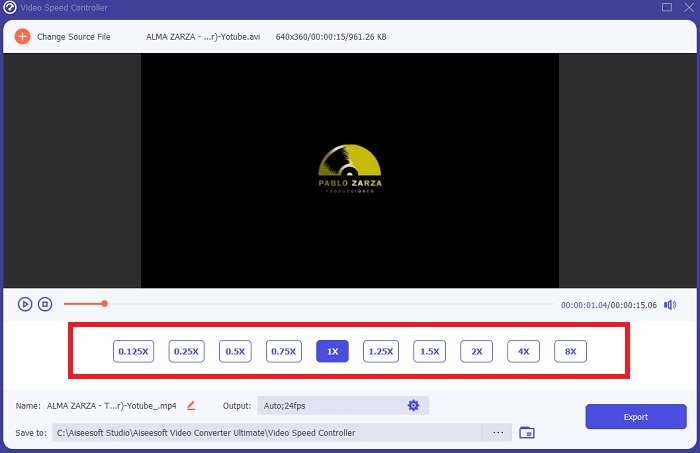
Step 4: Then, you can adjust the speed of the video by increasing and decreasing the playback speed.
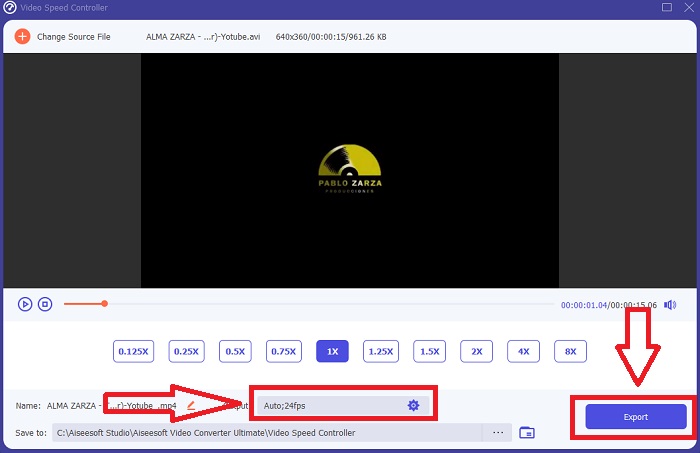
Step 5: After you've completed modifying the playing speed of your video clip, you may select your desired output by altering the format, resolution, and quality, among other things. When you're ready, click Export and select a location to store your work.
Parte 2. Outras maneiras de acelerar GIF [Grátis]
Como acelerar um GIF usando ImageOnline.co
Imagens Gif podem ser criadas com esta ferramenta gratuita com facilidade, desde que você tenha acesso a um computador e um navegador da web. Além disso, esta ferramenta não é apenas fácil de usar como editor de velocidade GIF; Não há limite para o número de imagens gif que você pode criar usando esta ferramenta da web. Qualquer imagem gif pode ser feita sem restrições, e nossa precisão permanece constante.
Prós
- É acessível a uma ampla gama de usuários.
- Ele oferece muitos recursos para usar.
- Ele fornece um memorando a seguir no uso de cada recurso.
Contras
- A interface tem muitos comerciais e anúncios.
- A interface é muito simples.
Step 1: Locate GIF Image Tools on the left corner of the interface and click Make GIF animations.
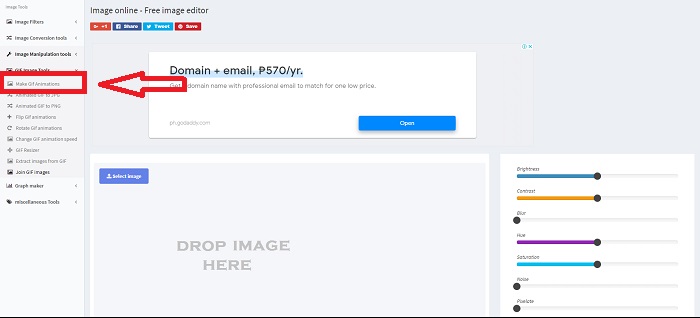
Step 2: Select an image from your desktop by clicking Select Image, or you can drag files and transport it to the web's interface.
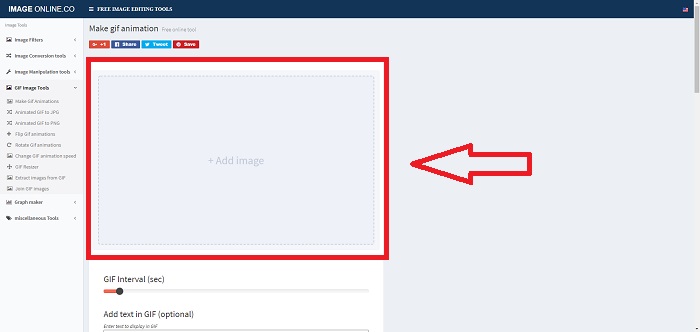
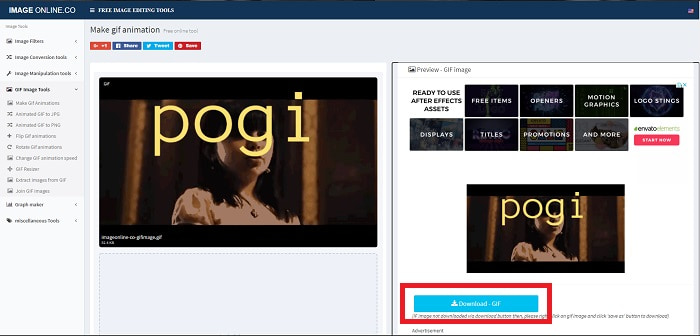
Step 3: Adjust the time interval of your GIF by dragging the Slider. You're able to add text to your GIF or resize it by customizing its dimension. If everything is settled, click Apply Changes. Lastly, click Download to transport the file to your computer.
Como acelerar um GIF usando o LunaPic
Esta ferramenta da Web é um editor de baixo orçamento que abrange várias ferramentas disponíveis para uma ferramenta da Web gratuita que pode fornecer uma edição de perspectiva profissional. A edição torna-se uma fatia de pão e proporciona uma excelente experiência para alguns editores profissionais porque esta ferramenta web cobre a maioria dos formatos e redes sociais disponíveis. Você verá ferramentas diferentes que outras ferramentas da web não oferecem. A interface é simples e pode ser personalizada para a preferência de cada usuário.
Prós
- Ele contém ferramentas maciças para usar na edição.
- Editor profissional.
Contras
- Algumas ferramentas precisam de esclarecimento ou descrição para serem conhecidas pelo público em geral ou usuários.
- É complicado de usar para usuários iniciantes.
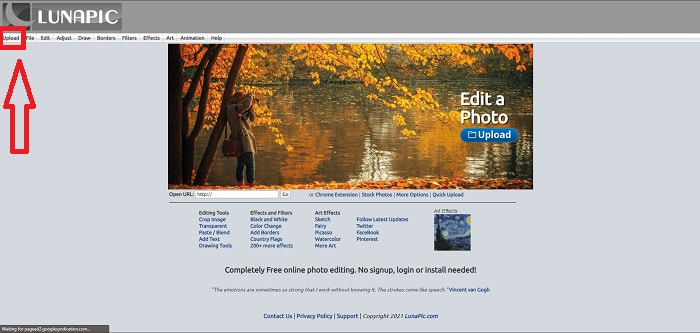
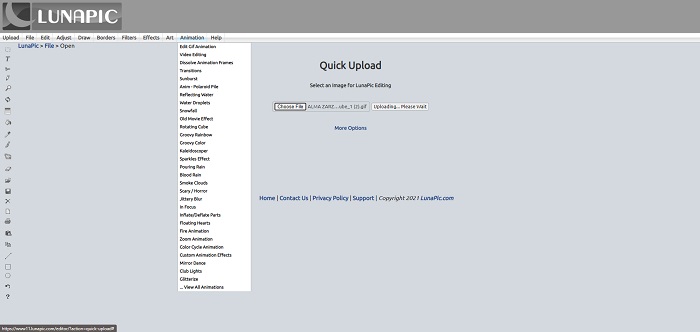
Step 1: Click the Upload tab to the upper left corner of the web's interface and add files by clicking Choose file.
Step 2: You can already edit your GIF at the first interface that will appear after you upload your file. But if you're going to increase the speed of GIF, proceed by clicking the Animations tab, then click Edit GIF Animation.
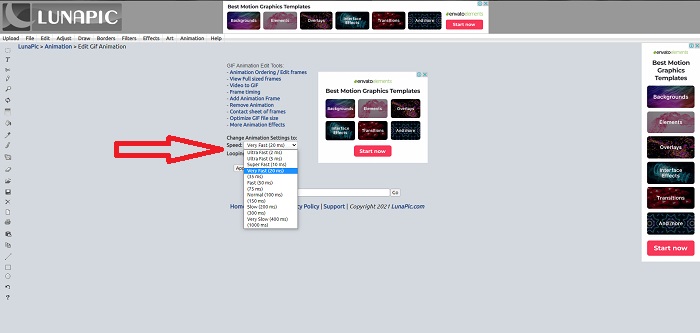
Step 3: Adjust the speed by selecting the playback speed of your GIF. Click Apply after you finish selecting the speed of your GIF. Below the preview of your GIF, click More Options and choose which format you will use in your GIF.
Como acelerar um GIF usando Gifntext
Também é uma ferramenta da web gratuita que fornece diferentes ferramentas de edição e envolve aumentar a velocidade e diminuir a velocidade de um GIF. Esta ferramenta da web é simples de usar e, ao contrário da outra ferramenta da web, Gifntext suporta URLs GIF e fornece tutoriais sobre como usar as ferramentas em destaque disponíveis na ferramenta da web. Além disso, não deixa marcas d'água no arquivo de vídeo de saída que podem levar a técnicas de publicidade.
Prós
- A interface não possui comerciais e anúncios.
- Ele fornece tutoriais sobre como usar as ferramentas.
Contras
- Ele contém ferramentas menores para usar na edição.
- Ele converte mais lentamente do que as outras ferramentas.
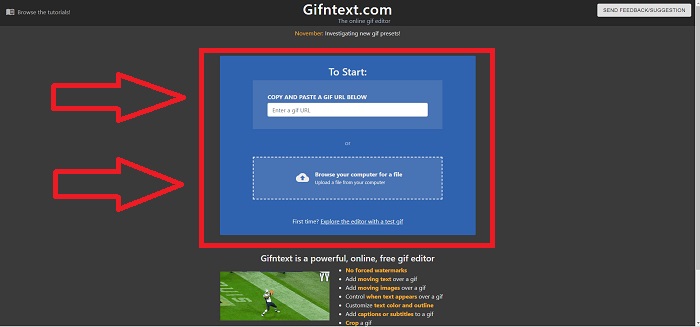
Step 1: At the main interface, you can choose if you'll upload a GIF URL or select a GIF file from your desktop.
Step 2: Edit the speed by dragging the Slider.
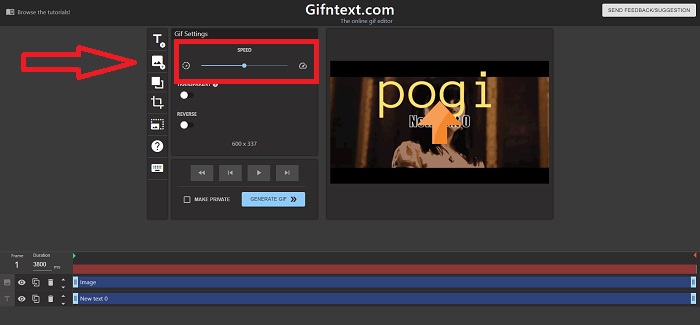
Step 3: Click Generate GIF to process your GIF. Wait patiently for the processing, then click Download GIF if it's done.
Parte 3. Perguntas frequentes sobre o GIF Speed Changer
O que é um GIF?
Because of its support and portability, the Graphic interchange format (abbreviated as GIF) is widely used on the internet. A separate palette of up to 256 colors can be used for each frame in the Gif format. GIF's palette restrictions mean it's less suitable than other formats, such as JPEG, for more complex images, in terms of reproducing color photographs and other illustrations with gradients.
Como vou converter MP4 para GIF?
Other video formats are not available in converting it into GIF. But since the MP4 is a standard video file, there's an article about converting MP4 to GIF.
Perco a qualidade se converter outros formatos para GIF?
Yes, converting every format into GIF can ruin the quality of the video because making a GIF requires compressing the file. But some converters can create a GIF that can minimize the degrading of quality of the video. Video Converter Ultimate provides high-end quality output in making a GIF, even animating GIF speed in a faster manner.
Conclusão
Ao longo do artigo, sabemos que o GIF é um formato que precisa desacelerar e aumentar sua velocidade para retratar a imagem ou a própria mensagem, pois o GIF não possui sons. Há muitas maneiras de fazer isso, gratuitas ou pagas; essas ferramentas e softwares da Web enfatizam a edição para o próximo nível. Mas se você quiser acessar o software de edição para que a conexão com a internet não cause problemas ao usá-lo. Baixe Video Converter Ultimate e use-o como editor e confiável em outros formatos de videoclipes, como GIF.
-
 5 melhores opções para gravar formato GIF com gravadores GIF para PC e Mac
 Qual é o melhor gravador de GIF que você deve usar para gravar GIFs? A lista abaixo fornece evidências de qual é o melhor gravador de tela.
-
 Como converter MPG para formato GIF [online e offline]
 Quer expressar uma emoção muito melhor? Então você deve usar GIF. Este artigo irá ensiná-lo a converter um arquivo MPG em GIF para expressar melhor seus sentimentos.
-
 [Atualizado em 2025] 9 melhores editores de GIF para PC, Mac, iOS e Android
 Precisa adicionar um toque pessoal ao seu GIF para que ele se torne mais expressivo? Continue lendo este artigo para saber como editar e a melhor ferramenta para o trabalho.
