


 Video Converter Ultimate
 Gravador de ecrã
 Reparo de vídeo
 Secure Download
Converter WMV para MP4: Qual dos 4 métodos é melhor
WMV is best suited for Windows. But it is not as compatible with options such as MP4, MOV, etc. iPhone, iPad, or Mac users will find themselves unable to open the format without problems. iPhone, iPad, or Mac users may find themselves unable to open WMV files without issues, and iMovie and QuickTime Player do not support the format. In order to bypass this limitation and ensure that WMV files can be handled on any device and editing software, we need to convert it to MP4 format. Many tools can accomplish this operation, and it's a question of how to choose and apply them. But in this guide, we will show you everything you want to know. The best desktop and online WMV to MP4 converters will be recommended, and FFmpeg, which runs uniquely, will also appear in the list. We'll compare their performance in every aspect in a table and accompany each tool with a detailed illustrated guide.

Parte 1. Converta WMV para MP4 no Win/Mac com tempo ilimitado
Among the four conversion tools, the one we recommend trying is FVC Video Converter Ultimate. This is because it is compatible with almost all popular formats and is friendly to both Windows and Mac users. The platform also doesn't just convert WMV to MP4 but allows us to do all kinds of editing and enhancement to the video we are about to output. We can find a trimmer, enhancer, compressor, noise remover, etc., on its interface, and we can also add various filters to the screen to ensure that the output is more colorful. Coming back to the job of converting formats, FVC Video Converter Ultimate is supported by advanced hardware acceleration technology, which allows it to convert up to 30X faster, and of course, it ensures that the quality of the video will not suffer any loss as much as possible. With FVC Video Converter Ultimate, we can also leave any audio or image processing tasks to it. This all-in-one program that supports more than 1000 formats is definitely the best choice for users.
Free DownloadFor Windows 7 or laterSecure Download
Free DownloadFor MacOS 10.7 or laterSecure Download
Veja como converter vídeo WMV para MP4 usando o FVC Video Converter Ultimate.
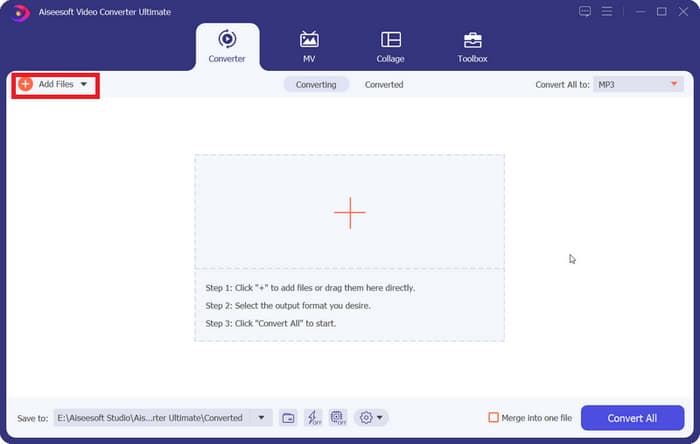
Step 1. Download and install FVC Video Converter Ultimate on your device. Open it and click on Add Files to upload your prepared WMV video.
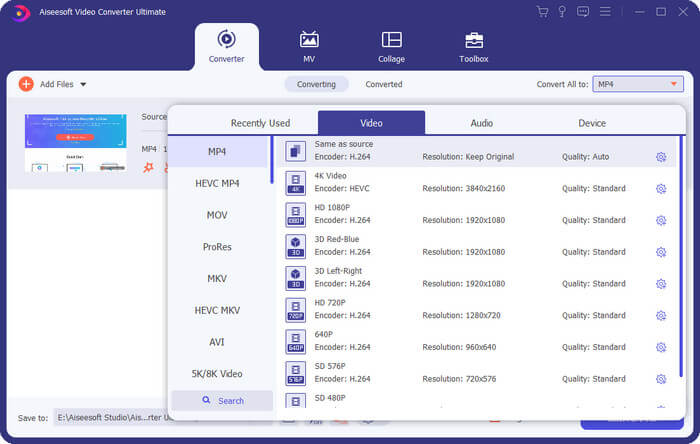
Step 2. Go to Convert All to, and select Video > MP4. Choose the version of clarity for your specific needs.
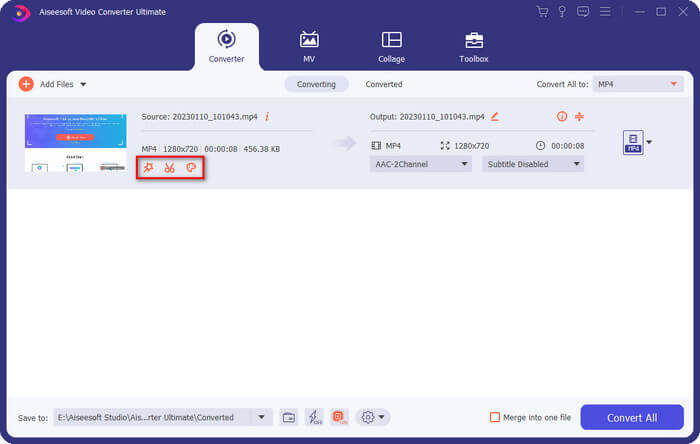
If you want to edit the added video before conversion, click Edit or Cut.
Step 3. After finishing setting the storage path, click Convert All to start the conversion between MP4 and WMV.
Parte 2. Converta WMV para MP4 gratuitamente usando o VLC Media
Jogador
Outro conversor de WMV para MP4 de terceiros que vale a pena experimentar é o VLC Media Player, cuja principal vantagem é ser de código aberto e gratuito. Seja você um usuário de Windows, Mac ou Linux, você pode baixá-lo para o seu dispositivo. O player é compatível com quase todos os formatos multimídia padrão do mercado e possui algumas ferramentas essenciais de edição de vídeo.
Veja como converter WMV para MP4 gratuitamente com o VLC Media Player.
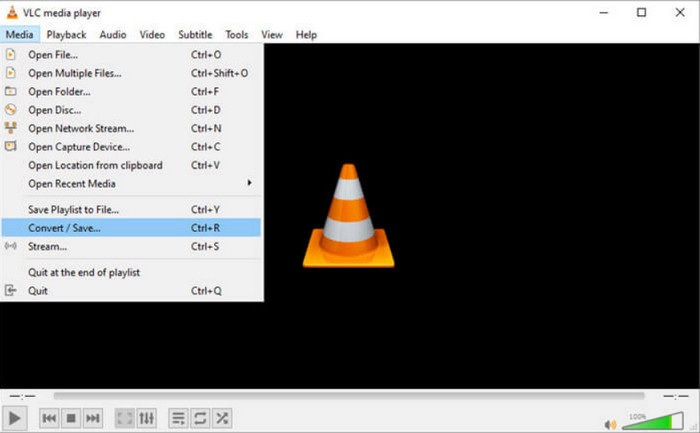
Step 1. Download the newest version of VLC Media Player on your computer. Launch it and click Media in the top left corner. In the expanded list, choose Convert/Save.
Step 2. A new pop-out window will appear. Go to the File tab and click +Add to upload your target WMV file. Then click Convert/Save.
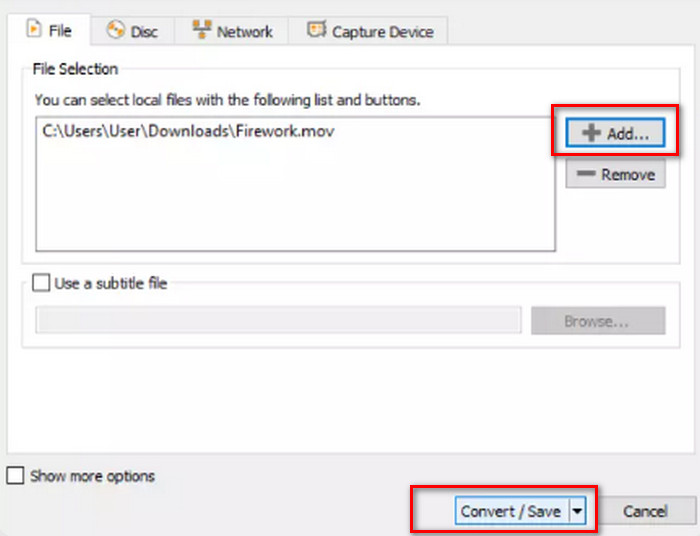
Step 3. Now, you will open another window. Find Profile and select Video - H.264 + MP3 (MP4) as the output format.
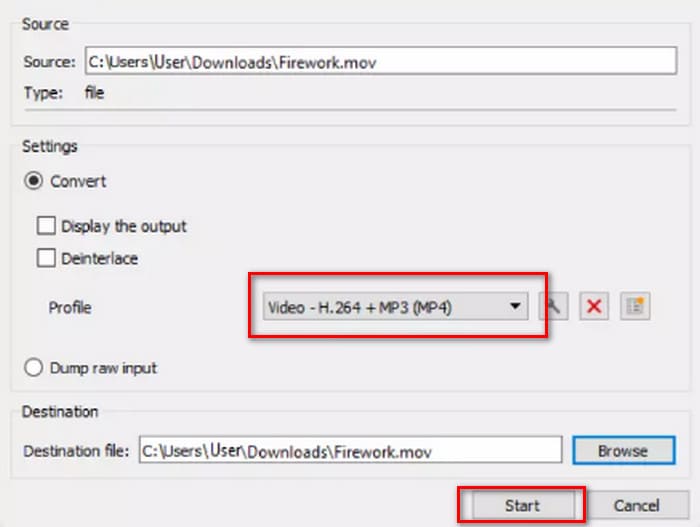
Step 4. Select a destination path and click Start to transfer WMV to MP4.
Embora o serviço do VLC Media Player seja totalmente gratuito, há poucas opções de processamento de vídeo disponíveis. Se precisar fazer alterações nos vídeos enviados, ainda recomendamos um software profissional de edição de arquivos multimídia, como o FVC Video Converter Ultimate.
Parte 3. Transferir WMV para MP4 sem perda de qualidade via FFmpeg
Os métodos comuns de conversão do formato WMV para MP4 geralmente exigem que carreguemos primeiro o arquivo de origem, escolhamos o formato de saída e, em seguida, cliquemos no botão Iniciar ou Converter. Mas o FFmpeg é diferente. Embora também possa realizar tarefas de conversão de formato e edição de vídeo, não possui uma interface e botões comuns; em vez disso, depende de instruções de código. Precisamos encontrar o modelo para a operação correspondente e preencher o caminho de armazenamento e o formato de saída do vídeo para que o FFmpeg funcione. Esta plataforma também é de código aberto e gratuita.
Veja como converter WMV para MP4 com o FFmpeg.
Step 1. Install FFmpeg on your computer. Then, use the computer's Search bar to locate the Terminal application.
Step 2. Refer to the following code instruction template.
ffmpeg -i input.wmv output.mp4
Substitua a entrada pelo nome do arquivo WMV que contém o caminho de armazenamento; substitua a saída pelo caminho de saída desejado no mesmo formato.
Example: /home/user/Desktop/XXX
Step 3. Enter the edited prompt and press Enter on your keyboard.
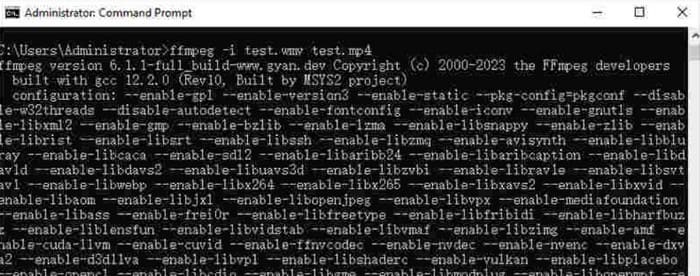
Para usuários familiarizados com os comandos de código ou com experiência no uso do FFmpeg, esta é a maneira mais fácil de converter WMV para MP4 no Mac ou Windows. Mas, para iniciantes, é difícil editar o código. Quase não conseguimos ver o processo de conversão.
Parte 4. Converta WMV para MP4 online facilmente
Se você acha que usar software para desktop é muito trabalhoso e procura um método mais simplificado e conveniente, recomendamos converter WMV para MP4 online. Existem muitas plataformas desse tipo, e o Convertio é uma boa opção. A vantagem desta plataforma é que ela suporta o upload de vídeos da nuvem e oferece algumas configurações personalizadas simples. Não há necessidade de instalar nenhum software ou plugin; encontramos o arquivo no navegador e podemos começar a usá-lo.
Veja como converter WMV para MP4 com o Convertio.
Step 1. Open Convertio with your browser. Click Select File to add your WMV video to this platform.
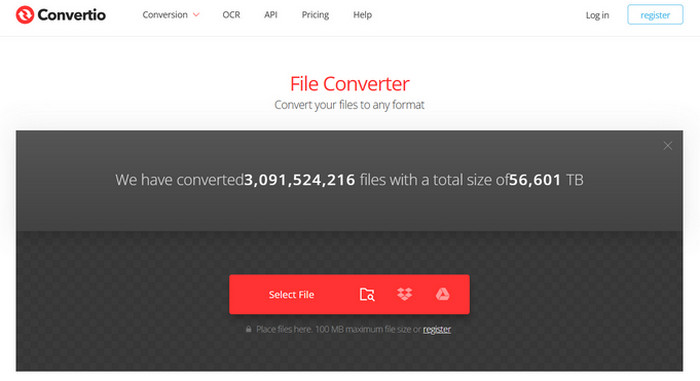
Step 2. Choose Arrive > Video > MP4. Finally, choose Conversion.
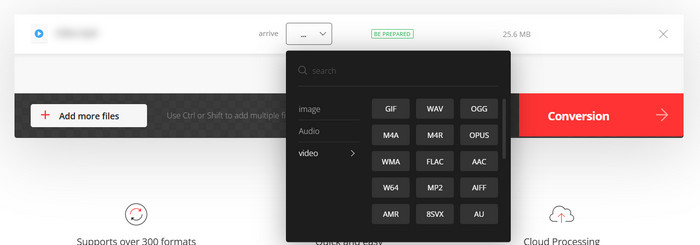
O Convertio é adequado para quem tem tarefas de conversão urgentes ou não quer que softwares de terceiros ocupem memória do computador. No entanto, a plataforma possui poucos recursos de edição de vídeo e só suporta arquivos de até 100 MB. Se você deseja converter WMV para MP4 com tempo ilimitado, ainda recomendamos tentar outras maneiras.
Parte 5. Compare cada sentido em uma tabela
Se você estiver com dificuldade para escolher entre os quatro conversores de formato, consulte a tabela abaixo. Compararemos o desempenho deles sob vários aspectos.
| Rapidez | Plataforma de Suporte | Limite de tamanho | Recursos de edição | Fácil de usar | |
| FVC Video Converter Ultimate | 30X mais rápido | Windows e Mac | Não | Vários | Muito fácil |
| VLC Media Player | Boa | Windows, Mac e Linux | Não | Algumas configurações básicas | Boa |
| FFmpeg | Boa | Windows, Mac e Linux | Não | Vários | Difícil |
| Convertio | Conclua a conversão em 1-2 minutos | Todas as plataformas incluem desktop e celular | 100 MB | Muito poucos | Muito fácil |
Parte 6. Perguntas frequentes sobre conversão de WMV para MP4
Devo converter WMV para MP4?
While the video quality of the WMV format is slightly higher than that of MP4, MP4 is superior to WMV in terms of compatibility and file size. If you are very concerned about the video quality issue, you can also use an MP4 editor to enhance the video quality after conversion or adjust parameters like bitrate.
O WMV está desatualizado?
Embora o WMV tenha surgido muito cedo, ele ainda é amplamente utilizado hoje em dia e é adequado para transferir e compartilhar vídeos. A única coisa com a qual você precisa se preocupar é que o WMV não é adequado para dispositivos iOS.
Como converter vídeo para MP4 no Windows?
Free tools such as VLC Media Player and Handbrake are good choices. However, we recommend FVC Video Converter Ultimate, which is not only compatible but also has the most comprehensive video processing tools and even supports adding and removing video watermarks.
Conclusão
This is an article that teaches you how to convert WMV to MP4. We provide four suitable converters they are FVC Video Converter Ultimate, which is the most versatile; VLC Media Player, which is free; FFmpeg, which has a unique startup method; and Convertio, which is online. After comparing their performances, you will find that FVC is the most cost-effective choice. Not only does it have no file size limitation, but it also has the most comprehensive video editing features among the four, and it is not as difficult to use as FFmpeg.
-
 Grátis | 3 melhores métodos para converter MP4 em WMV sem perder qualidade
 Esta postagem mostra como converter vídeo MP4 para o formato WMV no Mac ou Windows. Também ofereceremos várias opções, incluindo software de desktop e conversores on-line baseados na web. Pronto para conhecer as melhores ferramentas de conversão de MP4 em WMV?
-
 Análise dos 10 melhores reprodutores de vídeo WMV em 2025 (computador e telefone)
 Como posso jogar WMV? O VLC reproduz WMV? Qual aplicativo reproduz arquivos WMV? Esta postagem mostra os 10 melhores reprodutores de vídeo WMV para você no Mac, Windows PC, Android e iPhone.
-
 3 melhores métodos para juntar arquivos WMV online gratuitamente (atualização de 2025)
 Como mesclar videoclipes WMV online gratuitamente? FVC Free Online Video Merger e Clideo WMV Joiner são duas ferramentas poderosas para juntar arquivos WMV online. Este artigo irá apresentar como usá-los.

