


 Video Converter Ultimate
 Gravador de ecrã
 Reparo de vídeo
 Secure Download
Edite MP3 com as melhores ferramentas no Windows, Mac, online e celular
MP3 stands for MPEG-1 Audio Layer III, and it's a type of file that stores music in a compressed format. This kind of file is much smaller than uncompressed music files, which makes it easier to store and transfer. As more music is created, people are looking for easy ways to edit MP3s to make them sound better. This is because MP3 could be better than the original uncompressed music. The problem is that editing software can be expensive and require a powerful computer. Fortunately, this guide will show you how to use the most recommended MP3 editors so you can edit your music on all platforms you use. So, whatever your needs are, it is the best to start here!

Parte 1. Melhor escolha para editar MP3 com o All-in-One MP3 Editor
The first software that edits an MP3 file is FVC-picked Video Converter Ultimate. Yes, it is a media converter that is not only dedicated to catering videos but also audio files. It lets you easily adjust the volume up to twice as loud or down to a whisper. You can also speed things up or slow them down without getting bogged down in technical settings.
Além disso, ele pode remover ruídos de fundo, cortar partes indesejadas, dividir arquivos em seções e até mesmo editar gravações de voz. Além disso, ele oferece uma interface fácil de usar que, mesmo se você for um iniciante em edição de áudio, este programa simplifica fazer todas essas coisas em apenas algumas etapas. Você também vai adorar a tecnologia avançada que ele oferece, como aceleração de hardware, NVIDIA, Intel, AMD e as ferramentas de edição com tecnologia de IA que você pode usar.
Key Features:
• Conversão de áudio até 120x mais rápida.
• Suporte para mais de 1000 formatos diferentes.
• Divida, corte e mescle arquivos de áudio perfeitamente.
• Edite o tamanho do MP3 sem nenhuma limitação.
• Compacte arquivos de áudio no tamanho desejado.
• Modifique o codificador, a taxa de amostragem, o canal e a taxa de bits do arquivo MP3.
Free DownloadFor Windows 7 or laterSecure Download
Free DownloadFor MacOS 10.7 or laterSecure Download
How to Edit Audio Files with FVC
Step 1. Upon launching the software, you can add the MP3 files by hitting the Add Files button. Alternatively, you can drag the files from their path and then drop them into the editing software.
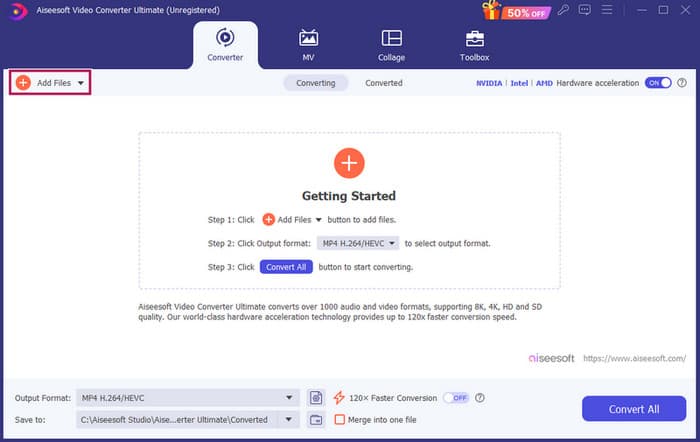
Step 2. Once the files are loaded, you can access the volume and delay settings by clicking the Star button on the thumbnail. The Scissors button is used to access the merger, splitter, and cutter. And, of course, the Settings button to access the profile modifier.
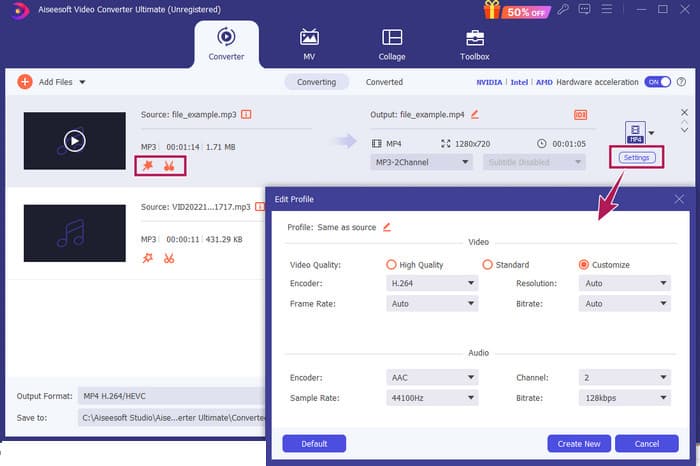
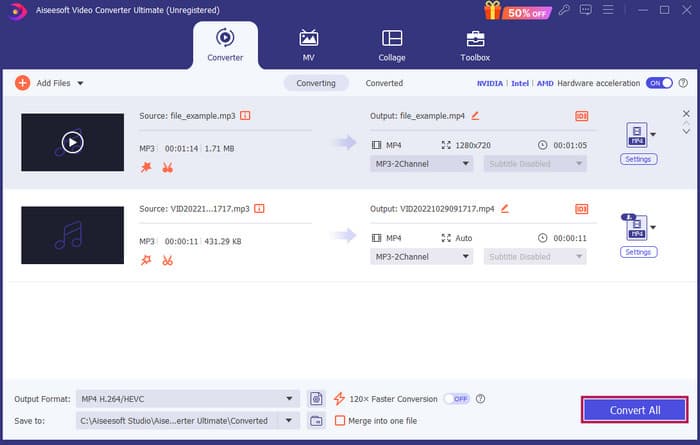
Step 3. After editing the files, you will need to click the Convert All button. And that’s how to edit MP3 on Windows 10 with FVC.
Verdict: FVC Video Converter Ultimate can be your go-to solution not only for enhancing or modifying MP3 but also a great tool for conversion. We love how simple and fast the audio editing is. Although most of the tools from the toolbox are for video files, there are still powerful audio editors lying in there. Thus, it is our personal handpicked for effective and easy file editing that is best for beginners.
Parte 2. Edite MP3 com Adobe Audition no Windows
Adobe Audition is one of the famous choices for professional audio editing, used by musicians, podcasters, and sound engineers alike. It is a known program for being powerful but easy to use. Furthermore, it comes with features like recording and editing multiple soundtracks at once, adding special effects that you can hear right away as you make them, and even including a library of sounds you can use in your projects. You can also think of it as a well-designed upgrade to an older program called Cool Edit Pro. Moreover, you can edit MP3s and customize the layout to fit your preferences, and it allows you to work with up to 40 separate soundtracks at the same time. There's also a mixing board editing tools and even a tool to add musical instruments to your project.
Key Features:
• Edite vários arquivos de áudio com apenas um clique.
• Adicione filtros e efeitos legais para deixar seu áudio incrível.
• Combine diferentes faixas de áudio para criar um som refinado.
• Corrija e melhore seus vocais com ferramentas poderosas.
How to Edit Audio Files with Adobe Audition
Step 1. Open the program and import the MP3 files by navigating to File-Open.
Step 2. To edit, you can use the Waveform Editor to detail a single track. For multiple audio tracks, use the Multitrack Editor.
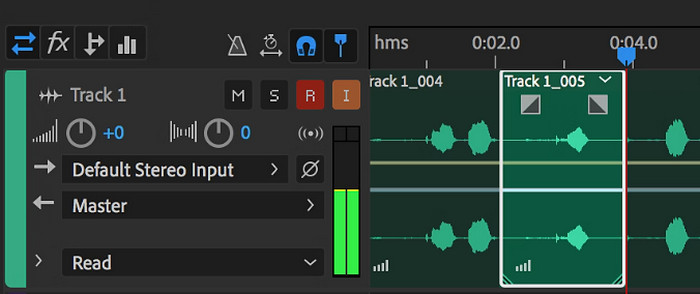
Step 3. Once you have finished editing, you can explore the program's other tools, like effects. Hence, when you have done what is needed, you may proceed to save the audio project. That’s how to edit MP3 on Windows with Adobe Audition.
Verdict: Indeed, Adobe Audition is an outstanding yet classic audio editor. No wonder many editors are still clinging to it. However, for beginners who don’t want challenging navigation, Adobe Audition might not be their best option.
Parte 3. Edite MP3 com o iTunes no Mac
O iTunes é como seu gerenciador de músicas, mantendo todas as suas músicas favoritas organizadas no seu computador. Imagine-o como uma caixa digital onde você pode facilmente classificar sua coleção de músicas por artista, álbum ou até mesmo gênero. Ele também permite que você corrija qualquer informação ausente, como títulos de músicas ou nomes de artistas, para que você sempre possa encontrar o que está procurando. Com este media player slash editor, você pode criar trilhas sonoras ou listas de reprodução personalizadas para diferentes estados de espírito ou atividades, como um mix de exercícios ou uma lista de reprodução para relaxar.
A melhor parte? O iTunes é super fácil de usar. Mesmo que você não seja um especialista em tecnologia, você pode adicionar músicas à sua biblioteca de forma fácil e rápida, organizá-las de forma organizada e reproduzi-las sem problemas. Embora ele não possa fazer edições sofisticadas como os outros programas, é uma ótima escolha para tarefas básicas, como cortar silêncio indesejado do início ou do fim dos seus arquivos MP3. Exploraremos como editar MP3 no Mac e no Windows em algumas etapas simples!
Key Features:
• Gerencia e cria uma biblioteca digital de arquivos de áudio.
• Além de MP3, ele também suporta vários formatos de áudio, incluindo WAV, AIFF, Apple Lossless e AAC.
• Permite a edição de informações de arquivos MP3, como artista, álbum, gênero e ano de lançamento.
How to Edit Audio Files with iTunes
Step 1. Launch the program and load the MP3 file. Find the File section and choose the Add File to Library option or choose the similar option. Then, pick the MP3 you want to trim from your device.
Step 2. Now, go to File again and choose Library. Make sure that MP3 is listed there. Then, right-click on it and select Get Info.
Step 3. You may now set the trimming points. To do so, navigate to the Get Info window, look for Options, and then find the Start and Stop time. Now, set the beginning and ending points of the part you want to keep. Once done, you can now save the changes by clicking the OK button.
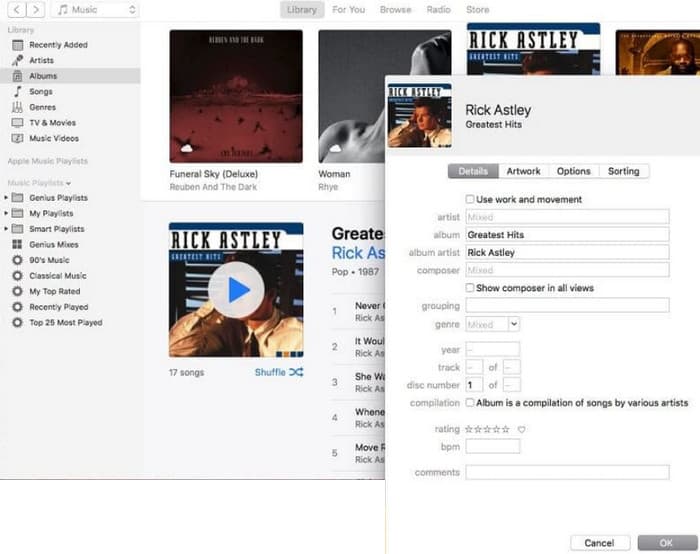
Verdict: iTunes can provide basic MP3 editing and enhancement as needed. However, since it is not a dedicated audio editor that edits an MP3 thoroughly, you might be frustrated by its lack of features.
Parte 4. Edite MP3 com um editor de MP3 online
Clideo is a promising MP3 cutter and editor for those who want to use an online audio editor to cut their MP3 files. It's a web tool that works on any device, so you don't need to download any software. Clideo lets you cut out specific parts of your audio by setting the exact start and end times or by simply dragging markers on the screen.
Além disso, ele suporta vários tipos de arquivo, então você pode editar praticamente qualquer arquivo de música que você tenha. Além disso, o Clideo permite que você adicione efeitos como fade-in e fade-out para uma transição de som mais suave no início e no fim do seu clipe. No geral, o Clideo é uma ferramenta amigável e versátil que torna a edição dos seus arquivos de áudio uma brisa.
Key Features:
• Corte partes indesejadas dos seus arquivos de áudio com facilidade.
• Adicione efeitos de fade-in e fade-out.
• Suporta vários formatos de áudio.
How to Edit Audio Files with Clideo
Step 1. Once you reach the official page of Clideo, go to its audio cutter.
Step 2. To upload MP3 files, click the Choose File button. Once the file importation is successful, you may start editing it.
Step 3. Set the dragger to your preferred size, then click Export to save the changes.
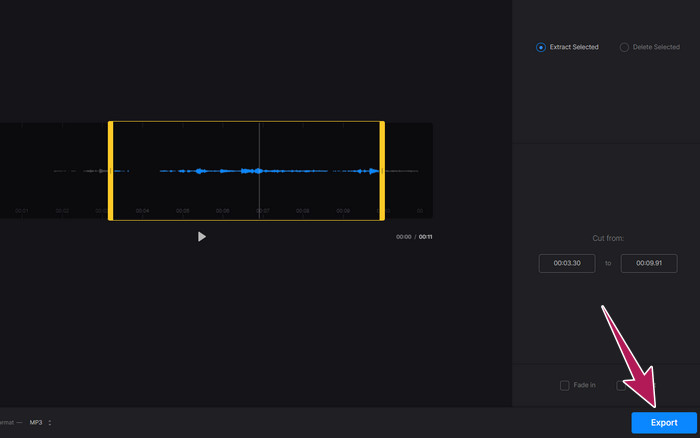
Verdict: Clideo is an online tool that proposes several tools for editing MP3s and other file types, including videos. However, you should keep in mind that online tools like Clideo might give you uncertain security since they are more vulnerable than offline tools.
Parte 5. Edite MP3 com um aplicativo móvel no iPhone/Android
The final MP3 editor that I recommend is an app you can acquire on Android and iOS. It is called the WavePad and has a lot of features, so it might look complicated at first. With this app, you can cut and trim clips, change the pitch of your voice, and even remove background noise. Furthermore, it edits MP3 on iPhone and Android with a bunch of sound effects and music you can add to your recordings for free. It has a built-in equalizer, which helps you make your audio sound just right. Aside from MP3, WavePad also works with the most common sound file types.
Key Features:
• Recorte, copie, cole e adicione efeitos aos sons.
• Suporte para vários formatos de áudio como MP3, WAV e AIFF.
• Possui diferentes configurações de qualidade de som.
How to Edit Audio Files with WavePad
Step 1. Launch the app, tap the three lines, and choose File-Import from the Audio tabs. This will enable you to upload the MP3 file that you need to edit.
Step 2. Access the editing tools by swiping right on the tool options at the upper part of the screen.
Step 3. Once you've done this, you can tap the REC button to record the part you want to keep from the file. Then, save and export it to your device.
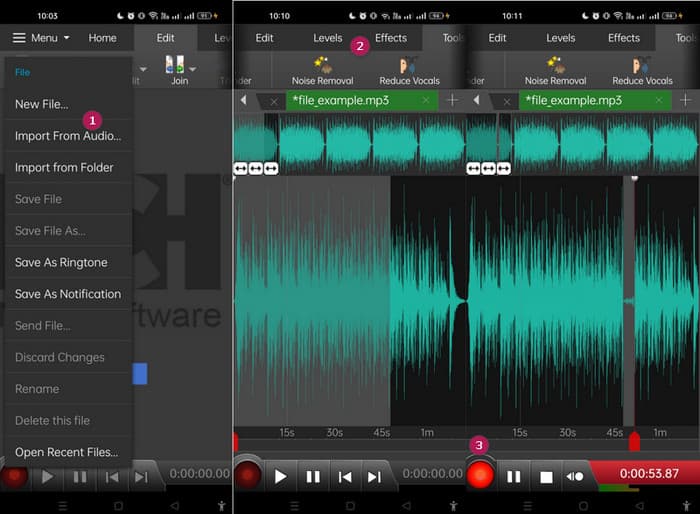
Verdict: The free version of WavePad has most features, but there's a paid option for $3 a month that also gets rid of ads to get everything, like all the sound effects and the ability to save your files in different formats. This will enable you to edit MP3s more advancedly on Android or iPhone.
Parte 6. Perguntas frequentes sobre edição de um MP3
Posso cortar uma música no Apple Music?
Não. Infelizmente, não é possível cortar músicas diretamente no Apple Music.
A Microsoft tem um editor de áudio?
Há muitos editores de áudio disponíveis, como o Audacity para edição de MP3, que você pode baixar na Microsoft Store.
Como faço para cortar um arquivo MP3 no Windows Media Player?
Unfortunately, Windows Media Player itself doesn't have built-in editing features to trim MP3 files.
Conclusão
At least you now know the best ways to edit MP3s like never before. With the best audio editors we recommend above, you will surely meet your desired audio! These tools provide comprehensive solutions for various platforms, ensuring flexibility and convenience regardless of your device or operating system. Whether you prefer a desktop application, an online tool, or a mobile app, you can achieve professional-quality edits with ease. From basic trimming and merging to advanced effects and enhancements, the right editor can transform your MP3 files efficiently. Explore the options, and start refining your audio tracks to perfection today.
-
 Os 10 principais reprodutores FLV para Windows, Mac, iOS e Android em 2024
 O FLV player ajuda você a acessar facilmente seus arquivos FLV em seu dispositivo Windows, Mac, Android ou iOS. Confira os melhores reprodutores de arquivos FLV que você pode baixar agora.
-
 8 melhores jogadores MOV para reproduzir arquivos QuickTime MOV com qualidade original
 Saiba mais sobre os 8 melhores reprodutores MOV disponíveis para Windows e Mac. Você pode escolher o desejado e apropriado para reproduzir arquivos MOV com a qualidade original.
-
 Obtenha seu melhor reprodutor MP4 para reproduzir arquivos MP4 com alta qualidade visual
 Leia e obtenha o seu melhor MP4 player com as recomendações dos 10 softwares mais recentes para MP4 video player. Você pode reproduzir arquivos de vídeo MP4 no Windows e Mac sem problemas, sem atrasos.
