


 Video Converter Ultimate
 Gravador de ecrã
 Reparo de vídeo
 Secure Download
Como converter M2TS em formatos compatíveis com iPad no Windows / Mac / Online
Can you play M2TS on iPad directly? Sadly, the answer is No. M2TS is not compatible with iPad. If you want to get M2TS playback on iPad, you need to install an M2TS player app on iPad, or you can convert M2TS to iPad format. Obviously, this article chooses the latter solution. Just read and learn how to change video format on iPad from M2TS.

Parte 1: Como converter M2TS para iPad no Windows e Mac
Quais formatos o iPad suporta? Na verdade, o iPad aceita os formatos de vídeo comuns H.264, MP4, M4V, MOV, MPEG-4 e M-JPEG. Para colocar M2TS no iPad, você precisa primeiro converter M2TS para o formato de vídeo do iPad.
Como converter M2TS para iPad no Windows gratuitamente
FVC Free M2TS Converter is a M2TS to iPad batch converter totally free to use. You can batch convert M2TS files to iPad with 50x speed faster than common M2TS converters. Thus, it does not matter if you need to convert large M2TS video files to iPad in bulk. The M2TS to iPad converter free can handle it perfectly.
Moreover, you can merge M2TS files and add themes before the M2TS to iPad conversion. The real-time preview window can show you video effects instantly. In a word, you can edit and convert AVCHD M2TS to iPad on Windows for free in one stop.

Conversor M2TS grátis
113.456 Downloads- Converta M2TS para iPad H.264, MP4, MOV, MPEG-4 e outros formatos compatíveis.
- Velocidade 50x mais rápida com o suporte de conversão em lote.
- Mantenha o alto nível de qualidade ao converter para iPad de todas as filmadoras HD.
- O conversor M2TS para iPad funciona com o computador Windows 10/8/7.
Free DownloadFor Windows 7 or laterSecure Download
Free DownloadFor MacOS 10.7 or laterSecure Download
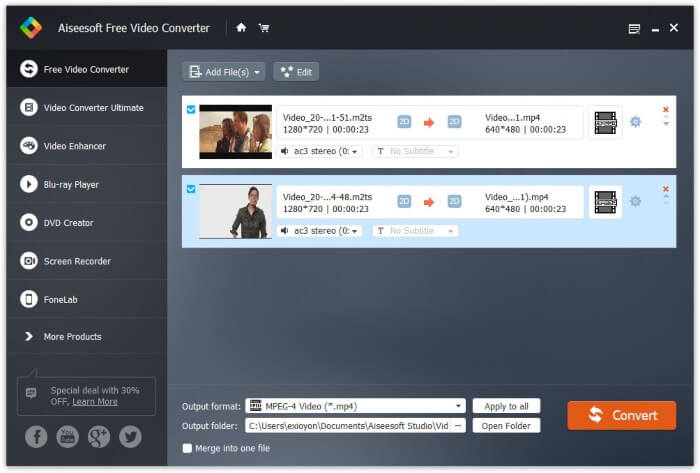
Step 1: Free download, install and launch FVC Free M2TS Converter. Drag and drop M2TS files into the main interface.

Step 2: Unfold the Output format list near the bottom. To convert M2TS to iPad on Windows, you can set the output format from the Apple iPad category directly.

Step 3: Click the gear Settings icon to adjust video encoder, frame rate and more. At last, click Convert to convert video from M2TS to iPad format.
Como converter M2TS para iPad no Mac gratuitamente
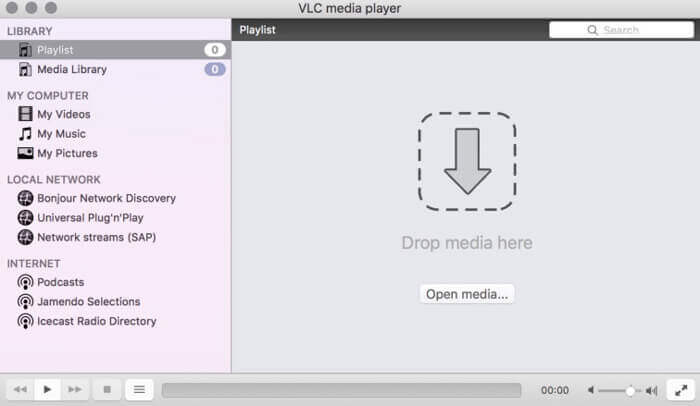
Se você deseja converter vídeo M2TS para iPad no Mac gratuitamente, o VLC Media Player pode ser sua boa escolha. É um reprodutor e conversor M2TS gratuito e de código aberto para multiplataforma.
Step 1: Open VLC Media Player on Mac. Choose Convert/Save from the Media drop-down list.
Step 2: Click Add to import a M2TS file. Then select the file and click Open below to continue the process.
Step 3: Click Convert/Save at the bottom to move on to the next window.
Step 4: Choose iPad format from the Profile drop-down list. You can click the Tools icon besides to adjust video settings.
Step 5: Click Start to start converting M2TS file to iPad on Mac via VLC.
Parte 2: Como converter M2TS para iPad online
Para usuários móveis, usar um conversor online de M2TS para iPad também é uma boa escolha. Você pode converter um arquivo M2TS para iPad gratuitamente, sem necessidade de download, instalação ou registro.
Step 1: Open an M2TS to iPad online converter, such as FVC Free Online Video Converter.

Step 2: Download FVC launcher through clicking Add Files to Convert and install.

Step 3: Find the M2TS file in your computer to convert. And don’t forget to choose the format.

Step 4: Click Start Converting to convert M2TS to iPad free online.
Parte 3: Perguntas frequentes sobre a conversão de M2TS em iPad
O que acontece que de repente não há áudio em arquivos M2TS no iMovie?
M2TS não é nativamente suportado por dispositivos Apple. Você precisa converter M2TS para o formato Mac para resolver o problema.
Como abro arquivos M2TS no iPhone e iPad?
AVCHD M2TS não é compatível com dispositivos iOS. Se você insiste em reproduzir vídeos M2TS no iPad, você pode usar o aplicativo VLC Media Player para obter a reprodução de vídeo.
Qualquer bom aplicativo de player de vídeo para iPad?
Você pode obter uma tela maior no iPad do que no iPhone. Portanto, a experiência de assistir a vídeos também será melhor. Os reprodutores de vídeo recomendados incluem PlayerXtreme Media Player, KMPlayer, VLC, AirPlayer e mais. Você pode escolher qualquer um para obter controles de vídeo com flexibilidade.
That's all to convert M2TS to iPad with online and offline tools. Those M2TS video converters are free and safe to use. No matter how many M2TS files you want to convert to iPad compatible formats, you can get the fastest speed here.
-
 Como converter M2TS para MP4 sem reduzir a qualidade
 Quer converter o vídeo de uma filmadora HD para MP4 comum? Aqui estão 4 maneiras simples e gratuitas de alterar o arquivo M2TS para MP4 no Windows e Mac.
-
 Como converter M2TS em MKV sem perder qualidade
 Quer converter M2TS em MKV mantendo a qualidade original? Esta postagem mostra métodos gratuitos e online para alterar M2TS para MKV sem perdas.
-
 Qual é a diferença entre MTS e M2TS
 O que é um arquivo MTS ou M2TS? Qual é a diferença entre M2TS e MTS? Como posso assistir ao arquivo MTS ou M2TS da câmera de vídeo gravado? Encontre todas as respostas neste post.
