


 Video Converter Ultimate
 Gravador de ecrã
 Reparo de vídeo
 Secure Download
Como converter MTS para FLV com o conversor de 3 MTS para FLV
Want to convert MTS files to FLV? The videos recorded with AVCHD camcorders are usually stored in MTS or M2TS format. MTS files are not commonly supported by some media players, nor are they uploaded to YouTube or Facebook. If you have an AVCHD camcorder like Sony, Panasonic or Cannon, you may want to convert the recorded MTS videos to flash video format. So they can play on most media players. That's why you should read on our post, for we shall provide 3 methods to convert the MTS files to FLV on Windows and Mac.

Parte 1. Maneira profissional de converter MTS em FLV gratuitamente
To convert your MTS file to flash video for uploading, you need a professional tool like FVC Free MTS Converter. It is an MTS to FLV converter that can batch convert MTS files to FLV, MP4, WMV, MOV and other video and audio formats. With the built-in video editing tools, you can edit the MTS files before converting.

FVC Free MTS Converter
Mais de 1.286.400 downloads- Converta MTS em FLV no Windows 10/8/7 / Vista / XP e Mac OS X.
- Compactar, mesclar e adicionar outros efeitos de vídeo aos arquivos MTS.
- Adicione temas especiais aos seus arquivos MTS, como férias, família, aniversário.
- Converta em lote MTS para FLV, MP4, MKV, etc. a uma velocidade 50x mais rápida.
Free DownloadFor Windows 7 or laterSecure Download
Free DownloadFor MacOS 10.7 or laterSecure Download
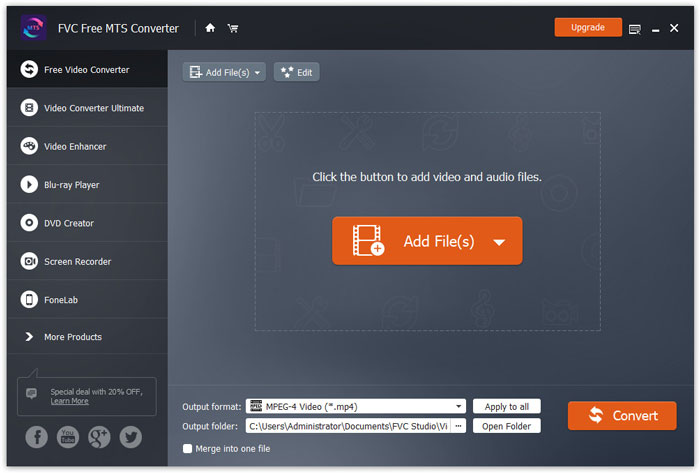
Step 1. Add MTS file
Free download, install and launch FVC Free MTS Converter. Click Add File(s) button to import your MTS file. You can also drag more than one MTS file into the program for free.
Step 2. Edit MTS file
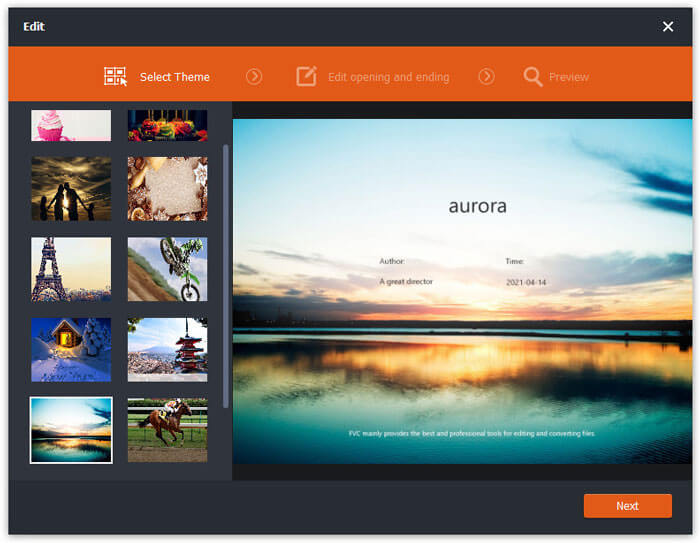
Click the Edit button to start editing your MTS file. You can select a certain theme, edit the title, author, time at the opening and ending.
Step 3. Set FLV as output
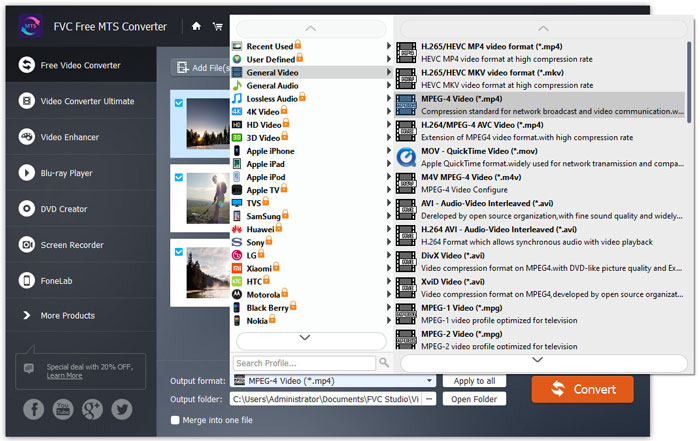
Then go to the Output format area and choose General Video category. Find FLV - Flash Video Format (.flv) and set it as the output format. This format is a widely used network video streaming media format.
Step 4. Convert MTS to FLV
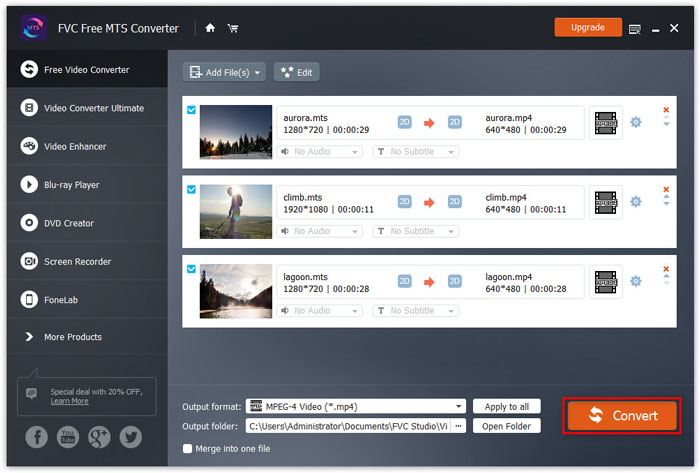
Finally, go to the Output folder area and choose the destination where the converted FLV file will be saved. You can click the Convert button to start converting MTS to FLV file for free.
Depois disso, você pode enviar o arquivo FLV convertido para o YouTube, Vimeo, Facebook, Google Video ou outras plataformas de mídia.
Parte 2. Como mudar o MTS para FLV Free Online
If you want to find an online tool without downloading any software, you can come to FVC Free Online Video Converter. It is an easy-to-use and free online MTS to FLV converter that helps convert any popular video/audio formats like MTS to FLV, MP4, WMV, AVI, MOV, MP3, etc., totally free on Windows and Mac. You can check the detailed steps to change MTS to FLV with this free online tool.
Step 1. Visit the official website of FVC Free Online Video Converter (https://www.free-videoconverter.net/free-online-video-converter/). Click Add Files to Convert button to download and install the launcher.

Step 2. Select your MTS files to convert from your computer.
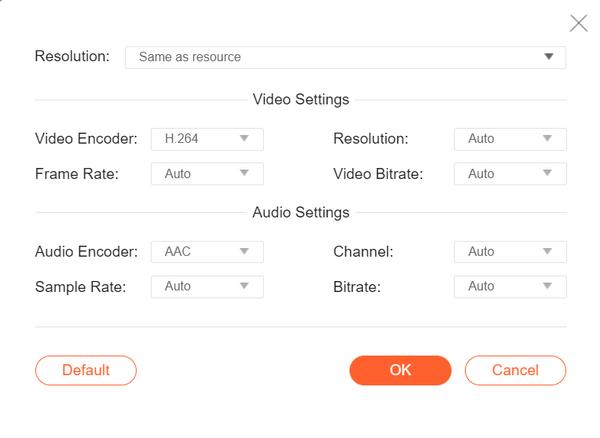
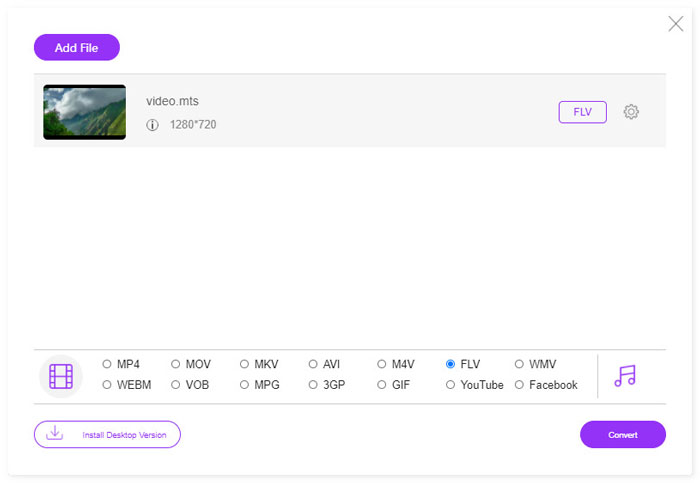
Step 3. Set FLV as the output format at the bottom. If you want to adjust more settings, you can click the gear icon to adjust video encoder, resolution, frame rate, bitrate and other audio settings like audio encoder, channel, sample rate and bitrate.
Step 4. Click the Covert button to start converting your MTS file to FLV.
Parte 3. Exportar vídeo Flash gratuito de arquivo MTS com VLC
VLC Media Player is not only a simple video/audio player, but also a video converter that packed with useful features. It works as a good MTS to FLV converter that handles a wide range of supported files for conversion. It is totally free without any limitations. With VLC, you can export the Flash videos from MTS file on Windows or Mac for free. To convert MTS file to FLV, you need to download and install VLC on your computer.
Step 1. Launch VLC Media Player, go to Media and click Convert / Save button.
Step 2. Click Add button to add the MTS file, and click Convert / Save button to continue.
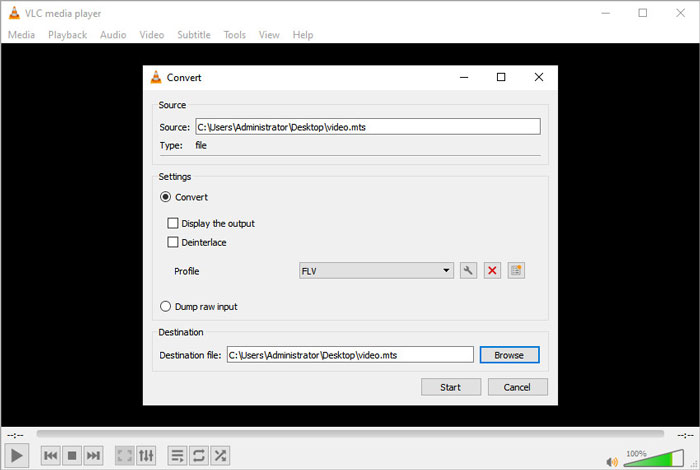
Step 3. Check the Convert in Settings area, and click the drop-down arrow to select FLV as the output format. If there is no FLV file output, you can click Create a new profile icon and create a new FLV profile.
Step 4. Then go to the Destination area and click the Browse button to set the output folder.
Step 5. Make sure you have made all settings done, and click the Start button to start converting MTS to FLV in VLC.
Parte 4. Perguntas frequentes sobre a conversão de MTS em FLV
Qual é o formato de vídeo MTS?
A MTS file is a video that saved in the Advanced Video Coding Definition (AVCHD) format. MTS file is the standard video format used by many Sony and Panasonic HD camcorders. It is also used for storing high-definition video on Blu-ray discs.
Como faço para converter arquivos MTS para MP4?
With FVC Free MTS Converter, you can also convert MTS file to MP4. Click Add File(s) button to import the MTS files. Then go to the Output format and choose MP4 as the output format. After that, click Convert button to start converting MTS to MP4 for free.
O Windows 10 pode reproduzir arquivos MTS?
sim. Você pode usar o Windows Media Player para reproduzir seus arquivos MTS. Se o arquivo MTS falhou para reprodução, você pode tentar outros reprodutores MTS como VLC Media Player, 5K Player, FVC Free Video Player e muito mais.
Conclusão
Neste artigo, falamos principalmente sobre três métodos para converter arquivos MTS em FLV gratuitamente. Você pode tentar todos os conversores MTS para FLV acima para exportar arquivos de vídeo flash para upload. Este Conversor MTS gratuito pode facilmente alterar seus arquivos MTS para FLV, MP4, WMV, VOB, MP3 e mais em alta velocidade.
-
 Os 10 principais jogadores FLV para Windows, Mac, iOS e Android em 2021
 O FLV player ajuda você a acessar facilmente seus arquivos FLV em seu dispositivo Windows, Mac, Android ou iOS. Confira os melhores reprodutores de arquivos FLV que você pode baixar agora.
-
 Melhores maneiras de converter VOB em FLV
 Quer converter um arquivo VOB em um arquivo FLV? Você pode completar a tarefa facilmente com conversores de desktop ou online. Leia este guia e aprenda como transformar VOB em FLV com facilidade e rapidez.
-
 MTS VS M2TS - Diferença entre MTS e M2TS
 O que é um arquivo MTS ou M2TS? Qual é a diferença entre M2TS e MTS? Como posso assistir ao arquivo MTS ou M2TS da câmera de vídeo gravado? Encontre todas as respostas neste post.
