


 Video Converter Ultimate
 Gravador de ecrã
 Reparo de vídeo
 Secure Download
Métodos extraordinários para converter MTS para M4V instantaneamente
Do you want an effective converter for your device? Then, you will get an idea by reading informative details from this article. We will show you various ways on how to convert MTS to M4V using Mac and Windows. Also, you will discover an online tool you can try to convert more files.

Parte 1: Diferenças entre MTS e M4V
Para ver as diferenças entre esses dois formatos de arquivo, consulte os detalhes na tabela abaixo.
| MTS | M4V | |
| Extensão de arquivo | A extensão de nome de arquivo de arquivo de vídeo de Codificação de Vídeo de Alta Definição Avançada (AVCHD) é MTS. Ele tem uma extensão de nome de arquivo .mts e inclui um vídeo HD MPEG gravado com marcas e modelos de filmadoras específicos, incluindo JVC, Sony, Canon e Sanyo. Ele pode abrir em muitos softwares e suportar vídeos HD de até 1080i x 720p. | A Apple Inc. criou o formato contêiner de vídeo digital M4V. Em termos de estrutura, é razoavelmente comparável ao conhecido MP4, mas os arquivos M4V podem vir com DRM. Atualmente, o principal formato de vídeo para vídeos na iTunes Store é o M4V, que pode multiplexar vários dados de áudio e vídeo. |
| Desenvolvido por | Sony/Panasonic | Apple Inc. |
| Programas Associados | VLC Media Player Apple Final Cut Pro X Roxio Creator NXT Pro 7 | Reprodutor de Mídia Clássico KMPlayer VLC Media Player Reprodutor de zoom |
| Tipo MIME | vídeo/mp2t | vídeo/x-m4v |
Parte 2: Métodos Excelentes para Converter Múltiplos MTS para M4V Usando Mac
Se você deseja converter MTS para M4V usando o Mac, pode experimentar o FVC Video Converter Ultimate. Esta ferramenta offline pode converter arquivos instantaneamente porque possui uma velocidade de conversão 30 vezes mais rápida. Além disso, esta ferramenta oferece conversão em lote, o que torna possível a conversão de vários formatos de arquivo de uma só vez. Além disso, quase todos os formatos de vídeo podem ser carregados neste aplicativo porque ele suporta vários formatos de arquivo, incluindo MKV, MOV, MP4, FLV, AVI, SWF e muito mais. Você também pode editar seu arquivo de vídeo MTS. Você pode confiar nessa ferramenta se tiver vários arquivos MTS e quiser que eles sejam combinados, pois ela oferece uma ferramenta de fusão de vídeo. Dessa forma, você pode mesclar vários vídeos MTS em uma única peça. Além disso, se você deseja ajustar o volume do seu vídeo MTS, pode usar a ferramenta de aumento de volume. Com a ajuda deste aplicativo offline, você pode alterar facilmente o volume do seu vídeo. Existem mais recursos que você pode aproveitar usando o Video Converter Ultimate.
Features
◆ Pode converter mais de 100 formatos de arquivo de vídeo.
◆ Oferece criador de vídeos musicais com muitos temas gratuitos.
◆ A criação de uma colagem com modelos e filtros gratuitos está disponível.
◆ It provides editing tools such as a video speed controller, compressor, and cropper.
◆ Pode remover marcas d'água de um vídeo.
Siga as etapas básicas abaixo para converter seu arquivo de vídeo MTS para o formato M4V usando o FVC Video Converter Ultimate no seu Mac.
Step 1: Using your Mac, download the FVC Video Converter Ultimate by clicking the Download button below. Then, launch the application.
Free DownloadFor Windows 7 or laterSecure Download
Free DownloadFor MacOS 10.7 or laterSecure Download
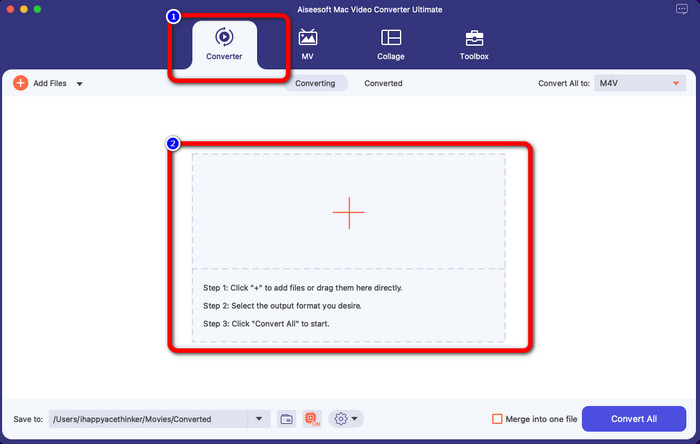
Step 2: In the middle of the interface, click the Plus icon to attach your MTS video file. You can also drop the file directly into the box.
Step 3: For the next procedure, you will see the Convert All to button at the upper right of the interface. Click it to see the format options, then select the M4V file format. To add multiple MTS files, press the Add Files button at the upper left part of the interface.
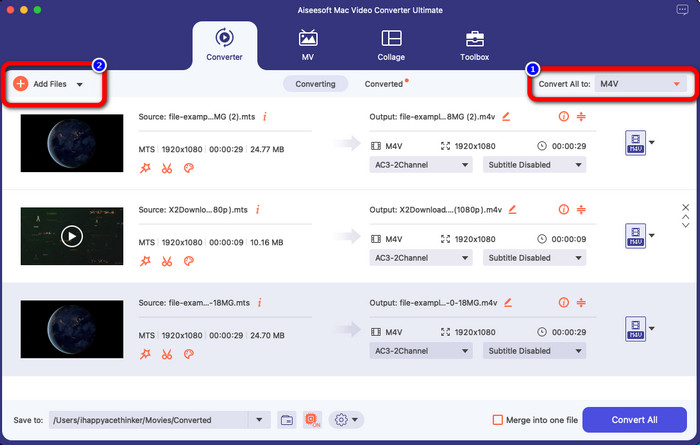
Step 4: After converting all the MTS files to M4V format, click the Convert All button and save your final output on your desired location.
Parte 3: Como converter vários arquivos MTS para M4V no Windows gratuitamente
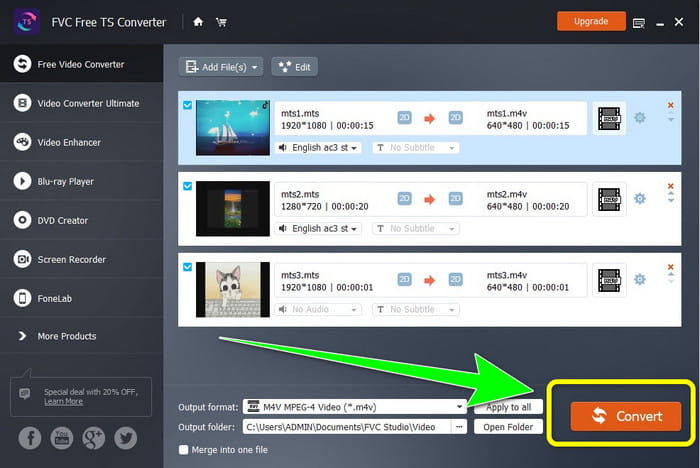
In this part, you will discover how to convert multiple MTS files to one m4v using Windows. To convert MTS files, you can use the FVC Free TS Converter. It can convert your video files 10x faster than the average conversion speed. It offers batch conversion, wherein you can convert multiple files in one go. In this way, you’ll never get bored converting files one by one. In addition, it has an intuitive interface with basic methods, making it more suitable for users. If you want to convert multiple MTS files to M4V format using FVC Free TS Converter on Windows, use the simple steps below.
Features
◆ Converta formatos de arquivo de vídeo, como AVI, MOV, MPEG, MP4, DIVX, XVID, etc.
◆ Fornece um aprimorador de vídeo.
◆ Capaz de gravar tela.
◆ Pode reproduzir qualquer disco Blu-ray.
◆ Oferece conversão em lote.
Step 1: Download the FVC Free TS Converter on your Windows by clicking the Download button below. Launch the application after the installation process.
Free DownloadFor Windows 7 or laterSecure Download
Free DownloadFor MacOS 10.7 or laterSecure Download
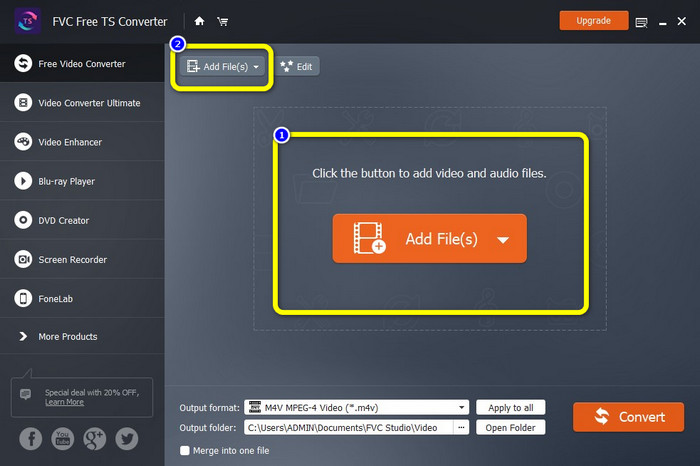
Step 2: After launching the application, press the Add Files button at the center to upload MTS files. You can also click the other Add Files button at the upper part of the interface to add more MTS files you want to convert.
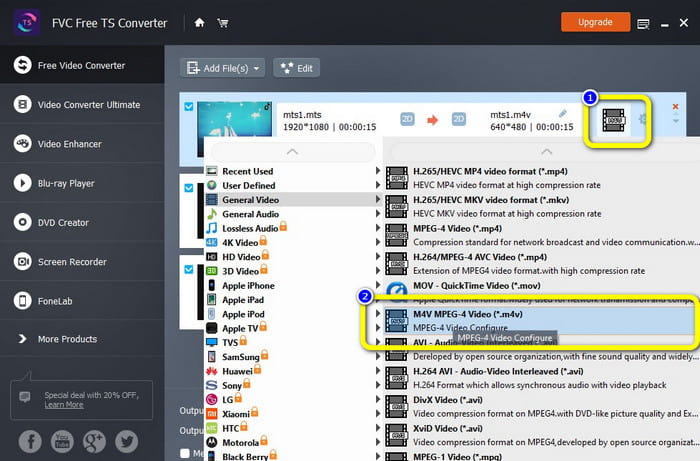
Step 3: Click the format options on the right part of the interface. Then, select the M4V file format as your output format. Do the same procedure for the remaining MTS files.
Step 4: Hit the Convert button to convert multiple MTS files to M4V format.
Parte 4: Melhores maneiras de converter MTS para M4V usando o aplicativo online
When converting MTS to M4V using an online tool, then the best converter you can use is FVC Free Video Converter Online. With the guide of this tool, you can easily convert your MTS file to M4V. It only takes three steps to convert files. Also, this online tool is 100% free. So, without further ado, let’s convert your MTS to an M4V file format. Follow the steps we provided for you!
Features
◆ Converta vários arquivos, como MP4, FLV, WMA, MOV, MTS, M4V, etc.
◆ Permite conversão em lote.
◆ Acessível em Mac e Windows.
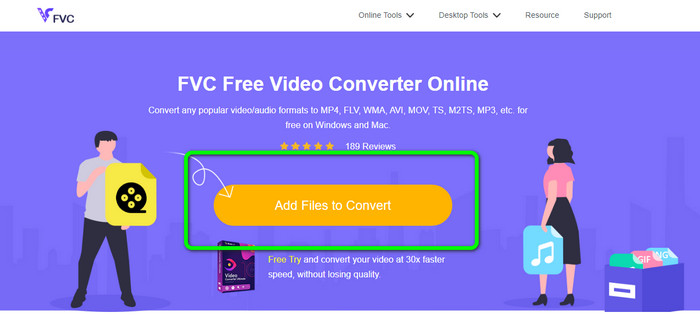
Step 1: Visit the FVC Free Video Converter Online website. Then, click the Add Files to Convert button to upload your MTS video.
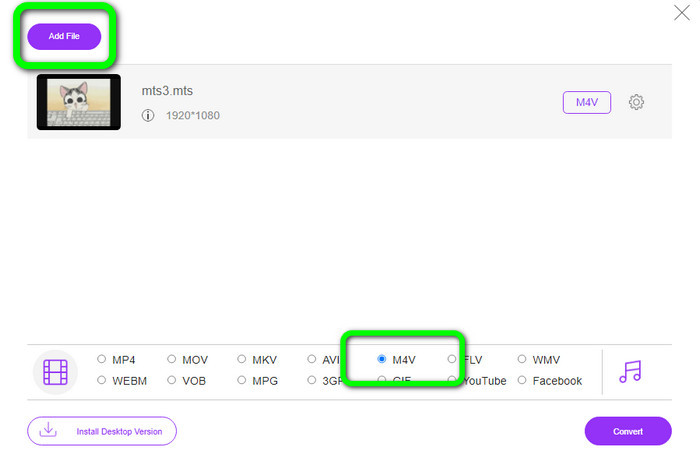
Step 2: Next is to select the M4V format on the format options on the lower part of the interface. You can also click the Add File button to convert multiple files.
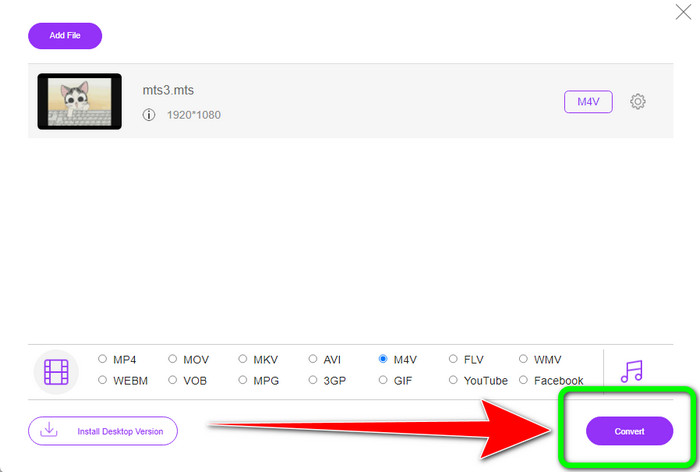
Step 3: After selecting your desired format, you can click the Convert button to save your video in an M4V file format.
Parte 5: Perguntas frequentes sobre a conversão de MTS para M4V
1. O MTS é um bom formato?
Sim. Os codecs de vídeo HD 720p e 1080i são suportados por MTS, um MPEG de alta definição e formato de vídeo de fluxo de transporte H.264. As pessoas frequentemente se referem aos arquivos MTS como AVCHD, criados em conjunto pela Sony e Panasonic e lançados em formato de alta qualidade em 2006.
2. Como posso converter MTS para MP4?
You can use the applications mentioned above. Those converters are effective and useful in converting MTS to MP4 and other file formats.
3. Por que você usaria M4V?
Os arquivos M4V podem ter legendas suaves e proteção DRM para impedir a pirataria e tornar mais difícil para os consumidores distribuir arquivos entre os dispositivos.
Conclusão
The three applications above are the best converter you can use on your devices. If you are a Windows user, you can use the FVC Video Converter Ultimate. If you are using Mac, you can try FVC Free TS Converter. Lastly, you can use FVC Free Video Converter Online if you prefer an online application. These converters can convert MTS to M4V smoothly.
-
 MTS VS M2TS - Diferença entre MTS e M2TS
 O que é arquivo MTS ou M2TS? Qual é a diferença entre M2TS e MTS? Como posso assistir ao arquivo MTS ou M2TS gravado na filmadora? Encontre todas as respostas neste post
-
 Os 5 principais players M4V para Windows / Mac / Android / iOS que você deve conhecer
 Quando você não consegue reproduzir seus vídeos M4V no QuickTime Player, você deve aprender mais com os 5 excelentes players M4V para Windows, Mac, Android e iOS deste artigo
-
 [Resolvido] Como converter MTS para MKV na qualidade original
 Você está se perguntando como pode converter MTS para MKV gratuitamente? Neste artigo, listamos os melhores conversores gratuitos de MTS para MKV
