


 Video Converter Ultimate
 Gravador de ecrã
 Reparo de vídeo
 Secure Download
Como converter seus arquivos de vídeo DAT para o formato FLV gratuitamente
Since there are so many video formats you might need to convert one format to the other. This article focuses on how to convert DAT to FLV on desktop and online for free. A file with the DAT extension is not a standard file but data file that stores information. Therefore, no specific program is responsible for opening DAT files. If a video file is being stored this way, a proper DAT to FLV converter can help you open it.

Parte 1: Melhores maneiras gratuitas de converter DAT em FLV
Modo 1: converter DAT em FLV com o conversor FLV gratuito
FVC Free FLV Converter is a powerful video converter although it is freeware. It means that you can get the features similar to professional software without paying a penny.
Key Features of the Best Free DAT to FLV Converter
- 1. Converta em lote arquivos DAT para o formato FLV rapidamente.
- 2. Produz uma saída de alta qualidade usando tecnologia avançada.
- 3. Inclua uma ampla gama de ferramentas de bônus, como edição de vídeo.
Free DownloadFor Windows 7 or laterSecure Download
Free DownloadFor MacOS 10.7 or laterSecure Download
How to Convert DAT to FLV for Free
Etapa 1: abrir arquivos DAT
Run the best free DAT to FLV converter once you install it on your computer. To keep your data safe, you’d better download it from the official website. Click the big Add File(s) button in the home interface, seek and select the DAT video files and open them. Then they will appear in the library area.

Etapa 2: definir FLV como formato de saída
Head to the bottom area, click and expand the Output format option. Go to the General Video tab on the list, scroll down and select FLV or relative format. You can also reset the frame rate, resolution and other parameters by hitting the Gear icon on each title.

Etapa 3: converter DAT em FLV
Next, click the Open Folder button and change the destination directory based on your preference. By default, the DAT to FLV converter will save the output to your video library. Finally, click on the Convert button to begin converting DAT to FLV on your desktop immediately. It only takes a few minutes to complete converting.

Maneira 2: como converter DAT em FLV por VLC
VLC é outra maneira de converter DAT em FLV gratuitamente. O media player de código aberto pode abrir um arquivo de vídeo com extensão DAT e convertê-lo em arquivos de vídeo padrão. Considerando o procedimento complicado, compartilhamos as etapas básicas abaixo.
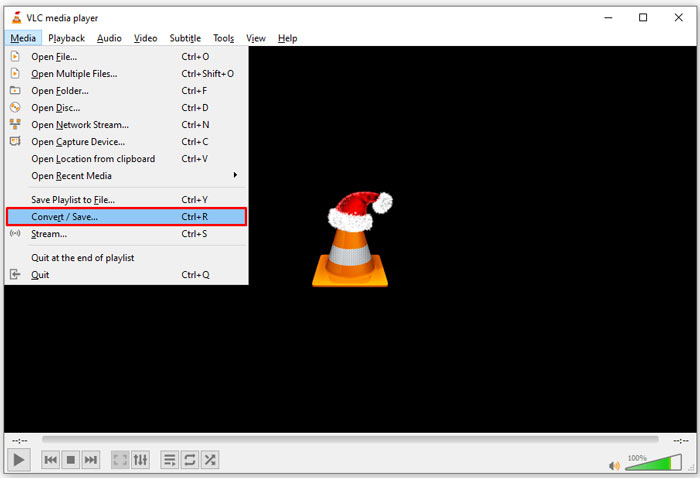
Step 1: Open VLC and click the Convert/Save open in the Media menu on the top ribbon. Then you will see the open-media dialog.
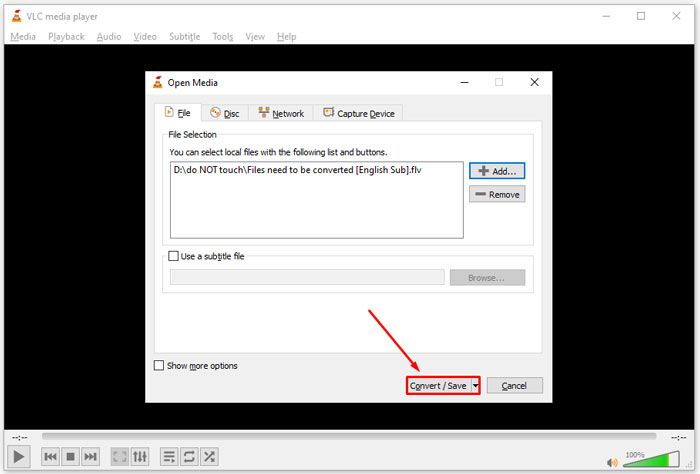
Step 2: Click the Add button and open the DAT video files into VLC. Hit the Convert/Save button to move on.
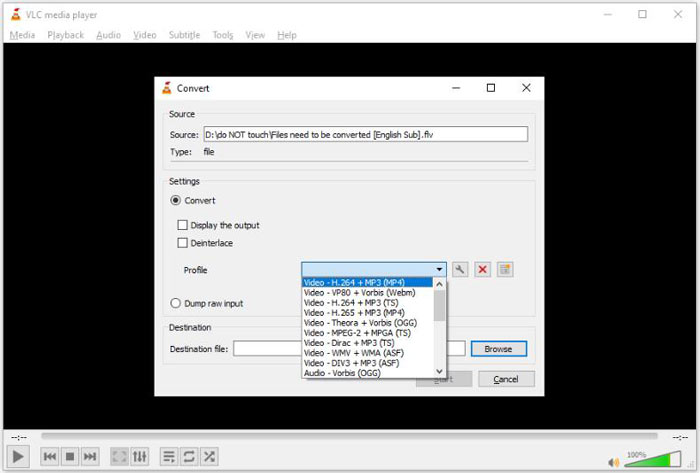
Step 3: Unfold the Profile drop-down list and set FLV as the output format. Click the Browse button to select an output folder in Destination section.
Step 4: Click the Start button to initiate DAT to FLV converting. It takes as long as your video file to convert it in VLC.
Parte 2: Como converter DAT em FLV Online
FVC Free Online Video Converter is an easy way to convert DAT to FLV online for free. Compared to other web video converters, it lets you do the job without any limit, like file size, registration, watermark, etc.
Step 1: Open a browser, and visit https://www.free-videoconverter.net/free-online-video-converter/. Click the Add Files to Convert button to download the launcher.

Step 2: Click the Add File button on the launcher and upload the DAT video files from your computer. Then head to the format section at the bottom and select FLV.

Step 3: Press the Convert button to initiate converting DAT to FLV online. When it is done, download the video files to your hard drive.
Here you may like:
Convert Your TS Files to FLV Format
Parte 3: Perguntas frequentes sobre DAT para FLV
Posso converter arquivos DAT em FLV do Internet Explorer?
Se os arquivos DAT do IE estiverem armazenando conteúdo de vídeo, você pode convertê-los em vídeos padrão. No entanto, o DAT não armazena apenas dados de vídeo, mas também outras informações. Para outros dados, você não pode converter em vídeos.
Como abrir arquivos DAT?
Um arquivo DAT é um arquivo de dados que contém informações sobre o programa ao qual está associado. Você pode tentar abrir um arquivo DAT clicando duas vezes nele. Seu sistema pode distribuir o programa adequado.
Posso converter DAT em QuickTime?
Depende da sua situação. Em primeiro lugar, os arquivos DAT devem armazenar dados de vídeo. Então você também precisa de um conversor de vídeo compatível com DAT e QuickTime.
Conclusão
Este guia compartilhou três maneiras de converter seu DAT em FLV em seu desktop ou online. VLC é uma forma gratuita de fazer o trabalho no Windows, Mac e Linux. No entanto, o FVC Free FLV Converter oferece mais recursos de nível profissional para solicitar qualquer pagamento. Se você tiver outras dúvidas, deixe uma mensagem abaixo deste post.
-
 MP4 para FLV | 3 principais conversores gratuitos (online / Mac / Windows)
 Esta postagem é o guia detalhado para a conversão de MP4 para FLV. Você pode usar os 3 principais conversores gratuitos para mudar de MP4 para FLV online, no computador Windows ou Mac com facilidade.
-
 3 soluções para converter MTS em FLV grátis e online
 Quer converter MTS para FLV? Aqui estão três softwares de conversão de MTS para FLV gratuitos que você pode tentar converter MTS para FLV no Mac OS X e Windows 10/8/7.
-
 Quatro maneiras gratuitas de converter vídeos FLV para MP4 na área de trabalho e online
 Este guia compartilha quatro métodos gratuitos para converter seus arquivos de vídeo FLV para o formato MP4 no Windows 10/8/7 / XP e Mac OS X, para que você possa desfrutar dos vídeos em qualquer dispositivo.
