


 Video Converter Ultimate
 Gravador de ecrã
 Reparo de vídeo
2 Conversores Recomendados Usados para Alterar F4V para FLV com Tutoriais
Adobe Flash Player supports F4V and FLV as a container for playback media to stream content from the internet. Although the format is Adobe-based, still these two are different in a lot of aspects. For example, the data encoded on FLV aren't the same as the F4V because FLV has SWF likeness. Moreover, if you want to convert F4V to FLV and have an encoder like SWF, then read this article to know more.

Parte 1. 2 do conversor mais escolhido para converter F4V para FLV
1ª Escolha. Conversor de Vídeo FVC Ultimate
FVC Video Converter Ultimate is the highly recommended F4V to FLV converter you can download on your Windows or Mac. This tool has the fastest and most reliable converting process you will ever encounter, and it already satisfies millions of users. Further explanation, converting format is not the only strong suit of this tool. Guess what? You can also edit here, like cutting the video, merging, boosting the audio, crop, and more. If you want to have a unique converter that will suffice your needs, this converter is the one. The following details below are steps on converting your F4V files into an FLV format within a matter of minutes.
How to Convert F4V to FLV with the Help of FVC Video Converter Ultimate:
Step 1. To download the software on your computer disk, click the download button.
Free DownloadFor Windows 7 or laterSecure Download
Free DownloadFor MacOS 10.7 or laterSecure Download
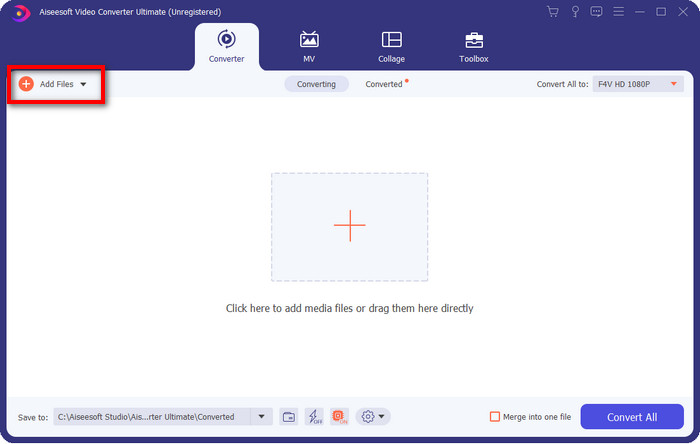
Step 2. Click the software to open it, insert the file by clicking the Add Files at the upper right part of the interface, and click Open once you have selected the F4V file you want to convert.
Step 3. Hit the Convert All to button and change the format into FLV.
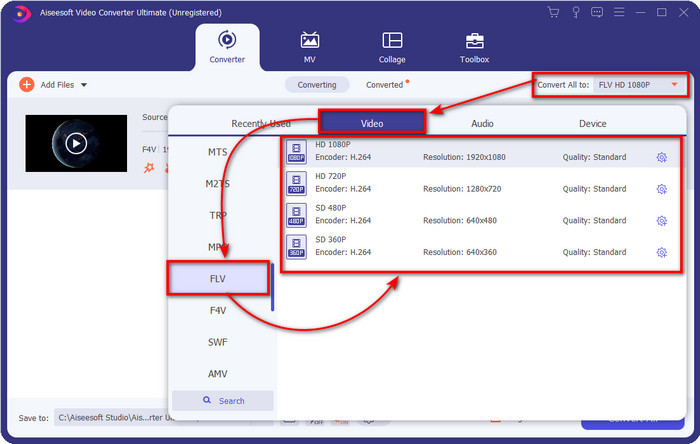
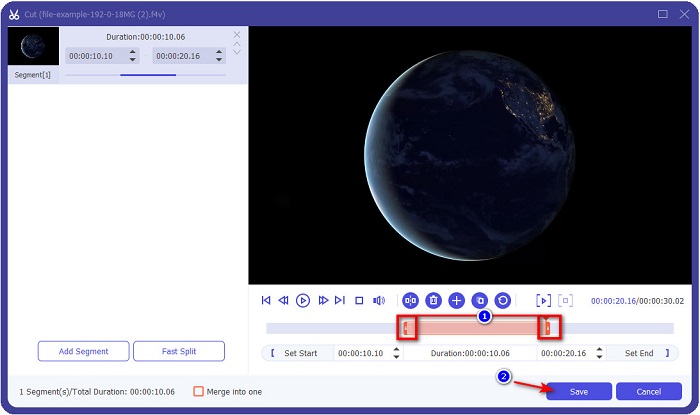
Want to make the video shorter? If so, click the scissors icon. Adjust the handlebar according to the length you want to have, then click Save to save the changes.
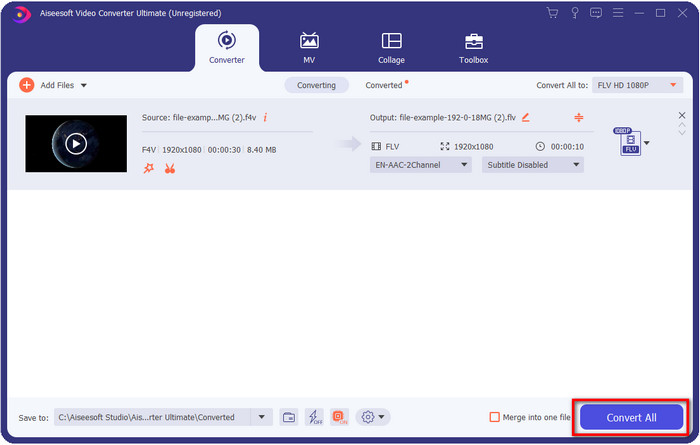
Step 4. To change F4V to FLV, click Convert All, and the process will begin quickly. A computers' folder will show where your file is.
Prós
- Converte sem esforço vários formatos F4V para FLV, AVI, MOV, MKV e mais de 200 formatos.
- Aceleração de hardware e conversão rápida estão disponíveis aqui para tornar a conversão mais rápida.
- Está disponível em todo o Windows e macOS.
- Recursos excepcionais de edição de vídeo para tornar seu vídeo fenomenal estão em Toolbox.
Contras
- Precisa ser comprado antes que você possa usá-lo.
- O download do conversor em seu desktop é necessário.
2ª Escolha. Conversor de vídeo gratuito FVC online
FVC Free Video Converter Online helps you make your conversion process done online. This tool is available in all browsers to convert F4V to FLV online without limitation. However, you can't do a batch conversion here because it is not supported. Nevertheless, you can achieve the format you want to convert with this online converter. Want to know how? Then follow the steps below.
How to Convert F4V to FLV with the Help of the FVC Free Video Converter Online:
Step 1. To open the web tool, you must click this link.
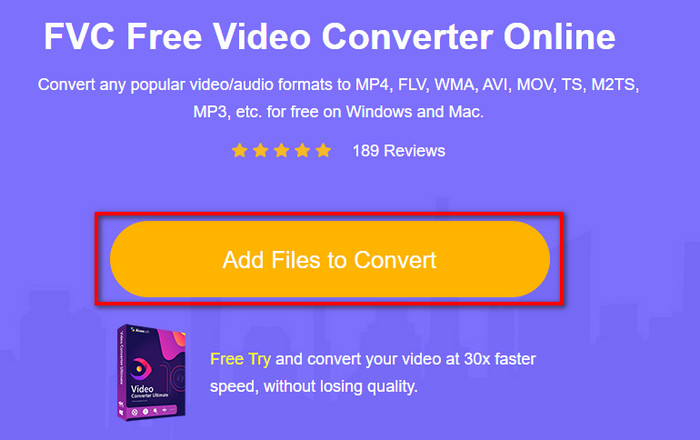
Step 2. On the main web converter UI, click the Add Files to Convert button. Find the F4V file on the folder that will show and press Open.
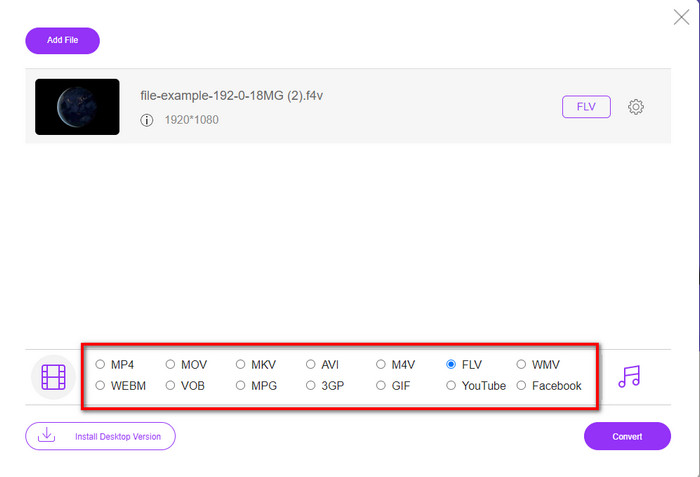
Step 3. At the bottom part, there are a lot of formats you can choose from; click FLV.
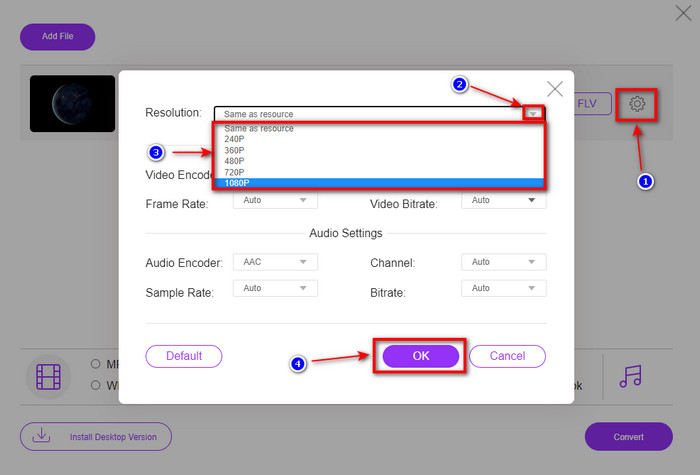
Want to change the resolution of the video? Then click the cog icon, hit the drop-down, and choose the video quality.
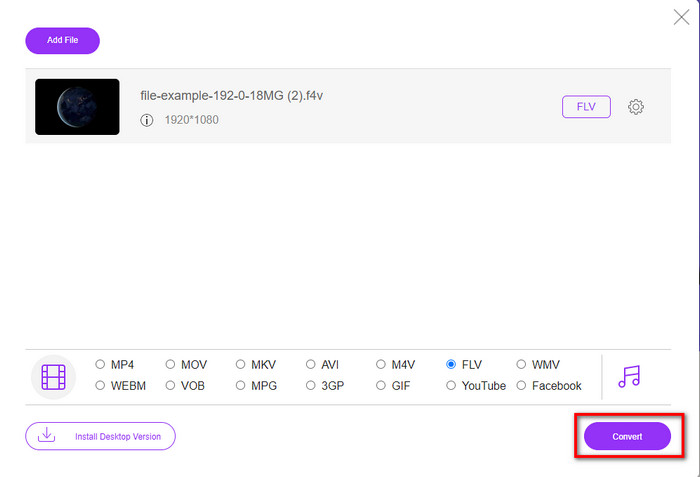
Step 4. Begin the converting process of F4V to FLV by clicking Convert.
Prós
- Disponível em todos os navegadores da web que você possui.
- Conversor online gratuito e fácil de usar.
- Livre de malware e sem anúncios no site principal.
Contras
- A conexão com a Internet é uma obrigação.
- Ele não suporta recursos de edição de vídeo como o FVC Video Converter Ultimate.
Parte 2. F4V vs. FLV: Qual dos Formatos é o Melhor
Como dito no início, esses dois formatos são contêineres da Adobe que você pode usar para distribuí-los na web. Mas agora, vamos comparar as diferenças entre os dois formatos lendo os detalhes abaixo.
O formato F4V é um contêiner Quicktime como o formato MP4. É um formato de arquivo de mídia de base ISO para streaming de vídeos pela Internet. Além disso, esse formato é uma versão atualizada do FLV. Ainda assim, há muitos problemas na codificação de vídeo e áudio que estão em FLV. Além disso, você não pode gerar uma página HTML como o FLV pode fazer por você.
FLV são arquivos que têm quase a mesma estrutura que o SWF. Este formato é mais suportado no Adobe Flash Player e na maioria dos HTML 5. Ele suporta compressão de vídeo e áudio como os codecs Sorenson Spark ou VP6. Além disso, se você considerar baixar um vídeo na web, esse formato é a melhor escolha. Ao contrário do F4V, se você deseja gerar HTML em sua página da web, este é o formato para você.
Seria melhor converter F4V para FLV porque os benefícios que você obteria em FLV que não estão disponíveis em F4V. Embora se diga que o F4V é a nova versão do FLV, ainda assim a singularidade do FLV é de um tipo que o F4V não pode copiar em muitos aspectos.
Parte 3. Perguntas frequentes sobre a conversão de F4V para FLV
Como posso reproduzir vídeos F4V?
With the help of the powerful media player, you can do it without breaking a sweat, and the best example is the Aiseesoft Blu-ray Player. Follow these simple steps to know how to play F4V files. The first is to download the software on your desktop and launch it. Upload the file on the tool by clicking the Open File. After loading, the file will play automatically.
Qual é melhor? F4V ou MOV?
Well, it depends on what purpose you want to use it. For example, F4V is great at distributing media files on the web without quality loss. However, if you're going to edit videos on Mac, go with the MOV. So, if you want to edit your F4V videos on Mac, you must learn how to convert F4V to MOV.
O F4V contém saída de alta qualidade?
Os arquivos F4V podem conter qualidade de vídeo 1080 ou 720, mas o tamanho do arquivo permanecerá mínimo.
Conclusão
Now that we learn how to change F4V to FLV with the help of the converters, it is now the right time to pick your reliable converter based on the reviews. If you want to experience a free online converting process, you must use the FVC Free Video Converter Online. But this webtool can't outperform the ultimate converter at the top. Without introduction needed, we prefer to use the FVC Video Converter Ultimate since it does your job of converting easily and faster. This phenomenal converter is one of a kind that impresses many users with its unique features. So now, we can say that we are now one step to success with the help of these tools.
-
 4 novos conversores online e offline para converter F4V para o formato AVI
 Você não tem idéia de qual conversor você deve usar para converter F4V para AVI ou qualquer outro formato de vídeo? Então leia este artigo enquanto aprendemos como converter com a ferramenta disponível.
-
 Como converter F4V para MOV sem perder qualidade [Resolvido]
 Se você está lutando para reconhecer alguns formatos de vídeo como F4V. Leia este artigo para saber mais sobre o formato de vídeo F4V e MOV e saiba como converter F4V para MOV usando métodos diferentes.
-
 Converta TRP em FLV com os métodos offline e online mais fáceis
 Deseja converter seu arquivo de vídeo TRP para FLV rapidamente e sem problemas? Leia este artigo para fornecer o melhor software e serviço online que melhor se adapte à situação.
