


 Video Converter Ultimate
 Gravador de ecrã
 Reparo de vídeo
 Secure Download
Como converter seus arquivos de vídeo FLV para o formato 3GP gratuitamente
This article will show you the best ways to convert FLV to 3GP. According to the survey, there are tons of video file formats on market. Developers released them for different purposes. FLV, for example, standing for Flash Video, is used to store visual contents for playing in Adobe Flash Player over the internet.
3GP, por outro lado, é o formato multimídia criado pelo Third Generation Partnership Project para economizar largura de banda e uso de dados em dispositivos móveis. Em outras palavras, é melhor você converter FLV para 3GP e assistir a vídeos no aparelho.

Parte 1: melhor maneira de converter FLV em 3GP na área de trabalho
FVC Free FLV Converter is a powerful video converter. As its name indicated, it enables you to convert FLV to 3GP without paying a penny. Moreover, it offers you a lot of useful functionalities, such as video and audio editing. More importantly, the user-friendly interface makes you find what you want quickly.
Principais recursos do Best Free FLV Converter
- 1. Converta vídeos FLV para qualquer formato de multimídia, como 3GP.
- 2. Lidar com vários arquivos de vídeo ao mesmo tempo.
- 3. Transcodifique arquivos FLV para reproduzir em dispositivos móveis.
Free DownloadFor Windows 7 or laterSecure Download
Free DownloadFor MacOS 10.7 or laterSecure Download
Como converter FLV para 3GP gratuitamente
Start the best free FLV converter after you install it on your machine. It is compatible with Windows 10/8/7 and Mac OS X. Click the Add File(s) button to trigger the open-file dialog. Select the FLV files that you want to convert and click Open. Then the videos will appear in the library area.

Step 2: Set output format
Click and expand the Profile format dropdown menu at the bottom and you will be presented the profile box. Enter 3GP in the Search Profile box and press the Enter key on your keyboard. Then select the output format. If you want to play the videos on your mobile device, select the manufacturer and pick the right model directly.

Step 3: Convert FLV to 3GP
Set a specific directory to store the output by hitting the Open Folder button at the bottom. Finally, click on the Convert button to initiate FLV to 3GP converting. A few minutes later, you will find the 3GP files on your hard drive.

Parte 2: Como converter FLV para 3GP online
Web video converter apps are another popular way to convert FLV to 3GP for free. However, most of them have various downsides, like file size limit, watermark, security issue and more. Fortunately, FVC Free Online Video Converter can help you resolve the problem. It is free of charge without any restrictions. The output quality is great.
Step 1: Visit https://www.free-videoconverter.net/free-online-video-converter/ in a web browser and click the Add Files to Convert button to get the launcher. It won't take up local space of your computer.
Download the Desktop Version to convert files in batch.
Step 2: Click the Add File menu and upload the FLV files that you wish to convert. The web app enables you to batch convert videos at one time.
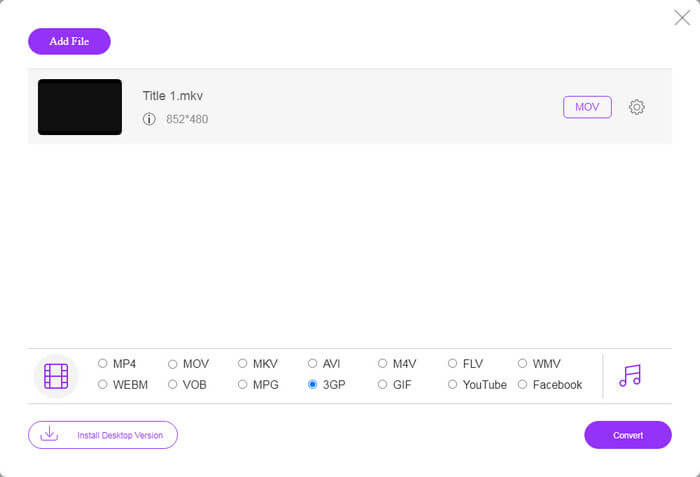
Step 3: Go to the bottom and select 3GP at the profile section. Click on the Convert button to initiate converting FLV to 3GP online. If your network works fast, it will finish in a few seconds. Then download the 3GP files to your hard drive.
Não perca:
Parte 3: Como converter FLV para 3GP com VLC
Às vezes, o freeware é tão poderoso quanto o software profissional. O VLC, por exemplo, é um reprodutor de mídia de código aberto popular. É capaz de converter FLV para 3GP no Windows, Mac e Linux gratuitamente. Claro, a despesa é óbvia, como difícil de usar. Portanto, compartilhamos as etapas abaixo:
Step 1: Run the free FLV to 3GP converter on your computer. You need to install it first. The official website provides the safe installer.
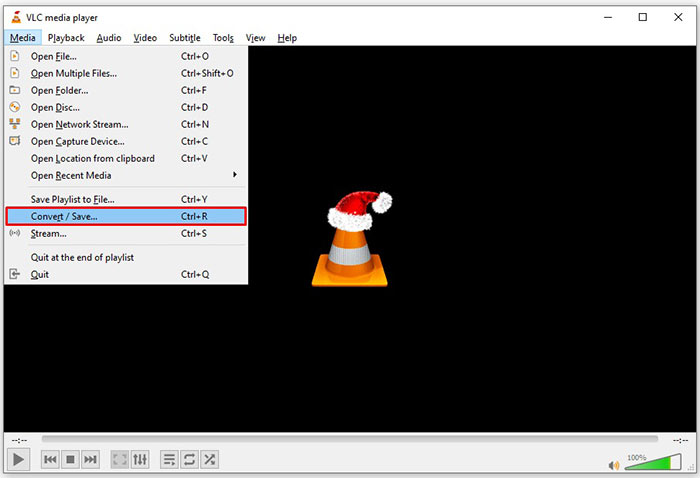
Step 2: Go to the Media menu on the top ribbon and choose Convert/Save. Then the open media dialog will pop up.
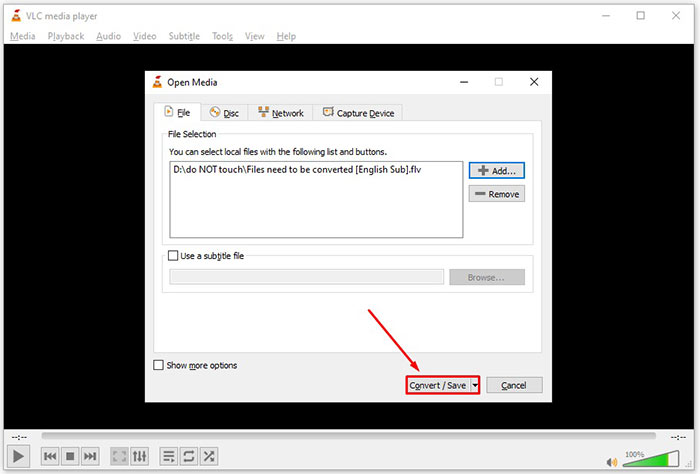
Step 3: Click the Add button, find the FLV file that you need to convert and select it, and click Open. Hit the Convert/Save button to move to the next window.
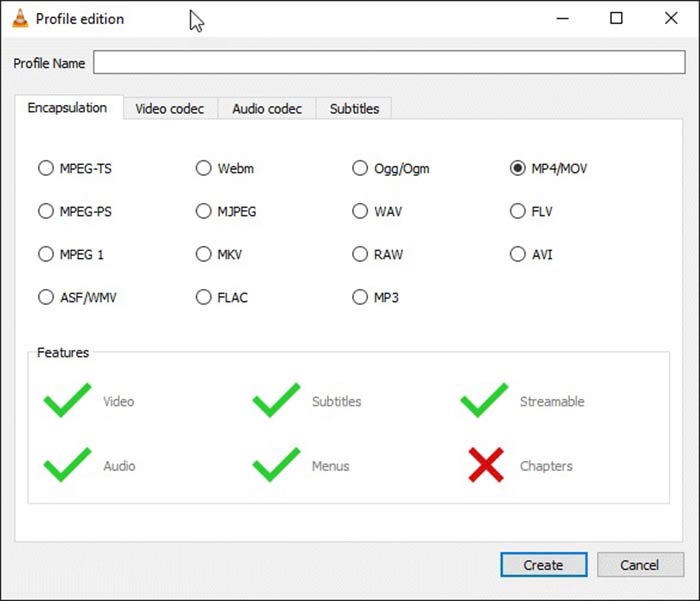
Step 4: Unfold the dropdown list next to Profile and choose 3GP or relative video format. If you want to change the video codec or other parameters, click the Profile Edit button next to the dropdown list and add 3GP.
Step 5: Click the Browse button and choose a specific folder to save the output 3GP file in the Destination section.
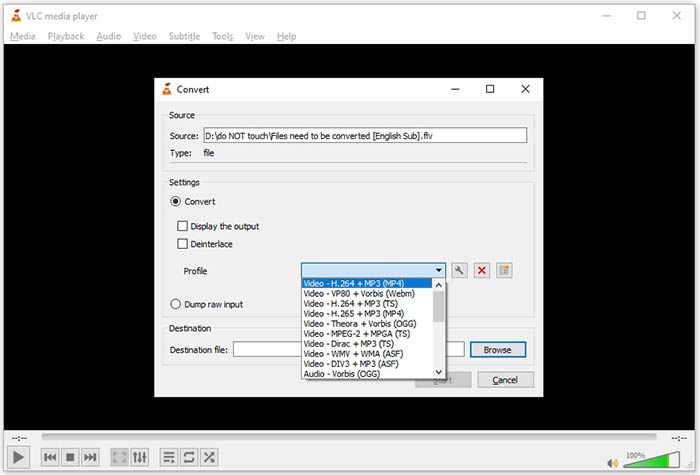
Step 6: As long as you click on the Start button, VLC will begin converting FLV to 3GP.
Leva um momento para completar a conversão, já que o VLC faz o trabalho gravando o vídeo original. Isso significa que o processo dura tanto quanto a duração do seu vídeo FLV.
FLV vs. 3GP
O Adobe Flash Player usou o FLV para fornecer conteúdo de vídeo, como filmes e programas de TV. Atualmente, a Adobe não desenvolve mais o player e recomenda que os usuários o desinstalem por motivos de segurança. No entanto, você ainda pode usar o formato FLV em muitos programas que não são da Adobe/Macromedia.
O 3rd Generation Partnership Project (3GPP) produziu o formato 3GP/3GPP como um formato de contêiner multimídia. Na verdade, é baseado no formato de arquivo de mídia ISO. Costumamos usá-lo para salvar fluxos de vídeo/áudio que são transmitidos entre telefones celulares 3G e online.
Parte 4: Perguntas frequentes sobre a conversão de FLV em 3GP
A conversão de FLV em 3GP prejudicará a qualidade do vídeo?
De modo geral, a conversão de vídeo perderá qualidade. No entanto, um poderoso programa conversor de vídeo é capaz de corrigir esse problema e otimizar a qualidade do vídeo usando tecnologia avançada.
Quanto tempo leva para converter um vídeo FLV?
É determinado por vários fatores, como a duração do vídeo, o software de conversão de vídeo que você usa, o desempenho do hardware e muito mais. Se você estiver usando um conversor de vídeo da web, sua conexão com a Internet é um elemento essencial.
Por que o FLV não está reproduzindo no meu iPhone?
O iPhone é compatível com MOV, parte do MP4, ASF e AVI. Portanto, você não pode abrir o FLV diretamente no iPhone. No entanto, existem maneiras de assistir FLV em dispositivos móveis. Se o seu arquivo FLV for hospedado por serviços de Internet, como o Google Drive, o reprodutor de mídia integrado estará disponível. Além disso, você pode usar outro reprodutor de mídia, como o VLC.
Conclusão
Este guia descreveu três maneiras gratuitas de converter arquivos de vídeo FLV para o formato 3GP no computador ou online. Se você se preparar para assistir a vídeos FLV em dispositivos móveis, é melhor convertê-los para 3GP ou outros formatos de vídeo compatíveis com dispositivos móveis com o FVC Free FLV Converter. Não é apenas fácil de usar, mas também capaz de proteger a qualidade do seu vídeo. Mais perguntas? Por favor, deixe uma mensagem abaixo.
-
 Como converter seus arquivos de vídeo FLV para MP4 sem pagar um centavo
 Este guia compartilha quatro métodos gratuitos para converter seus arquivos de vídeo FLV para o formato MP4 no Windows 10/8/7 / XP e Mac OS X, para que você possa desfrutar dos vídeos em qualquer dispositivo.
-
 Como converter seus vídeos FLV em arquivos de áudio MP3 na área de trabalho e online
 Como converter um FLV para um arquivo MP3? Tudo que você precisa fazer é ler este artigo com atenção, encontrar seu método favorito e seguir nosso guia passo a passo para obter o que deseja.
-
 3 maneiras principais de converter FLV em MOV
 Como converter FLV para MOV? Como faço para converter FLV para MOV no Mac? Existe alguma maneira gratuita de converter FLV para MOV online? Esta postagem compartilha 3 conversores de FLV para MOV para alterar arquivos FLV para MOV.

