


 Video Converter Ultimate
 Gravador de ecrã
 Reparo de vídeo
 Secure Download
Como converter seus arquivos de vídeo FLV para o formato AVI no PC / Mac
This guide concentrates on how to convert FLV to AVI with desktop software and online apps. There are many reasons why you need to convert your FLV videos. FLV was developed for distributing video contents online, but not playback on digital devices. When you want to watch FLV on computer, you have to change it to another video format. Moreover, it is a good idea to edit your video files that converting FLV to an uncompressed video format.

Parte 1: 2 principais maneiras gratuitas de converter FLV em AVI
Método 1: converter FLV para AVI com o conversor FLV gratuito
When converting FLV to AVI, you may be worried about several factors, like output quality, easy to use, and more. FVC Free FLV Converter is the best choice. Although it is free of charge, you will get a lot of pro-level features without much technical skills. Plus, it provides plentiful bonus tools, like video editing.
Principais recursos do melhor conversor de FLV
- 1. Converta vídeos FLV para outros formatos de multimídia facilmente.
- 2. Suporta quase todos os formatos de vídeo, como AVI, MP4, MKV, etc.
- 3. Processar em lote centenas de arquivos FLV por conversão.
Free DownloadFor Windows 7 or laterSecure Download
Free DownloadFor MacOS 10.7 or laterSecure Download
Como converter FLV para AVI no Desktop gratuitamente
Step 1: Add FLV files
As long as you install the best free FLV converter on your computer, launch it. It is compatible with both PC and Mac. Click on the Add File(s) menu at the top left corner to activate the open-file dialog. Then find and select the FLV videos on your computer, and click the Open button to add them.

Step 2: Edit video and set format
If you wish to change your video files, select the FLV file and click the Edit menu. Then you will be taken to the video editor window. Follow the onscreen instructions to edit it and then go back to the main interface.
Clique no menu suspenso Formato de saída na parte inferior da interface principal para abrir a caixa de diálogo do perfil. Em seguida, procure AVI e selecione-o na guia Vídeo Geral.

Step 3: Convert FLV to AVI
Hit the three-dot icon next to Output folder field and select a specific directory to save the AVI files. Finally, click on the Convert button to begin converting FLV to AVI immediately.

Método 2: Como converter FLV para AVI com VLC
O VLC é muito mais do que um simples reprodutor de mídia. Você pode encontrar muitos recursos úteis, incluindo conversão de vídeo. Como um projeto de código aberto, o VLC permite que você converta FLV em AVI gratuitamente. Além disso, o VLC é capaz de reparar vídeos AVI corrompidos.
Step 1: Open the free FLV converter. If you do not have VLC, download it from the official website for free.
Step 2: Go to the Media menu from the top ribbon and choose Convert/Save. Choose Convert/Stream from the File menu on Mac.
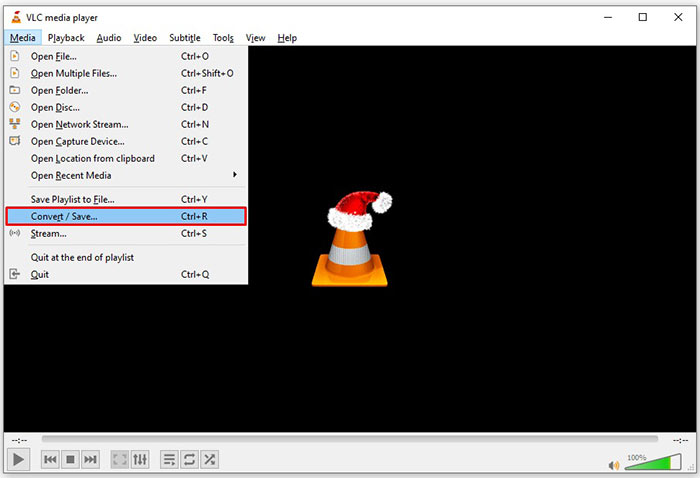
Step 3: Click the Add button on the open media dialog and add the FLV file that you want to convert.
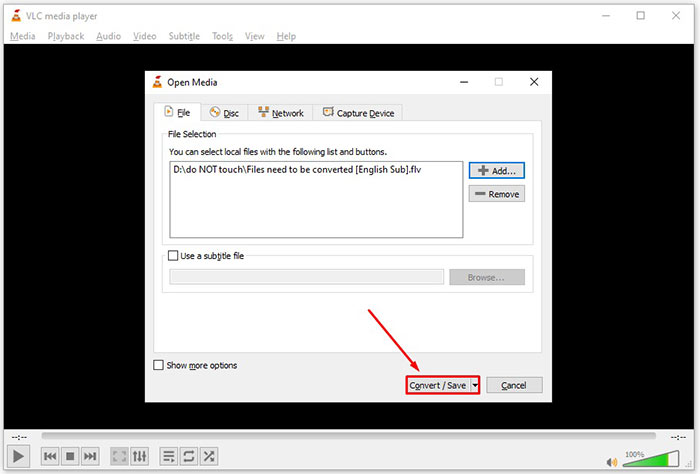
Step 4: Then hit the Convert/Save button to move to the next dialog.
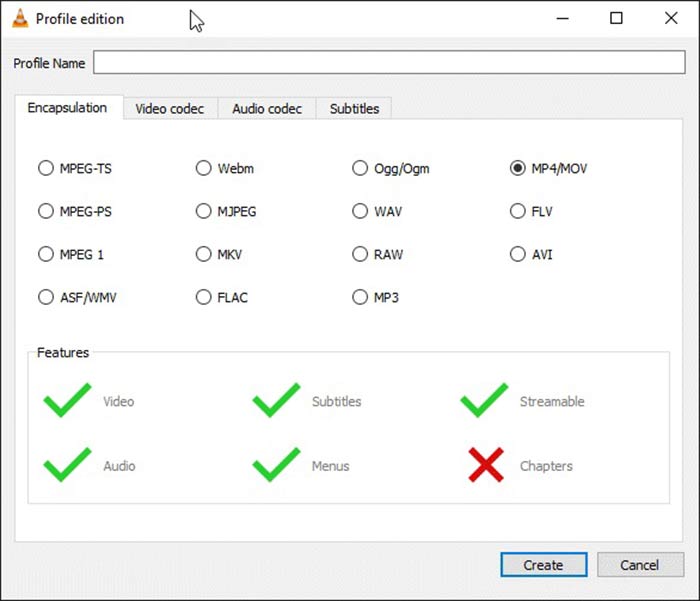
Step 5: Open the Profile dropdown list and select AVI. If you cannot find it, click the third button next to Profile. It will open the Profile edition dialog. Select AVI and write down a Profile Name. Click Create to confirm it. Then select the new item from Profile.
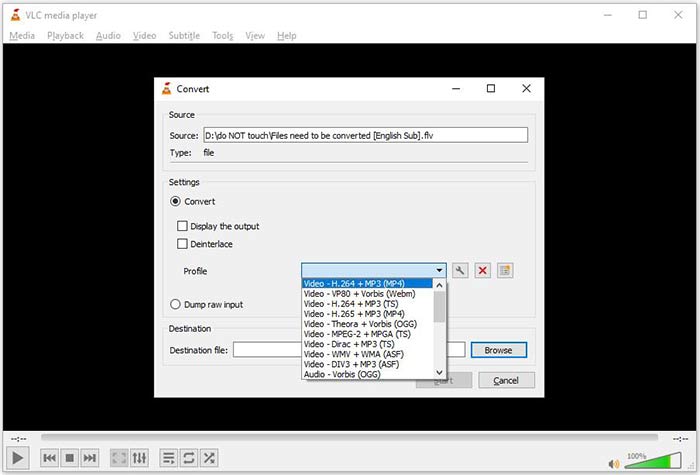
Step 6: Set the output folder by hitting the Browse button. Click on the Start button and VLC will convert the FLV to AVI.
Don't Miss:
- • 3 maneiras principais de converter FLV em MOV
- • Como converter seus vídeos FLV em arquivos de áudio MP3 na área de trabalho e online
Parte 2: Como converter FLV para AVI online
Sometimes, you just need to convert FLV to AVI online occasionally. Plus, some people do not like to install software. FVC Free Online Video Converter can meet your need. It works online, but is enough to convert several FLV files to AVI. Unlike other web apps, it does not have limit on file size, watermark and more.
Step 1: Visit https://www.free-videoconverter.net/free-online-video-converter/ in a browser when you need to convert videos. Click the Add Files to Convert button and download the launcher.
Download the Desktop Version to convert files in batch.
Step 2: After downloading, the launcher will pop up automatically. Click on the Add File button at upper left side and upload the FLV files that you wish to convert. Then choose AVI at the bottom.
To change the resolution, frame rate and other parameters, click the Gear icon to open the profile dialog.
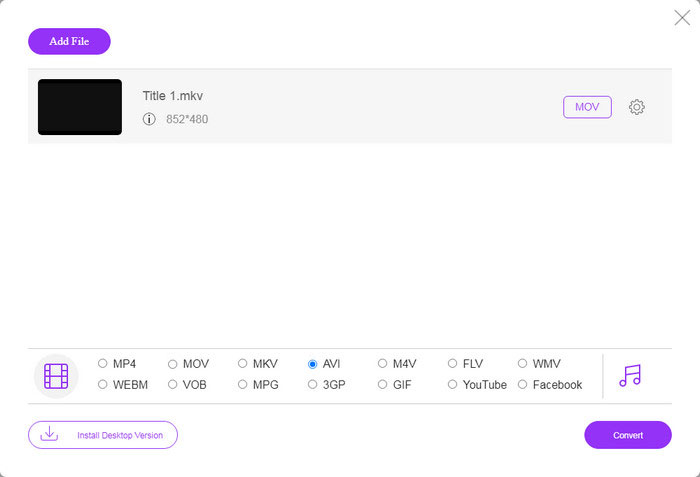
Step 3: Once you click on the Convert button, the web app will work as you wish. When prompted, download the AVI video files to your hard drive.
Comparado com outros conversores de vídeo da web, o Free Online Video Converter funciona rápido, mas você também precisa de uma boa conexão com a Internet.
FLV vs. AVI
O Adobe Flash Player usou o FLV para fornecer conteúdo de vídeo, como filmes e programas de TV. Atualmente, a Adobe não desenvolve mais o player e recomenda que os usuários o desinstalem por motivos de segurança. No entanto, você ainda pode usar o formato FLV em muitos programas que não são da Adobe/Macromedia.
Baseado no Resource Interchange File Format (RIFF), o formato AVI foi introduzido pela Microsoft em 1992. Ele pode salvar vídeo/áudio de alta qualidade, pois usa menos compactação. Mas isso também causa o tamanho grande do arquivo AVI, o que pode ser um problema quando há espaço limitado.
Parte 3: Perguntas frequentes sobre FLV para AVI
Quanto tempo devo esperar para converter FLV para AVI?
Depende da sua situação. De um modo geral, é muito rápido converter vídeos no desktop. Para ferramentas online, sua conexão com a Internet determinará a eficiência.
É seguro converter FLV para AVI online?
A maioria dos aplicativos de conversão de FLV online promete excluir seus vídeos após a conversão. No entanto, você não deve enviar vídeos privados online, a menos que tenha certeza de que o aplicativo da web é 100% seguro para uso.
AVI é melhor do que FLV?
FLV é um formato de vídeo com perdas, enquanto AVI é um formato de vídeo não compactado. Isso significa que o arquivo FLV é menor do que AVI na mesma condição. No entanto, o AVI oferece melhor qualidade de vídeo. FLV é usado para compartilhar vídeos online, enquanto AVI é uma boa opção para editar vídeos.
Conclusão
Este guia compartilhou três maneiras de converter arquivos de vídeo FLV para o formato AVI com software de desktop e aplicativo da web. O VLC é um reprodutor de mídia e um conversor de vídeo gratuitos, embora seja difícil de usar. Além disso, você pode fazer o trabalho online sem instalar nenhum software. No entanto, sugerimos que você experimente o FVC Free FLV Converter, pois a qualidade da saída é incrível. Além disso, é muito fácil de usar e navegar. Se você tiver outras perguntas relacionadas à conversão de FLV para AVI, deixe uma mensagem abaixo deste post.
-
 3 maneiras gratuitas de converter FLV em WAV
 Como faço para converter um arquivo FLV? O VLC pode converter FLV em WAV? Este post mostra três maneiras gratuitas de converter FLV em WAV sem perda de qualidade.
-
 3 maneiras gratuitas de converter FLV em MPG
 Como converter FLV para MPEG? Posso converter FLV para MPG gratuitamente? Este post compartilha 3 conversores de vídeo gratuitos para ajudá-lo a converter FLV para MPG sem perda de qualidade.
-
 3 maneiras gratuitas de converter FLV para jogar no Xbox
 Não consegue reproduzir arquivos FLV no Xbox One ou Xbox 360? Precisa converter FLV para formato compatível com Xbox, como MP4, AVI, MOV ou WMV? Esta postagem lista 3 conversores FLV para Xbox gratuitos para você jogar FLV no Xbox.

