


 Video Converter Ultimate
 Gravador de ecrã
 Reparo de vídeo
 Secure Download
Como converter seus arquivos de vídeo FLV para o formato DivX sem perda de qualidade
This guide will tell you the best way to convert FLV to DivX. Both of them are popular video formats, but they are totally different on use. FLV is a file format used to deliver video over the Internet using Adobe Flash Player. Most websites support FLV including YouTube, Google Video, Yahoo Video, and more. However, DivX is a high-quality video codec used to store video content with resolution up to 1080 HD.

Parte 1: maneira mais fácil de converter FLV em DivX gratuitamente
When converting FLV to DivX, you may worry about the issue of quality loss. It cannot be denied that this problem will happen if you use a wrong tool. FVC Free FLV Converter, on the other hand, is a power FLV to DivX converter. Although it is free of charge, the output quality is awesome. That is because the software
Key Features of the Best Free FLV to DivX Converter
- 1. Converta em lote arquivos FLV para DivX rapidamente.
- 2. Otimize a qualidade de vídeo e áudio automaticamente.
- 3. Suporta quase todos os formatos de vídeo e áudio.
Free DownloadFor Windows 7 or laterSecure Download
Free DownloadFor MacOS 10.7 or laterSecure Download
Como converter FLV para DivX em lote gratuitamente
Etapa 1: importar arquivos FLV
Launch the best free FLV to DivX converter once you install it on your computer. Then click the Add File(s) button to trigger the open-file dialog. Find the FLV files that you want to convert and open all of them into the converter.

Etapa 2: definir DivX como formato de saída
After FLV loading, you will be taken to the main interface and the videos appear in the library panel. Here you can preview and edit the videos. To set the output format, click and open the Output format option at the bottom, go to the General Video tab, scroll down and select DivX.

Etapa 3: converter FLV em DivX
Next, click the Open Folder button and change the output folder. By default, your videos will be saved to the video library folder. Finally, click on the Convert button to start doing FLV to DivX converting immediately.

Parte 2: Como converter FLV para DivX Online
Método 1: Como converter FLV em DivX Online sem limites
FVC Free Online Video Converter is a web-based FLV to DivX converter app. Unlike other web apps, there is no limit at all. You can upload several FLV files online at one time. Moreover, it is totally free to use without registration or watermark.
Step 1: Copy and paste https://www.free-videoconverter.net/free-online-video-converter/ into the address bar and open it in your browser. Click the Add Files to Convert button to download the launcher.

Step 2: Wait for the launcher to pop up, and then click the Add File button to upload your FLV files for converting.

Step 3: Move to the bottom and choose your desired output format. Then click the Convert button. The last thing you need to do is to download the result when it is done.
Método 2: como converter FLV em DivX por Convertio
Convertio é um aplicativo conversor de vídeo baseado em nuvem. Você pode alterar vários arquivos FLV de até 100 MB para o formato DivX por vez. Além disso, oferece opções personalizadas básicas para criar os resultados desejados. Aqui estão as etapas.
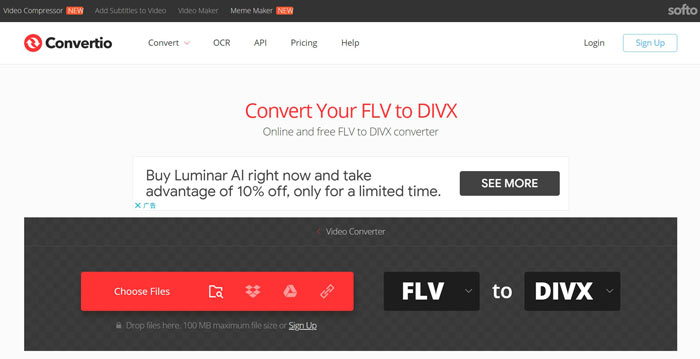
Step 1: Visit https://convertio.co/flv-divx/ in a web browser to open the FLV to DivX converter directly.
Step 2: There are four ways to upload FLV files, from computer, from Dropbox, from Google Drive or from URL. Choose the right one and upload your videos.
Step 3: Click the Convert button to initiate FLV to DivX converting online. Wait for the process to finish and download the DivX files to your hard drive.
Parte 3: Perguntas frequentes sobre FLV para DivX
Qual é o formato DivX?
DivX é o formato de vídeo criado pela DivX, Inc. Ele se torna popular em parte porque é capaz de compactar vídeos a quase 15% do tamanho do arquivo original sem perder muita qualidade.
Como posso reproduzir arquivos DivX?
Unfortunately, both Windows Media Player and QuickTime Player cannot open DivX files. In result, you have to install a third-party DivX player on your computer or install codec package for your video player.
O FLV ainda é usado?
Although HTML 5 increasingly popular on the Internet, FLV is still acceptable on YouTube and most video websites. Moreover, popular video players are compatible with FLV as well, like VLC, MPC-HC, or other FLV players.
Conclusão
Este guia compartilhou três métodos para converter seus arquivos de vídeo FLV para o formato DivX, para que você possa abri-los e reproduzi-los com seu reprodutor de mídia sem problemas. Claro, você pode experimentar os aplicativos conversores de vídeo da web. No entanto, FVC Free FLV Converter é a melhor escolha se você tiver muitos arquivos FLV esperando para serem convertidos. Além disso, é muito fácil de usar e não exige conhecimentos técnicos. Mais perguntas? Por favor, deixe sua mensagem abaixo deste post.
-
 3 métodos fáceis para converter FLV para AVI no desktop e online
 1. Converta vídeos FLV para outros formatos de multimídia facilmente. 2. Suporta quase todos os formatos de vídeo, como AVI, MP4, MKV, etc. 3. Processamento em lote de centenas de arquivos FLV por conversão.
-
 3 maneiras principais de converter FLV em WMV no Windows e Mac
 Procurando a melhor maneira de converter FLV em WMV sem perder qualidade no PC ou Mac? Você tem sorte, pois aqui compartilhamos três métodos para fazer o trabalho facilmente.
-
 Os 6 principais conversores de MP4 para DivX para transcodificar MP4 para DivX com facilidade
 Quando você precisar fazer backup de arquivos MP4 em um DVD ou reproduzi-los em uma smart TV com alta qualidade, você pode aprender mais sobre os 6 melhores conversores MP4 para DivX gratuitos neste artigo.
