


 Video Converter Ultimate
 Gravador de ecrã
 Reparo de vídeo
Descubra quais são os melhores 3 conversores FLV para MKV para converter seus arquivos FLV para MKV
Are you tired of browsing over the internet for the best way to convert FLV to MKV for free? It might be a coincidence, but today we found out the best FLV converters you can use; of course, we only choose the best. To make you're exploring much more manageable, you must keep the ball rolling by reading the article below because you will learn a lot about FLV and MKV and the converters you can use.

Parte 1. 2 maneiras de converter FLV para MKV gratuitamente
1ª Via. Use o conversor online para converter FLV para MKV
This online converter is undoubtedly one of the big transcoders to convert FLV to MKV online. FVC Free Video Converter Online is a simple and easy-to-understand converter you can use online. But this tool is internet-dependent which means if you don't have an internet connection, this is your last resort on converting. Although the tool is internet-based, it still has no ads on the interface that can irritate you, and it is malware-free. So now, if you want to have a hands-on experience with this tool, you must follow the steps below.
Step 1. Hit this link to open the FVC Free Video Converter Online on a new tab.
Step 2. Hit the Add Files to Convert button to open the folder on the computer you are using. Choose the FLV file you want to convert and press Open to upload the file.
Download the Desktop Version to convert files in batch.
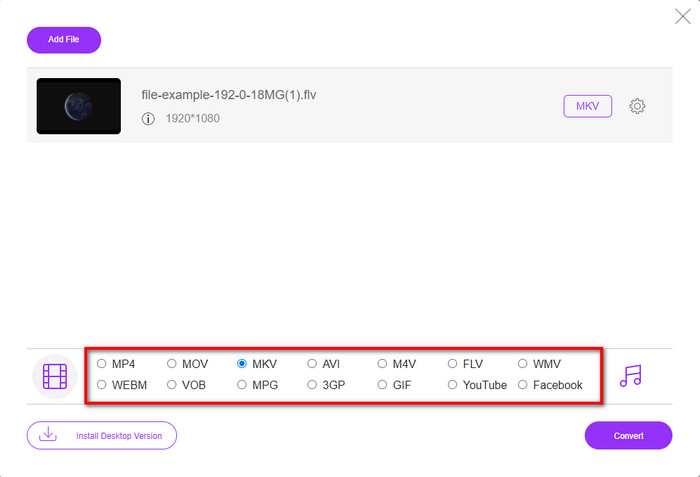
Step 3. Pick out the MKV format on the format list presented below.
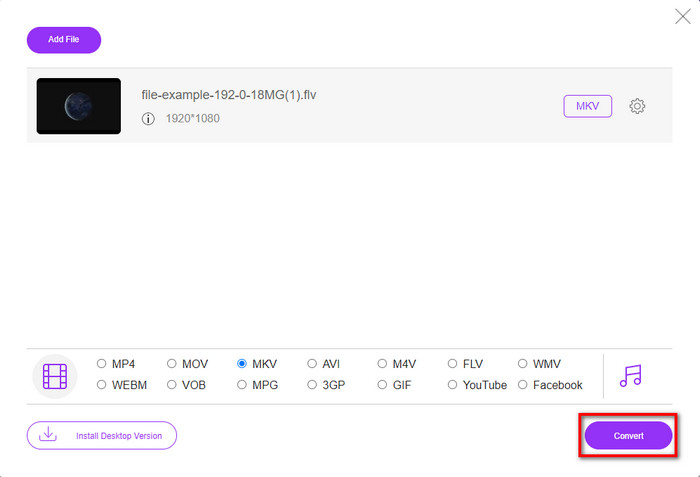
Step 4. Start converting process by clicking the Convert button, and the converted file will automatically be saved on your computer drive after.
2ª Via. Use o conversor gratuito disponível para download no Windows e Mac
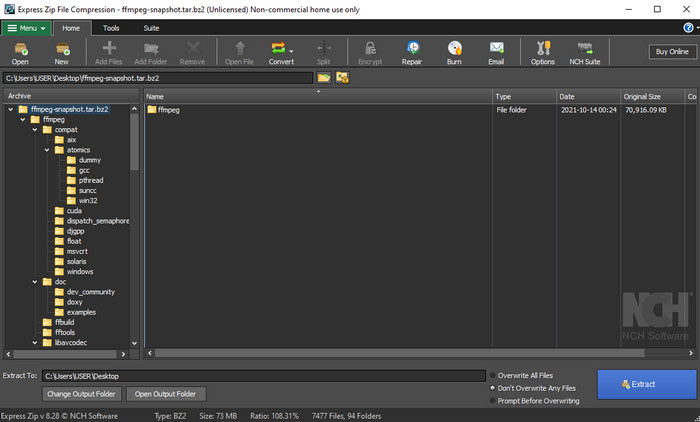
FFmpeg is not the classic converter you already use. Even though it is not the usual converter, it can still convert your FLV file. So now, what makes this tool different is that it uses a CLI-based interface, which means before you perform converting, you will need to command it by encoding or make it simple typing. If you find this converter interesting, then read the details below to use this FFmpeg FLV to MKV by following the steps.
Step 1. Download and open the FFmpeg.exe.
Step 2. Open your command prompt on your computer.
Step 3. Browse the FLV file using the CMD. Then copy this code and paste it on the command prompt ffmpeg -i input.flv -vn -ar 44100 -ac 2 -b:a 192k output.mkv after that, press Enter on your keyboard for the process to begin.
Parte 2. Converta FLV para MKV com o Melhor Conversor FLV para MKV sem Perdas
3ª via. Use o Conversor Profissional para Converter FLV para WMV
Still not satisfied with the first two converters presented above? If so, you must try the FVC Video Converter Ultimate. Why? Well, it provides and professional output even you don't put too much effort into your converting. Also, it supports more formats to convert your FLV file into MKV, AVI, MOV, AVI, MP4, and 200+ other formats. Still not impressed? Maybe you want to add magic to your video? In that case, you are lucky to have this converter because it provides advanced video editing features you can use. Do you doubt it because the tool might be complex for you to handle? If so, follow the steps written below to experience and learn how to use this FLV to MKV converter.
Step 1. Before using this converter, you must download it first by clicking the download button below. Follow the installation prompt next after downloading, and launch it.
Free DownloadFor Windows 7 or laterSecure Download
Free DownloadFor MacOS 10.7 or laterSecure Download
Step 2. To add the FLV file you want to convert, press the + button. Browse the FLV file on the folder that will show on your interface, and press Open to proceed to the next step.
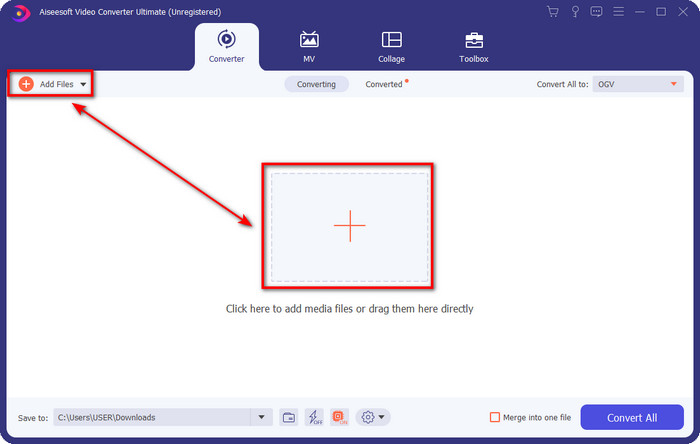
Step 3. After that, let's change the format into MKV by clicking the drop-down button on the upper right side of the user interface.
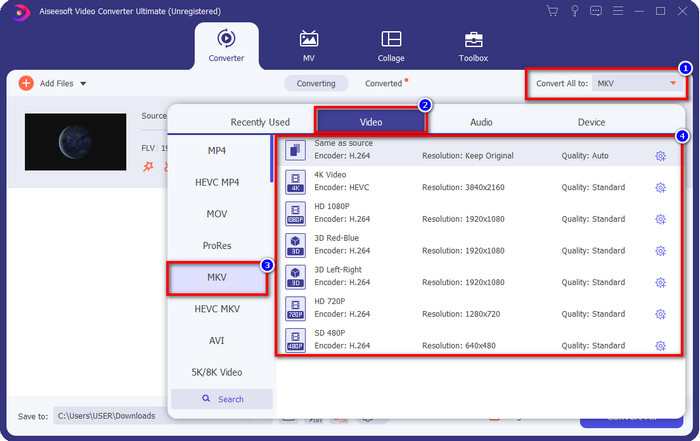
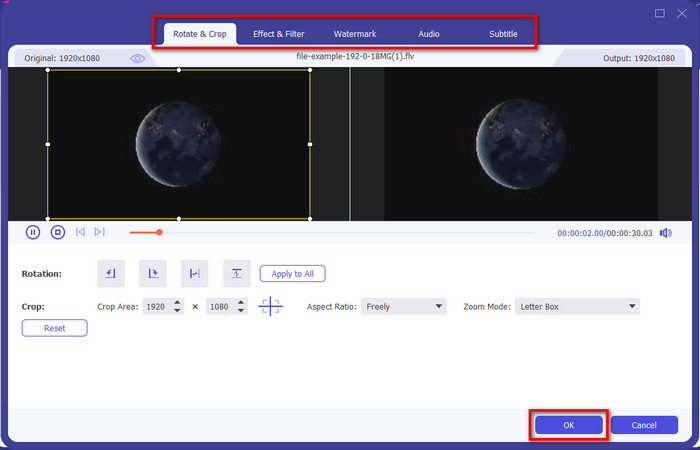
Optional. Maybe you need to edit the video; you can click the wand button if you want to. A new interface will show; you can Rotate, Crop, Effects, Filter, Watermark, Audio, and Subtitle in this interface. Don't limit your imagination, do whatever you want, and to apply all the magic you've made, click OK.
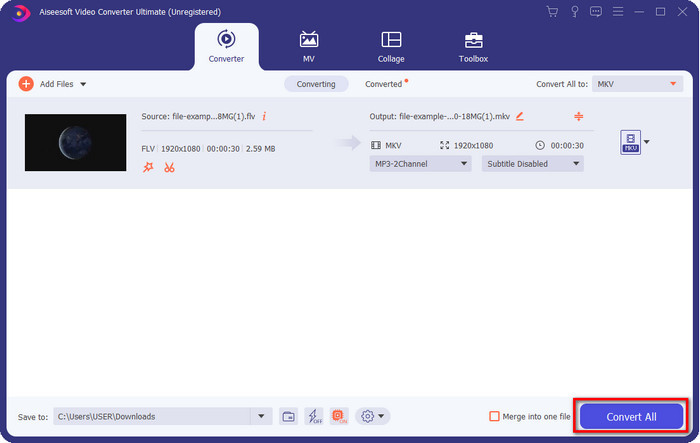
Step 4. After all, click Convert All to convert the FLV to MKV format. The process will only take less than a minute, so no need to wait for too long. A folder will show on your screen with the converted FLV.
Related:
Parte 3. Qual é a diferença entre FLV e MKV
FLV e MKV são conhecidos por estarem entre os melhores containers que todos conhecem. Mas antes de mais nada, vamos comparar e ver informações mais detalhadas sobre os dois formatos.
O FLV é conhecido em todos os sites porque é popular nas páginas da Web, principalmente porque foi criado pela Adobe. Além disso, .flv reproduz fluxos de vídeo online porque são muito mais fáceis de carregar do que o outro formato. Além disso, esse formato precisa de um plug-in-play antes que você possa visualizar ou assistir ao vídeo nesse formato, ou você pode baixar facilmente o Flash Player. Apesar do formato ser excelente, os plug-in-plays que ele utiliza já decolaram, o que significa que o formato não é a melhor escolha. No entanto, muitos players de mídia ainda suportam esse formato e usuários que ainda o utilizam.
O MKV é conhecido por ser o formato mais parecido com o futuro disponível. Este formato não seria como qualquer outro formato em muito sentido se estivéssemos prestes a compará-lo. Por exemplo, a estrutura construída neste formato não é a mesma do MP4 ou AVI, mas é diferente. O design e seu armazenamento exclusivo de arquivos de mídia o tornam mais impressionante. Hoje em dia, é difícil escolher qual formato está desatualizado, e um deles é o MKV.
Se nos aprofundarmos nos detalhes, encontraremos muitas razões pelas quais você precisa converter FLV em MKV. Embora os dois formatos contenham conteúdo de mídia, o MKV é mais poderoso que o FLV. Portanto, se você deseja ter o poder exclusivo do MKV, deve converter seu arquivo para este formato.
FLV vs. MKV
O Adobe Flash Player usou o FLV para fornecer conteúdo de vídeo, como filmes e programas de TV. Atualmente, a Adobe não desenvolve mais o player e recomenda que os usuários o desinstalem por motivos de segurança. No entanto, você ainda pode usar o formato FLV em muitos programas que não são da Adobe/Macromedia.
O formato de contêiner multimídia Matroska, lançado em 2002, é um formato de código aberto que pode incluir várias faixas de vídeo, áudio, imagem e legendas. Assim, você pode usá-lo para armazenar clipes de vídeo curtos, programas de TV e filmes facilmente. É bastante popular para legendas de fãs de anime.
Parte 4. Perguntas frequentes sobre conversão de FLV para MKV
É seguro converter FLV para MKV online?
Bem, a conversão de formato deve ser segura se você usar uma ferramenta da web. No entanto, nem todos os conversores online são seguros para converter seu formato de arquivo. Como existem algumas tendências, haverá muitos erros inesperados quando você usar o conversor errado. Por exemplo, a perda de qualidade é um problema generalizado, vírus ao baixar o arquivo após a conversão, vários anúncios pop-up, malware infeccioso e muito mais. Portanto, se você deseja ter um processo de conversão seguro online, deve usar o FVC Free Video Converter Online.
A conversão de FLV levará tempo?
O processo de conversão dependerá de muitos fatores, e um deles é a ferramenta que você está usando e o tamanho do arquivo. Se você tiver um arquivo FLV grande, deve usar o FVC Video Converter Ultimate, especialmente com pressa. Como essa ferramenta fornece um processo rápido, você não precisará de uma conexão com a Internet para usá-la. E agora, se você estiver procurando por um conversor que possa processar seu formato mais rapidamente, a melhor ferramenta é a escolha.
Por que não consigo abrir meu arquivo FLV?
Existem várias razões pelas quais você não pode abrir seus arquivos FLV. Tome nota; este detalhe a seguir é um dos centésimos motivos pelos quais você não pode abrir o arquivo FLV. Em primeiro lugar, você não pode abrir um FLV se o arquivo estiver quebrado ou tiver um vírus nele. Em segundo lugar, o problema mais comum é que o arquivo de vídeo não é compatível com o aplicativo que você está usando. Terceiro, se você baixar um arquivo FLV na internet, haverá o caso de o arquivo perder algumas informações vitais para reproduzi-lo. Embora isso seja um problema, ainda podemos ajudar convertendo seu FLV em outro formato. Mas lembre-se, você não pode restaurar o FLV alterando o formato se estiver danificado ou incompleto.
Conclusão
We learned that we need to know to convert FLV to MKV in several ways. The tools above are great to use if we convert the format into a new version. So now, it is in your hand to choose which format you think fits you the best in transforming your format. Either of the three tools above your success guarantees, but if you want a professional output and bring out the best on your video file, you must go with the FVC Video Converter Ultimate. No explanation is needed because this tool will fill the gap in your needs.
-
 3 Soluções sobre como converter FLV em PSP sem perdas
 Como converter FLV para PSP? Aqui você obterá o guia passo a passo para converter vídeos em Flash para formatos compatíveis com PSP (WMV, MP4, AVI, FLV, etc.) no Windows e Mac.
-
 2 métodos para converter áudio FLV para WMA [Free & Online]
 Quer extrair áudio WMA de vídeo FLV? Aqui estão 2 extratores de áudio WMA gratuitos para converter FLV (Flash Video) em WMA (Windows Media Audio) com alta velocidade de conversão no Mac OS X e Windows 10/8/7.
-
 [Resolvido] Como converter vídeos FLV em arquivos GIF animados gratuitamente
 Se você deseja criar GIFs a partir de segmentos de vídeo FLV para melhor envio, você pode aprender mais sobre como converter vídeos FLV em arquivos GIF facilmente neste artigo.

