


 Video Converter Ultimate
 Gravador de ecrã
 Reparo de vídeo
 Secure Download
3 métodos eficientes para converter FLV em VOB gratuitamente
If you download a video from YouTube and you want to save it to a DVD, you may notice the video from the Internet is in FLV format. To burn it into a DVD, you need to convert FLV files to VOB. So, this article introduces you 3 methods to convert FLV to VOB for free and you can easily realize it on desktop devices.

Parte 1. Como exportar VOB de FLV gratuitamente
FVC Free FLV Converter is an ideal tool to change FLV to VOB. As an all-in-one video converter, it allows you to convert, merge, and customize FLV files in high quality and speed. You can also add themes to decorate your videos and share them on various devices including iPhone and iPad.

- Converta FLV para VOB e outros formatos gratuitamente com um clique.
- Permite que você desabilite ou edite seletivamente as trilhas de áudio.
- Adicione um tema para o seu vídeo FLV antes da conversão.
- Oferece uma maneira gratuita, rápida e simples de converter arquivos FLV em lote.
Free DownloadFor Windows 7 or laterSecure Download
Free DownloadFor MacOS 10.7 or laterSecure Download
Step 1. After downloading and launching Free FLV Converter, you can select a folder to save the VOB file. Click the Menu option on the top of the interface and go to the Preference. In the General Settings, you can choose the output folder.
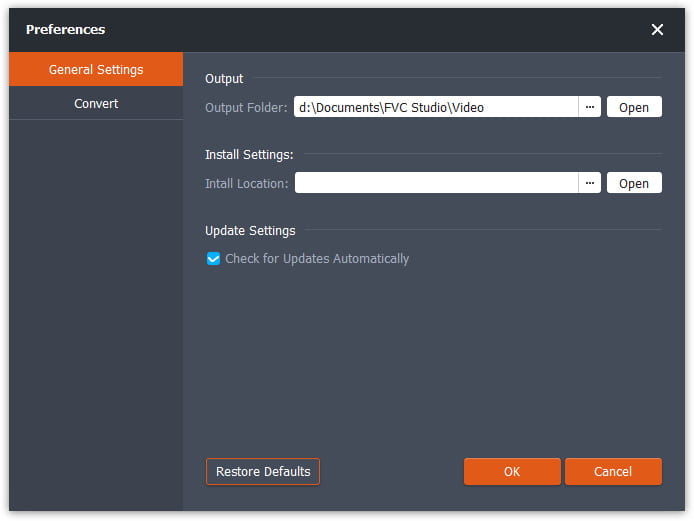
Step 2. To add FLV files, you should click the Add Files button on the interface. Then you can select files in the browse window. Then you should click the Output Format field and select the VOB format.

Step 3. You can add themes for your video file before the conversion. Click the Edit button on the interface and go to Select Theme. You can choose the theme like birthday, family, and landscape for your FLV video. Then you can preview the effects of the video and save it.
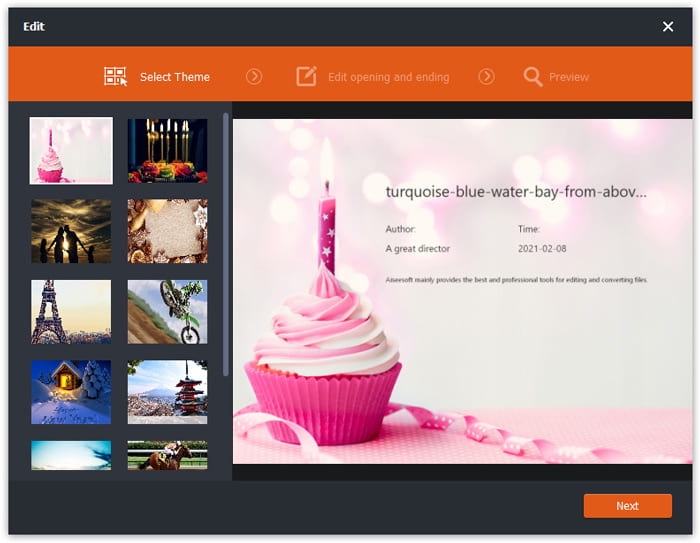
Step 4. To start convert, you need to click the Convert button in the main interface. It will open the folder automatically and you and find the VOB file in it.
Free FLV Converter é um software versátil para transformar vídeos FLV e você pode atualizar seus vídeos com recursos de edição avançados.
Parte 2. Como alterar FLV para VOB online
FVC Free Online Video Converter is an online free tool to convert FLV to VOB. It has a well-organized and clear interface that is friendly to all users. Since it's an online tool, you don't have to download and install anything.
- 1. Um clique para converter FLV para VOB em segundos sem perder qualidade.
- 2. Personalize o arquivo FLV antes da conversão.
- 3. Seguro e estável de usar.
Step 1. Go to the website of Free Online Video Converter. You need to click the Add Files to Convert button. The browse window will pop up to let you add FLV files.
Download the Desktop Version to convert files in batch.
Step 2. After adding files, you need to select the format to export the files. There are several formats listed at the bottom of the window. Find VOB and click the circle next to it.
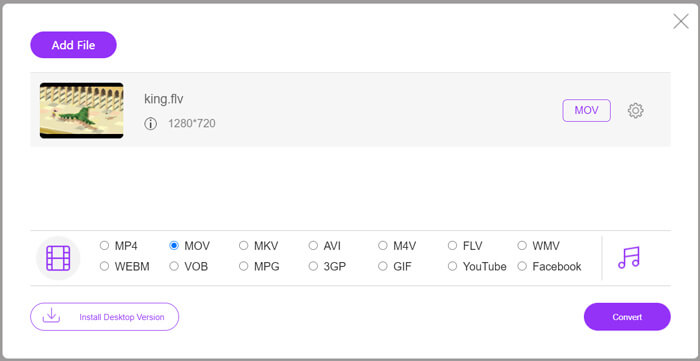
Step 3. Before conversion, you can click the Gear icon to adjust parameters like video resolution, encoder, audio volume, and channel of the FLV file.
Step 4. Click the Convert button to start the conversion. You can find the VOB file in the folder you set when the converting is finished.
To sum up, Free Online Video Converter is a convenient and efficient tool to change FLV to VOB online for free. Also, you can compress FLV files here.
Parte 3. Como usar o freio de mão para transcodificar FLV para VOB
Handbrake é um transcodificador gratuito e de código aberto que você pode usar para converter FLV em VOB. Suporta sistemas Windows e Mac. Aqui estão as etapas para converter FLV em VOB com o Handbrake.
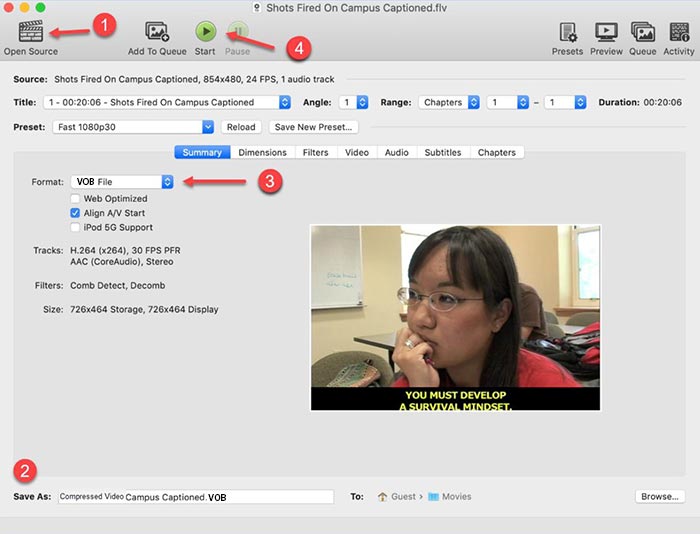
Step 1. Download and launch Handbrake. To add FLV files, you need to click the Open Source button. You can find the FLV file in the browse window.
Step 2. Then set the folder to save the output VOB file by clicking the Save As field at the bottom of the interface.
Step 3. Then select VOB format in the Format field.
Step 4. Click the Start button to begin the conversion.
FLV vs. VOB
O Adobe Flash Player usou o FLV para fornecer conteúdo de vídeo, como filmes e programas de TV. Atualmente, a Adobe não desenvolve mais o player e recomenda que os usuários o desinstalem por motivos de segurança. No entanto, você ainda pode usar o formato FLV em muitos programas que não são da Adobe/Macromedia.
O formato VOB é frequentemente usado para armazenar os dados do filme de um disco DVD, que inclui vídeo, áudio, legendas, menus de DVD e alguns outros conteúdos. Geralmente é formatado como fluxos de sistema MPEG-2. Você pode abrir arquivos VOB em várias ferramentas de reprodução de vídeo.
Parte 4. Perguntas frequentes sobre a conversão de FLV em VOB
1. Qual é o formato FLV?
FLV (Flash Video) is a file that uses Adobe Flash Player to transmit video or audio over the Internet. It's the standard format for video on the platforms and websites like YouTube and Hulu. (Find FLV player here)
2. Por que devo converter FLV em VOB?
Quando você precisa armazenar vídeos da Internet em um DVD, você precisa converter FLV para VOB. VOB é um formato que contém streaming de vídeo no formato MPEG-2 e streaming de áudio em diversos formatos em DVD.
3. Como posso cortar o arquivo FLV antes de converter?
Você pode usar um software de edição de vídeo profissional para cortar arquivos FLV como o Video Converter Ultimate. Ele permite que você defina o ponto inicial e final na linha do tempo para recortar o vídeo.
Conclusão
This article provides you 3 verified ways to convert FLV to VOB. You can use FVC Free FLV Converter and Free Online Video Converter to convert easily for free. There is some freeware you can use to convert like Handbrake or VLC Media Player. you can download and try them and see if they can solve your problem. If you have any questions about changing FLV to VOB or want to know more about it, please leave your comment below.
Free DownloadFor Windows 7 or laterSecure Download
Free DownloadFor MacOS 10.7 or laterSecure Download
-
 VLC não reproduz DVD, como consertar
 O VLC pode reproduzir um DVD? Por que o & #039; t VLC reproduziu meu DVD? Como faço para que o VLC reproduza um DVD no Windows 10? Esta postagem compartilha 3 dicas para corrigir o problema de VLC não reproduzindo DVD.
-
 As 3 principais maneiras gratuitas de converter MP4 em VOB rapidamente
 Como converter MP4 para VOB no Windows PC e Mac? Para resolver este problema, este post irá compartilhar as 3 melhores maneiras de ajudá-lo a converter MP4 para VOB gratuitamente.
-
 Melhores maneiras de converter VOB em FLV
 Quer converter um arquivo VOB em um arquivo FLV? Você pode completar a tarefa facilmente com conversores de desktop ou online. Leia este guia e aprenda como transformar VOB em FLV com facilidade e rapidez.

