


 Video Converter Ultimate
 Gravador de ecrã
 Reparo de vídeo
 Secure Download
Como converter arquivos de vídeo FLV para WMV sem perder qualidade
FLV files are not supported by all media players or mobile devices. So, you may wish to convert your FLV files to WMV format or another format compatible by your video player. The new problem is that you need a proper tool to do the job on your desktop or online. Don't waste your time to look for it on the internet. This demonstration will teach you how to convert your FLV videos to WMV so that you can continue your project with ease.

Parte 1: 2 métodos fáceis para converter FLV em WMV gratuitamente
Método 1: converter FLV em WMV com o conversor FLV gratuito
FVC Free FLV Converter is a powerful way to convert your FLV files to WMV. Although it does not require any payment or watermark, you can find plentiful functionalities similar to professional software. More importantly, it is very easy to use and does not require technical skills.
Principais recursos do melhor conversor de FLV
- 1. Converta vídeos FLV para outros formatos com um clique.
- 2. Lidar com vários arquivos de vídeo FLV ao mesmo tempo.
- 3. Suporta uma ampla variedade de formatos de multimídia.
Free DownloadFor Windows 7 or laterSecure Download
Free DownloadFor MacOS 10.7 or laterSecure Download
Como converter FLV para WMV gratuitamente
Step 1: Import FLV
Download and install the best free FLV video converter, and then launch it. The video converter is compatible with Windows 10/8/7 and Mac OS X. Click the Add File(s) menu at the upper left corner and add all FLV files that you wish to convert. The software utilizes multi-thread to process videos in batch.

Step 2: Set WMV as output format
Locate the bottom area after video loading, and click and expand the Output format dropdown list. Go to the General Video tab and select WMV. You can quickly find the output format by searching it in the Search Profile box.
If you want to edit your videos, click the Edit button at the top ribbon and open the video editor window.

Step 3: Convert FLV to WMV
Click the Open Folder button and set the destination folder in the Output folder field. Finally, click on the Convert button to start converting FLV to AVI. According to our research, it only takes a few minutes to convert dozens of FLV files.

Método 2: Como converter FLV em WMV com VLC
Muitas pessoas preferem conversores de vídeo de código aberto. O VLC, por exemplo, não é apenas um reprodutor de vídeo, mas também capaz de converter FLV para WMV gratuitamente. No entanto, muitos usuários reclamaram que o VLC é difícil de usar. Portanto, publicamos um guia básico abaixo.
Step 1: Run the free FLV to WMV converter. You can install it from the official website without paying a penny.
Step 2: Go to the Media menu and select Convert/Save on PC. If you are using VLC on Mac, choose Convert/Stream from the File menu.
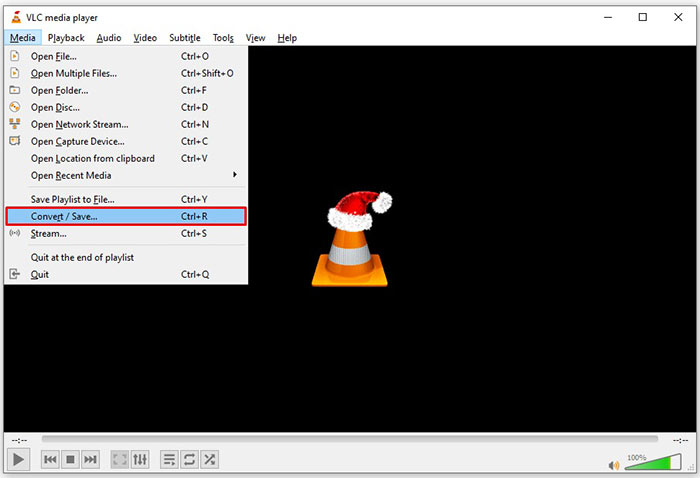
Step 3: Click the Add button to add a FLV file that you want to convert. When it comes to Mac, click Open media button to import the FLV video.
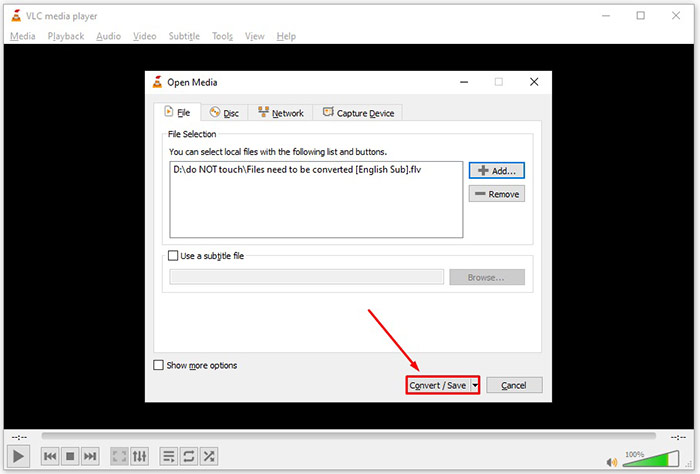
Step 4: Press the Convert/Save button to move to the next window. On Mac, scroll down to the Choose Profile section.
Step 5: By default, VLC does not support WMV output, but you can add it manually. Click the Profile edit button on PC or Customize button on Mac to open the Profile edition dialog.
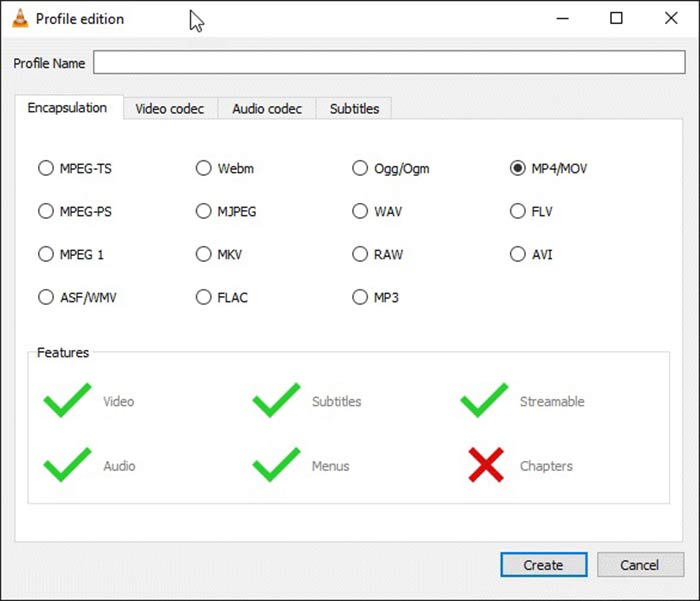
Step 6: Write down WMV in the Profile Name box, and select ASF/WMV. Click Create button and close the dialog. Then open Profile dropdown list and select WMV.
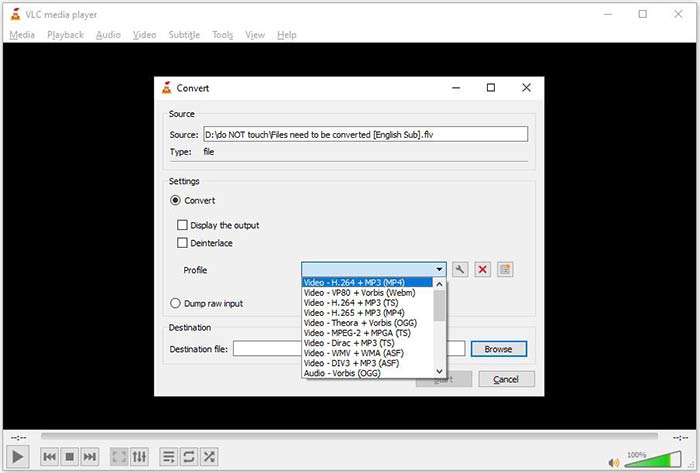
Step 7: Click the Browse button and select a specific directory to save the output WMV file. Finally, click on the Start button to initiate converting FLV to WMV immediately. It takes as long as the video file to convert it, so you must be patient.
Parte 2: Como converter FLV para WMV online
For people who do not like to install software, web apps are the portable alternative solutions to perform various tasks. FVC Free Online Video Converter, for example, can help you to convert FLV files to WMV format online for free. Unlike other web apps, it utilizes advanced technology to convert videos online without file size limit.
Step 1: Open https://www.free-videoconverter.net/free-online-video-converter/ in your browser when you need to convert FLV to WMV. Click the Add Files to Convert button download and install the launcher.
Download the Desktop Version to convert files in batch.
Step 2: As long as installation is done, the launcher will pop up. Click the Add File button and then upload the FLV files that you want to convert.
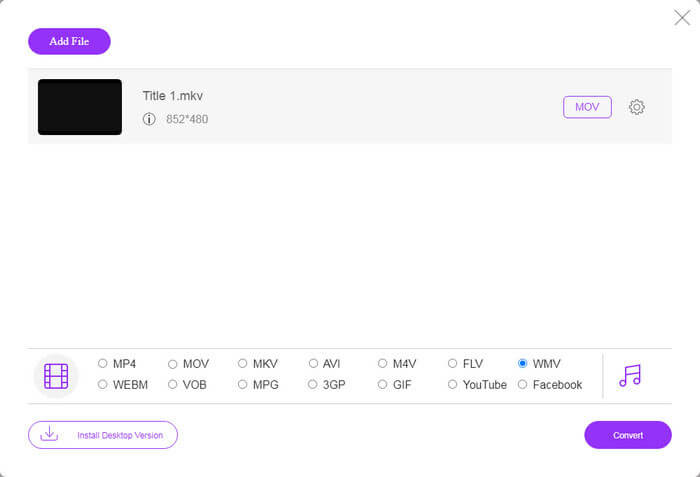
Step 3: Next, select the WMV option at the bottom and click on the Convert button. It spends a while to complete converting. Then download the output files to your hard drive.
Don't Miss:
- • 3 maneiras gratuitas de converter FLV em MPG
- • 3 maneiras gratuitas de converter FLV para jogar no Xbox
FLV vs. WMV
O Adobe Flash Player usou o FLV para fornecer conteúdo de vídeo, como filmes e programas de TV. Atualmente, a Adobe não desenvolve mais o player e recomenda que os usuários o desinstalem por motivos de segurança. No entanto, você ainda pode usar o formato FLV em muitos programas que não são da Adobe/Macromedia.
Produzido pela Microsoft, o WMV era um dos formatos de vídeo mais comuns nos anos 2000. Ele pode ser visto na web e reproduzido por vários players de mídia no Windows. E também é o formato de arquivo de vídeo padrão do Windows Media Player. Mas foi assumido por outros formatos recentemente.
Parte 3: Perguntas frequentes sobre FLV para WMV
Posso converter FLV em WMV no Windows 10?
Não há nenhum recurso interno do Windows 10 capaz de converter arquivos de vídeo. Para fazer o trabalho, você também precisa de um programa ou aplicativo conversor de vídeo instalado em seu PC.
Por que o FLV não está sendo reproduzido no Windows Media Player?
Como sabemos, FLV é um formato que ganhou popularidade na entrega de vídeos pela Internet. No entanto, FLV não é compatível com o Windows Media Player. Aqui você tem duas opções, usar outro reprodutor de mídia ou instalar o pacote de codec para WMP.
É seguro converter FLV para WMV online?
É difícil responder a essa pergunta. Embora a maioria dos conversores de vídeo da web prometa excluir seus vídeos após a conversão, alguns deles podem colocar seus arquivos em outras mãos. Portanto, você deve usar uma ferramenta confiável, como o FVC Free Online Video Converter.
Conclusão
Este guia compartilhou três maneiras de converter FLV em WMV no desktop e online. Quando você tiver essa necessidade, pode seguir nosso guia concreto para terminar o trabalho facilmente. FVC Free FLV Converter, por exemplo, além de gratuito, converte seus arquivos de vídeo sem prejudicar a qualidade. Se você encontrar outros problemas, entre em contato conosco deixando uma mensagem abaixo deste post.
-
 Como converter seus arquivos de vídeo FLV para MP4 sem pagar um centavo
 Este guia compartilha quatro métodos gratuitos para converter seus arquivos de vídeo FLV para o formato MP4 no Windows 10/8/7 / XP e Mac OS X, para que você possa desfrutar dos vídeos em qualquer dispositivo.
-
 Como converter seus vídeos FLV em arquivos de áudio MP3 na área de trabalho e online
 Como converter um FLV para um arquivo MP3? Tudo que você precisa fazer é ler este artigo com atenção, encontrar seu método favorito e seguir nosso guia passo a passo para obter o que deseja.
-
 3 maneiras principais de converter FLV em MOV
 Como converter FLV para MOV? Como faço para converter FLV para MOV no Mac? Existe alguma maneira gratuita de converter FLV do YouTube em MOV online? Esta postagem compartilha 3 conversores de FLV para MOV para alterar arquivos FLV para MOV.

