


 Video Converter Ultimate
 Gravador de ecrã
 Reparo de vídeo
 Secure Download
3 maneiras gratuitas de converter FLV para jogar no Xbox
FLV is widely used for news and video sharing sites. When you download some online videos from YouTube, Hulu or Facebook, you are more likely get FLV files. FLV format can be supported by many players, devices, platforms and browsers. But it can't be played on Xbox.
More than just a game console, Xbox also allows you to play videos and music through a USB flash drive or external drive. Xbox is compatible with many popular media files. But as it mentioned above, you can't directly play FLV on Xbox. When you want to view FLV files on Xbox, you have to convert FLV to Xbox supported format.

This post shares 3 free ways to convert FLV to Xbox. When you want to watch FLV files on your Xbox One, Xbox 360, new Xbox Series X or Xbox Series S console, you can rely on them to convert FLV to an Xbox supported file.
Parte 1. Como converter gratuitamente FLV para Xbox Online
Muitos conversores de vídeo podem ajudá-lo a converter FLV para formatos compatíveis com Xbox, como AVI ou MP4. Se você estiver lidando com alguns pequenos videoclipes FLV, primeiro experimente o conversor online gratuito de FLV para Xbox.
Free Online Video Converter is an easy-to-use video converter which enables you to convert FLV to MP4, AVI, WMV, MOV, or another Xbox console supported format. Compared with other online converters, it requires no account sign up or sign in. Moreover, there is no any file size limit for your FLV file conversion. The following guide will show you how to use it.
Step 1. This online FLV to Xbox converter is compatible with any web browser like Chrome, Safari, IE, and Firefox. You can open your browser and go to the Online FLV to Xbox converter site.
Step 2. When you get there, click Add Files to Convert and then Download button to install a launcher for the FLV converting. When the launcher is ready, there will be a pop-up window for you to add your FLV file.

Step 3. You can see some popular video formats including MP4, AVI, MOV, FLV, WMV, MKV, and more are listed under the loaded FLV file. You can pick a Xbox supported format like MP4 or AVI.
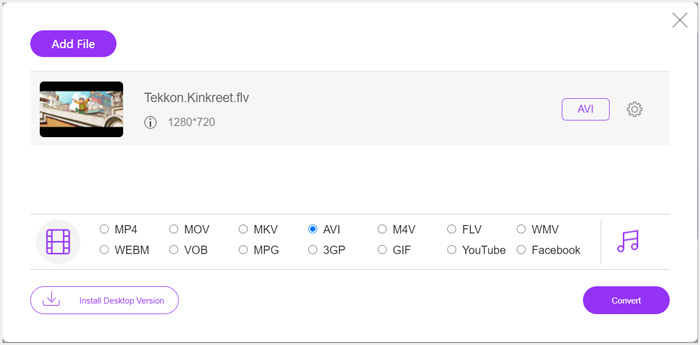
Step 4. If you want to custom more output video and audio settings, you can click the Settings icon next to the output format. After that, you can click the Convert button to start converting FLV to Xbox. The output video will be automatically saved on your computer as soon as the conversion is finished.
Parte 2. Como converter FLV para Xbox Online com FreeConvert
FreeConvert is another popular video and audio converter which can help you convert FLV to Xbox supported MP4, AVI, or WMV. It has a specific FLV to Xbox Video Converter for you to directly convert your FLV files to Xbox.
Step 1. Open your browser and go to this FLV to Xbox Video Converter page.
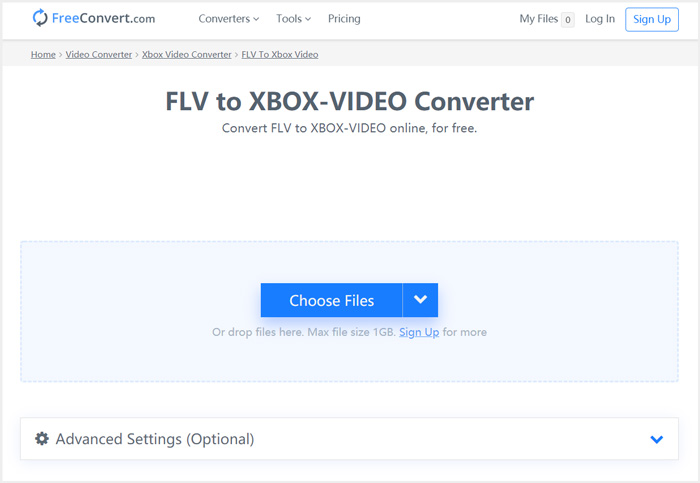
Step 2. Click Choose Files button to browse and upload your FLV file. You are also allowed to add file through URL, Google Drive and Dropbox.
Step 3. You can click Add More Files to upload other FLV files you want to convert. The target format will be set as XBOX by default. You can simply click on Convert to Xbox Video button to start the FLV to Xbox conversion.
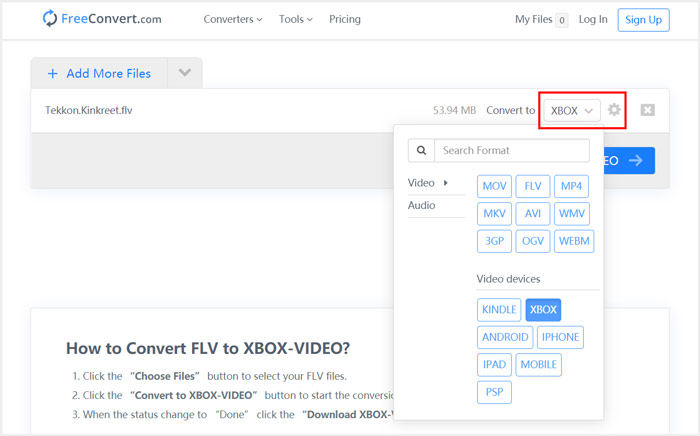
Follow the similar steps, and you can play any music on Xbox after converting them to Xbox compatible formats.
This FLV to Xbox Video Converter will start to upload and convert your video. After converting, you can click Download button to save it on your Mac or Windows PC. Or you can choose to save it on Google Drive and Dropbox. You will see some ads while using this free FLV to Xbox converter.
Parte 3. Melhor maneira de converter FLV gratuitamente para Xbox no Mac e PC com Windows
Besides online FLV converters, you can also rely other free video converters to convert and play your FLV files on Xbox game console. Here we introduce you with the powerful Free FLV Converter. It is specially designed to make various FLV conversions.

- Converta qualquer formato FLV para Xbox compatível, como MP4, AVI, WMV, MOV e muito mais.
- Oferece uma série de temas para editar e personalizar o arquivo FLV.
- CPUs multi-core avançadas e acelerações de GPU para converter FLV para Xbox em alta velocidade.
- Converta um ou mais arquivos FLV para Xbox sem qualquer perda de qualidade de imagem ou som.
Free DownloadFor Windows 7 or laterSecure Download
Free DownloadFor MacOS 10.7 or laterSecure Download
Step 1. First, you can double click on the download button to free install it on your computer. Open it and click Add Files to import your FLV file(s).

Step 2. Select MP4 or AVI as the target format from the drop-down list of Output format. For more settings, you can click the Settings icon next to the output format to enter the Profile Settings window.
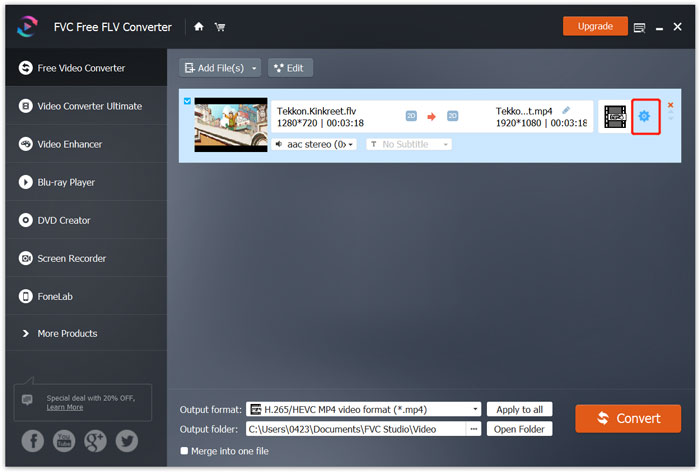
It also lists a specific Xbox category in the Output format for you to directly convert FLV to Xbox One or Xbox 360 supported file. But you need to upgrade it to a paid version.
Step 3. Click the Convert button to start the video conversion from FLV to MP4 or another Xbox supported video format.
Parte 4. Perguntas frequentes sobre como jogar FLV no Xbox
Pergunta 1. Quais formatos podem ser suportados pelo Xbox One?
Como um dos consoles de jogos mais populares, o XBox é compatível com muitos formatos de áudio e vídeo usados com frequência, incluindo MP4, AVI, M4V, MOV, WMV, MKV, H.264 AVCHD, WAV, WMA, vídeo 3GP, áudio 3GP, AAC , MP3 e muito mais.
Pergunta 2. Como reproduzir vídeos no Xbox?
Se você tiver o aplicativo Filmes e TV em seu Xbox One ou Xbox 360, ao transmitir vídeo para o Xbox ou conectar sua unidade externa ao Xbox, poderá usá-lo para assistir a vídeos com facilidade.
Pergunta 3. Qual reprodutor pode reproduzir arquivos FLV?
Quando você deseja reproduzir arquivos FLV em seu Mac, PC com Windows ou dispositivo portátil iOS / Android, o VLC Media Player é sempre uma boa opção para isso. Ele oferece aplicativos de desktop e móveis para você reproduzir arquivos FLV em seu computador ou telefone.
Conclusão
Não consegue reproduzir arquivos FLV no console de jogos Xbox? Para fazer isso, você deve primeiro converter FLV para arquivo compatível com Xbox. Você pode encontrar três métodos gratuitos para converter e reproduzir FLV no Xbox neste artigo.
-
 Os 10 principais jogadores FLV para Windows, Mac, iOS e Android em 2021
 O FLV player ajuda você a acessar facilmente seus arquivos FLV em seu dispositivo Windows, Mac, Android ou iOS. Confira os melhores reprodutores de arquivos FLV que você pode baixar agora.
-
 Tutorial para compactar GIF e reduzir o tamanho do arquivo com alta qualidade
 Aqui estão duas maneiras fáceis de compactar GIF em seu computador ou telefone celular. Você pode usar o FVC Free Online Video Compressor e o Photoshop para reduzir o tamanho do arquivo GIF em diferentes aspectos.
-
 Quatro maneiras gratuitas de converter vídeos FLV para MP4 na área de trabalho e online
 Este guia compartilha quatro métodos gratuitos para converter seus arquivos de vídeo FLV para o formato MP4 no Windows 10/8/7 / XP e Mac OS X, para que você possa desfrutar dos vídeos em qualquer dispositivo.
