


 Video Converter Ultimate
 Gravador de ecrã
 Reparo de vídeo
2 dos melhores conversores M4V para FLV para Windows/Mac/Online
A video and audio container made primarily to use on every Apple iTunes, M4V. This format is protected to avoid copyright issues by DRM copyright protection. In this case, the file is hard to play if you don't have your account on iTunes with the credentials. So if you want to watch the videos on your PC or Android phone, it is a must to convert them into playable FLV. To know how to convert M4V to FLV, read this article and have a brief idea about M4V and FLV.

Parte 1. 1ª escolha na conversão de M4V para FLV no Mac e PC
It is the most efficient converter you would love to use, especially if you convert M4V to FLV on Mac or PC. FVC Video Converter Ultimate is the most pick converter a lot of users already depend on. Furthermore, if you want to have a multi-purpose tool that provides phenomenal output, this is a must. Also, you can convert any media file in here and set the quality to SD, HD, 1080 even 4k videos. Expect nothing less if you download this tool on your drive because it is said in its name that it is ultimate. Moreover, follow the tutorial written below if you want to experience this tool's maximum conversion capacity.
How to Convert M4V to FLV with the Help of the FVC Video Converter Ultimate:
Step 1. Click the download button below, choose what OS you are currently using. After downloading, click Install, and a welcome interface will show, then press Start Now.
Free DownloadFor Windows 7 or laterSecure Download
Free DownloadFor MacOS 10.7 or laterSecure Download
Step 2. Start the tool, click + sign in the middle of the interface and select the .m4 file on the folder that will show, click it and press Open.
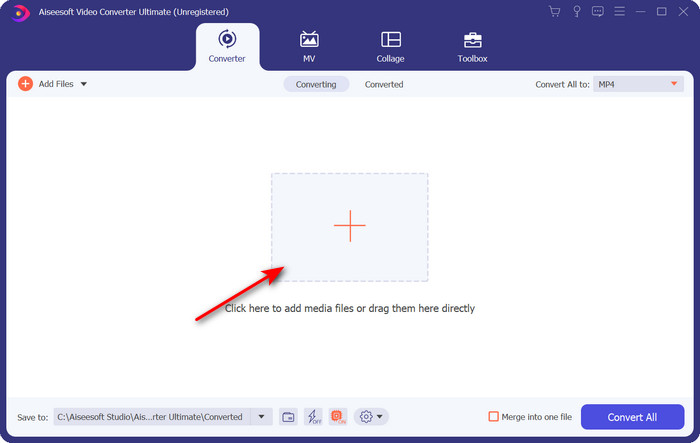
Step 3. Once the .m4v file is on the interface, click Convert All to and find the FLV format.
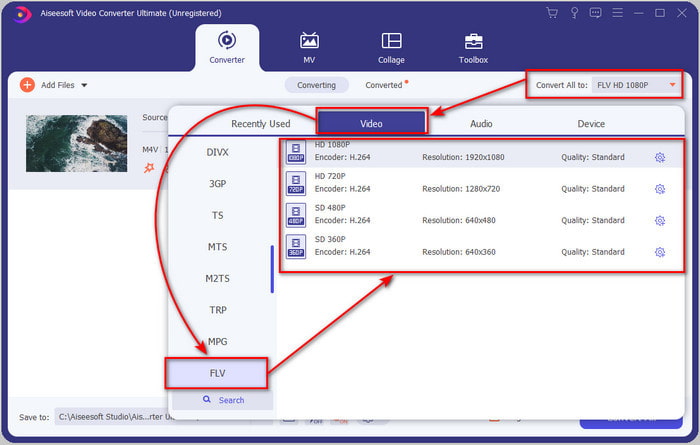
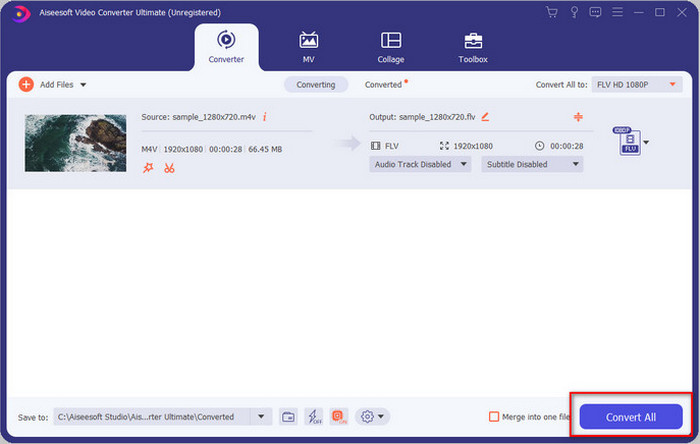
Step 4. Go ahead and click Convert All to start the changing of M4V to FLV.
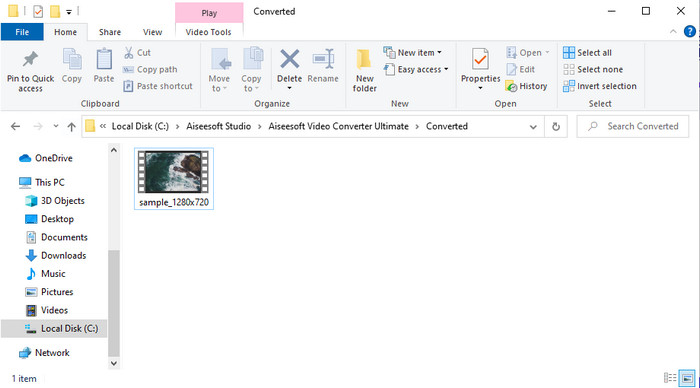
Step 5. Converting the file will take less than a minute because of the fast conversion this tool provides. A folder will show your converted file; click the file to watch or share it online.
Prós
- Conversão rápida e aceleração de hardware estão disponíveis para a melhor experiência.
- Disponível em todas as plataformas como PC ou Mac.
- A edição de vídeos para torná-los excelentes pode ser superada aqui.
Contras
- Pagamento antes de usar, mas o preço dele é acessível.
- Baixe o software antes de usar.
Parte 2. 2ª escolha na conversão de M4V para FLV gratuitamente via online
Converting your files online can be efficiently executed if you use a proper convert M4V to FLV online with the help of FVC Free Video Converter Online. This online tool is the best converter you can access on all web browsers if you have an internet connection. Also, you can convert here without a limit in size, but you can't perform the batch conversion here. Even though the online software is excellent still internet connectivity is needed, so if you don't have then this is not a choice like the other web converters available. But, if you have an internet connection and want to experience a well-done free converting online, you must follow the steps below.
How to Convert M4V to FLV with the Help of the FVC Free Video Converter Online:
Step 1. Hit this link to go to the free online converter the FVC provides for you.
Step 2. On the web interface, click Add Files to Convert to download the installer. Once downloading the installer is done, hit the Add Files to Convert again and a folder, then select the M4V file.
Download the Desktop Version to convert files in batch.
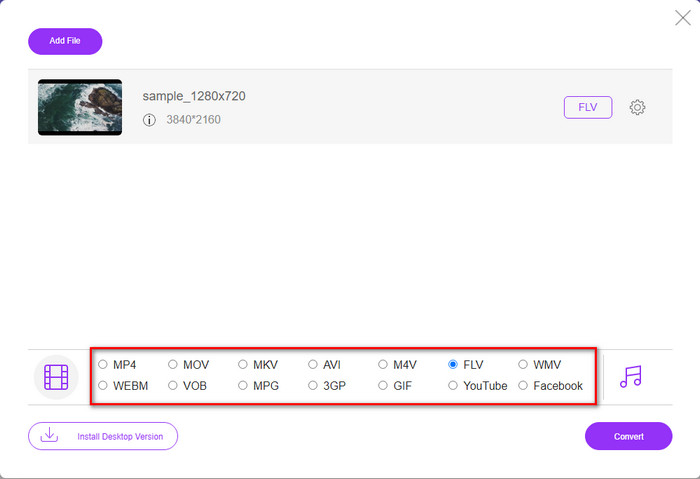
Step 3. A new web interface will show the below choose the FLV format by clicking it.
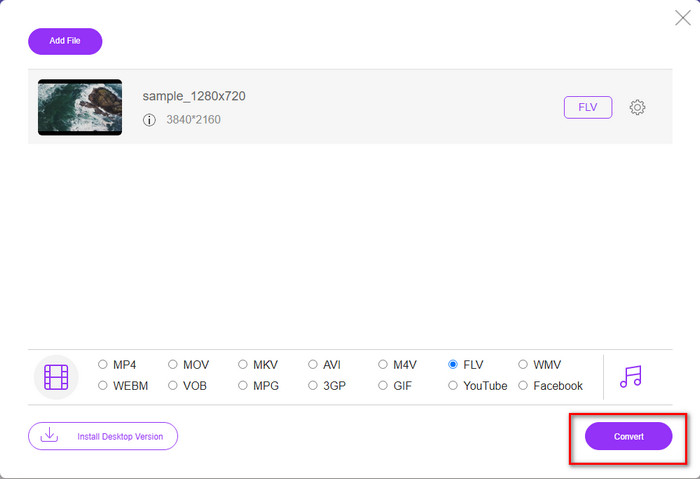
Step 4. So, to begin to convert M4V to FLV for free, click Convert.
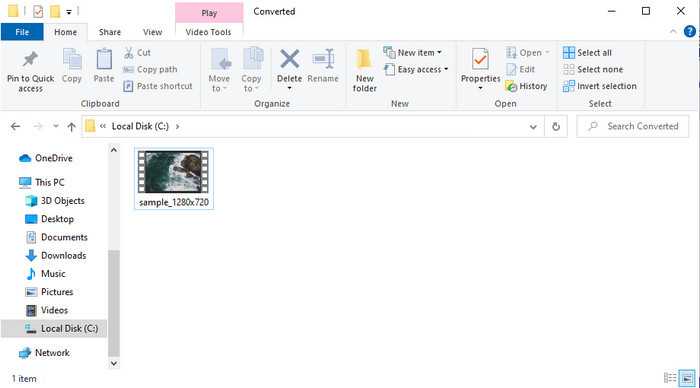
Step 5. After the conversion, a folder will show on the interface; click the file to play it on your local media player.
Prós
- Gratuito e compatível em todos os navegadores da web.
- Tamanho de arquivo e conversão ilimitados.
- Seguro e sem anúncios na ferramenta web principal.
Contras
- Ele precisa de conectividade com a Internet para usar a ferramenta.
- Formato menos suportado para fazer upload e converter.
Parte 3. Diferenças entre os formatos M4V e FLV
O M4V armazena a mais alta qualidade de vídeo baixada em sua loja Apple iTunes. Este formato é semelhante ao MP4 porque eles usam o codec MPEG-4 como compressor. Mas os vídeos M4V são protegidos pela proteção de direitos autorais do Apple FairPlay DRM. Portanto, reproduzir vídeos nesse formato é complicado porque não será reproduzido imediatamente se você os inserir em um media player que não seja o iTunes ou o Quicktime Player. Arquivos M4V desprotegidos podem ser acessados em seu media player alterando a extensão do arquivo para .mp4.
Por outro lado, o FLV é usado para transferir dados de vídeo e áudio pela web o mais rápido possível. Flash Video é o formato mais favorável que está em todos os sites HTML 5. No entanto, esse formato foi descontinuado porque o Adobe Flash já havia sido aposentado. No entanto, você ainda pode reproduzi-lo em seus plug-ins de media player necessários depois de baixá-lo ou convertê-lo.
M4V vs. FLV
O M4V é desenvolvido pela Apple, que também usa MPEG 4. Os arquivos M4V são frequentemente usados para armazenar os vídeos baixados da loja Apple iTunes, como videoclipes, episódios de TV, etc. Você pode encontrar alguns arquivos M4V protegidos contra cópia, pois usa Proteção de direitos autorais FairPlay DRM da Apple.
O Adobe Flash Player usou o FLV para fornecer conteúdo de vídeo, como filmes e programas de TV. Atualmente, a Adobe não desenvolve mais o player e recomenda que os usuários o desinstalem por motivos de segurança. No entanto, você ainda pode usar o formato FLV em muitos programas que não são da Adobe/Macromedia.
Parte 4. Perguntas frequentes sobre a conversão de M4V para FLV
Qual é melhor; MP4 ou M4V?
Se você deseja proteger seu arquivo, M4V é o formato que você deve usar, pois está disponível apenas em Apples e é protegido. Mas suponha que você queira um formato compatível com todos os players de mídia, o editor e muito mais. Nesse caso, MP4 é o formato de mídia universal que você gostaria de usar.
Posso jogar M4V no VLC?
VLC is free to use and compatible with all platforms; also, it can play almost all of the media formats. But the protected M4V can't be played here because it is protected. So now, if you want to watch .m4v on VLC, it is a must to convert the M4V file into MP4 or AVI.
Perco a qualidade depois de converter M4V?
Depois de converter o M4V, a qualidade do mesmo deve manter a taxa padrão da qualidade original do M4V. No entanto, alguns conversores não suportam a conversão do vídeo em HD, 1080 ou 4k. Então, é melhor você escolher a ferramenta perfeita e não a ferramenta certa que satisfará suas necessidades de conversão sem perder sua qualidade.
Conclusão
All in all, the two online and offline tools presented here are destined for greatness, especially if you want to convert M4V to FLV. Also, we gain insights into the two formats, the M4V and FLV. Although altering the M4V is necessary to watch the protected file, choosing the right tool for the right job is tricky. So, we present two tools you can use to convert the format for free by using FVC Free Video Converter Online. Or rather experience new heights of converting by using the FVC Video Converter Ultimate. And now, what are you waiting for if you want to watch your M4V for free? Choose the tool above, follow the quick and easy steps presented above, and voila, enjoy the video.
-
 [Guia] Como converter vídeos M4V em GIFs animados no Windows / Mac
 Se você deseja fazer arquivos GIF animados de seus vídeos M4V favoritos, você pode aprender sobre 2 maneiras fáceis e eficientes de converter vídeos M4V em GIFs com configurações personalizadas.
-
 3 Programa de conversão de vídeo usado para converter iTunes M4V para AVI no Mac
 Não tem ideia de como converter MKV para formato AVI? À medida que continuarmos lendo este artigo, conheceremos as 3 ferramentas que podem ajudá-lo a converter esse formato de arquivo.
-
 Conversor M4V para MOV grátis - Como converter M4V para MOV
 Se o seu media player não suporta M4V, você já se esforçou para assistir a um filme no seu iPhone? O tópico principal deste artigo é convertê-lo em um arquivo de vídeo MOV.

