


 Video Converter Ultimate
 Gravador de ecrã
 Reparo de vídeo
Dicas e truques sobre como converter arquivos WebM em FLV para Windows/Mac/Online
Are you having trouble playing videos under the file extension of WebM? Maybe you are currently looking for the best solution via converting the file into a playable format on your device. If that is the case, you are lucky because this article will discuss two of the best WebM converters you can use online or offline. Let's jump into the WebM to FLV converter for free you can use on your desktop and learn how to convert WebM hands-on.

Parte 1. Conversor WebM para FLV de alto nível no Windows e Mac
First on the list is the phenomenal WebM to FLV converter you can download on your desktop to aid your problem. FVC Video Converter Ultimate is the best converter choice to achieve a 100% success rate on your conversion. It is used explicitly on converting your video and audio format into a compatible one with the 200+ format of your choice. It is even more refined, as it offers a simple conversion with the super high-speed converting process without altering its quality. This converter takes the conversion to the next level, want to experience it? In that case, let's learn how to use this tool by following the detailed steps below.
Steps on How to Convert WebM Files to FLV format with the FVC Video Converter Ultimate:
Step 1. Click the download button presented below and follow the installation prompts.
Free DownloadFor Windows 7 or laterSecure Download
Free DownloadFor MacOS 10.7 or laterSecure Download
Step 2. To add your WebM files, click the Add Files at the top-left corner of the interface. Then choose the .webm file on your folder and click Open.
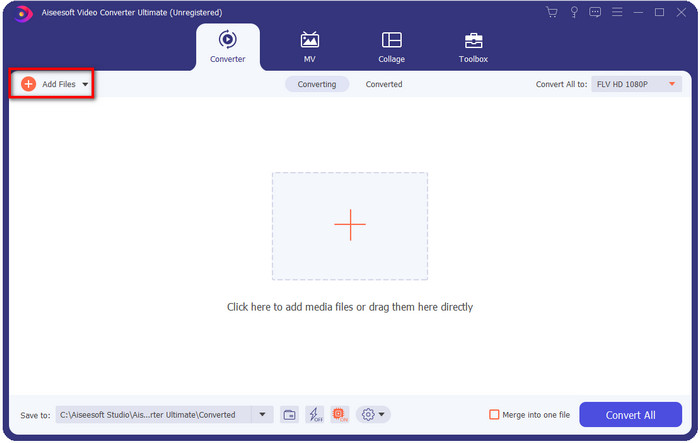
Você pode arrastar e soltar os arquivos na interface se quiser adicionar vários arquivos WebM ou quaisquer outros arquivos para fazer a conversão em lote.
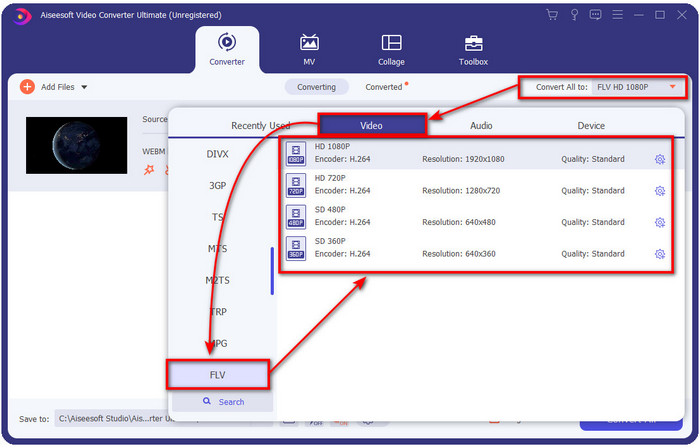
Step 3. Click the Convert All to option at the top-right corner of the interface and choose the FLV format.
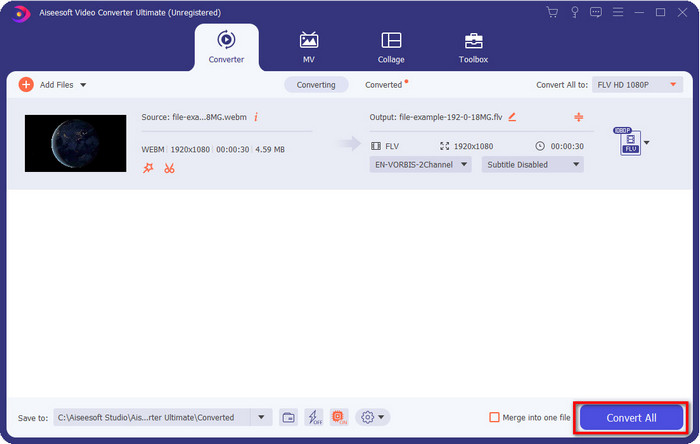
Step 4. Click Convert All to start and convert WebM to FLV. After the process, a folder will show on your screen with the newly converted FLV file.
Prós
- Ele suporta inúmeros perfis de formato que você pode escolher.
- Suporta aceleração de hardware e conversão rápida para procedimentos de conversão mais rápidos.
- Ele oferece vários recursos avançados de edição, como cortar, mesclar, cortar, adicionar efeitos e muito mais.
- Converta seus arquivos WebM em lote.
- Disponível em todos os sistemas operacionais como Windows e Mac.
Contras
- Faça o download em sua área de trabalho.
- Conversor pago.
Parte 2. Converter WebM para FLV gratuitamente online
FVC Free Video Converter Online offers you a powerful WebM to FLV converter online. This converter is available in all of the search engines of your choice. Instead of downloading a converter on your desktop, why don't you use this web tool as an alternative? Aside from being free, it is also ads and malware-free. However, many functions aren't in here that the FVC Video Converter Ultimate has significantly the scope of format supported. Want to know how to use this web converter? Then follow the steps provided below.
Steps on How to Convert WebM files to FLV Format Online with the FVC Free Video Converter Online:
Step 1. Click this FVC Free Video Converter Online to open the converters website.
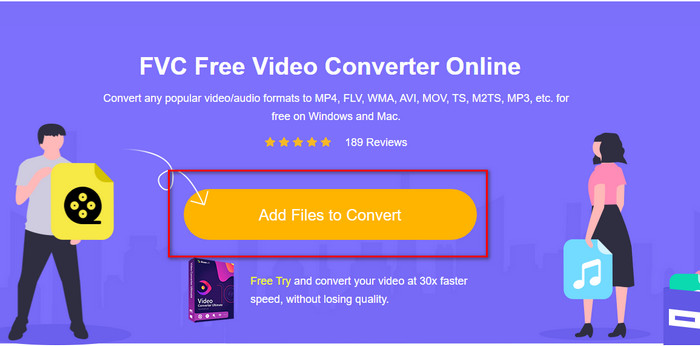
Step 2. On the converters website, click Add Files to Convert to install the launcher of the web tool. Tap it again, and a folder will open, search the .webm file and click Open.
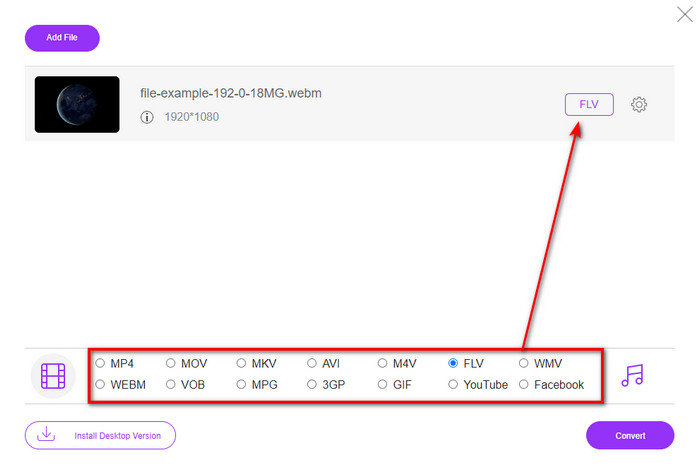
Step 3. Set the format to FLV by choosing it under the setlist.
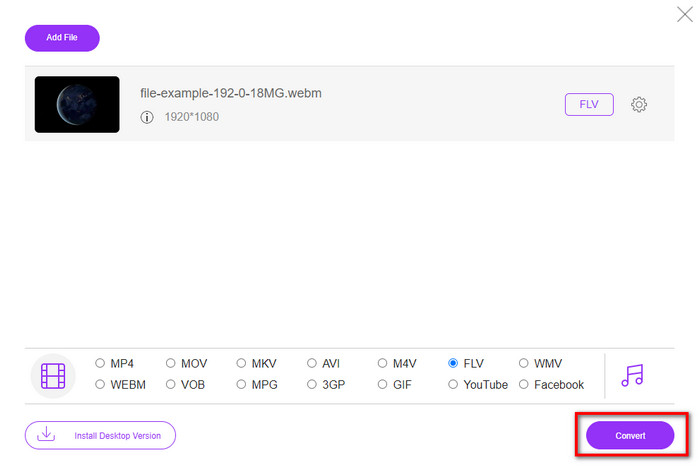
Step 4. To convert the file, click Convert.
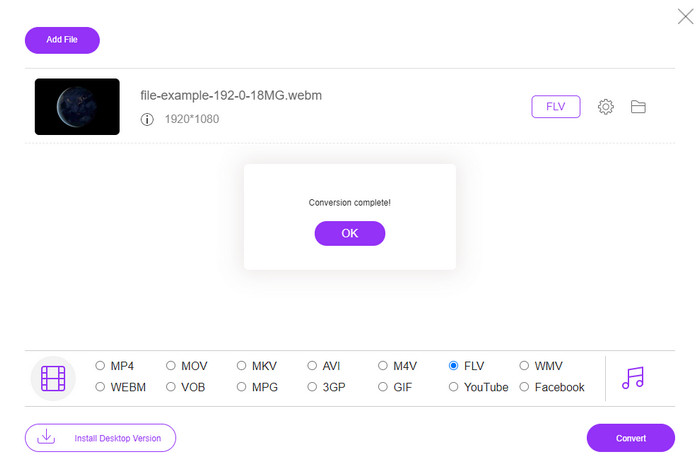
Step 5. Once the conversion is complete, a folder will show on your screen.
Prós
- Disponível e gratuito para acesso em todos os navegadores da web.
- Sem anúncios irritantes, e é livre de malware.
- Ele suporta um formato de médio alcance.
Contras
- É necessária uma ligação à Internet.
- Recursos especiais não estão disponíveis neste conversor.
Parte 3. WebM vs. FLV
WebM é jogável na maioria dos navegadores que estão sob HTML5. O objetivo deste formato é ser livre de royalties e estar disponível em todos os navegadores da web para reproduzir vídeos e áudio. Além disso, ele pode se adaptar a qualquer situação de largura de banda que os usuários tenham. Ele reproduz principalmente vídeos e áudio sem afetar a qualidade, mesmo que os usuários tenham uma péssima conectividade com a Internet. Outro recurso fantástico desse formato é usar um codec separado em fluxos de vídeo e áudio. Embora esse formato possa conter vídeo de alta qualidade, alguns smartphones e players de mídia não podem reproduzir esse tipo de vídeo de formato. Há muitas razões pelas quais você não pode reproduzir o arquivo, e uma delas é que a versão do seu sistema operacional está desatualizada.
Ao contrário do WebM, o objetivo do FLV é fornecer conteúdo de vídeo pela Internet usando o Adobe Flash Player ou o Adobe Air. Além disso, esse formato pode conter não apenas conteúdo de vídeo, mas também elementos como metadados, cabeçalho curto, áudio e fluxos de vídeo. Embora o formato tenha plug-ins, você não precisa dele para reproduzir o arquivo em seu media player ou armazená-lo em seu telefone. Igual ao WebM, este formato também usa codecs de compressão de áudio e vídeo separados.
Para tornar seu arquivo WebM compatível, você precisará transformar seu WebM em FLV. Mesmo que você possa armazenar arquivos WebM em seu dispositivo, ainda é um desperdício de armazenamento se você não puder usá-lo. Além disso, transformar seu arquivo WebM em um formato reproduzível lhe dará a chance de visualizar o arquivo em vários dispositivos.
Parte 4. Perguntas frequentes sobre conversão de WebM para FLV
O VLC suporta o formato WebM?
VLC is one of the multi-purpose media players that you can download on your Windows, Mac, and even your smartphones. It can support various video and audio playback, including .webm files. But if you want to watch your WebM files into a better media player, read this article to know more about the five best software to play WebM files.
Como converter WebM para GIF?
Converting your WebM files into an animated GIF can be done within a minute. Want to know how to convert WebM to GIF? If so, click this link to learn more.
Posso compactar meu arquivo WebM?
Absolutely Yes, you can make your WebM file more diminutive in size to send it through e-mail or save some space to your drive. If you don't have software of your choice, you are lucky as we sift out the 2 free WebM compressors you can use.
Conclusão
Now that we know how to convert our WebM files into an FLV format, it is time to select the converter you should use. Although these two WebM converters presented here can guarantee your success, they still have different capabilities. For example, suppose you want to convert your WebM thru online without limitation and ads at all. In that case, you must go with the FVC Free Video Converter Online. But if you want to do more than convert files, your pick must be the FVC Video Converter Ultimate. Are you still doubting the ultimate converter abilities? If so, you must download it right now on your desktop to experience the full functionality of the converter.
-
 3 maneiras de converter WebM em MP3 sem perder a qualidade do som
 Tendo um problema porque os arquivos WebM não podem ser usados para reproduzir o áudio que você salvou? Então leia este artigo, pois fornecemos uma ajuda eficaz convertendo WebM para MP3.
-
 3 Software impressionante usado para converter arquivo WebM em formato AVI
 Não tem ideia de como converter WebM em AVI? Então vamos começar a ler este artigo. Como especificamos todos os detalhes no WebM e os três conversores que você pode usar para converter.
-
 Métodos fáceis de seguir sobre como converter WEBM em MOV
 Você acha difícil que seus vídeos WebM não possam ser reproduzidos pelo safari e não deseja alternar para um navegador que suporte esse formato? Leia este artigo para aprender como alterar o WebM para MOV com facilidade.
