


 Video Converter Ultimate
 Gravador de ecrã
 Reparo de vídeo
 Secure Download
Como salvar um GIF como vídeo no iPhone de 5 maneiras incríveis
Who else would have thought people could interact expressively online through a Graphics Interchange Format or GIF? These files were designed on a small resolution and animated video clips. Whether you aim to flair a funny message or send hugs to your loved ones, GIFs will be your utmost companion. In this post, we curated several social media sites where you can access thousands of GIFs and teach you how to save animated GIFs on iPhone.

Parte 1: Como salvar GIFs no iPhone [iOS16/17]
1. Safári
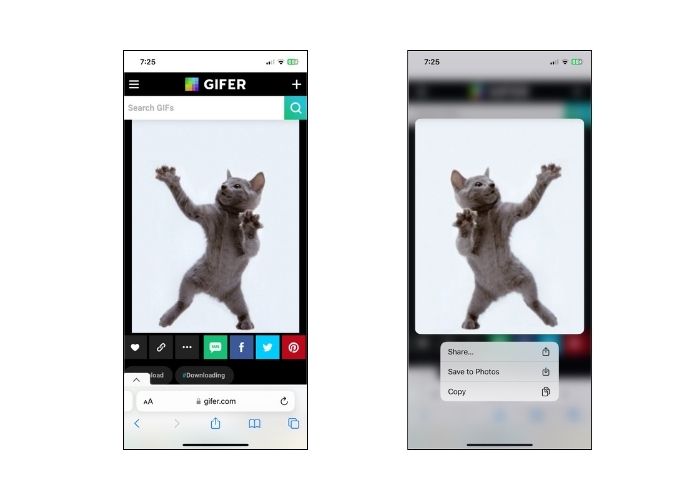
Não vamos fazer o contrário e começar primeiro com o navegador nativo de qualquer modelo de iPhone, o Safari. Siga as etapas sobre como salvar GIFs no iPhone a partir do Safari.
Step 1. Open the Safari application on your phone and search for your desired GIF.
Step 2. Tap and hold on your target GIF from your chosen GIF-sharing website.
Step 3. Next, tap the Save to Photos from the menu and it will be saved on your Photos app.
2. Twitter
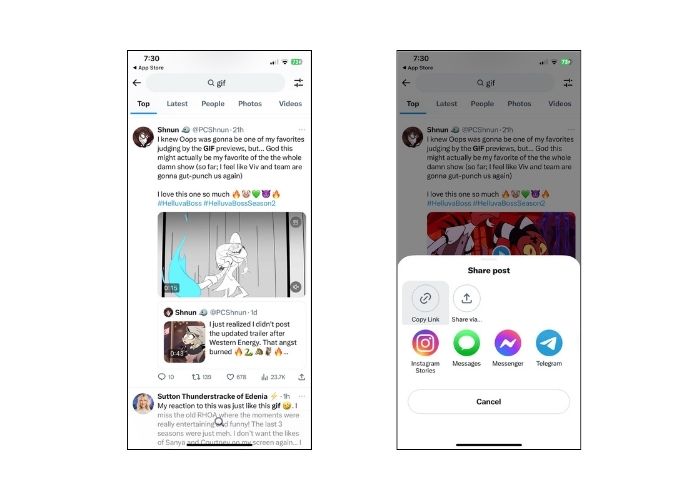
Se você deseja encontrar GIFs únicos e expressivos, experimentar alguns sites de redes sociais online como o Twitter, hoje conhecido como X, é uma ótima opção. A partir dos tweets das pessoas, você realmente terá uma opção abrangente sobre qual selecionar. Como salvar um GIF em um iPhone do Twitter? Siga o guia abaixo.
Step 1. Open your Twitter application on your iPhone and navigate the GIF you want to have.
Step 2. After choosing your target GIF tweet, tap the Menu and copy the link.
Step 3. Finally, paste the link on the GIF downloader and press Save to Library.
3.Google
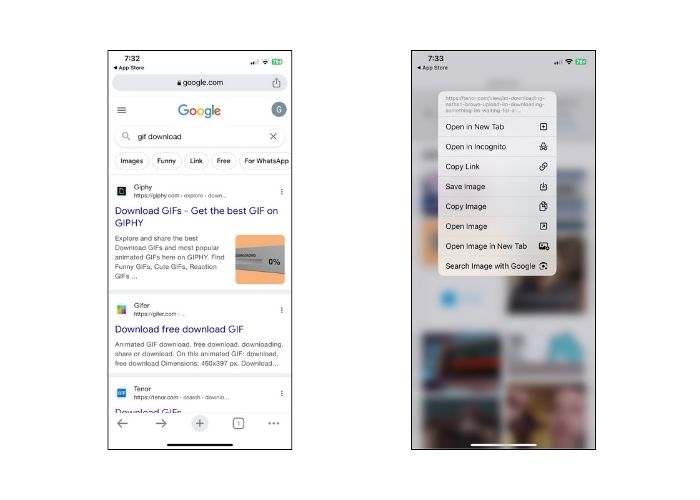
Em relação aos motores de busca, o Google talvez seja aclamado como um dos mais populares do mundo. Além disso, este mecanismo de busca permite que você visualize milhões de GIFs em toda a web e forneça o que você precisa. Veja como salvar GIFs em um iPhone do Google.
Step 1. Enter Google Chrome on your iPhone device. On the search bar, type the GIF you wish to save.
Step 2. Once you find the GIF, tap the Menu and hit Save Image.
Step 3. Then, a prompt should notify you if you will allow the addition of GIF to your Photos app or not. Hit OK to proceed.
4. GIPHY
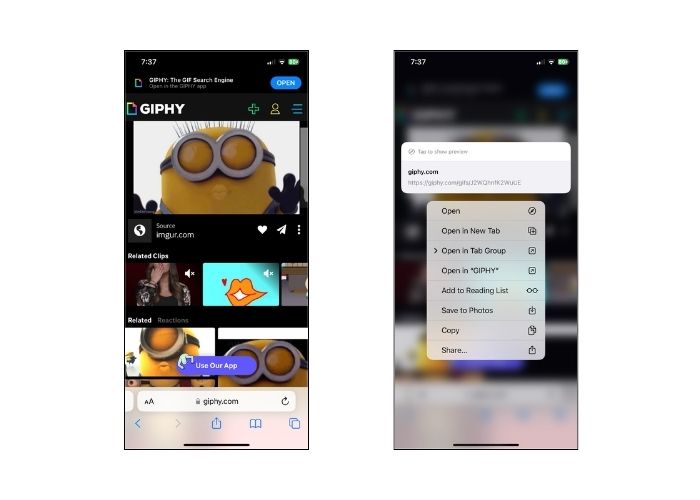
GIPHY é um site online que permite às pessoas acessar uma variedade de GIFs para qualquer ocasião. Se você deseja saber como salvar um GIF do GIPHY no iPhone, siga o guia abaixo.
Step 1. Open your web browser and land on GIPHY's official website. After that, search your target GIF using a keyword or click the specific category on the list.
Step 2. After choosing the GIF, tap and hold the GIF until the selection appears.
Step 3. Finally, select Save to Photos and the GIF will be added to your local file storage.
5. WhatsApp
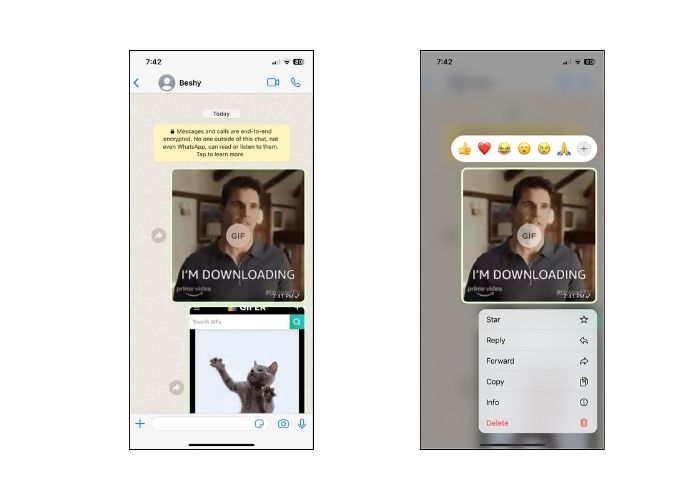
Outra plataforma de comunicação online amplamente notória hoje é o WhatsApp. Como qualquer outra ferramenta de comunicação digital, o WhatsApp também é melhor para receber GIFs de amigos e entes queridos. Também aprendemos como salvar um GIF do WhatsApp no iPhone.
Step 1. Go to the chat box or group with the GIF.
Step 2. After scrolling through the saved Media or Chat, tap the GIF and press for 3 seconds until the Menu shows up.
Step 3. Choose Save to add the GIF to your files.
Parte 2: Por que não consigo salvar GIFs no iPhone?
Vários fatores devem ser considerados quando há tentativas fracassadas de salvar GIFs no iPhone. Veja os seguintes motivos abaixo e tente determinar qual é o culpado.
1. If you can't save gifs on iPhone, your internet connection might be the cause. In this case, try to see if your internet is available by clicking Settings > Wi-Fi.
2. Se você não conseguir fazer download ou mesmo tirar capturas de tela, tente reiniciar o iPhone. Neste caso, seu telefone será reiniciado.
3. Forçar o encerramento do aplicativo também pode ser útil. Há casos em que a falha será resolvida após sair do aplicativo.
4. Por fim, verifique seu armazenamento. Se você estiver carregado de arquivos, pode ser necessário liberar espaço excluindo fotos, vídeos e até mesmo desinstalando alguns aplicativos não utilizados.
Parte 3. Como salvar um GIF no iPhone como vídeo
1. Video Converter Ultimate
Sometimes, we need to turn a GIF into a video, but in this case, not all GIF makers can do it. That is why here is a great platform to help. Video Converter Ultimate is a GPU-accelerated tool that converts GIF to a video file smoothly and quickly. You can also convert video to another file extension like MOV, FLV, MP4, ASV, and more. On top of that, this tool works wonders in retaining a 1:1 ratio quality of your footage.
Step 1. Install the Best GIF to Video Transcoder
First, head to the Download buttons beneath that suits your operating system. Afterward, run the file to launch it on your computer.
Free DownloadFor Windows 7 or laterSecure Download
Free DownloadFor MacOS 10.7 or laterSecure Download
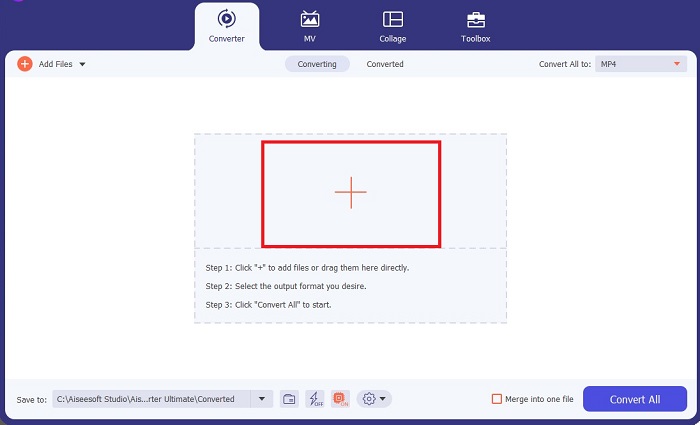
Step 2. Import the GIF file
To upload your GIF file, click the Plus button at the center of the screen. You can also convert GIF files in bulk by uploading a folder.
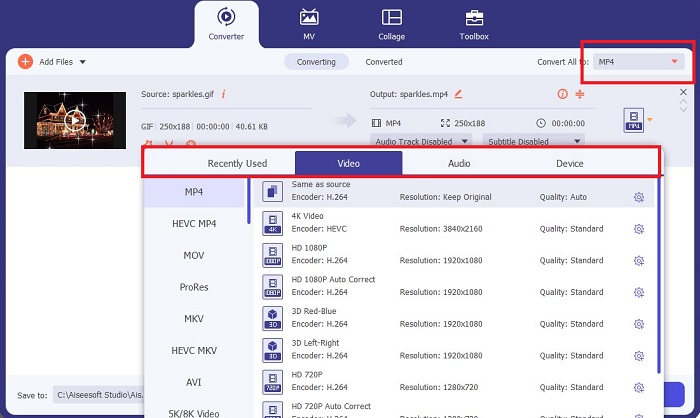
Step 3. Choose Video Format
Once your GIF appears on the screen, drop the Output tab to access the list of video formats. To maintain the compatibility of your file, choose MP4.
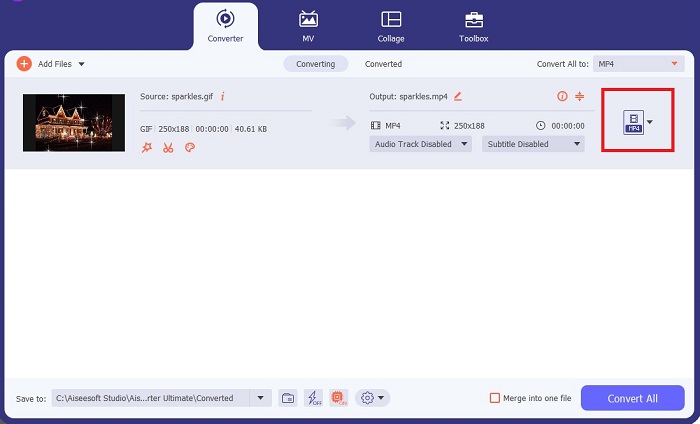
Step 4. Save the Project
Finally, tick the Convert button below the screen to initiate the conversion. You can also check your file by clicking the Folder to access the local directory where your converter GIFs are saved.
Further Reading:
The Undefeatable Ways to Add GIF Text (All Platforms)
GIF Background Removal with Effective and Useful Tools
Parte 4. Perguntas frequentes sobre maneiras de salvar GIF no iPhone
Você pode salvar um GIF no seu iPhone a partir de um e-mail?
Absolutamente! Você pode salvar qualquer GIF de um e-mail no rolo da câmera. Basta tocar no ícone Compartilhar em seu e-mail e clicar em Salvar arquivo.
Posso postar GIFs no Twitter no meu iPhone?
Os GIFs podem ser compartilhados em sites de mídia social, incluindo o Tweeter. Você pode fazer isso da mesma forma que publica uma imagem.
Onde encontrar os GIFs salvos no iPhone
Depois de salvar os GIFs, você pode acessar o Explorador de Arquivos do iPhone ou atualizar o aplicativo Fotos.
Posso salvar um GIF no rolo da câmera do iPhone?
Absolutamente! Se desejar salvar um arquivo GIF no rolo da câmera, você pode salvá-lo como faria em uma imagem normal. Pressione a imagem por 3 segundos ou toque no Menu. Depois, clique em Salvar imagem.
Como salvar gifs do Reddit no iPhone?
Você pode salvar GIFs do Reddit usando as mesmas etapas mencionadas acima. Depois de salvar seu GIF na câmera, abrir o diretório de arquivos é a melhor maneira de encontrar o GIF salvo no iPhone. Esta é a coisa mais conveniente a fazer, pois há casos em que as fotos ou GIFs baixados não aparecem no aplicativo Fotos.
Conclusão
Knowing how to manipulate GIFs, including converting them into a video, is necessary if you wish to rock the world of the digital age. There you have ways on how to save GIFs on iPhone through the lens of different social media sites and applications.
-
 Como transformar vídeo em GIF para criar GIFs atraentes
 Descubra como converter facilmente seus vídeos em GIFs envolventes com nossos conversores de vídeo para GIF escolhidos a dedo e processo de vídeo para GIF fácil de seguir.
-
 Revisão abrangente de recursos e alternativas do Ezgif
 Se você usa o Ezgif e ainda não sabe o que está na manga. Esta análise do Ezgif irá ajudá-lo com essa preocupação. Continue lendo para saber mais.
-
 Os 10 melhores compressores GIF para usuários de desktop e online
 Nesta postagem, você aprenderá sobre os melhores compressores GIF para ajudá-lo a resolver seu problema com arquivos GIF grandes. Confira e obtenha os melhores insights.
