


 Video Converter Ultimate
 Gravador de ecrã
 Reparo de vídeo
 Secure Download
3 maneiras gratuitas de converter WebM em GIF animado
GIFs recently have become widely popular on various social apps. Are you looking for a way to convert video like WebM to GIF?
In fact, it’s quite simple to create your own GIFs with some short video clips, as long as you get a well animated GIF converter or GIF maker. And many video to GIF converters including online free ones claim that they can help you convert WebM to GIF with ease. While with so many tools offered on the market, you may not know which one you should use.

Considering your need, this post like to share 3 free ways to convert WebM to GIF. 3 great video to GIF converters are recommended for you to make animated GIFs. Besides WebM, they can support videos in other frequently-used formats like MP4, MOV, AVI, FLV, and more. You can get a detailed guide on how to convert WebM to GIF with them.
Parte 1. Converta WebM para GIF com o Free Online Converter
In the first part, we like to introduce you with a popular online video to GIF converter, Free Online Video Converter. It can work as a video to GIF converter to help you turn your WebM video into GIF online.
Besides the WebM format, it highly supports all popular video formats including MP4, MOV, MKV, AVI, FLV, WMV, M4V, and more. That means you can easily upload any video to this online GIF converter and change it to a GIF file. Now you can take the following guide to convert WebM to GIF online free.
Step 1. Open your web browser like Google Chrome, Microsoft IE, Safari, Yahoo or Firefox, and go to this free WebM to GIF converter site. When you get there, click the Add Files to Convert button to quickly install a launcher for the GIF converting. Only the first time needs the installation.
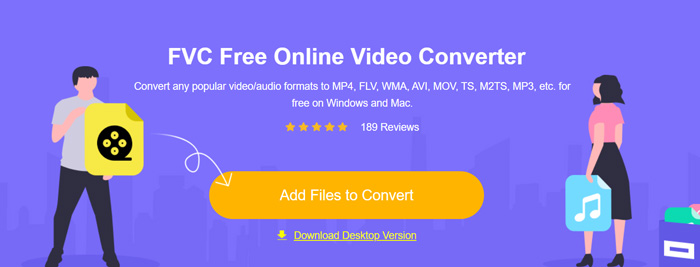
Step 2. After that, you can browse and select your WebM video from the pop-up window. In some cases, you need to click Add Files to Convert button again to manually upload the file. Then you will be taken to the converter window.
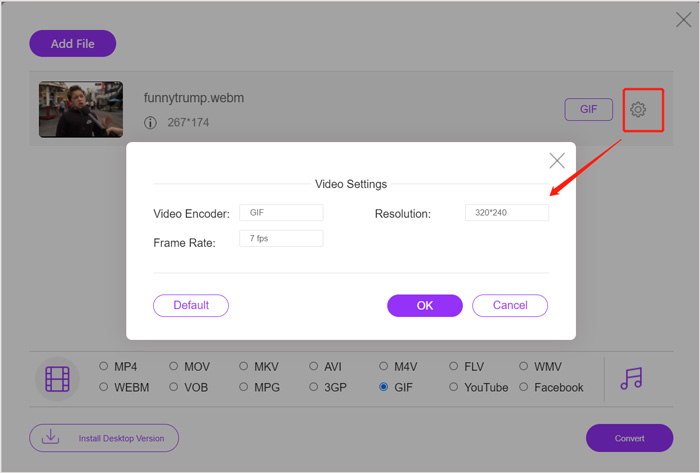
Step 3. Many frequently-used video formats are listed there. Here you should choose GIF as the output format. Click the settings icon next to the output GIF format, and you can custom video encoder, resolution and frame rate. Click OK to save the changes. After all these operations, you can simply click on Convert button to start the WebM to GIF conversion. As it mentioned above, it also enables you to convert MP4 to GIF easily.
Parte 2. Maneira Gratuita de Converter WebM para GIF sem Perda de Qualidade
Apart from online WebM to GIF converter, there are also other free GIF converters that can help you change WebM to GIF. Here we strongly recommend the Free Video to GIF Maker for you. It is specially designed to deal with various video and audio conversions. It enables you to convert WebM to GIF with no quality loss.
Free DownloadFor Windows 7 or laterSecure Download
Free DownloadFor MacOS 10.7 or laterSecure Download
Step 1. This WebM to GIF converter allows you to create your own GIFs on either a Windows 10/8/7 PC or a Mac. You can pick the right version based on your system, and then free install it on your computer.
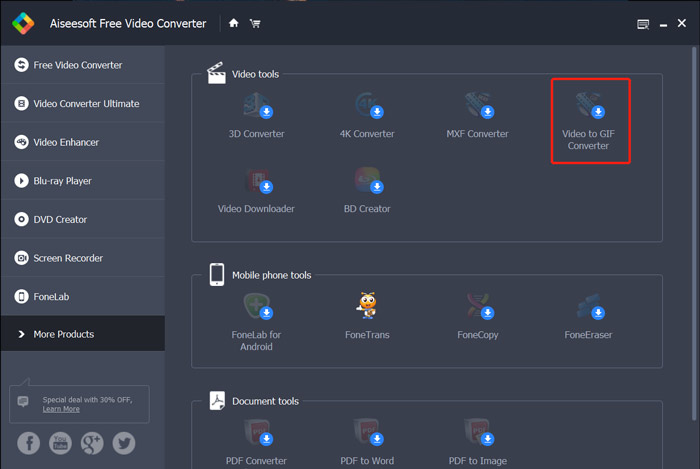
Launch it and click More Products on the left to display more tools. Locate the Video to GIF Converter and click its icon to get the installation.
Step 2. When the installation is finished, you will be guided to the Video to GIF Converter. Here you can click Add File to load your WebM file.
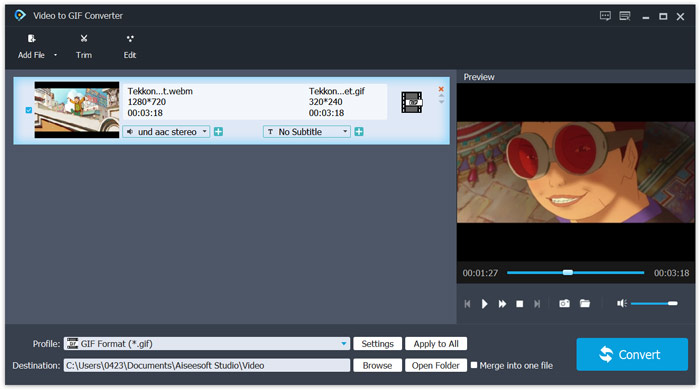
Step 3. This free WebM to GIF converter is equipped with many editing features, such as cut, merge, rotate, effect, watermark and more. Before the GIF conversion, you can use them to edit your file and adjust the output effects.
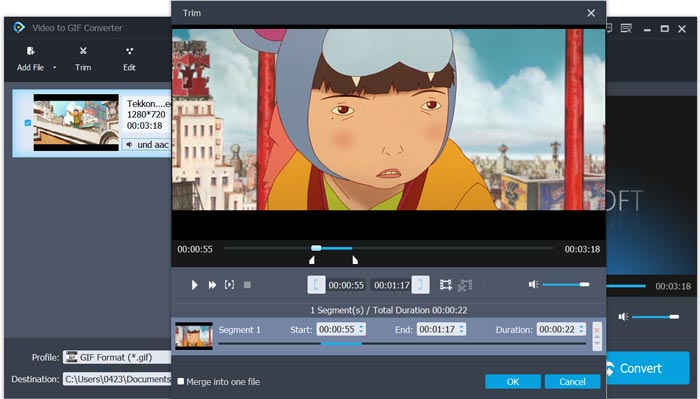
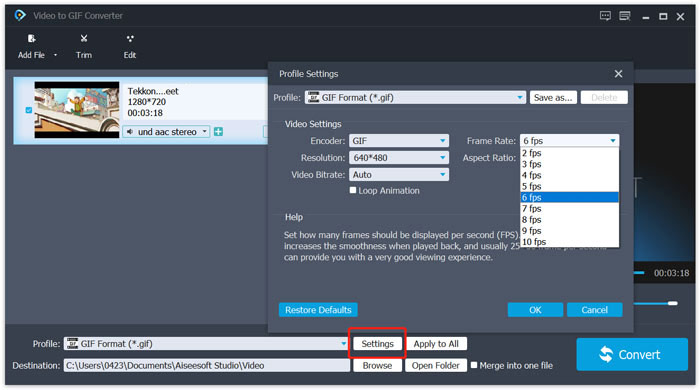
Step 4. The target format will be automatically set as GIF. You can click the click Settings button next to Profile to custom more options. After that, click on the Convert button to start converting WebM to animated GIF.
Parte 3. Como alterar WebM para GIF com ZAMZAR
Zamzar is an all-featured online file converter which can help you convert WebM to animated GIF with ease. It offers different converting services for users to convert videos, audio, documents, ebooks, and other files. It has a WEBM to GIF page for you to directly make the conversion from WebM to GIF.
Step 1. Navigate to this free online WebM to GIF converter page on your browser.
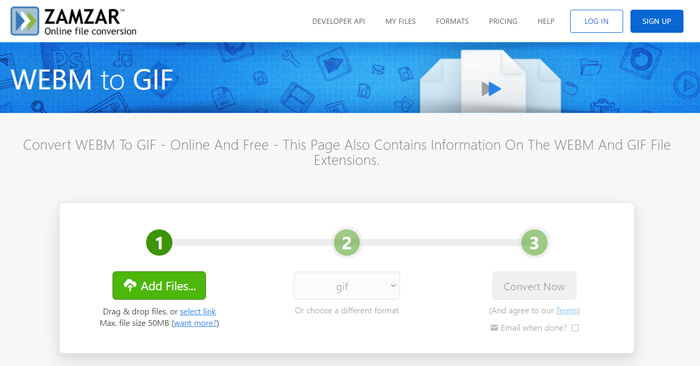
Step 2. Click the Add Files button to upload your WebM file. The uploading file size is limited to 50MB.
Step 3. Make sure the output format is GIF, and then click Convert Now button. This free online GIF converter will start the file uploading and converting process.
Step 4. When the converting process is complete, you can click Download to save the converted GIF file on your computer. The converted file will be stored in its services for 24 hours.
Parte 4. Perguntas frequentes sobre como converter WebM em GIF
Pergunta 1. O WebM é um GIF?
Não. WebM é um tipo de alternativa ao formato GIF. Comparado com o GIF, o WebM carrega uma qualidade muito maior e um tamanho de arquivo menor. Além do mais, o WebM permite que você controle sua reprodução como parar, iniciar, autoplay e loop. O GIF não exige que ninguém aperte o play.
Pergunta 2. Posso alterar a extensão do arquivo para transformar WebM em GIF?
Você pode alterar facilmente a extensão do arquivo WebM para .gif para fazer a conversão de WebM para GIF. Com este método, você pode finalmente obter um arquivo GIF. No entanto, na maioria dos casos, o arquivo GIF será corrompido e você não poderá abri-lo ou reproduzi-lo normalmente.
Pergunta 3. Por que os GIFs são de tão baixa qualidade?
A maioria dos GIFs são criados com baixa resolução e tamanho pequeno. Comparado com a imagem estática, é difícil manter uma série de imagens em movimento no mesmo tamanho de arquivo. Então, a maioria dos GIFs parece tão baixa qualidade. Por outro lado, os arquivos GIF podem ser compartilhados com frequência. Assim, o arquivo de origem será compactado e ficará pior cada vez que for salvo ou reenviado. Mas ainda existem muitos conversores de vídeo para GIF e os criadores de GIF podem exportar facilmente GIFs de alta qualidade.
Conclusão
Creating GIFs with WebM videos is easy. Here in this post, you can get 3 free methods to convert WebM to GIF on your computer or online free. With the converter recommended in this article, you can also convert FLV to GIF, too. When you want to change a video clip to animated GIF, you can pick your preferred tool to get the job done.
-
 Os 5 melhores gravadores de mouse e teclado para Windows e Mac
 Aqui estão os cinco melhores programas de gravador de mouse e teclado que podem salvar os movimentos do mouse e cliques do teclado e repetir os eventos.
-
 Tutorial para compactar GIF e reduzir o tamanho do arquivo com alta qualidade
 Aqui estão duas maneiras fáceis de compactar GIF em seu computador ou telefone celular. Você pode usar o FVC Free Online Video Compressor e o Photoshop para reduzir o tamanho do arquivo GIF em diferentes aspectos.
-
 GIF Player - 5 melhores reprodutores de GIF para Windows PC, Mac, Android e iPhone
 Qual programa abre arquivos GIF? Como faço para visualizar GIFs no Android? O iPhone tem um GIF player para abrir GIFs? Esta postagem compartilha 5 melhores jogadores de GIF para você.
