


 Video Converter Ultimate
 Gravador de ecrã
 Reparo de vídeo
 Secure Download
2 maneiras eficientes de converter arquivos WMV para GIF para compartilhamento fácil
Quando você corta os fragmentos interessantes e maravilhosos de vídeos WMV e deseja compartilhá-los com seus amigos, você os verá incapazes de enviar através de muitas plataformas. A melhor solução é converter segmentos WMV em arquivos GIF animados com tamanhos pequenos e alta compatibilidade com a web ou dispositivos portáteis. Dessa forma, você pode compartilhar facilmente seus momentos favoritos nos vídeos por meio de qualquer aplicativo.
This article will introduce the 2 best methods for you to convert WMV videos to GIFs with detailed steps. You can choose the professional way to solve all the problems or the easy way with simple steps but fewer functions. Please keep reading and learn more about them.

Parte 1: A melhor e mais eficiente maneira de converter vídeos WMV para GIFs gratuitamente
To make interesting GIFs from WMV videos in an efficient way, you should rely on the professional GIF maker - FVC Free Video to GIF Maker. It is actually a versatile video converter that can transform 100+ formats to any format, including converting WMV format to GIF. Moreover, it supports adjusting the video resolution and frame rate to keep high quality and fluency.
- 1. Transfira vídeos WMV para GIFs com simples cliques.
- 2. Apare e recorte os vídeos WMV para que permaneçam nas partes desejadas.
- 3. Personalize a resolução de vídeo, taxa de quadros e efeitos livremente.
- 4. Corte, coloque marca d'água, marca d'água e gire o WMV antes de criar GIFs.
Free DownloadFor Windows 7 or laterSecure Download
Free DownloadFor MacOS 10.7 or laterSecure Download
Step 1: Free download FVC Free Video to GIF Maker on Windows/Mac and launch it. Click the Add Files button to choose the desired WMV videos to convert to GIFs.
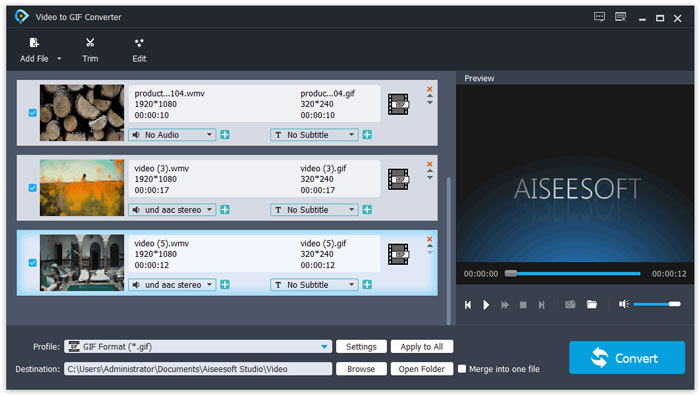
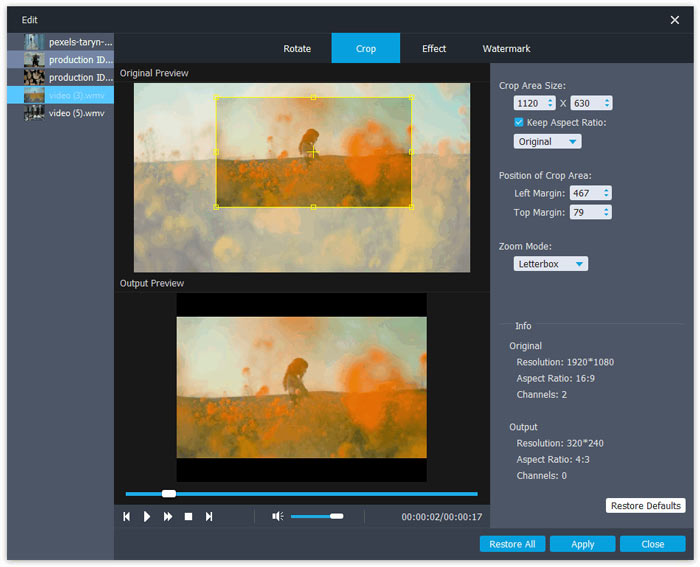
Step 2: Click the Edit button to clip the videos into short animations. You can also crop and rotate the videos freely. Then you can add the desired themes, effects, and subtitles freely.
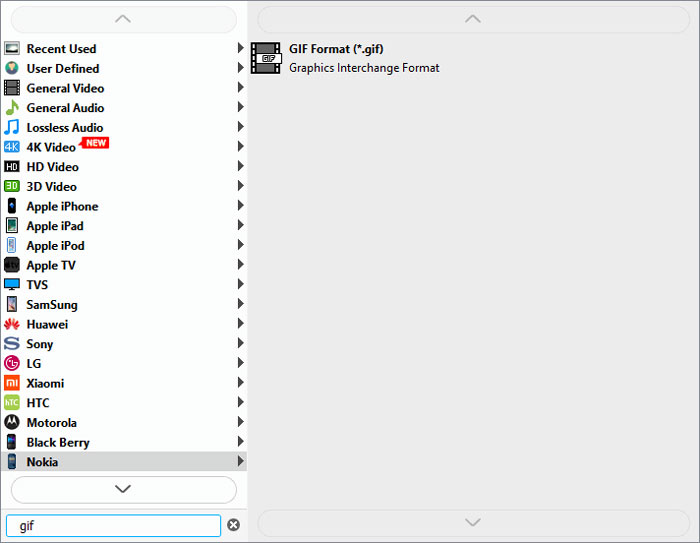
Step 3: Then you should click the Profile menu and choose the GIF format to export. To keep the quality and fluency of GIF files, click the Settings icon and change the resolution and frame rate to the highest one. Then go back to the main interface and click the Convert button to start transferring WMV to GIF.
Parte 2: Como transformar WMV para o GIF animado online gratuitamente facilmente
FVC Free Online Video Converter is very easy to use that can helps you convert WMV videos to animated GIFs online without downloading other software. It supports importing any format and exporting videos to more than 10 common formats. Regardless of the low resolution and frame rate of GIF settings, it’s the best choice for quick conversion. The detailed steps are introduced in the following:
Step 1: Open FVC Free Online Video Converter on any browser. Click the Add Files to Convert button to install the launcher. Then click the button again to add the edited WMV files and launch the converter.
Download the Desktop Version to convert files in batch.
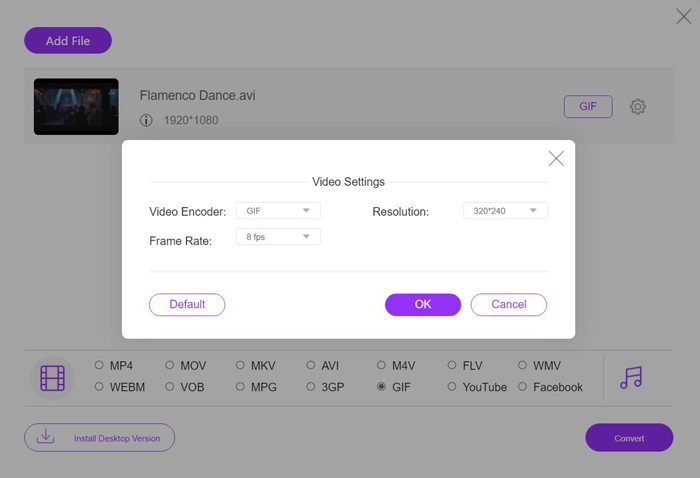
Step 2: Choose the GIF format in the video list, and then click the Settings icon to choose the 320X240p resolution and 8 fps frame rate. Then click the OK button to save the settings. After that, click the Convert button to choose the storage path and start transforming WMV videos to GIF files.
WMV vs. GIF
Produzido pela Microsoft, o WMV era um dos formatos de vídeo mais comuns nos anos 2000. Ele pode ser visto na web e reproduzido por vários players de mídia no Windows. E também é o formato de arquivo de vídeo padrão do Windows Media Player. Mas foi assumido por outros formatos recentemente.
GIF é um formato de imagem comum para gráficos da web. Além de salvar pequenas imagens e imagens que contenham texto, o GIF também pode conter e exibir animações básicas em sites. É um formato sem perdas e a compactação GIF não degrada a clareza da imagem.
Parte 3: Perguntas frequentes sobre como converter vídeos WMV em GIFs
1. Como transformar WMV em GIF com a qualidade original?
Na verdade, você não pode manter a qualidade original depois de converter WMV para GIF. O GIF suporta apenas cores de 256 bits, portanto, a qualidade da imagem é relativamente baixa e o tamanho do arquivo é pequeno. Mas você pode usar o FVC Free Video to GIF Maker para ajustar as configurações e manter a qualidade relativamente alta.
2. Por que não consigo enviar fragmentos WMV no Twitter?
Isso porque o Twitter suporta apenas os formatos de vídeo MP4 e MOV. Se você deseja compartilhar um fragmento de filme no Twitter, é melhor converter vídeos WMV em arquivos GIF compatíveis com tamanhos menores.
3. Devo excluir a faixa de áudio ao converter WMV para GIF?
Não, você não precisa fazer isso. Como o GIF é combinado apenas com várias imagens, ele não suporta arquivos de áudio. Quando você deseja transferir WMV para GIF, a faixa de áudio será apagada automaticamente.
Conclusão
GIF é muito popular agora, e você pode querer criar GIFs interessantes ou maravilhosos a partir de vídeos WMV. Este artigo apresentou 2 maneiras fáceis e eficientes de ajudá-lo a converter vídeos WMV em GIFs. Você pode transformar WMV em GIF online gratuitamente com ajustes básicos. Para manter a alta qualidade e fluência, faça o download gratuito do FVC Free Video to GIF Maker para alterar a resolução e a taxa de quadros.
-
 Conversor FLV para Xvid grátis - Converta FLV para Xvid para CD / DVD Player
 Este post é um guia passo a passo para converter gratuitamente arquivos FLV para Xvid codificados para que você possa reproduzir os arquivos de vídeo FLV em um CD e DVD player sem esforço.
-
 Como baixar o codec MKV no Windows Media Player para uma reprodução suave
 Não é possível reproduzir vídeo MKV no Windows Media Player? Você pode baixar gratuitamente o codec MKV para o Windows Media Player. Ao contrário, converta o MKV para torná-lo reproduzível no Windows Media Player.
-
 Como converter vídeos AVI em arquivos GIF animados no Windows / Mac
 Quer selecionar os segmentos AVI interessantes para criar memes GIF? Este artigo apresentará os 2 melhores métodos para recortar os vídeos AVI e converter arquivos AVI em GIF animados gratuitamente.

