


 Video Converter Ultimate
 Gravador de ecrã
 Reparo de vídeo
 Secure Download
Como converter BMP para PNG e JPGU usando conversores online e offline
Bitmap or BMP format is not optimal for colored images with blends or gradients. You won't see as many photos in it these days. Technically speaking, BMP is an outdated format with almost no compression. Hence, if you want to open BMP images without limitation, you need to convert BMP to common-used images. You can convert between several image formats in numerous ways. We shall outline the simplest and most straightforward approaches in this post. So, if you want to know how to convert BMP to JPG or PNG image format, read this post. We will introduce exceptional image converters that may help you.

Parte 1. BMP x JPG x PNG
| Formato de arquivo | BMP | JPG | PNG |
| Extensão de nome de arquivo | .bmp | .jpg | .png |
| Desenvolvido por | Microsoft | Grupo Conjunto de Especialistas em Fotografia | Grupo de Desenvolvimento PNG |
| Descrição | UMA BMP arquivo é a abreviação de bitmap e é pronunciado como colisão. A Microsoft criou o formato de arquivo BMP para seu sistema operacional Windows. É manter a resolução das imagens digitais em diversas telas e aparelhos. Podem ser armazenadas fotografias bidimensionais a cores e a preto e branco. Os arquivos BMP não são mais compatíveis apenas com dispositivos baseados no Windows nos tempos modernos. Eles agora são compatíveis com um grande número de dispositivos Mac e Android. | o JPG formato de arquivo de imagem é o mais eficaz para compactação de imagem. Os usuários usam amplamente arquivos JPG. Também é conhecido como arquivos JPEG ou JPG. O Joint Experts Group é o nome completo do JPEG. Além disso, a maioria das imagens de bitmap tem a extensão de arquivo.jpg. O objetivo principal é tornar os arquivos menores em tamanho. Como o JPG é um formato com perdas, a compactação excessiva afeta a qualidade das imagens. | Portable Network Graphics, um PNG extensão para a família raster, que realiza compactação sem perdas. Foi desenvolvido para substituir o GIF, o Graphics Interchange Format, e não é patenteado. Eles podem ser baseados em uma paleta e, normalmente, em imagens em tons de cinza que oferecem transparência. PNG é uma compactação sem perdas. Isso implica que ele mantém informações, especificidades e qualidade. |
Parte 2. Métodos online para converter BMP para JPG/PNG
Converta BMP para JPG/PNG usando o FVC Free Image Converter
To convert BMP to JPG for free online, you can use FVC Free Image Converter. This online tool has the most straightforward procedure to convert BMP to PNG or JPG. Because of its intuitive interface, advanced and non-professional users can use this converter. You can convert images in just three steps. In addition, you can upload any images with various file formats. It supports input formats like PNG, JPG, BMP, GIF, TIFF, and more. Additionally, the FVC image file converter supports the batch conversion process. It allows you to convert numerous images at once. This is much more effective and practical than other image converters on the market. It is convenient for all users because you can convert 40 image files simultaneously.
O FVC Free Image Converter garante uma imagem de alta qualidade. Após a conversão, a imagem ainda terá a mesma aparência do original. Além disso, você não verá anúncios perturbadores em sua tela, mesmo que seja um conversor de imagens online. Dessa forma, você pode se concentrar mais na conversão de suas imagens. Este conversor está disponível em quase todos os navegadores. Inclui Chrome, Safari, Edge, Firefox e muito mais. Você pode seguir as etapas simples abaixo para converter o formato BMP para JPG e PNG.
Step 1: Go to your browsers and visit the FVC Free Image Converter website. See the Convert to option and select your desired format. You can click the JPG or the PNG.
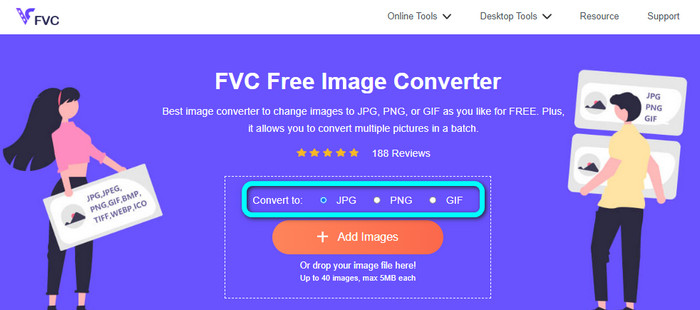
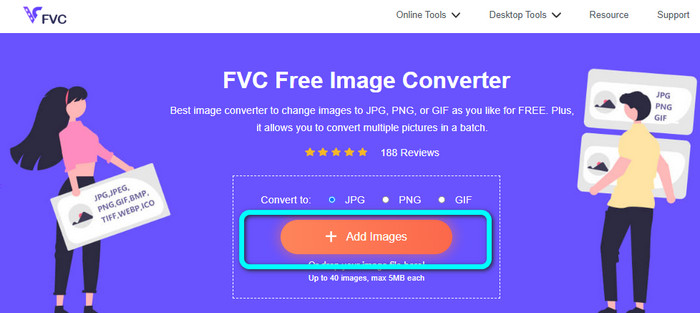
Step 2: Add the BMP image by clicking the Add Images button. Your computer file will appear on your screen. Choose the MBP image file you want to convert.
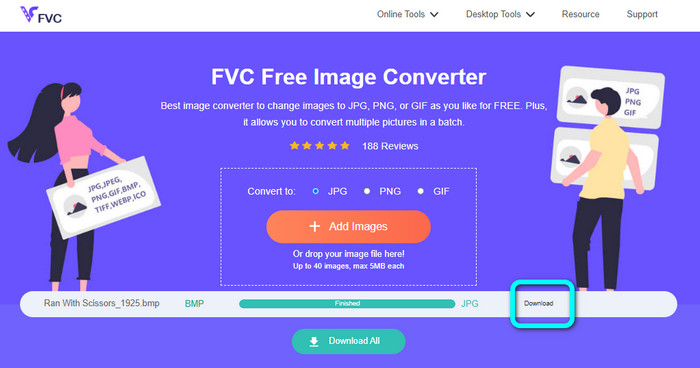
Step 3: After uploading, it will convert the photo automatically. So, for your last step, click the Download button to save your image on your desktop.
Converter BMP para JPG/PNG usando o Convertio
Convertio is another online tool to convert BMP to JPG or PNG. It is a file converter that allows you to convert various formats. It includes BMP, JPG, PNG, GIF, SVG, and more. With the assistance of this tool, converting numerous images is easy. It also offers a batch conversion process. This way, you can convert BMP to JPG by batch to save more time. In addition, Convertio guarantees your privacy. After converting your images, it will automatically delete your data after 24 hours. Also, you can access this converter on different browsers. You can use it on Google, Mozilla, Edge, etc.
No entanto, o Convertio tem desvantagens. Você só pode fazer upload de uma imagem de até 100 MB. Se você deseja um tamanho de arquivo ilimitado para carregar, adquira um plano de assinatura. Você também precisa de uma conexão com a Internet para operar este conversor.
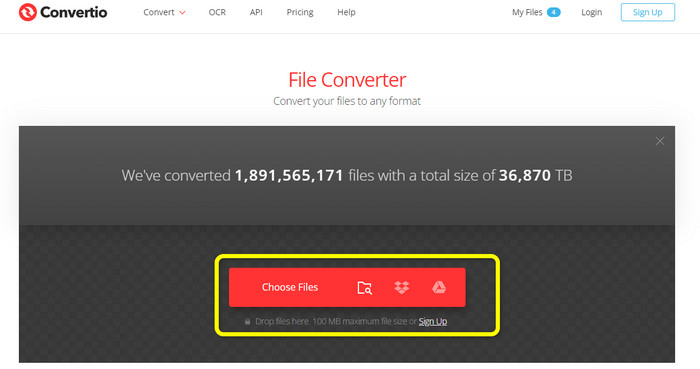
Step 1: Visit the Convertio website. Click the Choose Files button to add the BMP image file.
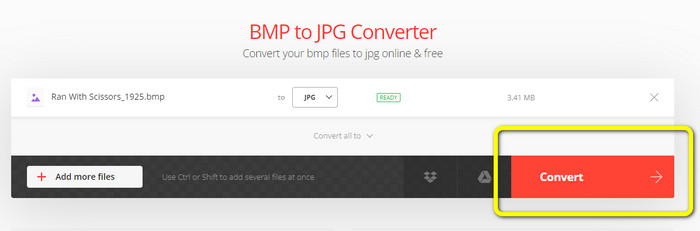
Step 2: Select the JPG or PNG file format from the format options. If you want to add more images, click the Add more files button.
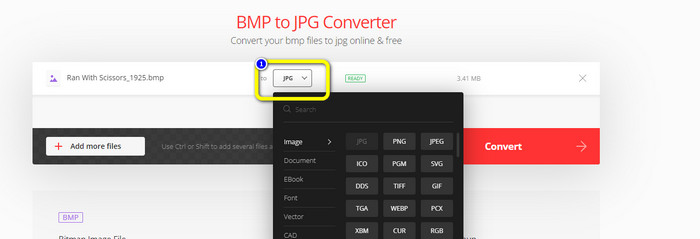
Step 3: After selecting your desired file format, click the Convert button. Wait for the conversion process and download your images on your computer.
Parte 3. Métodos off-line para converter BMP para JPG/PNG
You can also utilize Video Converter Ultimate to convert BMP to JPG. This offline converter has an understandable method of conversion. It also has an intuitive interface, making it suitable for all users, especially beginners. Video Converter Ultimate offers a batch conversion process. It means that you can convert multiple images simultaneously. It also offers a fast conversion process. With this feature, you can convert many files instantly. Moreover, it supports various image formats. It includes JPG, BMP, PNG, GIF, TIFF, and more. Besides converting, you can also change your photo’s quality from the output settings. This way, you can modify your image quality based on your preference. Aside from that, you can access this downloadable converter on both Mac and Windows computers. Follow the instructions below to convert your BMP file to JPG or PNG format.
Step 1: Download the Video Converter Ultimate on your Mac or Windows. Launch the program after the installation process. We also provided you with the converter by clicking the Download button below.
Free DownloadFor Windows 7 or laterSecure Download
Free DownloadFor MacOS 10.7 or laterSecure Download
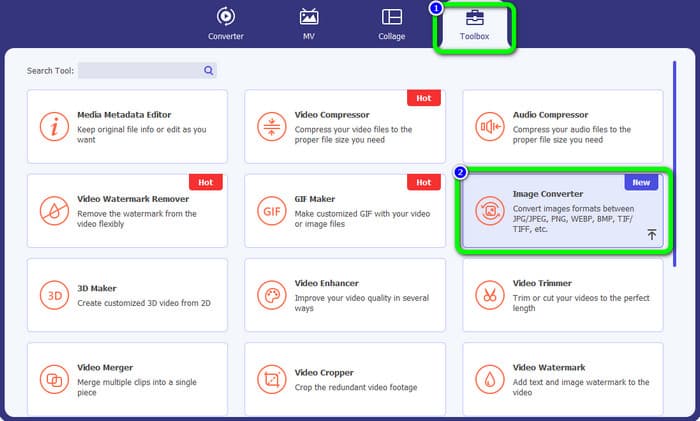
Step 2: Navigate to the Toolbox panel and select the Image Converter tool. Another interface will appear.
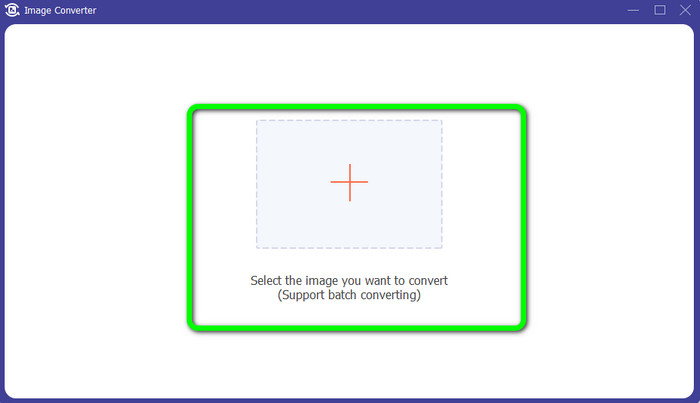
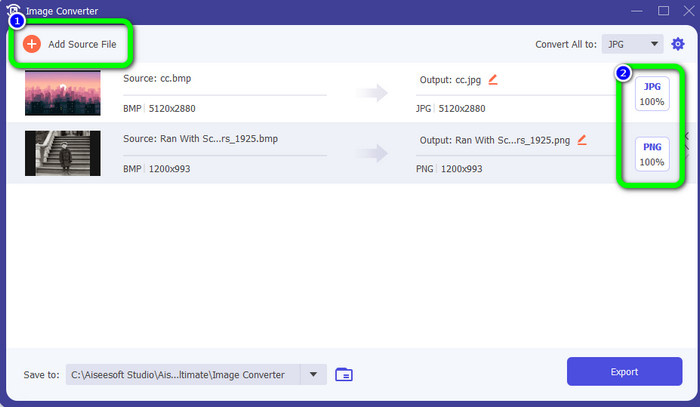
Step 3: Click the Plus symbol. Then, choose the BMP photo you want to convert from your file folder.
Step 4: Click the Add Source File button to add more files. Then, go to the format option to select your desired output format. You can select the PNG and JPG formats.
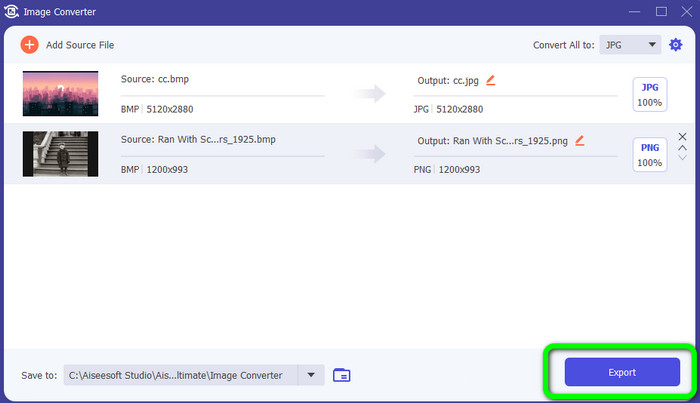
Step 5: For the final step, click the Export button. Wait for the conversion process. Then, open your converted images from your folder.
Parte 4. Perguntas frequentes sobre a conversão de BMP para JPG/PNG
1. Como converter em lote BMP para PNG?
If you want to do a batch conversion process, use FVC Free Image Converter. First is to select the PNG format from the Convert to option. After that, simply click the Add Images button. You can add multiple image files. It allows you to upload up to 40 images at once. Then, after the uploading process, the tool will convert your image files automatically. Then, to finish the process, click the Download All button to save them on your desktop.
2. Um arquivo BMP pode ser animado?
Infelizmente não. A animação geralmente não é compatível com arquivos BMP. Em vez de usar o Flash, pense em usar o formato de arquivo GIF. Ele pode fazer animações curtas e diretas que podem ser compartilhadas e salvas.
3. O que é maior, um arquivo BMP ou um arquivo JPEG?
Um BMP será maior com fotos comparáveis. Mas um BMP só pode ter até 4 GB devido a restrições de tamanho. O tamanho de um JPEG é irrestrito. Por exemplo, algumas imagens de satélite estão disponíveis no formato JPEG.
Conclusão
Since a BMP file has a larger file size, it is necessary to convert them to other formats like JPG and PNG. You are grateful because this article provided excellent methods to convert BMP to JPG and PNG formats. But, if you prefer an easy and free way to convert images, use FVC Free Image Converter.
-
 Maneiras completas de converter JPG para PNG online e offline
 Procurando métodos úteis para converter o formato de arquivo JPG para PNG? Este guia tem a resposta que você precisa. Para descobrir esses métodos, leia o artigo
-
 Converta JPEG para JPG com eficiência [Cinco métodos listados]
 Venha e obtenha os tutoriais mais diretos sobre a conversão do formato de arquivo de imagem JPEG para JPG. Clique neste guia e comece a aprender seus métodos preferidos
-
 Os 5 principais tutoriais para converter PNG para JPG rapidamente
 Se você precisar converter seu arquivo PNG para o formato JPG, poderá aprender as melhores maneiras aqui. Você também aprenderá a diferença entre os formatos de arquivo PNG e JPG
