


 Video Converter Ultimate
 Gravador de ecrã
 Reparo de vídeo
 Secure Download
Maneiras fáceis de alterar JPG para PNG que você não pode perder
Files that have .png and .jpg are image files. These file formats contain photographs, drawings, screenshots, and visual information. It also includes other types of media. Since they are two different file formats, each has its capabilities. You are lucky if you want to learn detailed data about these file types. This guidepost will give you enough information about JPG and PNG file formats. In addition, you will also discover the best ways to convert your JPG image to PNG format. We will provide helpful online and offline tools you can use. Also, you will learn about their advantages and disadvantages. This way, you will get an idea of what image converter is the most effective for you. Read this guidepost and gain all the information you can learn on how to convert JPG to PNG.

Parte 1. Detalhes completos sobre os formatos de arquivo JPG e PNG
Qual é o formato JPG?
Joint Photographic Experts Group, JPG, é um formato popular que utiliza um algoritmo. Comprime gráficos e fotografias. Este formato de arquivo oferece compactação considerável, tornando-o amplamente útil. JPG tem um tamanho pequeno, o que é excelente. É perfeito para compartilhar pela internet e usar sites. Um arquivo JPG suporta compactação com perdas e cores de 24 bits. Além disso, pode exibir 16,8 milhões de cores, mantendo um tamanho pequeno. Também é perfeito para exibição fotográfica. Os fotógrafos usam o formato de arquivo JPG. É para fotografar um formato bruto para garantir a captura precisa de uma imagem. Por ser pequeno, os usuários podem abrir a imagem mais rapidamente na maioria dos navegadores. Além da exibição fotográfica, esse formato também é adequado para publicação na web. O arquivo JPG é útil para blogueiros e editores. Ele oferece um tempo de carregamento de página mais rápido para que os espectadores possam acessar o conteúdo instantaneamente.
Prós
- O tamanho pequeno do arquivo permite a transferência instantânea.
- A saturação e o balanço de branco em JPG são definidos.
- Este formato de arquivo é reconhecível em todos os navegadores.
- Ele pode oferecer uma resolução de imagem de alto nível.
Contras
- A compressão deteriora a qualidade da imagem.
- Este formato de arquivo não é adequado para imagens com texto ou bordas nítidas.
- JPG não suporta imagens em camadas.
Qual é o formato PNG?
Um gráfico de rede portátil, PNG, é um tipo de arquivo de imagem raster. Este formato é a evolução do formato GIF. Em 1995, Oliver Fromme criou o formato PNG para fazer o que o GIF não pode fazer. O formato PNG é livre de patentes e possui uma paleta de cores mais extensa, ao contrário do GIF. O PNG é um dos arquivos de imagem mais populares da época. É, sem dúvida, popular entre os web designers. Ele pode lidar com fundos semitransparentes e transparentes. Você pode fazer ilustrações, criar um site, criar fotografias e muito mais. Por exemplo, se você deseja colocar uma foto sobre o logotipo, tudo o que você pode fazer é recortar o logotipo. Como o arquivo não é patenteado, você também pode abrir PNG sem licença em qualquer software de edição de imagem. Além disso, esse formato usa compactação sem perdas. Isso significa que a compactação não afeta a qualidade da imagem.
Prós
- O formato de arquivo PNG pode lidar com imagens mais detalhadas.
- Nenhuma patente existe, então você pode abrir as imagens PNG em todos os programas.
- Após a compactação, a imagem PNG não perderá nenhum dado.
Contras
- PNG tem um tamanho maior que JPG e GIF.
- Este arquivo não oferece suporte aos modos de cores CMYK.
- Tem uma capacidade de resposta e tempos de carregamento de página mais lentos.
Parte 2. Maneiras eficazes de converter JPG para PNG
Maneira 1. Como converter JPG para PNG usando FVC Free Image Converter
Converting JPG to PNG is easy when using FVC Free Image Converter. This web-based converter offers a simple conversion process. You can convert your JPG file to PNG format in just steps. Users, especially beginners, can easily use this tool with its intuitive interface. It also has a fast conversion process, making it convenient for all users. Moreover, you can do a batch conversion process. It means that you can convert multiple image files at once. You can also access this online software in all browsers. It includes Google, Explorer, Safari, Edge, and more. The software is also free and safe to use. It automatically deletes your data after converting and saving the images.
Prós
- Adequado para iniciantes.
- Ele oferece uma interface fácil de entender.
- Acessível em todos os navegadores.
- 100% Grátis.
- Ele fornece um processo de conversão em lote.
Contras
- Requer uma conexão com a Internet para usar o conversor de imagens.
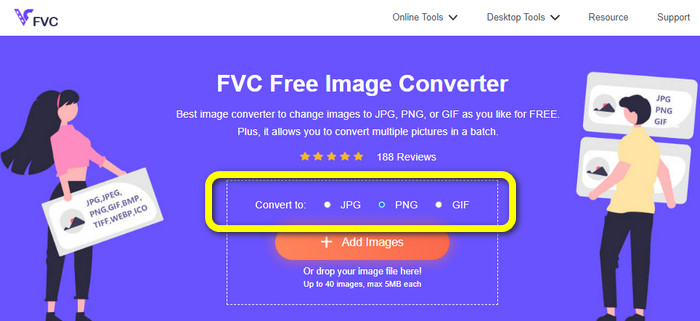
Step 1: Visit the website of FVC Free Image Converter. Navigate to the format options and choose the PNG format.
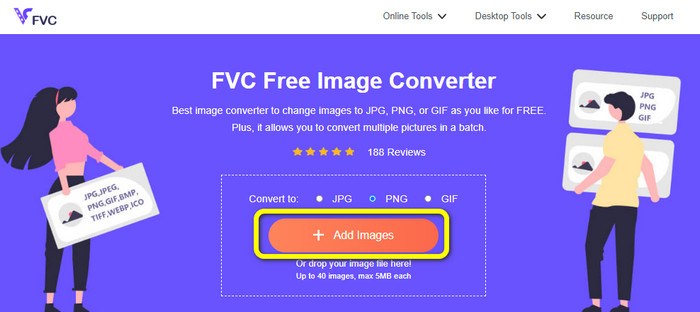
Step 2: Click the Add Images button to add the JPG image you want to convert.
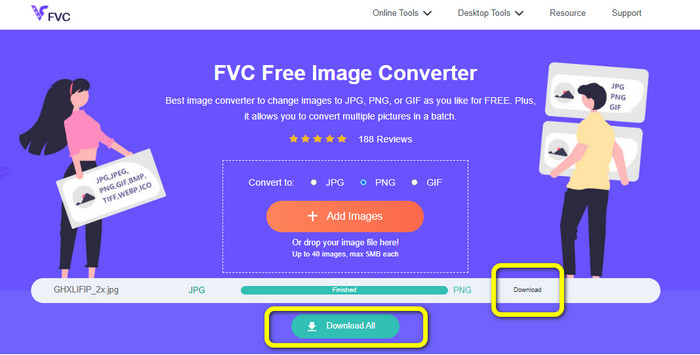
Step 3: After uploading the JPG image, it will proceed to the conversion process. Wait for a second and click the Download button to save the image.
Caminho 2. Como converter JPG para PNG usando o FreeConvert
FreeConvert is another image converter you can use online. It can help you to convert JPG to PNG online. Also, with its easy-to-follow procedure, the conversion process becomes easy. It is suitable for all users, particularly beginners. Moreover, a batch conversion process is available on this software. This way, you can convert many files simultaneously to save more time. Aside from the PNG format, it also supports BMP, TIFF, GIF, and more. However, the free version has limitations. The maximum file size is 1GB. You must buy a subscription plan to get a bigger maximum file size. Also, annoying ads are always showing up on the screen.
Prós
- O processo de conversão em lote está disponível.
- Fácil de operar.
Contras
- Ele precisa de uma conexão com a internet para usar o software.
- Anúncios irritantes estão sempre aparecendo na tela.
- Obtenha a versão paga para aproveitar mais ótimos recursos.
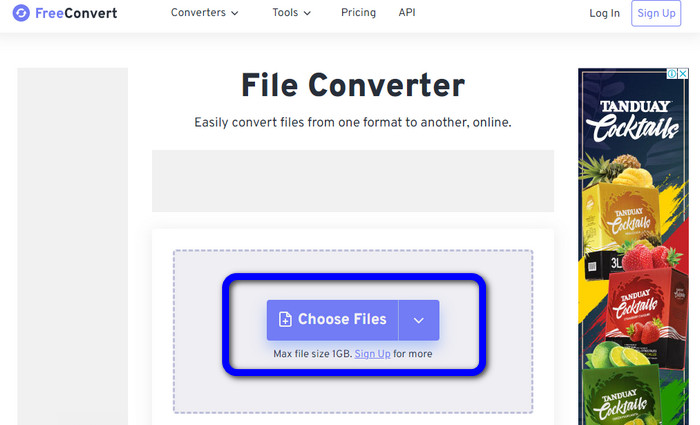
Step 1: Go to the FreeConvert website. Click the Choose Files button to upload the JPG image.
Step 2: Go to the Output option and choose the PNG file format.
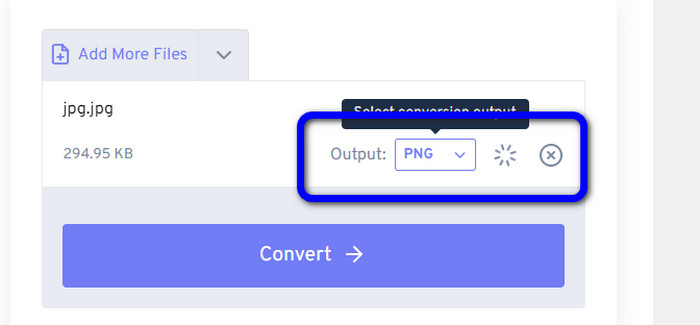
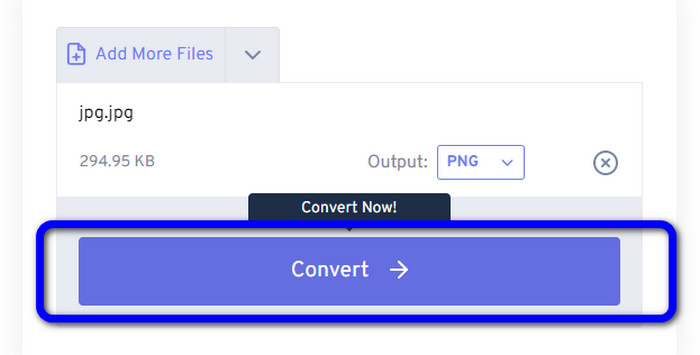
Step 3: Click the Convert button to proceed with the conversion process. Then, after the conversion process, save the image to save it on your computer.
Caminho 3. Como converter JPG para PNG usando JPG para PNG
Another online tool you can use to convert JPG to PNG is JPG to PNG. It allows you to upload images with up to 50MB file size. In addition, you can convert up to 20 JPG images you desire to convert at once. Also, this web-based software is easy to use. This way, professional and non-professional users can be able to convert images. It supports various image file formats, including HEIC, WebP, JPG, and more. However, there are some instances when this converter is not performing well. There are also some disturbing ads while converting images. You also need internet access to convert image files.
Prós
- Perfeito para usuários não profissionais.
- Ele pode converter 20 imagens de uma só vez.
Contras
- Os anúncios são irritantes.
- Às vezes, o conversor não está funcionando bem por algum motivo.
- Você precisa de uma conexão com a internet para usar a ferramenta.
Step 1: Visit the official website of JPG to PNG. Click the Upload Files button to insert the JPG image.
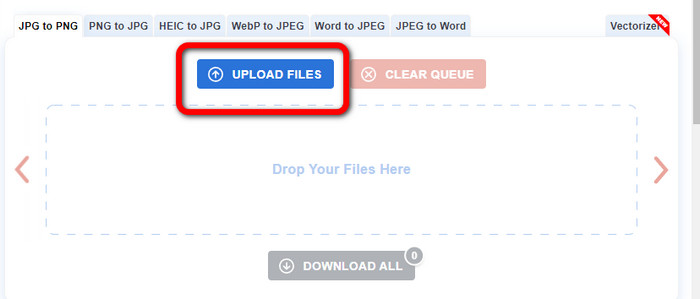
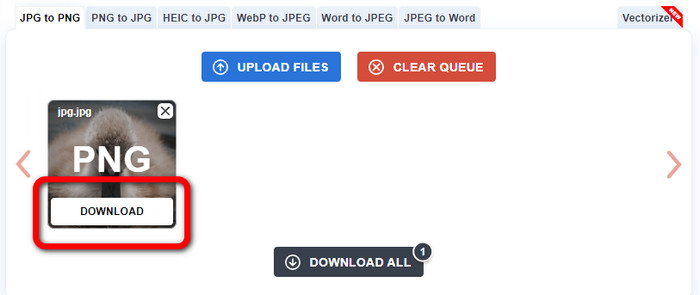
Step 2: After uploading the JPG image, it will automatically convert it to PNG. Click the Download button after the conversion process.
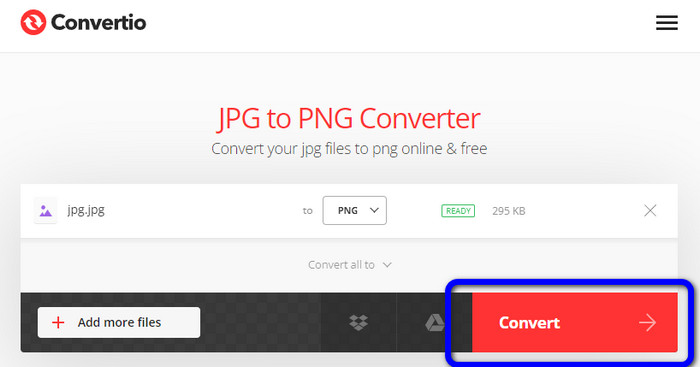
Caminho 4. Como converter JPG para PNG usando o Convertio
Convertio is also an image converter you can use online. This converter lets you convert JPG to PNG with a trouble-free method. You can convert image files in a few clicks. Also, with the help of its intuitive interface, you can follow the instructions easily. It also supports other image formats besides PNG. This converter supports JPG, SVG, GIF, TIFF, BMP, and more. However, using the free version, you can only upload an image with a maximum file size of 100 MB. So, if you want to convert more image files, purchase a subscription plan.
Prós
- O processo de conversão é fácil, adequado para iniciantes.
- Ele suporta vários formatos de imagem, como PNG, JPG, TIFF, BMP, SVG e muito mais.
Contras
- O tamanho máximo do arquivo para upload na versão gratuita é de apenas 100 MB.
- É necessária uma conexão com a Internet.
Step 1: Go to the website of Convertio. Click the Choose Files button to upload the photo.
Step 2: Select the PNG format from the format options.
Step 3: Hit the Convert button to convert the JPG image to PNG.
Caminho 5. Como converter JPG para PNG usando o Canva
Canva is an online converter you can use to turn JPG to PNG. You can convert your files here without losing any quality. You can access this converter in all browsers, making it convenient for all. But, if you don’t have a subscription plan, the features you can use are limited. So, purchasing the tool is the best way to enjoy its full functions.
Prós
- Acessível a todos os navegadores.
- Converta arquivos sem perder a qualidade.
Contras
- Ele precisa de uma conexão com a Internet para converter arquivos de imagem.
- Adquira a ferramenta para aproveitar mais ótimos recursos.
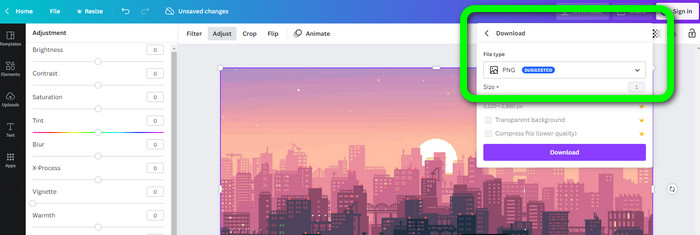
Step 1: Open your browser and go to the Canva website. Click the Upload your image button on the center interface.
Step 2: After you upload the photo, go to the Download button. Then, select the PNG format on the File type option.
Maneira 6. Como converter JPG para PNG usando JPG to PNG Converter
An application called JPG to PNG Converter is also an online-based tool. This program is good for converting images efficiently. You can convert files in a few seconds because it has a fast conversion process. This image converter is also available in all browsers. Unfortunately, there are times when the converter is not operating. Also, the image quality changes after the conversion process.
Prós
- A ferramenta é fácil de usar.
- Oferece um processo de conversão rápido.
Contras
- Às vezes, o software não está funcionando bem.
- Após o processo de conversão, a qualidade da imagem muda.
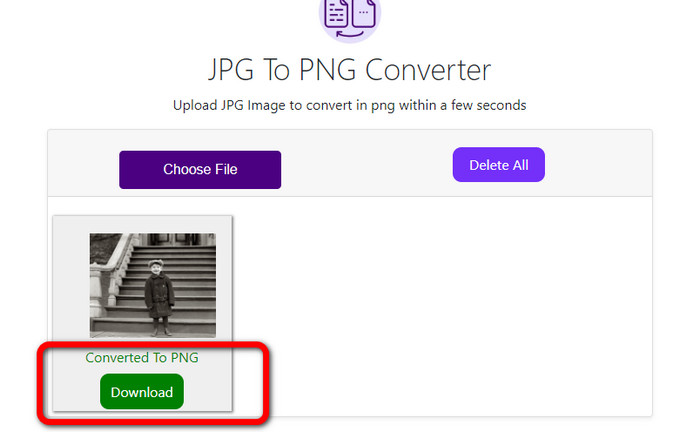
Step 1: Click the Choose Files button to add the JPG photo.
Step 2: Click the Download button to save your photo on your device.
Caminho 7. Como converter JPG para PNG usando o Video Converter Ultimate
If you are looking for a JPEG to PNG converter, use Video Converter Ultimate. It is a free download software. This image converter offers an intuitive interface with basic techniques to convert JPG to PNG. This way, professional and skilled users are capable of utilizing this software. In addition, it has a fast conversion process. You can convert image files in a few seconds. The best thing about this program is that you can convert multiple images simultaneously. This way, you can save more time and convert more images. It also supports numerous image files, such as TIFF, WebP, BMP, JPG, etc.
Prós
- Ele oferece uma interface intuitiva com etapas simples, tornando-o adequado para todos os usuários.
- Grátis para baixar.
- O processo de conversão em lote está disponível.
- Acessível em computadores Windows e Mac.
Contras
- Obtenha a versão paga para experimentar recursos mais incríveis.
Step 1: Download the Video Converter Ultimate on your Mac or Windows. Then, run the software.
Free DownloadFor Windows 7 or laterSecure Download
Free DownloadFor MacOS 10.7 or laterSecure Download
Step 2: Go to the Toolbox panel and choose the Image Converter function.
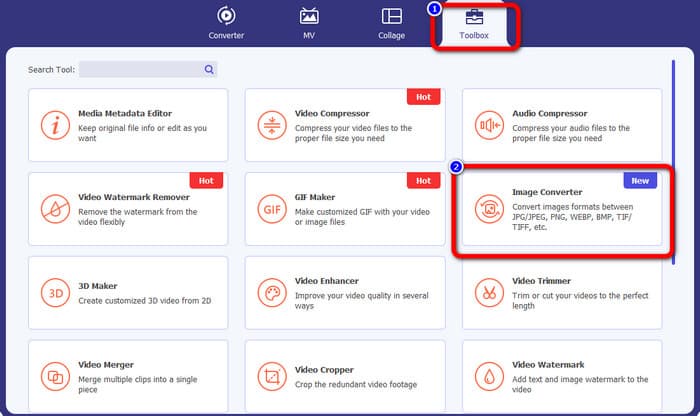
Step 3: Click the Plus icon to attach the JPG image.
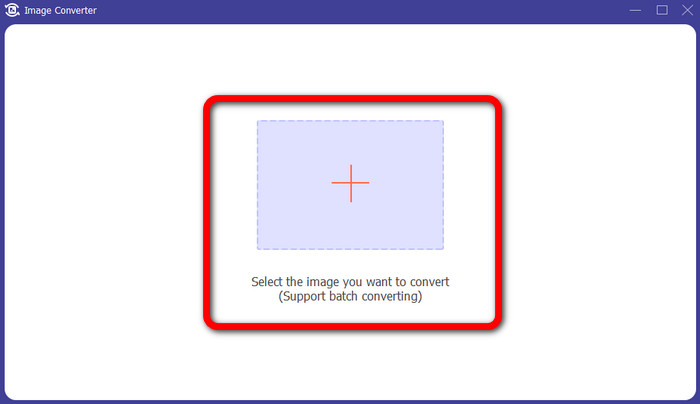
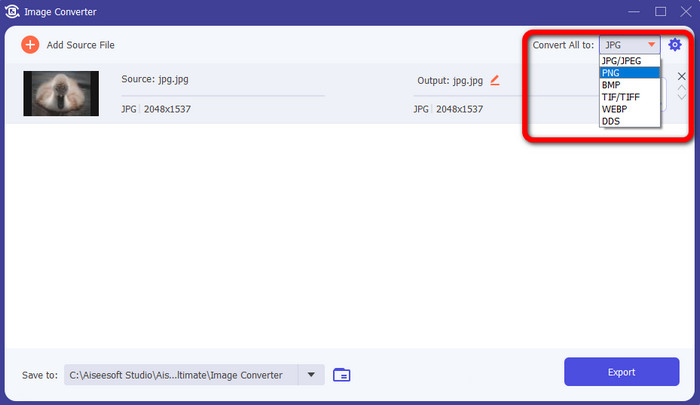
Step 4: Select the PNG format from the format options in the upper right corner of the interface.
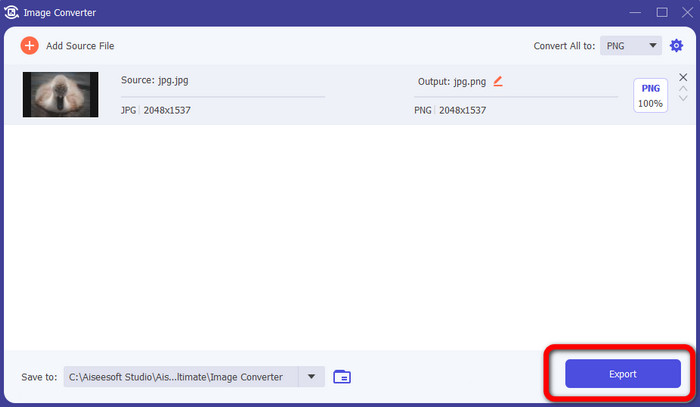
Step 5: Afterward, click the Export button. Wait for the conversion process; you can open your file from your folder.
Maneira 8. Como converter JPG para PNG usando BitRecover JPG Converter Wizard
Another offline tool to convert JPG to PNG is BitRecover JPG Converter Wizard. This software is suitable for Windows. Also, it is free to download. With the assistance of this software, you can convert your JPG image to PNG accurately. However, this software is hard to use. It has a confusing process, making it complicated for beginners. The installation process is too slow, which is time-consuming.
Prós
- Gratuito para download.
- O aplicativo é adequado para Windows.
Contras
- Inadequado para usuários não profissionais.
- O processo de instalação é complicado.
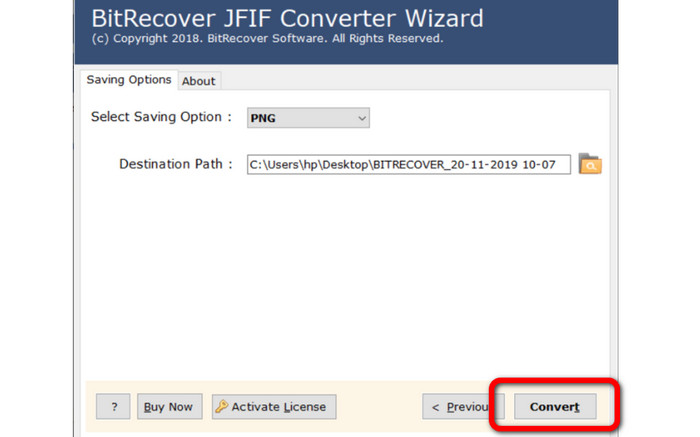
Step 1: Install the tool on your computer. Click the Select Files or Select Folders to attach the JPG image.
Step 2: Then click the Next button. After that, go to the format options and select the PNG file format.
Step 3: Click the Convert button to start the conversion process.
Parte 3. Perguntas frequentes sobre como converter JPG para PNG
1. Por que você deve converter JPG para PNG?
Se você deseja criar suporte para transparência, converter JPG para PNG é a melhor escolha. Além disso, se você deseja editar imagens ou adicionar camadas, uma imagem PNG é adequada.
2. Qual é a maneira mais direta de converter imagens JPG em PNG?
Use FVC Free Image Converter. It offers a simple method to convert JPG to PNG format. This way, even non-professional users can use this image converter online.
3. PNG é melhor que JPG?
Se você planeja editar suas imagens usando um software de edição de fotos, o formato PNG é melhor. Mas, se você quiser um arquivo de imagem pequeno, pode usar o formato JPG.
Conclusão
There you go! These are the most effective methods on how to convert JPG to PNG. This article also gave you their advantages and disadvantages. This way, you will get other essential information about each image converter. But, if you prefer software with a simple method, accessible and safe converter, use FVC Free Image Converter. If you want to convert image files using your computer, use Video Converter Ultimate. It offers an intuitive interface, which is perfect for everyone.
-
 Métodos sobre como converter imagens para JPG online e offline
 Deseja converter o arquivo para o formato JPG por algum motivo? Então esse artigo é para você. Ensinaremos o melhor método para converter sua imagem para JPG
-
 Métodos úteis para converter facilmente imagens para o formato PNG
 Você está procurando a melhor maneira de salvar sua imagem como PNG? Este guia oferece excelentes soluções para você converter imagens em PNG online e offline
-
 Detalhes completos sobre as diferenças entre JPEG e JPG e PNG
 Esta postagem fornecerá informações suficientes sobre as diferenças entre JPEG e JPG e PNG. Além disso, você aprenderá como converter imagens nesses arquivos.
