


 Video Converter Ultimate
 Gravador de ecrã
 Reparo de vídeo
 Secure Download
Maneiras definitivas de converter PNG para JPG usando conversores notáveis
PNG file format has a bigger file size than other formats. One disadvantage is uploading, downloading, or sharing files on websites. The loading process is too slow, making it time-consuming. On the other hand, a JPG file has a smaller file size compared to PNG. This way, it is quicker to save and upload images on the web. It will also become easy to open on other applications and devices. Fortunately, this article will give you enough information about converting PNG to JPG. To convert, you will need the help of reliable image converters. In addition, you will learn the definition of these formats. Read this post if you want to change your PNG images to JPG format.

Parte 1. Introdução ao PNG e JPG
O que é PNG
PNG, ou Portable Network Graphics, é um formato raster sem perdas. É uma nova variação do formato GIF. Profundidades de cor mais altas estão disponíveis, exibindo milhões de matizes. Um dos formatos de imagem predominantes hoje é o PNG. Salvar os formatos de imagem RGBA e RGB com base na paleta é uma das características do PNG. Além disso, ele tenta transferir fotos online. PNG também é frequentemente usado para impressão. A maioria das pessoas utiliza esse arquivo específico. Além disso, esse formato de imagem é comumente usado por especialistas em gráficos da web. Para cenários com cores transparentes, eles também usam o formato PNG. O tamanho reduzido do arquivo desse formato é outra vantagem. Mesmo assim, quase não há degradação da qualidade visual. Pode produzir a mesma qualidade que o original. PNG oferece muitas vantagens. Devido à compressão, é assegurada uma excelente qualidade de imagem.
O que é JPG
Joint Photographic Experts Group cria formato de arquivo JPEG. É um dos formatos de arquivo de imagem padrão na internet e em outros dispositivos. 10:1 a 20,1 é a taxa de compressão. A extensão com perdas é feita com a extensão. Mas, a taxa de compressão é ajustável. Isso atingirá um equilíbrio entre a qualidade da imagem e o espaço de armazenamento. Plataformas de compartilhamento fotográfico e câmeras digitais usam a extensão JPEG. JPEG tem várias vantagens. Você pode usá-lo para obras de arte e fotografias. É por causa da adaptabilidade na edição raster. É possível imprimir obras de arte e fotografias em alta resolução e baixa compactação.
Parte 2. Como converter PNG para JPG online
Converta PNG para JPG usando o FVC Free Image Converter
FVC Free Image Converter is one of the ultimate tools you can use. It is capable of converting PNG to JPG effortlessly. It offers an understandable interface and steps, making it perfect for users. Also, if you want to convert multiple PNG files to JPG, it is possible. This image converter can do a batch conversion process. You can also save multiple converted files in a single click. Aside from that, it supports other input file formats, including PNG, BMP, TIFF, GIF, and more. One of the good sides of this tool is it has no disturbing ads. Its interface is clean, so you can focus on converting files. You also don’t need to install this converter. You can operate it directly on your browser. Also, the image quality will remain the same as the original file after conversion. This way, you can ensure that your final is satisfying to view and use. FVC Free Image Converter protects your privacy. It won’t save your data after the conversion process.
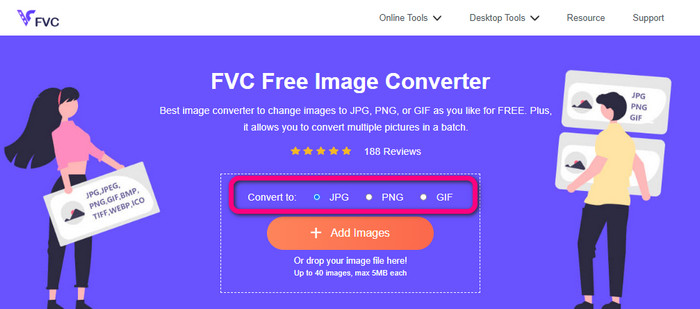
Step 1: Visit the FVC Free Image Converter website on your browser. Click the JPG file format from the format option.
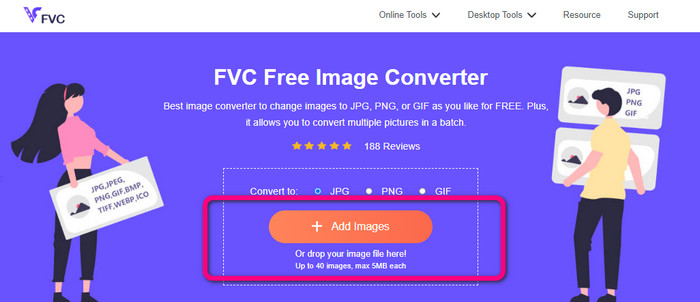
Step 2: Click the Plus icon or Add Images button to add the PNG image. You can also drop the image file on the box. After that, it will convert the image automatically.
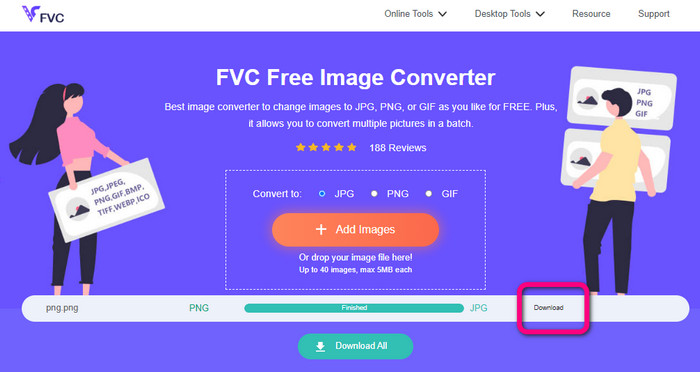
Step 3: For the last step, click the Download button to save your final image on your computer.
Converta PNG para JPG usando o Canva
Another online method to convert PNG to JPG is using Canva. This online tool has a friendly user interface, making it easy to understand. The conversion process is also easy to follow, which is suitable for beginners. It can provide a fast conversion process, converting many files as you want. Canva is accessible in all browsers, including Google, Firefox, Edge, and more. Aside from that, while you are converting images, there are more things you can do. You can crop and resize your photo. You can also add icons, stickers, etc. This way, you can enhance your images while changing the file format. However, even though Canva is a great tool, it has disadvantages. Using the free version has many restrictions. There are limited features, cloud storage, editing tools, and more. You need to purchase a subscription plan to enjoy unlimited and great features. Also, since it is an online image converter, you need an internet connection.
Step 1: Open Canva on your web browser or app to access PNG to JPG converter. Use a pre-made template or a blank layout to start your design project.
Step 2: Drag and drop the PNG file you want to use onto the page or choose it from your device.
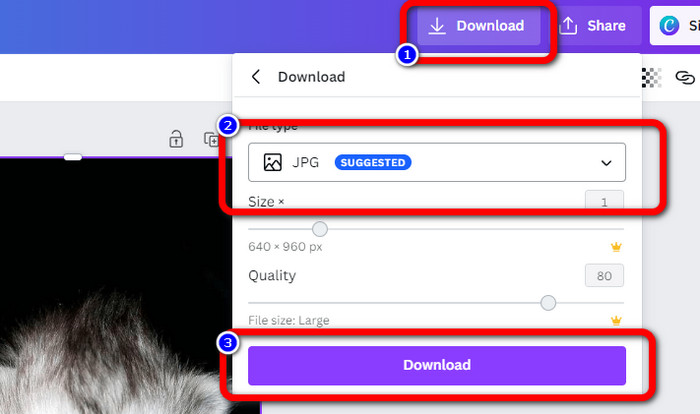
Step 3: Go to the upper right corner of the dashboard and click the Download button. Then, select the JPG format as your desired output format. Then click the Download button once again to save your image on your desktop.
Converter PNG para JPG usando o Convertio
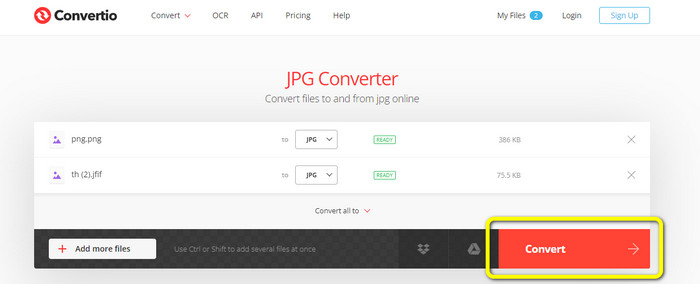
Convertio is also capable of converting PNG to JPG. With the assistance of this online image converter, you can quickly turn your PNG into JPG. Convertio offers you a simple way to convert images. Its user-friendly interface makes it more understandable for all users, especially beginners. In addition, it supports various image formats, such as PNG, GIF, BMP, SVG, and more. This image converter also supports a batch conversion process. With this excellent feature, you can instantly convert multiple images simultaneously. Furthermore, aside from images, you can also convert video, audio, and document files. This way, you don’t need to look for another online tool. However, using the free version can only upload up to 100MB. You need to purchase a subscription plan to add the maximum file size. You can also purchase the expensive plan to experience unlimited.
Step 1: Go to your browser and search Convertio. When you are on the main webpage, click the Choose Files button. Open the PNG photo from your computer file to upload.
Step 2: If you want to do a batch conversion process, click the Add more files button. It lets you upload more image files. Then, from the format options, select the JPG file as your output format.
Step 3: After uploading and setting up the output format, click the Convert button. The conversion process will start immediately. After the process, click the Download button to save them on your assigned file location.
Parte 3. Como Transformar PNG em JPG Offline
Converta PNG para JPG usando o Video Converter Ultimate
Video Converter Ultimate is one of the most outstanding image converters offline. This downloadable converter lets you convert PNG to JPG quickly. It offers a fast conversion speed so that you can convert numerous files in a short period of time. In addition, you can convert multiple files at once because it has a batch conversion process. Video Converter Ultimate also supports various image formats. It includes PNG, BMP, WEBP, TIF, and more. This offline image converter has an intuitive interface and simple steps for conversion. This way, professional and non-professional users can convert images effortlessly. Moreover, you can access this converter on both Mac and Windows computers. Use the simple steps below to convert PNG to JPG on Mac or Windows using Video Converter Ultimate.
Step 1: Download the Video Converter Ultimate on your Windows or Mac. Run the program after the installation process. You can hit the Download button below to access the converter.
Free DownloadFor Windows 7 or laterSecure Download
Free DownloadFor MacOS 10.7 or laterSecure Download
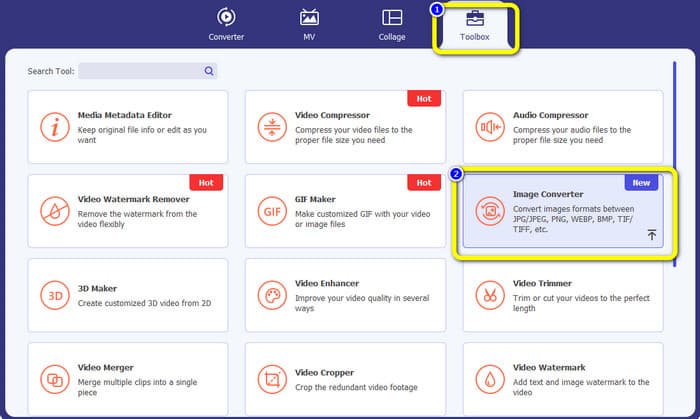
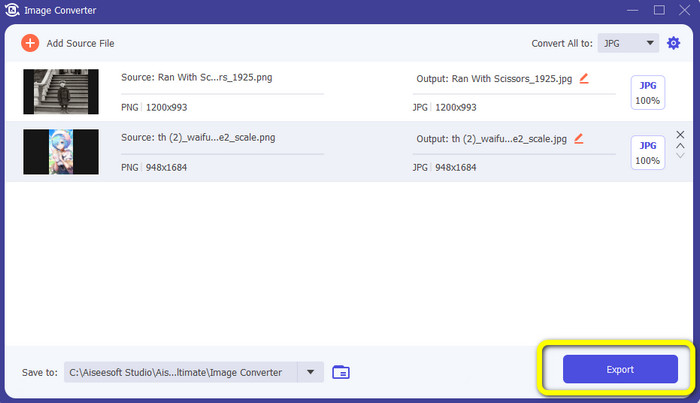
Step 2: Select the Toolbox panel when the interface shows up on the screen. Then, choose the Image Converter Tool. After clicking it, another interface will appear.
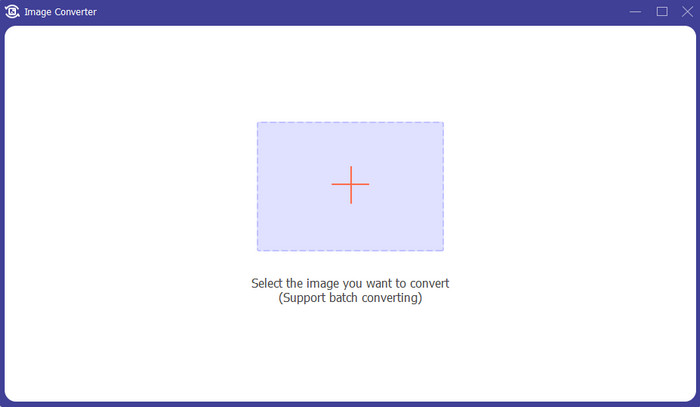
Step 3: Click the + icon. Then, choose the PNG image when your computer folder appears on your screen.
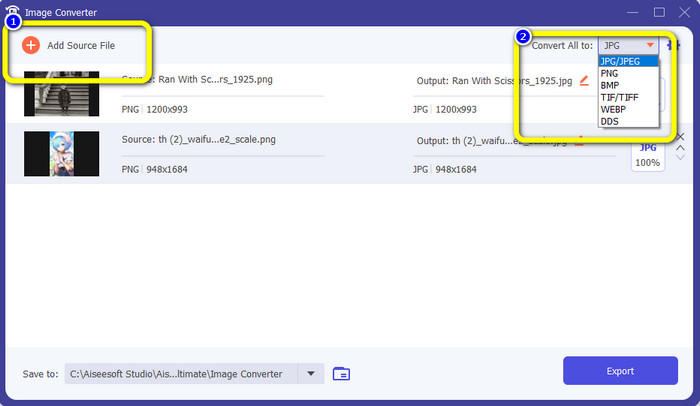
Step 4: If you want to do a batch conversion process, click the Add Source File button. Then, navigate to the Convert All to option and select the JPG file format.
Step 5: Click the Export button to save your final photo after converting. Then, you can open your JPG photo from your file folder.
Parte 4. Converter PNG para JPG usando um dispositivo móvel
Converter PNG para JPG usando PNGtoJPG
Se você quiser aprender como converter PNG para JPG usando iPhone e Android, use o aplicativo PNGtoJPG. Este é um aplicativo de download gratuito adequado para iPhones e Androids. Ele permite que você converta seus arquivos de imagem de forma fácil e instantânea. Ele também tem um procedimento essencial para a conversão. Desta forma, todos os usuários podem usar este aplicativo, principalmente usuários não profissionais. Além disso, o aplicativo PNGtoJPG oferece um processo de conversão rápido, tornando-o conveniente. Infelizmente, ao contrário de outros conversores de imagens, ele não suporta o processo de conversão em lote. Portanto, você precisa converter as imagens manualmente, o que é demorado.
Step 1: Install the PNGtoJPG application from your Apple Store or Play Store. Then, launch it.
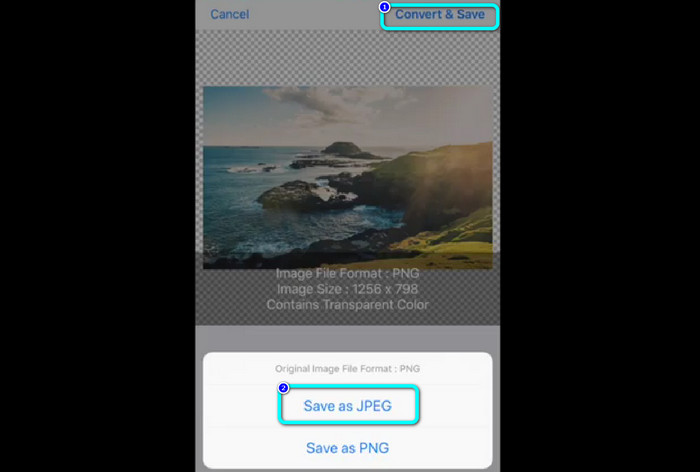
Step 2: Press the Load a photo option from the center interface after launching the application. Then, your photos will show up on your screen. Choose the PNG photo you want to convert.
Step 3: Go to the upper right corner of the screen and click the Convert & Save button. Then, when another option appears on the screen, select the Save as JPEG option. This way, you can turn your PNG to JPG file format. Click here to learn how to convert JPG to PNG.
Parte 5. Perguntas frequentes sobre a conversão de PNG para JPG
1. Como transformar um PDF em JPEG?
The best method to convert PDF to JPG is using the online software PDF Simpli. Click the Upload PDF to Upload button. Then, choose the PDF file from your folder. Go to the upper-right part of the interface and click the Convert button. Lastly, select the JPG format from the format option.
2. Como faço para abrir arquivos PNG no Windows 11/10?
The best way is to open your computer folder. Go to the folder where the PNG image is located. Then, right-click the image and select the Open option.
3. Como posso converter arquivos JPG gratuitamente?
You can use FVC Free Image Converter to convert JPG files for free. No matter how many images you need to convert, it won’t charge you a penny.
Conclusão
These are the best ways to convert PNG to JPG using image converters online and offline. But, if you prefer an accessible image converter, use FVC Free Image Converter.
-
 Converta JPEG para JPG com eficiência [Cinco métodos listados]
 Venha e obtenha os tutoriais mais diretos sobre a conversão do formato de arquivo de imagem JPEG para JPG. Clique neste guia e comece a aprender seus métodos preferidos.
-
 Detalhes completos sobre as diferenças entre JPEG e JPG e PNG
 Esta postagem fornecerá informações suficientes sobre as diferenças entre JPEG e JPG e PNG. Além disso, você aprenderá como converter imagens nesses arquivos.
-
 8 conversores de imagem surpreendentes [informações completas]
 Esta revisão irá falar sobre os melhores conversores de arquivos de imagem que você pode usar para converter arquivos de imagem. Leia este post para saber qual o melhor conversor de imagens para você
