


 Video Converter Ultimate
 Gravador de ecrã
 Reparo de vídeo
 Secure Download
Como converter SVG para JPG rapidamente [maneiras super fáceis]
You might want to convert an SVG image to a JPG one for several reasons. One possibility is to make editing simpler. A vector-based image editor is required for SVGs. However, raster-based image editors are more commonplace among users. Microsoft Paint and Adobe Lightroom are part of it. Using Lightroom to edit an SVG might be possible if you first convert it to a JPG. Online sharing is another reason to convert SVG to JPG. JPGs are almost always accepted by websites and apps that allow image uploads. However, it is unlikely that it would take an SVG. For instance, while Instagram accepts JPGs, it does not accept SVGs. The article will give you practical methods to change SVG to JPG. Also, you will discover the best image converters you can use online and offline.

Parte 1. Compare SVG e JPG
| Formato de arquivo | SVG | JPG |
| Extensão de nome de arquivo | .svg | .jng |
| Desenvolvido por | Consórcio World Wide Web | O Comitê JPEG |
| Desenvolvido por | SVG é um formato de arquivo de imagem vetorial para gráficos 2D baseados em XML. Animação e interatividade são suportadas. Nos arquivos de texto XML, as imagens SVG e seu comportamento são definidos. Como os arquivos SVG são apenas arquivos XML, eles podem ser editados com qualquer editor de texto. | JPG são usados para sites e e-mail porque têm tamanhos de arquivo reduzidos. No entanto, como o JPG apresenta perdas, isso afetará a qualidade da imagem após a compactação. O arquivo “com perdas” resultante significa que a qualidade foi perdida. Os cartões de memória para câmeras digitais usam o formato JPG. |
| Detalhes técnicos | SVG é um formato usado para definir gráficos vetoriais baseados em XML para a Web. Este arquivo não perderá qualidade de imagem mesmo quando ampliado ou redimensionado. Os elementos e atributos do arquivo SVG podem ser todos animados. | JPG é um formato de arquivo de imagem para edição de fotos. Ele fornece uma técnica de compactação simétrica que exige muito do processador. Também é demorado tanto na compactação quanto na descompactação. JPEG é um padrão comum da União Internacional de Telecomunicações. Também inclui a Organização Internacional de Normalização. |
| Programas Associados | Adobe Photoshop Visualização da Adobe Corel Paint Shop Pro Visualizador Corel SVG | Visualizador da Galeria de Fotos do Microsoft Windows Adobe Photoshop Visualização da Adobe Corel Paint Shop Pro |
Parte 2. Melhor maneira de converter SVG para JPG online
The best tool you can use is FVC Free Image Converter. It can convert SVG to JPG with ease. Additionally, it is possible to convert several SVG files to JPG at the same time. It provides an easy-to-follow UI and instructions, which is ideal for users. This image converter has the capability of batch conversion. Additionally, you can download numerous converted files with a single click. This tool's lack of annoying advertisements is one of its positive aspects. You can concentrate on converting files without encountering any ads. In addition, it accepts input files in various formats, such as PNG, BMP, TIFF, GIF, etc. Additionally, installing this converter is not necessary. It is controllable through your browser. Moreover, after conversion, the image quality will be the same as the original. This way, you can ensure that your image will still have an excellent appearance. Also, your information is safe on this website. After converting and saving images, it will eliminate all your data automatically.
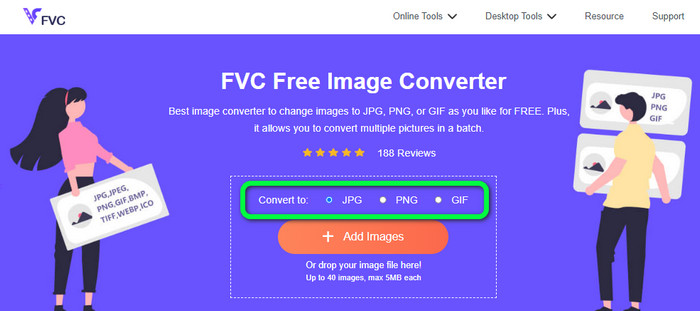
Step 1: Go to the main website of FVC Free Image Converter. Before adding the SVG image file, choose your desired output format. Click the JPG format from the format option.
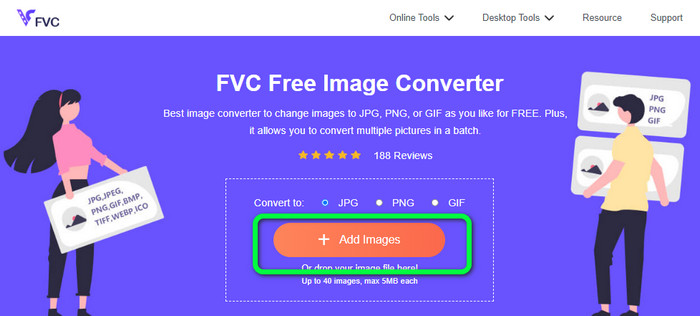
Step 2: Click the Add Images button on the center interface. After that, your file folder will appear on your screen. Choose the SVG image you want to convert and open it. You can also drop the SVG file directly into the box. Click the Add Images button again to do a batch conversion process.
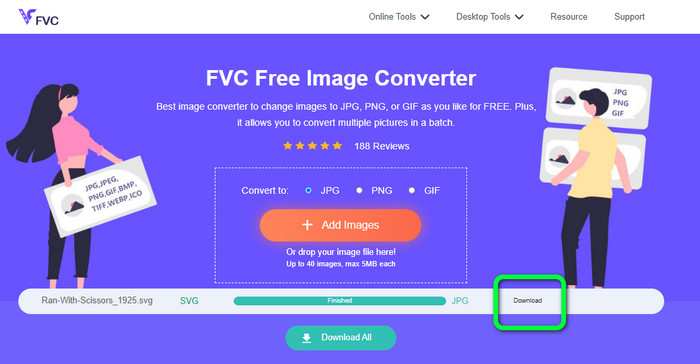
Step 3: While uploading the file, it will convert the image automatically. For the last step, click the Download button on the right interface. After the saving process, open the converted image on your computer.
Parte 3. Método fácil para converter SVG para JPG no Windows
You will discover the finest method for converting SVG to JPG offline on Windows computers in this section. The use of HitPaw Video Converter is one of the efficient methods. The Image Convert feature of HitPaw Video Converter makes batch image conversion simple. You can import photos and graphics in various formats and convert them to the format you want. For bulk or individual image format adjustments, this is a great choice. It also supports all widely used photo formats. These formats are PNG, JPG, HEIC, RAW, BMP, and more. So you also can use this tool to convert BMP to JPG or PNG. Additionally, this downloadable program offers other options in addition to converting. You can download music and video files using this software. Your videos can also be edited by rotating, cropping, and using filters. However, HitPaw Video Converter is difficult to use, especially for beginners. It has a confusing interface, making it hard to understand. Also, the installation process takes a lot of time.
Step 1: Install the HitPaw Video Converter on your Windows. Then, after the installation, run the application.
Step 2: Navigate to the Toolbox panel and select the Image Converter tool. Select the SVG image file you want to convert from your computer folder.
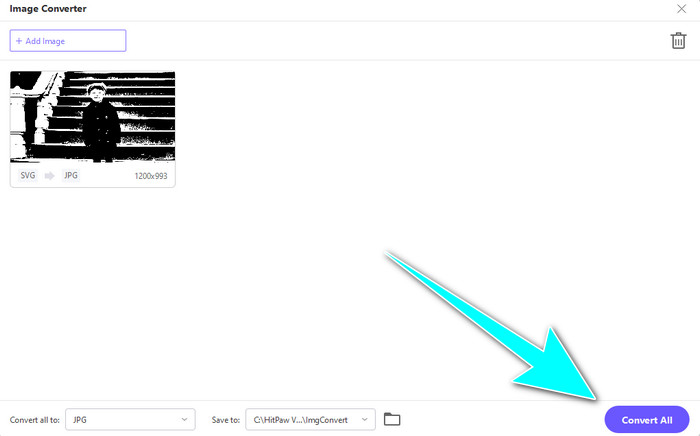
Step 3: Click the Convert All to option on the lower-left corner of the interface. Then, select the JPG format as your output format.
Step 4: Finally, click the Convert All button on the lower-right corner of the interface. Wait for the converting process. Then, you can already open your image in PNG file format.
Parte 4. Como converter SVG para JPG no Mac
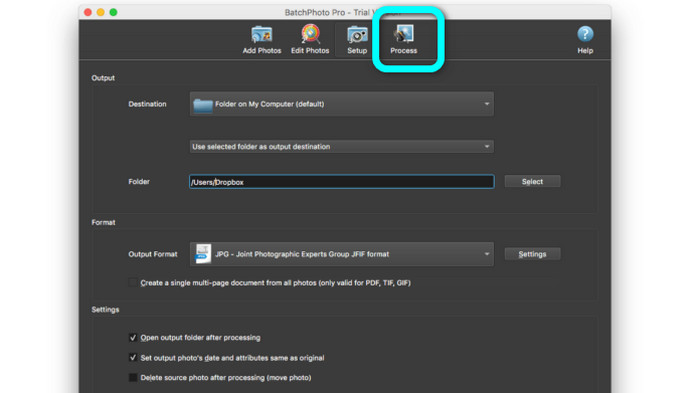
If you desire to convert SVG to JPG using Mac, use BatchPhoto Pro. It supports various image formats. It includes JPG, PNG, ICO, SVG, EPS, and 170+ more. You can even save images as PDFs. It also offers a batch conversion process. This way, you can convert multiple files simultaneously. Additionally, aside from converting images, it has another feature to offer. You can edit your photo by resizing, rotating, and adjusting the color settings. However, you must purchase the program if you want to use it continuously. It can only offer a few days' trial version. The conversion process is also hard to understand. Non-professional users will find it complicated to convert images.
Step 1: Download and install BatchPhoto Pro. You can grab the free trial version. After installing the application, launch it.
Step 2: On the upper part of the interface, select the Add Photos option. After clicking, add the SVG images you want to convert to JPG format. You can add multiple files at once.
Step 3: Go to the Set Up option on the upper part of the interface. Navigate to the Output Format options and select the JPG format.
Step 4: Click the Process option to start the conversion process. Once done, go to your output folder and check your converted image.
Parte 5. Perguntas frequentes sobre a conversão de SVG para JPG
1. Por que você deve converter SVG para JPG?
Comparado ao SVG, o JPG é mais adequado para mídias sociais e outros dispositivos. É um dos formatos de imagem populares que você pode usar hoje em dia. Em SVG, você só pode abrir este arquivo em navegadores da web. Portanto, a conversão de SVG para JPG é necessária para um uso mais compatível.
2. Quais são as vantagens e desvantagens dos arquivos SVG?
Você pode expandir ou reduzir um arquivo SVG para qualquer tamanho sem perder a qualidade. Os SVGs não se importam com o tipo de exibição ou tamanho da imagem. A maneira como eles aparecem é constante. Os SVGs também fornecem aos designers e desenvolvedores um grande controle sobre sua aparência. É melhor do que editá-los em um editor de texto. Até mesmo outros elementos visuais, como sombras e gradações de cores, são ajustáveis. No entanto, existem formatos melhores que o SVG para uma foto detalhada e de alta qualidade. Os usuários constroem gráficos vetoriais usando pontos e caminhos em vez de pixels. O código também é necessário.
3. Como faço para abrir um arquivo SVG?
The best way to open an SVG file is to go to your browser. Press the ctrl+o on your keyboard. Then, choose the SVG file you want to view and click Open.
Conclusão
Well, that’s it! The information above are ways to convert SVG to JPG on Windows, Mac, and online. However, downloading an image converter is a hassle. So, if you want a simpler way to convert images, use FVC Free Image Converter. This image converter online lets you convert images directly on browsers.
-
 Métodos úteis sobre como converter TIFF para JPG/PNG facilmente
 Não perca estas excelentes maneiras de transformar formatos TIF em JPG/PNG. Este post fornecerá as informações necessárias que você precisa saber. Inclui suas diferenças.
-
 Converta JPEG para JPG com eficiência [Cinco métodos listados]
 Venha e obtenha os tutoriais mais diretos sobre a conversão do formato de arquivo de imagem JPEG para JPG. Clique neste guia e comece a aprender seus métodos preferidos
-
 Os 5 principais tutoriais para converter PNG para JPG rapidamente
 Se você precisar converter seu arquivo PNG para o formato JPG, poderá aprender as melhores maneiras aqui. Você também aprenderá a diferença entre os formatos de arquivo PNG e JPG
