


 Video Converter Ultimate
 Gravador de ecrã
 Reparo de vídeo
 Secure Download
Maneiras eficazes de converter TIFF para JPG e PNG
TIFF is an image file format common to photographers and graphic designers. It has high quality, flexibility, and near-universal compatibility. But, its size is larger, making it difficult to share with others or on the web. In that case, one of the best solutions is to convert this file to other formats. JPG and PNG file formats have smaller file sizes than TIFF. That way, converting TIFF to JPG and PNG is better. The article can offer you the best methods to convert TIFF to JPG/PNG formats. Also, you will learn all the information you need about these image file formats. So, without anything else, let’s read this post as we give the solution you are looking for.

Parte 1. TIFF x JPG x PNG
| Formato de arquivo | TIF/TIFF | JPG | PNG |
| Extensão de nome de arquivo | .tif / .tiff | .jpg | .png |
| Desenvolvido por | Aldus (adquirida pela Adobe) | Grupo Conjunto de Especialistas em Fotografia | Grupo de Desenvolvimento PNG |
| Descrição | Em 1992, o Tag Image File Format (TIFF) foi desenvolvido. Os desenvolvedores podem expandir esse tipo de arquivo flexível para acomodar muitas necessidades. Arquivos TIF e TIFF são formatos de arquivo de imagem usados para armazenar imagens. Mas, existem algumas distinções entre esses formatos. Os arquivos de imagem TIFF são capazes de armazenar mais de uma imagem em um arquivo. Por outro lado, os arquivos TIF podem armazenar apenas uma imagem. Além disso, os arquivos TIFF podem armazenar metadados sobre a imagem, mas os arquivos TIF não. | JPG e JPEG são extensões iguais que se referem ao mesmo formato de imagem digital. Não há diferenças entre os formatos JPEG e JPG. A única diferença é o número de caracteres usados. Os arquivos JPG são salvos com a extensão de arquivo .jpg e os arquivos JPEG são salvos com a extensão .jpeg. JPEG é um acrônimo para Joint Photographics Experts Group. | A sigla de PNG significa Portable Network Graphic. Você pode salvar fotos de alta qualidade e compartilhá-las usando o formato PNG. Os PNGs podem lidar com impressionantes 16 milhões de cores. Ele também suporta fundos transparentes e semitransparentes. O arquivo de imagem PNG é um formato aberto, o que significa que você pode salvar e abrir um arquivo PNG de qualquer software de edição de imagem. |
Parte 2. Excelentes métodos para converter TIF/TIFF para JPG/PNG online
FVC Free Image Converter is the ultimate converter you can use to turn TIFF into JPG/PNG online. The converting procedure is also straightforward. Images may be converted in three easy steps. A batch conversion procedure is additionally offered. Multiple photos can be converted at once. It means you can convert your images in less time. It is simple to understand and offers an intuitive UI with understandable settings. Additionally, FVC Free Image Converter supports a variety of input formats. It supports various formats, including JPG, PNG, BMP, TIFF, WEBP, and GIF. Furthermore, this converter is completely free. Also, it guards the user's privacy. It will immediately remove your data once your photos have been converted and saved. The fact that you can use this online application with all types of browsers increases user accessibility. To use this TIFF to JPG converter, follow the simple instructions listed below.
Converter TIF/TIFF para JPG
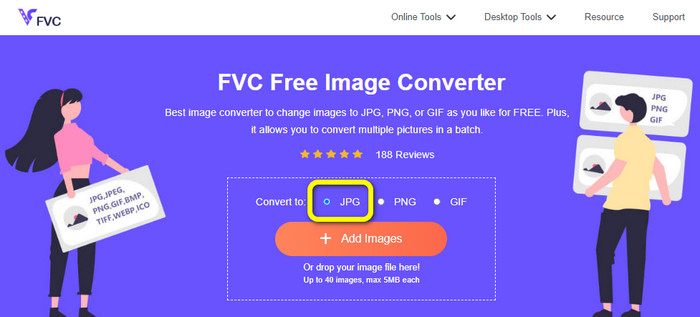
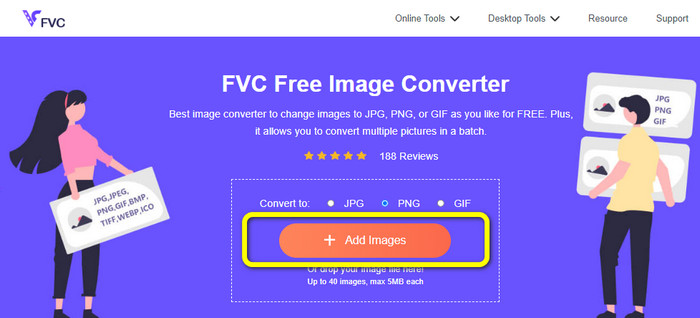
Step 1: Visit the FVC Free Image Converter website from your browser. Then select the JPG file format from the Convert to option.
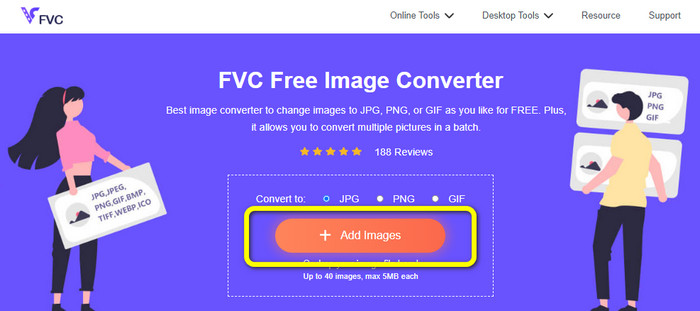
Step 2: The next step is to click the Add Images button. After clicking, the file folder will appear on your computer screen. Choose the image file and click Open.
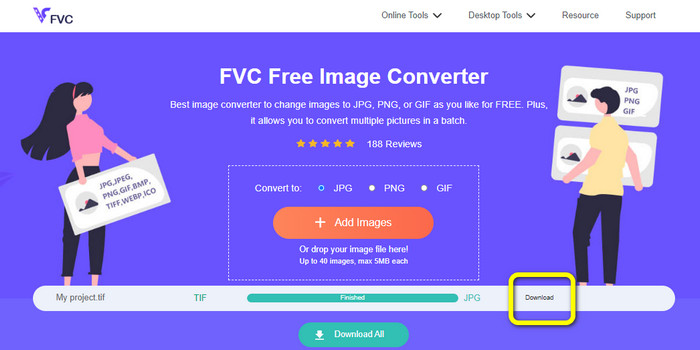
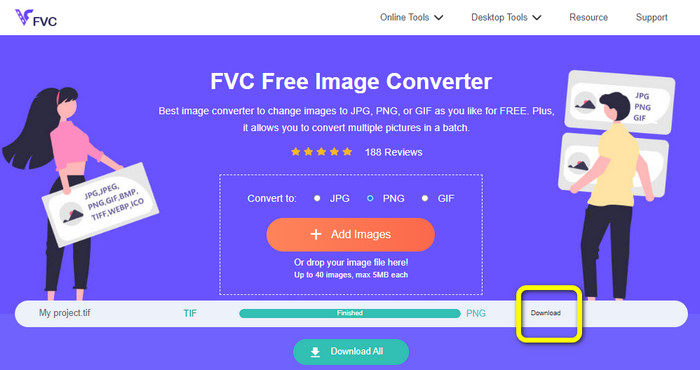
Step 3: The image converter will convert your image automatically after uploading. Click the Download button to save and download your converter image to your computer.
Converter TIFF/TIF para PNG
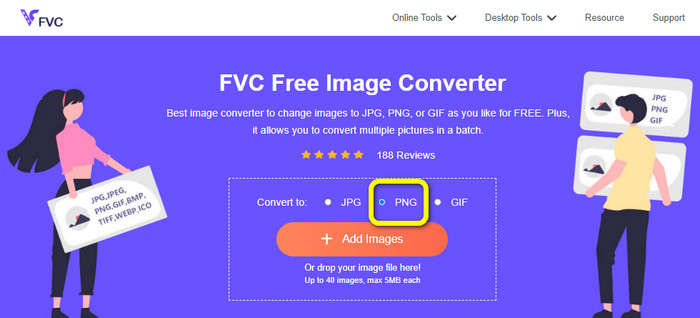
Step 1: From the webpage, select the PNG file format from the format option.
Step 2: Click the Add Images button. Then, when the file folder shows up on the screen, select the PNG file you want to convert. Then, open it.
Step 3: After the conversion process, click the Download button. Wait for the saving process and open your image from your folder. Click here to learn how to convert BMP to JPG or PNG.
Parte 3. Melhores maneiras de converter TIF/TIFF para JPG/PNG offline
Video Converter Ultimate is one of the best offline ways to convert a TIF file to JPG and PNG. You can download this program on both Mac and Windows operating systems. This offline image converter lets you convert your TIF file to JPG and PNG. Also, it supports other formats like WEBP, BMP, GIF, TIFF, JPG, PNG, and more. The converter offers a friendly user interface, making it perfect for professionals and beginners. Additionally, if you desire to convert multiple files at once, you can do so. One of its remarkable features is to do a batch conversion process. Because of that, it will become convenient for all users who like converting image files. Moreover, while converting images, there are more things you can do. On the settings icon, you can zoom in and out your images. You can also change the image quality based on mon preference. This way, you can get the result that you desire. Follow the basic procedures below to convert TIF to JPG and PNG format.
Converter TIFF para JPG
Step 1: Download Video Converter Ultimate on your computer. After that, run the application after the installation process. See the Download button below and click it to access the converter easily.
Free DownloadFor Windows 7 or laterSecure Download
Free DownloadFor MacOS 10.7 or laterSecure Download
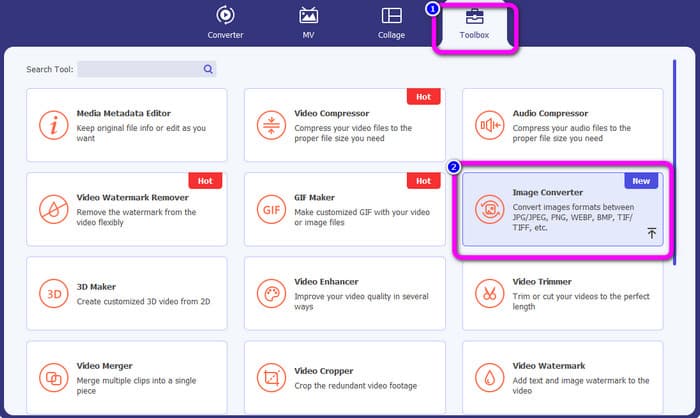
Step 2: Click the Toolbox panel on the upper part of the interface. Select the Image Converter function.
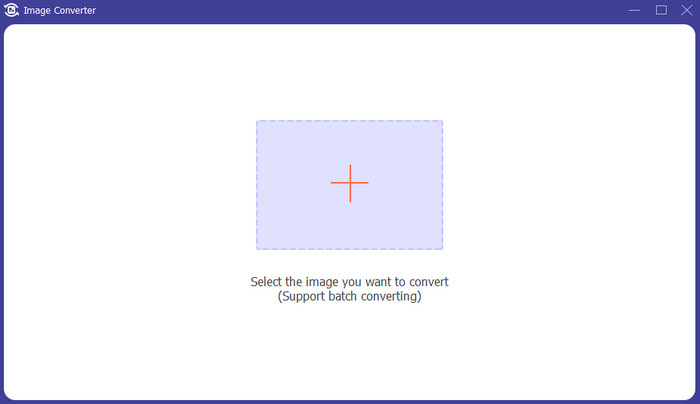
Step 3: Then click the Plus sign button on the center interface. Select the TIFF image file from your file folder, and open it.
Step 4: If you want more images, click the Add Source file button. Then, navigate to the Convert All to option and select the JPG file format.
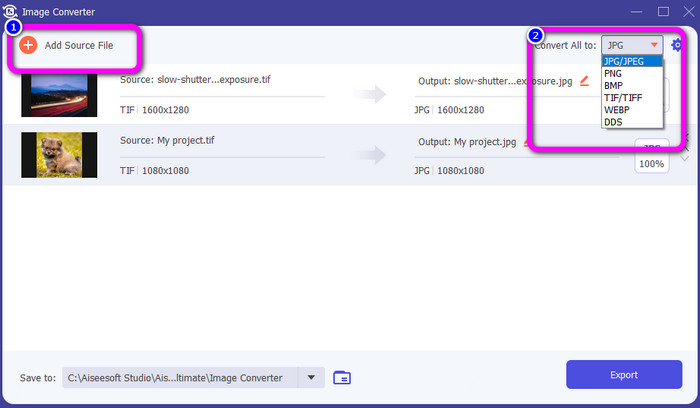
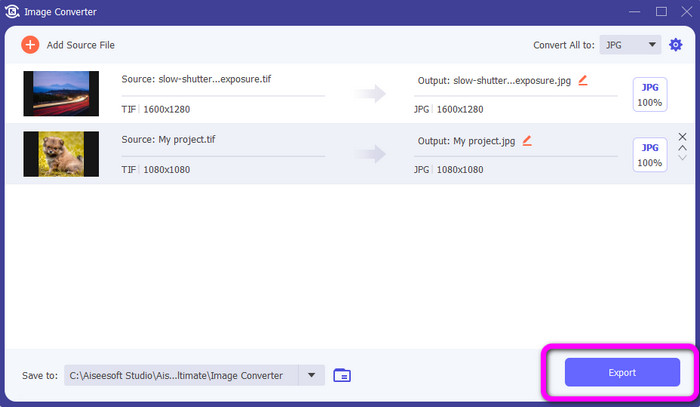
Step 5: Lastly, click the Export button after selecting JPG format as the output format. After the conversion process, you can open your converted image in your file folder.
Converter TIFF para PNG
Step 1: You can follow the same process above. Go to the Toolbox panel and select Image Converter Function.
Step 2: Click the Plus icon to insert the TIFF you want to convert.
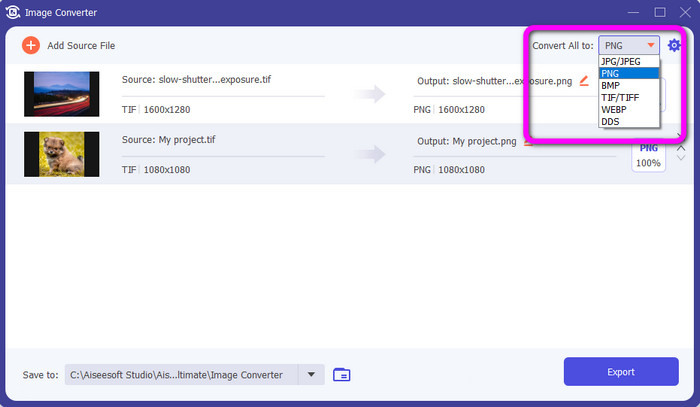
Step 3: After adding your TIFF images, you can go to the Convert All to option. Select the PNG file format as your output format.
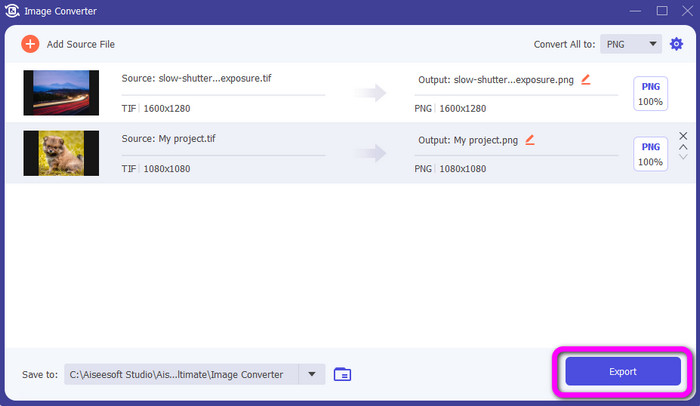
Step 4: For your final step, click the Export button from the lower left corner of the interface. You also can use this software to convert JPG to PNG.
Parte 4. Perguntas frequentes sobre a conversão de TIF/TIFF para JPG/PNG
1. Como converter TIFF para PNG no Mac?
One of the effective ways to convert TIFF to PNG on Mac is to use FVC Free Image Converter. Open Safari from your Mac and see this online image converter. From the main webpage, select the PNG format from the format option. Click the Add Images button to add the TIFF file you want to convert. While uploading, it will convert the file automatically. Then, click the download button to save the converted image on your Mac.
2. Quais são os benefícios de converter TIF para PNG?
Se você deseja tornar seu arquivo menor, é necessário alterar seu arquivo TIF para outros formatos. Converter TIF em um arquivo PNG é melhor, pois o PNG tem um tamanho de arquivo menor. Ele fornecerá um tamanho de arquivo gerenciável para navegadores e dispositivos da web.
3. Qual arquivo é mais fácil de enviar, JPG ou TIFF?
O formato de arquivo JPG tem um tamanho de arquivo menor. Facilita o envio de uma imagem online ou por e-mail. O TIFF tem um tamanho de arquivo maior, tornando lento o envio de uma imagem.
Conclusão
Now you know that the TIFF image file has a larger file size. So, if you want to send an image faster online, it is better to convert it to other formats with smaller file sizes. Therefore, this article provided you with the best solution to convert TIFF to JPG and PNG. If you want an easier way to convert image files, use FVC Free Image Converter. It offers an understandable interface with simple methods of converting image files.
-
 Converta JPEG para JPG com eficiência [Cinco métodos listados]
 Venha e obtenha os tutoriais mais diretos sobre a conversão do formato de arquivo de imagem JPEG para JPG. Clique neste guia e comece a aprender seus métodos preferidos
-
 Os 5 principais tutoriais para converter PNG para JPG rapidamente
 Se você precisar converter seu arquivo PNG para o formato JPG, poderá aprender as melhores maneiras aqui. Você também aprenderá a diferença entre os formatos de arquivo PNG e JPG
-
 Detalhes completos sobre as diferenças entre JPEG e JPG e PNG
 Esta postagem fornecerá informações suficientes sobre as diferenças entre JPEG e JPG e PNG. Além disso, você aprenderá como converter imagens nesses arquivos
