


 Video Converter Ultimate
 Gravador de ecrã
 Reparo de vídeo
 Secure Download
Como converter WebP para GIF com a ajuda de conversores notáveis
There is a valid reason why GIFs are growing more and more popular. They're a terrific way to give your website some personality. Also, sharing them on social media is simple. What about WebP format, though? Do you know anything about it? Don't worry if you want more information about the format. This guidepost will give you enough information about these two file formats. In addition, you will learn the best ways to convert WebP to GIF without hassle. So, without further ado, read this article and see all the best methods you can get.

Parte 1. WebP vs. GIF
| Formato de arquivo | WebP | GIF |
| Extensão de arquivo | .webp | .gif |
| Desenvolvido por | CompuServe | |
| Nome completo | Imagem no Site | Formato de intercâmbio de gráficos |
| Descrição | Um formato de imagem desenvolvido é chamado de WebP arquivo. Estão disponíveis compressões superiores sem perdas e com perdas. Transparência alfa e animação também estão incluídas. Os métodos de compactação sem perdas e com perdas ajudam a reduzir a quantidade de dados. Ele reduz o tamanho do arquivo em 26% e 34% em comparação com JPG e PNG. | GIF é um formato usado para transmitir imagens. É um formato gráfico usado que emprega 256 cores e comprime os dados em um formato sem qualidade. Em 1987, a CompuServe desenvolveu o formato GIF. Destina-se à transferência de gráficos raster em redes (GIF87a). |
| Compressão | Com perdas e sem perdas | Sem perdas |
| Programas/Navegadores Associados | Google Chrome, Internet Explorer, Microsoft Edge, Mozilla Firefox | Picosmos Shows, Paint, GIMP, Twitter, Facebook, Tumblr |
Parte 2. Melhores maneiras de converter WebP em GIF online e offline
Converta WebP para GIF usando FVC Free Image Converter
Among the best image converters available online for WebP to GIF conversion is FVC Free Image Converter. This tool can convert any file format into JPG, PNG, and GIF. This application supports a variety of input formats, including JPG, PNG, JPEG, TIFF, BMP, WEBCO, ICO, and more. It also provides three simple conversion processes that are suitable for all users. Batch conversion is another feature of the FVC image converter. You may convert a lot of pictures all at once using it. All browsers support FVC Free Image Converter. It works with Google, Mozilla, Microsoft Edge, Internet Explorer, Safari, and other browsers.
Step 1: On your browser, visit the main website of FVC Free Image Converter. Choose your output format. Select the GIF file format from the Convert to or format options.
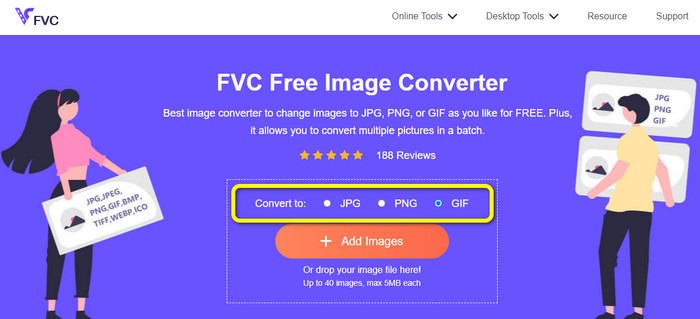
Step 2: Next is to click the Add Images button on the center interface. When the computer file shows up on your screen, choose the WebP images you want to convert. Then, click the Open button. You can also drop the image file into the box to upload.

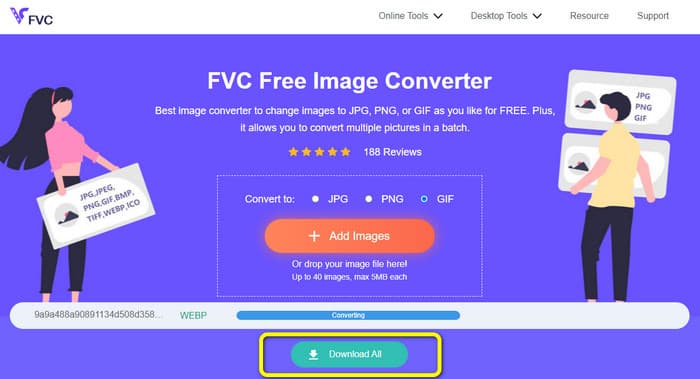
Step 3: After uploading the image, it will automatically change your WebP images to GIF format. When the process is done, click the Download All button.
Converter WebP em GIF usando o FreeConvert
FreeConvert is a WebP to GIF converter online you can trust. It has a simple process, and the interface is easy to understand. Advanced users and non-professional users can use this tool. Also, it can convert more than 500 different image formats like JPG, PNG, WebP, and others. RAW image files from cameras are also easy to convert. Any web browser can access this image converter. It includes Chrome, Firefox, Edge, Safari, etc. It provides file privacy and security. After saving your converted images, the tool will delete your data. But, it has some restrictions, especially when using the free version. The maximum size of the file you can upload is only 1 GB. Purchasing the tool is the best thing to do if you want to upload images using this image converter. Also, this image converter shows some ads on the web page, which is disturbing for users. It requires an internet connection to experience great performance.
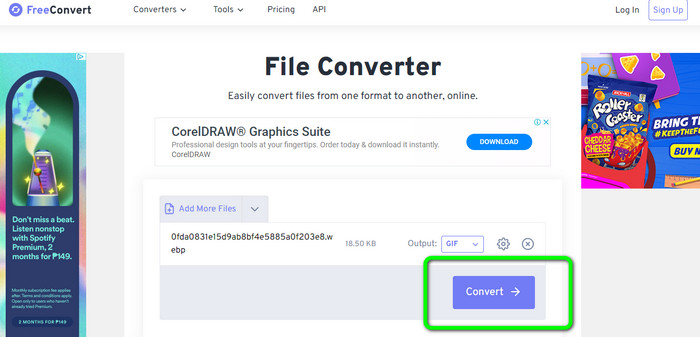
Step 1: Go to the website of FreeConvert on your web browser. Click the Choose Files button on the web page to add the WebP images. You can upload two or more images to do a batch conversion process.
Step 2: After uploading the photo, go to the format options. Then, select the GIF file as your output format. You can also click the Settings icon to resize your output image.
Step 3: After the conversion process, click the Download button. This way, you can save your converted file on your computer.
Converter WebP em GIF usando Ezgif
You may also use Ezgif as a WebP to GIF converter. Using this image converter's simple process, you may convert your WebP files to GIFs. Additionally, it has an easy-to-use interface that makes things clear. This makes it possible for all users to use this converter. The conversion procedure also moves quickly. You can convert images in just a few seconds. Ezgif is available in all browsers. You can use this image converter on Google, Firefox, Explorer, and more. Ezgif also has more features available. Aside from converting images, you can also convert video files. You can also crop and rotate your images freely. However, the tool only has limitations. You can only upload up to 50MB. There are also some instances when the tool is not working well, especially with a poor internet connection.
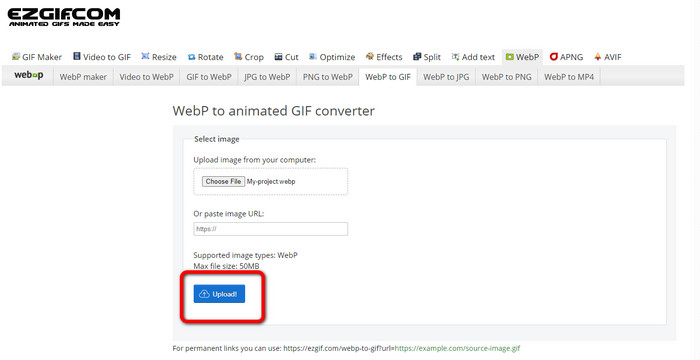
Step 1: Go to the Ezgif website. Click the Choose Files button. Open the WebP images from your computer file. You can upload the image through the link.
Step 2: After uploading the WebP image, click the Upload button.
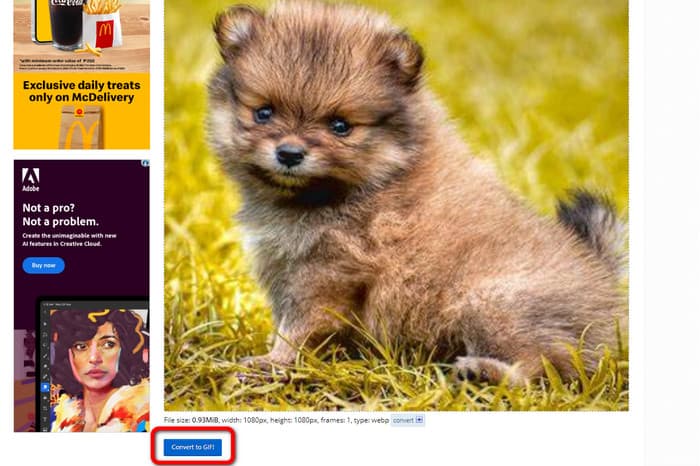
Step 3: Your image will show up on the screen. Click the Convert to GIF button to start the conversion process. Then, click Save.
Como converter WebP para GIF usando ferramentas Picosmos
On your computer, do you need another converter to convert WebP files to GIFs? Try out Picosmos Tools. The conversion program runs on Windows. It allows you to quickly convert a WebP file to a GIF for no cost. Additionally, your converted file won't have a watermark added to it. It is also more than just a WebP to GIF converter. It also contains a powerful image editor that makes it easy to edit, design, and composite your photographs. However, the interface of this program is confusing. It will become complicated, especially for beginners. It also takes time to install the program on the computer.
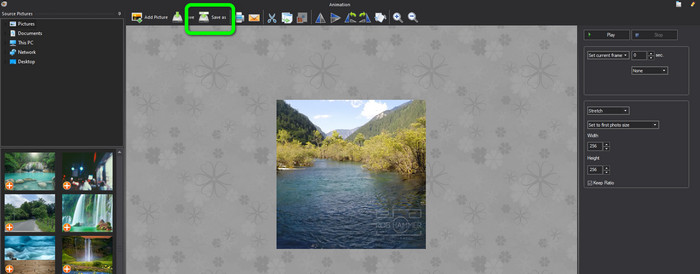
Step 1: After launching the program, click the Add Picture option and add the WebP image.
Step 2: When the image is on the screen, click the Save as button. This way, you can save your WebP images as animated GIFs. Click here to learn how to convert WebP to JPG.
Parte 3. Perguntas frequentes sobre a conversão de WebP em GIF
1. Qual é a vantagem do WebP sobre um GIF animado e vice-versa?
WebP é um novo formato que oferece melhor compressão do que GIF. Isso significa tamanhos de arquivo menores e tempos de carregamento mais rápidos. Mas o WebP é compatível com os navegadores, por isso nem sempre é a melhor escolha. GIF é um formato mais antigo suportado por navegadores e muitos dispositivos. Assim, o GIF também é uma escolha popular para animações simples. No entanto, eles geralmente são maiores em tamanho de arquivo do que as imagens WebP, levando a tempos de carregamento mais lentos.
2. Por que o tamanho do GIF é maior que o do WebP?
O WebP é usado para imagens estáticas, enquanto o GIF é usado para imagens animadas. Essa é a razão pela qual o GIF tem um arquivo maior que o WebP. Além disso, o GIF é sem perdas, o que significa que mantém todas as informações da foto original.
3. O Discord aceita WebP?
Unfortunately, no. Discord doesn’t support WebP. So, if you want to open an image file to Discord, you need to convert it to other formats. Then, use FVC Free Image Converter. It can help you convert your WebP images to JPG, PNG, and GIF formats.
Conclusão
Now you’ve got an idea on how to convert WebP to GIF. However, some online and offline image converters require a subscription plan and take much time to operate. So, if you want a simple and free image converter, use FVC Free Image Converter.
-
 Métodos perfeitos para converter WebP em PNG sem esforço
 Conheça os métodos notáveis de conversão de WebP para PNG. Este guia fornecerá os conversores de imagens mais úteis que você pode experimentar.
-
 Como converter HEIC para o formato GIF [melhores maneiras]
 Deseja converter o formato de arquivo HEIC para GIF? Em seguida, essas ferramentas ajudarão você a converter sem esforço seu arquivo HEIC em GIF.
-
 5 melhores maneiras de alterar a imagem para GIF animado [Atualizado em 2023]
 Precisa de um conversor de imagem para GIF? Este artigo fornecerá os cinco melhores conversores que podemos encontrar no mercado. Então, vamos descobrir essas ferramentas lendo este artigo.
