


 Video Converter Ultimate
 Gravador de ecrã
 Reparo de vídeo
Como alterar o fundo da imagem - Guia para iniciantes
Today, it’s not new to see photos with different backgrounds of the subject image. It’s a way for people to add a twist to their creativity. While this is interestingly a fun thing to do with our photos, replacing the background can sometimes be hard and time-consuming to do. Well, today, no more hassles in doing so, because in this article you will learn how to change the photo background quickly and understand why playing image backgrounds by altering and customizing them is necessary for any of us. Moreover, discover other tools and other ways to edit the picture background that would suit you best. Excited to elevate your creativity? Read the whole article now!

Parte 1. Maneira mais fácil de alterar o fundo da imagem
Aprender como alterar os fundos das imagens é importante porque faz com que as imagens pareçam melhores e mais interessantes. Esteja você tirando fotos profissionais ou criando conteúdo para mídias sociais, a possibilidade de personalizar planos de fundo adiciona um toque criativo. Ajuda a manter uma aparência consistente em seus designs e marca, fazendo com que tudo combine e pareça elegante. Esta é a ferramenta que você pode usar para alterar rapidamente o fundo da imagem.
FVC Free Background Remover is a tool that simplifies the process of changing image backgrounds. This user-friendly tool allows you to automatically remove backgrounds from your images or create a transparent background effortlessly. Moreover, it does not only remove backgrounds, but it also lets you change the background to a solid color of your choice or even replace it with another photo from your local folder. The tool supports common image formats like PNG, JPG, and JPEG, making it convenient for various applications.
Principais características
◆ Remoção automática de fundo.
◆ Edite imagens usando cortar, inverter e outros recursos.
◆ Suporta formatos de imagem populares: PNG, JPG e JPEG.
◆ Garante a privacidade do usuário e a segurança dos dados.
◆ Interface amigável com visualização em tempo real.
◆ Ferramenta totalmente gratuita, sem assinaturas ou inscrições.
◆ Preserva a qualidade da imagem original após a remoção do fundo.
Guia passo a passo
Step 1. Begin by visiting their official website and selecting the Upload Image button.

Step 2. Allow some time for the processing. Once completed, you have the option to customize your image by changing the background.
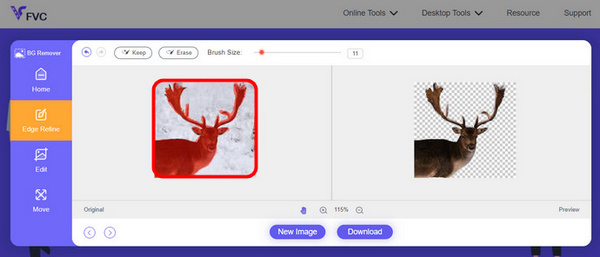
Step 3. To keep the edited result, simply click on the download button.
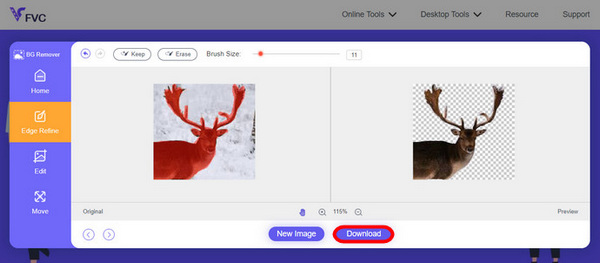
FVC Online Image Background Remover é realmente uma ferramenta versátil. Ele não apenas altera o plano de fundo da foto, mas também permite que os usuários personalizem suas fotos após remover o plano de fundo. Com seus recursos fáceis de usar, qualquer pessoa pode usar isso de forma rápida e fácil.
Parte 2. Mais maneiras de alterar o fundo da foto
Existem várias maneiras de alterar os planos de fundo das imagens e, se você estiver procurando opções além do FVC Free Background Remover, aqui estão mais algumas ferramentas e maneiras de explorar:
Photoshop
Adobe Photoshop se destaca como uma potência no domínio da edição de fundo de imagens. Com seus amplos recursos, o Photoshop é a escolha certa para profissionais e entusiastas. Seus recursos avançados, incluindo ferramentas de seleção precisas e ajustes de camada, tornam-no ideal para alterações complexas de plano de fundo. Embora venha com uma curva de aprendizado, o Photoshop oferece flexibilidade e controle criativo incomparáveis.
Quick Guide:
Step 1. In your Photoshop by, click on the File tab to open your image.
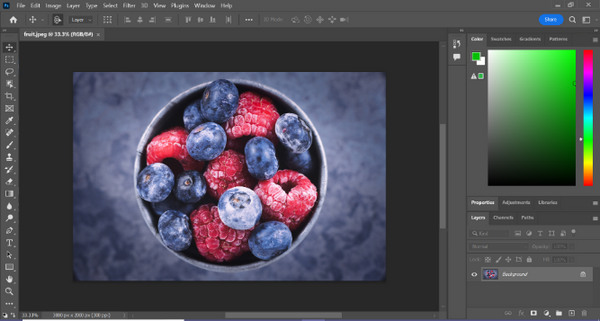
Step 2. Use the Object Selection tool and drag your mouse over the object you want to cut out.
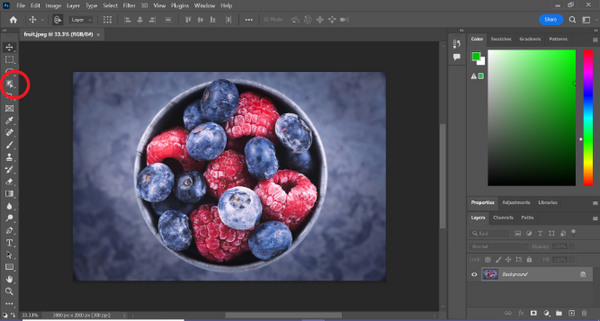
Step 3. Click on Select and Mask.
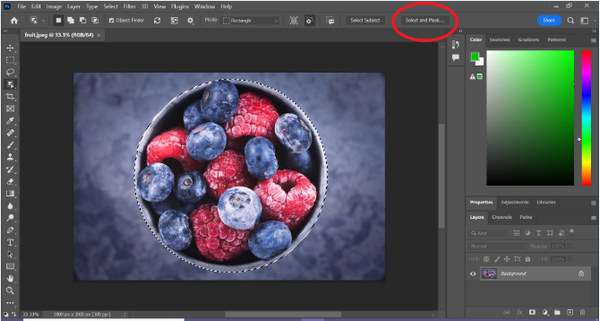
Step 4. Adjust the selection settings, like feathering, if needed.
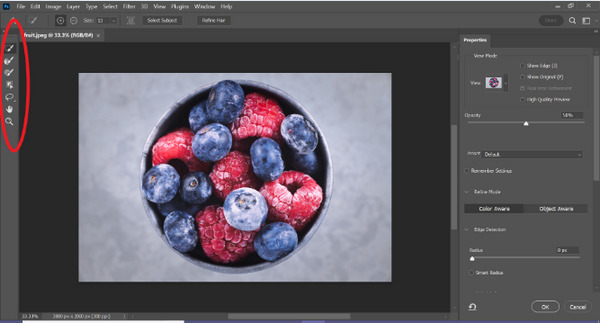
Step 5. Click the Mask icon to cut out your image and save the modified image.
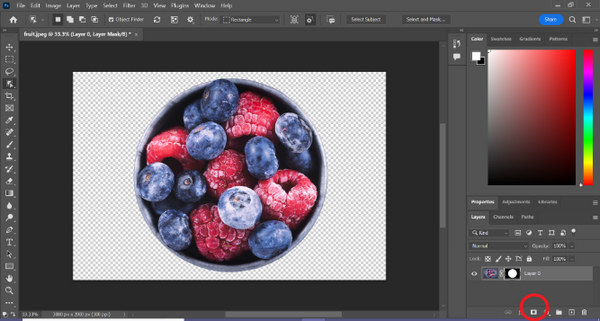
Step 6. Lastly, to replace the background, drag the new background image’s icon onto the masked photo. Then open the Layers panel and drag the new background layer below the layer with the mask.
O Photoshop é de fato outra boa maneira de substituir o fundo da imagem, a única coisa sobre esta ferramenta é que ela requer habilidades, pois a interface da ferramenta é complexa para ser facilmente navegada por novos usuários. No entanto, o Photoshop é uma potência quando se trata de substituir fundos de imagens.
canva
Canva é uma conhecida plataforma de design gráfico criada para simplificar o processo de criação de conteúdo visualmente atraente. Embora possa não corresponder à complexidade do Photoshop, a força do Canva reside na sua simplicidade e acessibilidade. Ele fornece uma interface fácil de arrastar e soltar, tornando-o perfeito para quem busca alterações simples no plano de fundo, especialmente para gráficos de mídia social. O Canva é uma ótima opção para edições rápidas e eficazes, sem a necessidade de amplo conhecimento em design.
Quick Guide:
Step 1. Open your Canva.
Step 2. Now, to upload your image, click the Upload button.

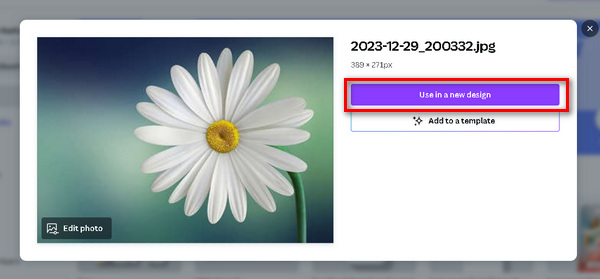
Step 3. Now, after uploading your image, click the Use in a New Design and choose Customize size.
Step 4. Press the image, click Edit Image, and choose BG Remover.
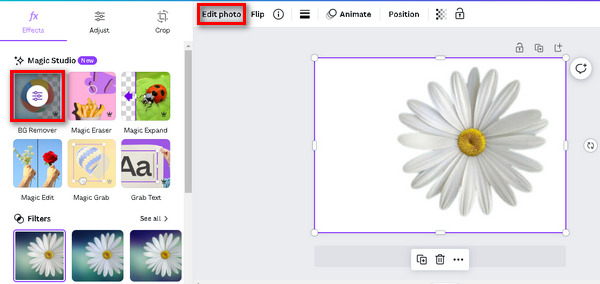
Step 5. To save your image, press the Share button at the upper right side of your screen and click Download.
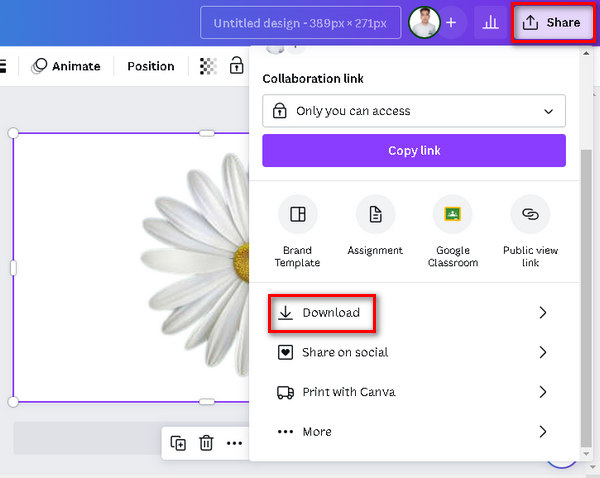
Não se esqueça de salvar o arquivo no formato PNG ou JPEG e com fundo transparente. Depois disso, cole-o no fundo desejado.
Fotografar
Fotor é uma ferramenta versátil de edição de fotos online onde os usuários podem manipular facilmente fundos de imagens por meio de recursos como remoção e substituição de fundo. Ele oferece vários filtros, efeitos e ferramentas básicas de edição, tornando-o ideal tanto para iniciantes quanto para usuários que procuram uma experiência de edição simplificada. A interface amigável e o conjunto diversificado de recursos do Fotor contribuem para sua popularidade para mudanças de fundo rápidas e eficazes.
Quick Guide:
Step 1. Begin by uploading your image onto the canvas. Click Open Image at the center of the canvas, then select and upload your image from your computer.
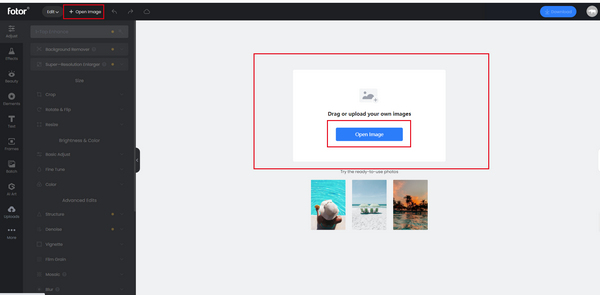
Step 2. Click on the Adjust feature and choose Background Remover. The system will automatically remove the background of your image.
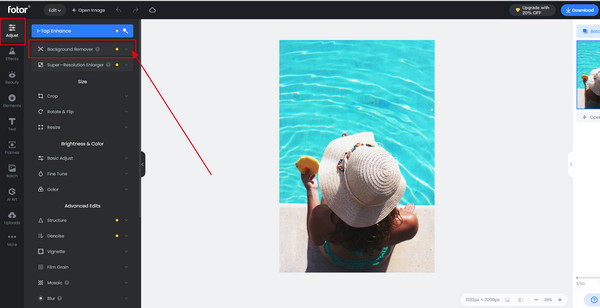
Step 3. Utilize the Retain/Erase tool to restore removed parts if needed. You can also click Change Background to switch up the picture's background.
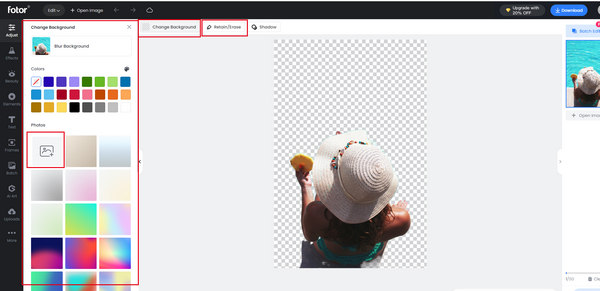
Step 4. Once all your edits are complete, click the Save button to apply the changes. While you export the image, you can resize the photo via its exporting feature.
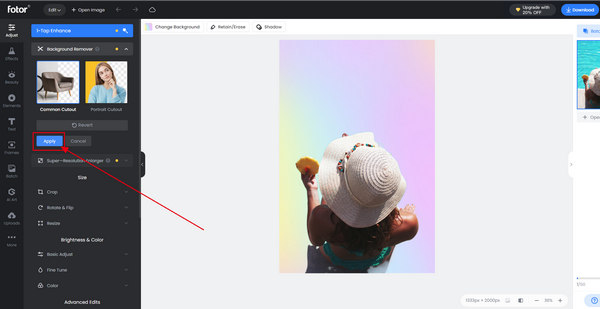
Fotor é realmente uma ótima ferramenta para alterar o fundo da imagem de forma rápida e fácil. Além disso, possui um plano gratuito que os usuários podem usufruir.
Parte 3. Perguntas frequentes sobre como alterar o fundo da imagem
O ChatGPT AI pode alterar o fundo da imagem com prompts?
Embora o ChatGPT AI seja excelente na geração de conteúdo baseado em texto, ele não pode manipular imagens, incluindo a alteração direta de planos de fundo. Para tarefas relacionadas a imagens, considere o uso de ferramentas ou software dedicados de edição de imagens.
Você pode alterar a imagem de fundo no iPhone?
Sim, você pode alterar o fundo da imagem em um iPhone usando vários aplicativos disponíveis na App Store. Aplicativos como Remove.bg ou Adobe Photoshop Express permitem que os usuários removam ou substituam fundos de suas fotos diretamente de seus iPhones. Basta instalar o aplicativo preferido, seguir as instruções específicas do aplicativo e aproveitar as alterações de plano de fundo em qualquer lugar.
Como coloco uma imagem atrás do fundo no Photoshop?
To place an image behind the background in Photoshop, follow these steps:
Step 1. Open your background image in Photoshop.
Step 2. Drag and drop the image you want to place behind the background onto the canvas.
Step 3. Adjust the size and position of the new image as needed.
Step 4. In the Layers panel, make sure the new image layer is positioned below the background layer.
Step 5. If necessary, use layer masks or other tools to refine the placement and blending of the two images.
Step 6. Save your edited image.
Posso usar o removedor de fundo online FVC em um Mac?
Sim, o FVC Free Background Remover é compatível com macOS. Você pode acessar e usar esta ferramenta no seu Mac visitando o site oficial e seguindo as instruções fornecidas.
Alterar o fundo da imagem afeta a qualidade da imagem?
When using reputable tools like FVC Free Background Remover or professional software such as Photoshop, changing the image background does not significantly impact the image quality. These tools are designed to maintain the original resolution and clarity of the image, ensuring that they maintain a high level of visual integrity.
Conclusão
Today, changing the background image is just a piece of cake. There are various tools that you can use to do it for you. With FVC Online Background Remover, you can quickly edit the photo background for free, as well as for the other tools mentioned here in the post. Just choose what’s best for you.
-
 Guia completo para tornar uma imagem transparente no Apresentações Google
 Aprenda como tornar uma imagem transparente no Apresentações Google em algumas etapas simples. Torne os slides da sua apresentação ainda mais profissionais com efeitos de transparência!
-
 Como o PPT remove a imagem de fundo? Guia abrangente
 Pronto para levar sua apresentação para o próximo nível? Neste artigo, descubra como o PPT remove imagens de fundo e cria facilmente excelentes apresentações em PowerPoint.
-
 Adicionar plano de fundo à foto no iPhone, Android, computador, online
 Posso adicionar um fundo branco à foto? Como fazer isso? Aprenda 3 maneiras de adicionar fundo em fotos online, no computador, iPhone ou Android.
