


 Video Converter Ultimate
 Gravador de ecrã
 Reparo de vídeo
 Secure Download
Um aplicativo excepcional para redimensionar imagem - FastStone Photo Resizer
Searching for a photo resizer on the internet is easy. Especially today, there are many photo editing software that is available online. When it comes to resizing and converting images, you can find many excellent tools online and offline. But if you are having difficulty choosing one, we will make it easy for you to select one. FastStone is an image editing platform you can use to resize your images. And in this post, we will give you the complete details about FastStone and how to use the FastStone photo resizer.

Parte 1. Revisão do FastStone Photo Resizer
FastStone Photo Resizer é um aplicativo de edição de imagem obrigatório. Você pode usá-lo na área de trabalho do Windows e baixá-lo facilmente. Além disso, possui uma interface limpa e fácil de usar, tornando-se uma ferramenta amigável. FastStone Photo Resizer suporta vários formatos de imagem, como JPEG, BMP, PNG, TIFF e GIF. Ele também contém muitos recursos de edição que você pode usar para converter, renomear, cortar, adicionar texto, alterar cor, adicionar marca d'água e muito mais.
Além disso, oferece processamento em lote, onde você pode processar simultaneamente duas ou mais imagens. E se você quiser visualizar a conversão que está fazendo, o FastStone permite que você faça isso. Você pode baixar o redimensionador de imagens FastStone gratuitamente no seu computador Windows, mas precisa comprar o aplicativo para usar seus recursos explícitos. Siga o tutorial abaixo se quiser saber como redimensionar imagens usando FastStone.
Prós
- Ele oferece uma variedade de recursos e ferramentas de edição.
- Tem um preço baixo.
- Possui uma interface de usuário direta.
- Tem um processo fácil de compartilhamento de arquivos.
Contras
- Ele tem apenas um suporte limitado e facilidade de ajuda.
- Não é gratuito para uso.
- Disponível apenas no software Windows
Como usar o FastStone Photo Resizer para redimensionar fotos:
Step 1. First, download and install FastStone Photo Resizer on your Windows desktop. After installing the app, run it on your desktop. Then, on the app’s main interface, click the Batch Convert button on the Menu to upload the image you want to resize.
Step 2. After importing your image/s, it will appear on the interface. And then, click the Output Format drop-down arrow to select the file output format you like. And to choose the destination of your output, click the Browse button beside the Output Folder.
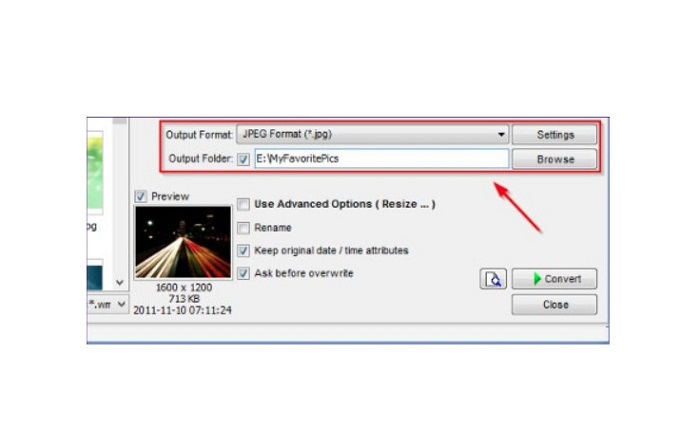
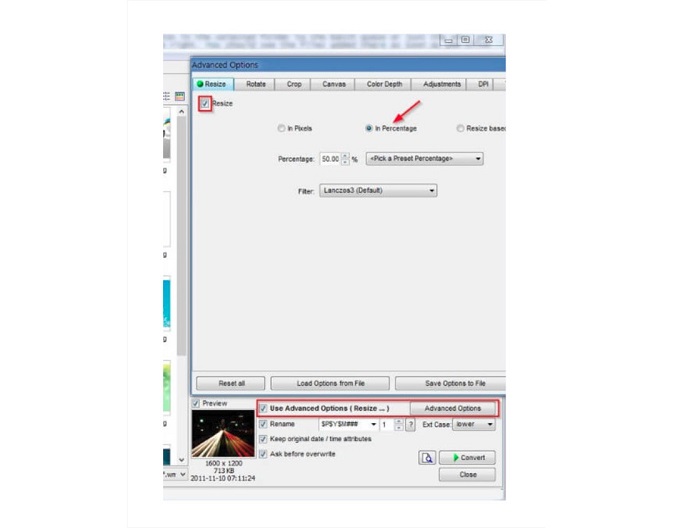
Step 3. Next, click Advanced Options, and a new tab will appear. Then on the Resize tab, tick the In Percentage option to change the image size by percentage. You can select a filter by clicking the drop-down arrow beside Filter.
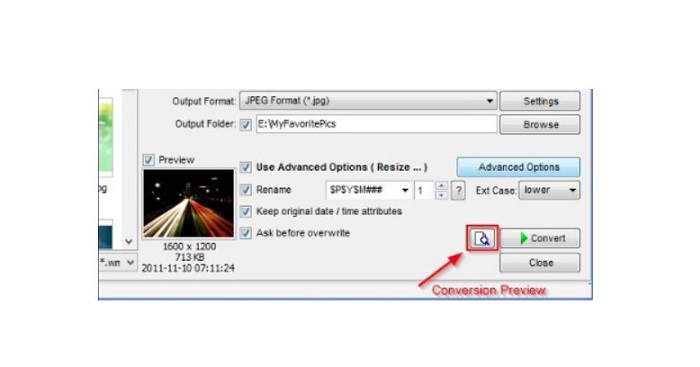
Step 4. And then, you can preview your image and compare it to the original file by clicking the Preview icon beside the Convert button.
Step 5. Lastly, tick the Convert button to start the resizing process. It will also convert your image file to the one you selected in the previous step. After FastStone resizes your image, a new window will appear where you will see the output image and their sizes.
E esse é o fim do tutorial FastStone Photo Resizer. Seguindo os passos acima, você pode facilmente redimensionar sua imagem usando FastStone.
Parte 2. Alternativas ao FastStone Photo Resizer
FastStone Photo Resizer só é acessível em desktops Windows. E outro contratempo é que você deve adquirir o aplicativo antes de acessar seus outros recursos de edição. Portanto, se você preferir usar um aplicativo de corte de vídeo disponível em dispositivos Windows, Mac ou Linux e disponível online, leia esta seção completamente.
Upscaler de imagem gratuito FVC
FVC Free Image Upscaler is one of the most used image resizer applications accessible online and on all browsers, including Google, Firefox, and Safari. This online can also help you with your blurry images. If you have a blurry or low-quality picture, you can use this online tool to deblur and improve its quality. Additionally, you can enhance your image by 2x, 4x, 6x, and 8x magnification. What’s impressive about FVC Free Image Upscaler is that it uses an AI technology process, which automatically detects the blurry portions of your image and then enhances it.
Além disso, ele suporta todos os formatos de imagem, como PNG, JPG, JPEG e BMP. Você também não precisa se registrar ou entrar em uma conta para usar esta ferramenta. E se você quiser verificar a visualização de sua saída antes de salvá-la, poderá fazê-lo enquanto estiver usando este aplicativo. Além disso, é seguro de usar e conveniente de usar. E apesar de ser um aplicativo dependente da internet, possui uma interface de processamento rápido onde você não terá dificuldade em fazer upload de imagens para redimensionar.
Step 1. Open your browser and type FVC Free Image Upscaler on your search box. Click the provided link to go straight to the main page.
Step 2. Launch the program on your desktop by clicking the Upload Photo button. After launching the app, click the Upload Photo button to upload the image you want to resize/deblur.
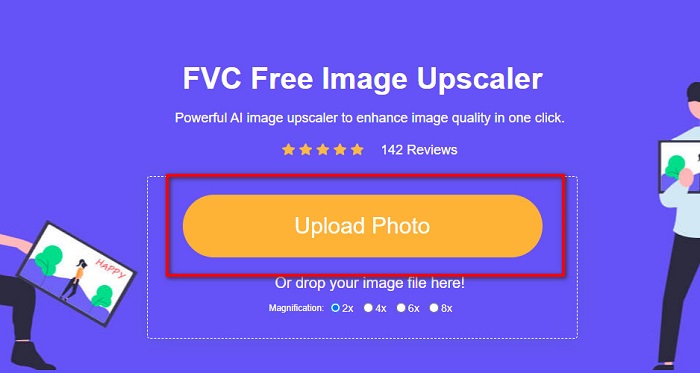
Step 3. Next, you will see the magnification preset you can choose from. You can select between 2x, 4x, 6x, or 8x.
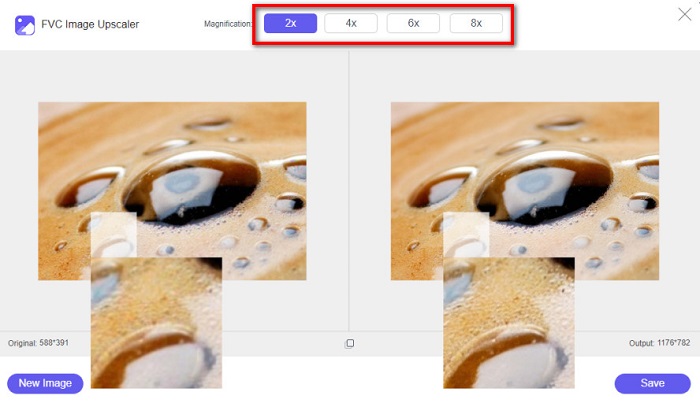
Step 4. Move your cursor to see the preview of your image. And if you are satisfied with the results, click the Save button at the bottom right corner of the interface.
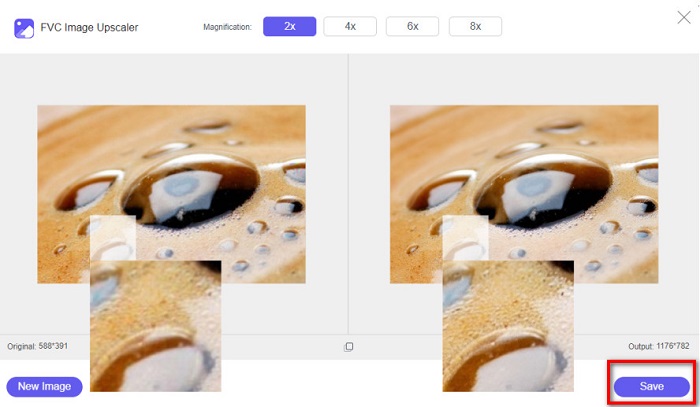
Image Resizer.com
Another fantastic online image resizer that you can use is Image Resizer.com. Image Resizer.com allows you to resize your image by adjusting the dimensions of the image. Furthermore, it has a feature to crop or rotate your photo. It is also a beginner-friendly tool because it has an easy-to-use interface. However, it contains many pesky ads that might distract you.
Step 1. On your browser, search Image Resizer.com. And on the main user interface, click the Select Image button to upload the photo you want to resize.
Step 2. And on the following interface, you can change your image’s dimensions by dimension or percentage. Then, type the Width and Height that you prefer for your picture.
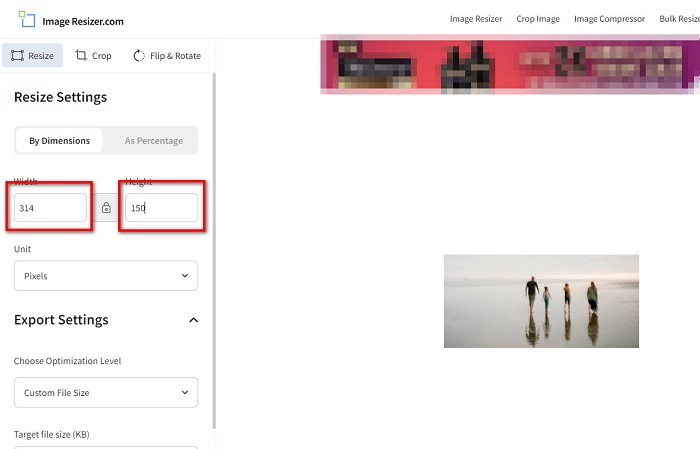
Step 3. If you are done resizing your image, click the Resize Image button to finish the process.
Parte 3. Perguntas frequentes sobre o FastStone Photo Resizer
Quanto custa o FastStone Photo Resizer?
Você pode comprar a versão completa do FastStone Photo Resizer para $19.95 (Licença Vitalícia)
O visualizador FastStone é gratuito?
FastStone Image Viewer é um visualizador de imagens que é usado para Microsoft Windows. Você pode usar o FastStone Image Viewer gratuitamente e gratuitamente.
O FastStone Photo Resizer estraga a qualidade da foto?
No. When you optimize your image using the FastStone Photo Resizer, you will not lose the quality of your image.
Conclusão
FastStone Photo Resizer is an excellent application if you want to resize your video on your Windows desktop. Aside from that, it has many editing features and is also a user-friendly tool. But if you are asking if there is a FastStone Photo Resizer for Mac, the answer is none. So, if you want a photo resizer available on all platforms, use FVC Free Image Upscaler now.
-
 Guia Completo do Imglarger – Solução para Designers de Fotos
 Imglarger é uma das ferramentas de solução de imagem mais eminentes. Clique nesta página para conhecer as descrições completas, prós e contras, preço e alternativas do Imglarger.
-
 Melhor aplicativo de redimensionamento de fotos online, offline, Android e iPhone
 Quais são os melhores aplicativos de redimensionamento de fotos? Clique na página para conhecer os cinco principais aplicativos de redimensionamento de fotos mais poderosos que você pode usar para aprimorar ou redimensionar seu arquivo.
-
 6 Maneiras de Reize uma Imagem na Web e Offline [100% Working]
 Com o tutorial que adicionamos aqui, agora você pode redimensionar facilmente uma imagem com base no tamanho preferido. Aprenda como fazer aqui!
