


 Video Converter Ultimate
 Gravador de ecrã
 Reparo de vídeo
 Secure Download
Como restaurar fotos antigas do seu computador
Searching for a solution for old photo restoration? Many tools will help you restore the old photos that you have. Old photo restoration is known for many people trying to enhance their old images. In addition, this process is also being used to restore damaged images and make them look new. So, if you also have an old photo you want to restore, you can use the methods we will teach you below. Read this blog post to learn the best ways to restore an old image or fix a damaged photo using upscaler tools.

Parte 1. Restauração de fotos antigas online gratuitamente
Você tem uma foto vintage antiga que deseja fazer nova? O upscaling de sua imagem possibilita restaurar uma foto antiga e torná-la nova e bonita. E se você pensa que isso é impossível de fazer, então você está errado. Porque usando este fantástico aplicativo online, você pode restaurar facilmente a foto antiga que você possui.
Upscaler de imagem gratuito FVC
FVC Free Image Upscaler is an online image upscaler that is free and easy to use. This tool can upscale your image to 2x, 4x, 6x, and 8x magnification. Moreover, beginners can easily use this image enhancer because it has a simple and clean user interface. What’s more is that you can use it on all web browsers, including Google, Firefox, and Safari. Additionally, it supports the most standard image formats, such as JPG, JPEG, PNG, and BMP. What’s even greater about this application is that it uses AI (Artificial Intelligence) Technology which automatically detects the low-quality parts of your images and enhances them. And unlike other online applications, FVC Free Image Upscaler has a fast enhancing process making it convenient.
Como melhorar fotos antigas usando o FVC Free Image Upscaler:
Step 1. Go to your web browser and search FVC Free Image Upscaler on the search box. You can also click the link to go directly to their main page.
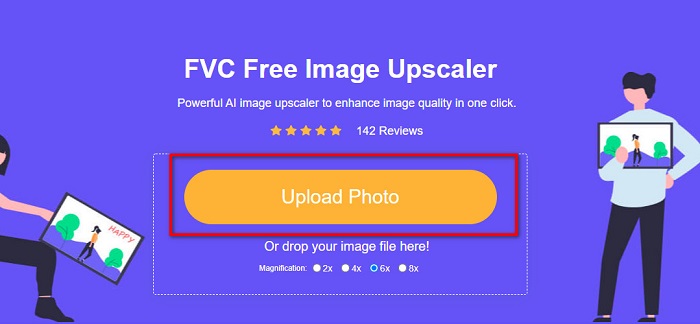
Step 2. And on the main user interface, click the Upload Photo button to import the old image that you want to enhance or upscale.
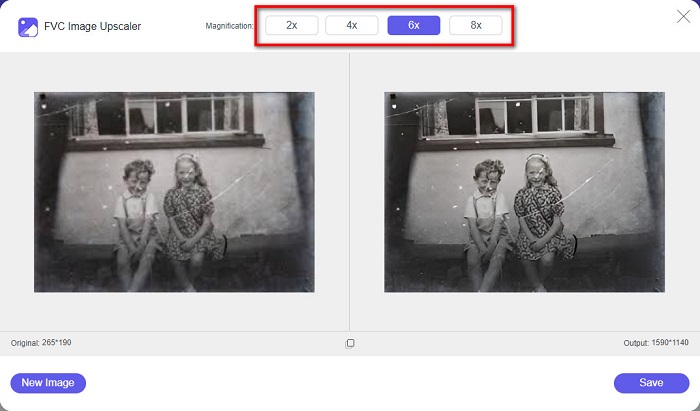
Step 3. After uploading your image, choose the Magnification preset that you want for your image. You can select between 2x, 4x, 6x, and 8x. The higher the magnification, the better the quality of your image will become.
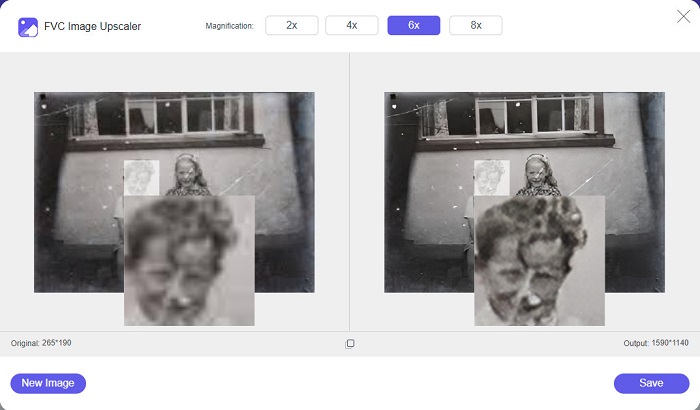
Step 4. And then, move your mouse to the image to see the difference between your enhanced image to the original.
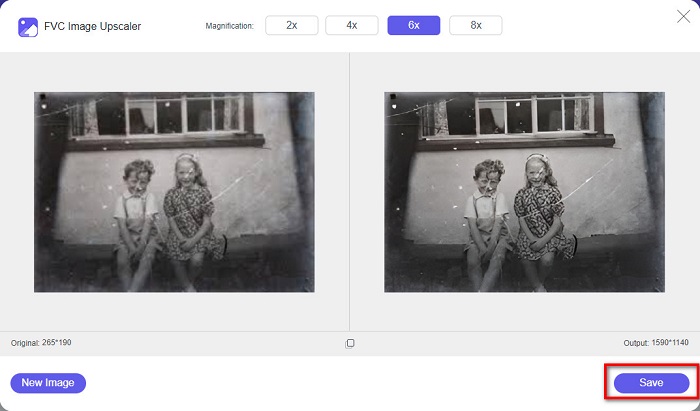
Step 5. When you are done enhancing your image, click the Save button to save your image to your device.
E é isso! Tão fácil quanto 1-2-3, você pode aprimorar sua foto vintage antiga para torná-la nova e melhor.
Zyro
Zyro image upscaler is one of the internet's most famous image upscaling tools. It has an easy-to-use software interface, making it a user-friendly tool. Furthermore, it also uses an AI image retouching process, automatically upscales the old image you want to enhance. It is also accessible on all web browsers, like Google and Firefox. Also, it supports some of the standard image formats, such as JPG and PNG.
Além disso, esta ferramenta aumenta a resolução da sua imagem, tornando-a melhor em qualidade. No entanto, você observará que isso não aumenta muito sua imagem. Ele também tem anúncios que podem ser uma distração para você. No entanto, muitos iniciantes ainda usam essa ferramenta porque possui uma interface de usuário simples.
Restauração de fotos online grátis usando o Zyro:
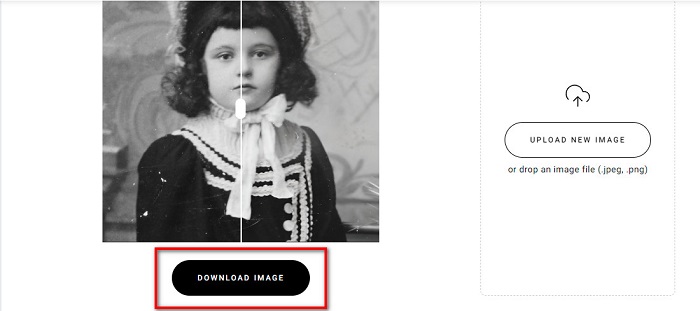
Step 1. Search the Zyro online image enhancer on your browser, then go directly to their main page. On the first interface, click the Upload Image button to upload the old photo you want to enhance.
Step 2. Since Zyro uses an AI-enhancing process, it automatically enhances your image. Then, you will see the difference between your original image and your enhanced old image.
Step 3. Lastly, tick the Download button to download your enhanced image on your device.
Parte 2. Como melhorar as fotos antigas offline
Se você não quiser usar um aplicativo dependente da Internet para aprimorar uma foto antiga, apresentaremos uma ferramenta offline que vale a pena tentar. Depois de usar um aplicativo offline, você não precisará mais acessar a Internet para aprimorar uma imagem. Portanto, leia esta seção completamente para saber como melhorar uma foto antiga offline.
HitPaw Photo Enhancer is an offline image upscaler you can download on almost all media platforms, including Windows and Mac. Also, it uses an AI Technology upscaling process that automatically adjusts your photo’s saturation, contrast, and brightness, and fixes your picture quality. Additionally, you can change the AI model that you want. You can choose between the Denoise, Face, and Colorize models. Furthermore, you can zoom your image to see the enhanced part of your image. Also, you can download this app for free, but with limitations. The downside of Hitpaw Photo Enhancer is that it needs you to avail the premium version to export your enhanced image.
Como melhorar fotos antigas usando o HitPaw Photo Enhancer:
Step 1. Download Hitpaw Photo Enhancer on your device. Follow the installation process, then run the app.
Step 2. On the software’s main interface, click the Choose Images button to browse for the image you want to enhance.
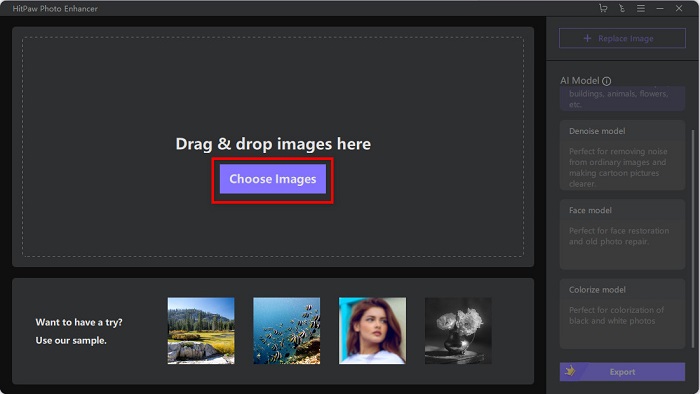
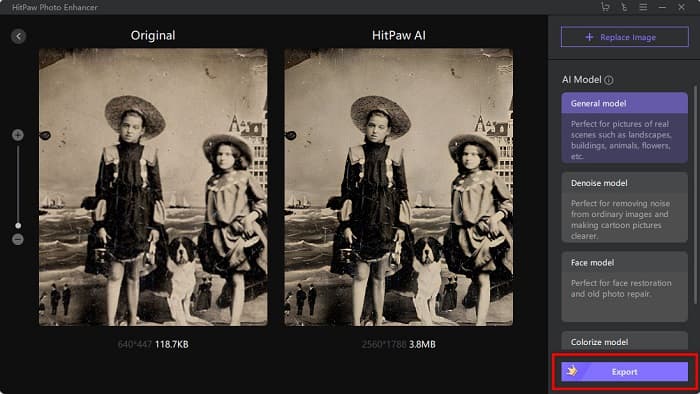
Step 3. Then, click the AI model's General Model and the Preview button to see the result.
Step 4. And then, you will see that your image is now enhanced. Click the Export button to save your image.
Parte 3. Perguntas frequentes sobre como melhorar fotos antigas
O tamanho do arquivo aumenta quando você aprimora sua imagem?
Sim. Quando a qualidade de uma imagem aumenta, a resolução da imagem provavelmente também aumentará, tornando o tamanho do arquivo maior que o original.
Aumentar os pixels melhora a qualidade da foto?
Alta resolução significa mais pixels por polegada, o que significa mais informações de pixel, tornando sua imagem de alta qualidade e tamanho. Por outro lado, se você tiver uma imagem de baixa resolução, sua foto terá poucos pixels. Portanto, se você aumentar os pixels de sua imagem, sua imagem terá melhor qualidade.
Quantos pixels é uma imagem de boa qualidade?
A melhor resolução para impressão é de 330 PPI (Pixels por polegada). Com 330 PPI, sua imagem aparecerá nítida e sem cortes. E se você tiver 330 PPI, terá uma imagem de alta resolução, fazendo com que pareça uma imagem de alta qualidade.
Conclusão
Old photo restoration is not complex if you follow the methods that are presented above. And since all the tools mentioned above will help you enhance your old image, it will be easy for you to upscale your image. However, not all image upscaler will produce high-quality outputs, so use FVC Free Image Upscaler for high-quality image compression.
-
 Como converter imagem de baixa resolução em alta resolução online
 Se você deseja aprender a converter imagens de baixa resolução em imagens de alta resolução online, este artigo é para você. Leia completamente para saber como.
-
 Como melhorar facilmente a qualidade da imagem no Windows e Mac
 Deseja melhorar a qualidade da sua imagem? Saiba como aumentar a qualidade da imagem online e offline no seu computador ou iPhone lendo o guia simples.
-
 Os 6 principais removedores de fotos de manchas que você deve ter agora [2022]
 Precisa de um removedor de manchas de fotos para ter uma pele lisa? Não se preocupe mais! Aqui, apresentaremos diferentes ferramentas que podem ajudar seu dispositivo.
