


 Video Converter Ultimate
 Gravador de ecrã
 Reparo de vídeo
 Secure Download
Top 5 aplicativos incríveis de redimensionamento de fotos que você deve experimentar
Other people find it hard to resize a photo because they cannot find a tool that can compress losslessly. And many people resize their photos to enhance the quality of their images. Although resizing an image will affect the quality, it is the best choice if you do not have enough storage on your device. Moreover, resizing an image is also a great choice to enhance your blurry image. The good news is that there are apps online, offline, on Android, and on iPhone that can resize your image without losing quality. Therefore, finish reading this article to learn the five best photo resizer apps.

Parte 1. Aplicativo de redimensionamento de fotos on-line gratuito
Muitas pessoas querem usar um redimensionador de fotos online porque não exigirá que você baixe nada no seu dispositivo. Uma ferramenta online é a melhor escolha se você quiser economizar armazenamento para o seu dispositivo. Além disso, os aplicativos online geralmente são gratuitos, assim como a ferramenta que muitos usuários recomendam, que é o FVC Free Image Upscaler.
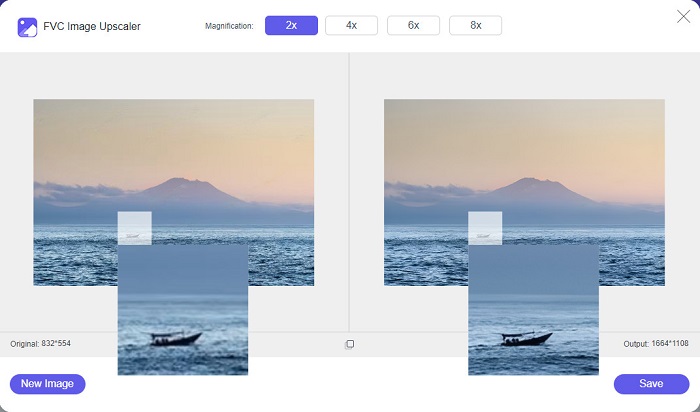
FVC Free Image Upscaler is an online resizer app accessible on all web browsers, including Google, Firefox, and Safari. Also, this amazing app can upscale your image between 2x, 4x, 6x, and 8x magnification. Additionally, it supports almost all image formats, such as PNG, JPG, JPEG, and BMP. What’s even excellent about this tool is its intuitive user interface, making it a beginner-friendly tool. Furthermore, FVC Free Image Upscaler uses an AI (Artificial Intelligence) technology that automatically identifies the blur parts of your image and enhances it immediately. Besides enlarging your image by choosing the magnification you want, this tool is known for its AI-enhancing capabilities. And since it is an online application, you do not need to download anything on your device, which allows you to save storage. So, what are you waiting for? Browse this best free app to resize photos now.
Prós
- Tem um processo de upscaling rápido.
- Não requer que você faça login para uma conta.
- Possui uma interface de software fácil de usar.
- Você pode acessá-lo em seu dispositivo Windows ou Mac.
Contras
- É uma ferramenta dependente da Internet.
Parte 2. Melhor aplicativo de redimensionamento de fotos para seu computador
Você pode usar muitos aplicativos em seu computador se estiver procurando por um redimensionador ou upscaler de imagem. No entanto, nem todos os aplicativos para download são gratuitos. Muitas vezes, os aplicativos de software para o seu PC não são gratuitos. Felizmente, encontramos um aplicativo para o seu computador que pode ser baixado gratuitamente. Leia esta seção para saber mais sobre este melhor aplicativo gratuito de redimensionamento de fotos para o seu PC com Windows.
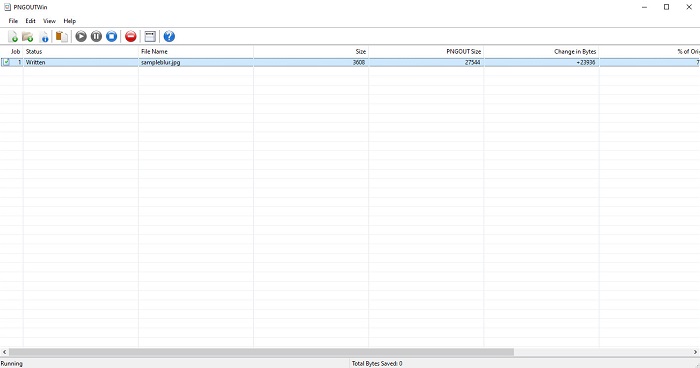
PNGOUTWin is an offline photo resize that you can download for free on your Windows computer. This photo resizer app supports standard image formats, like PNG and JPG. Moreover, it automatically resizes your photo after uploading the image you want to compress. Although it is easy to use, its functions are hard to navigate. But after many users, you will surely get the hang of this tool. It has a batch resizing process, allowing you to resize images simultaneously and save them in one folder.
Prós
- O download é gratuito.
- É seguro e fácil de usar.
- Oferece processo de upscaling em lote.
Contras
- Disponível apenas em dispositivos Windows.
- Você não pode visualizar sua imagem com upscaling.
Parte 3. Melhor aplicativo para redimensionar fotos no Android
Hoje em dia, muitas pessoas usam telefones Android. E se você tiver uma imagem de baixa qualidade em sua galeria, talvez queira aprimorá-la com um aplicativo de redimensionamento de fotos. Felizmente, existem muitos aplicativos gratuitos de redimensionamento de fotos que você pode baixar na PlayStore para ajudá-lo a aprimorar sua imagem de baixa qualidade.
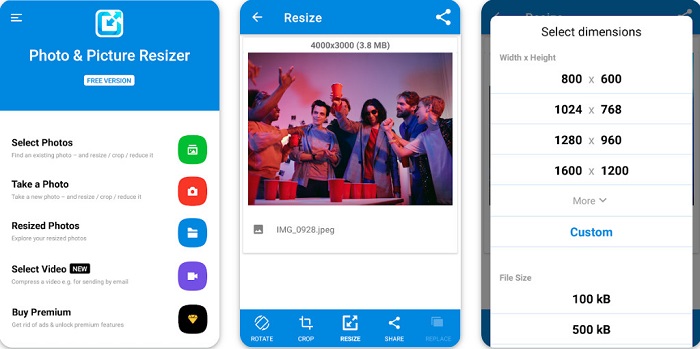
Photo & Picture Resizer is the first on the list if you search for photo resizer apps on PlayStore. It is one of the best picture resizer apps you can download on your Android device. Furthermore, it offers a batch upscaling process, where you can compress two or more images simultaneously. Moreover, you can select from the dimension presets what size you want for your image. In addition, you can also change the file size and resolution of your image. Photo & Picture Resizer app can also compress your videos. The drawback of Photo & Picture Resizer is that it requires you to purchase the premium app before accessing its special editing features.
Prós
- É gratuito e seguro para download.
- Possui um processo de redimensionamento rápido.
- Você pode exportar sua saída para outras plataformas de mídia social.
Contras
- Compre a versão premium para usar recursos especiais.
- Ele contém anúncios irritantes.
Parte 4. Melhores aplicativos de redimensionamento de fotos para iPhone
Muitas pessoas estão usando iPhones hoje em dia, e você sabia? Você pode baixar muitos aplicativos de redimensionamento de fotos gratuitos no seu iPhone para redimensionar ou aprimorar sua imagem. E se você quiser saber qual é o melhor para usar, leia esta parte com tudo incluído.
Remini
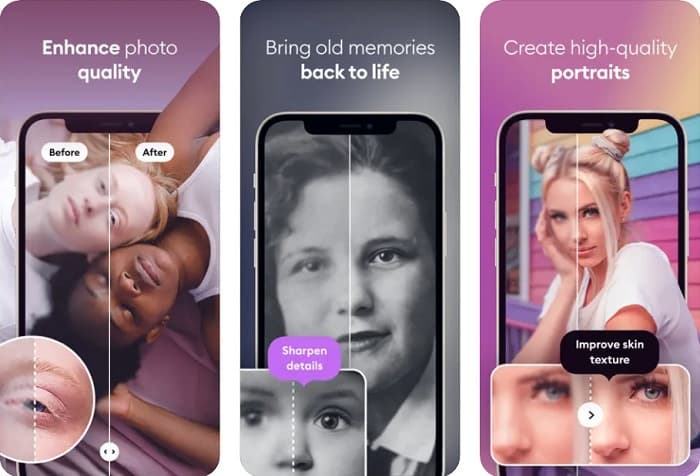
Remini is the best photo resizer app for iPhone. Remini is free to download on the AppStore and is safe to use. Also, it uses AI (Artificial Intelligence) technology which automatically resizes and enhances your image. Additionally, this app allows you to see the changes made to your image before saving it on your device. It also enables you to export your output on popular social media platforms like Facebook, Instagram, and TikTok. And on its Pro version, there are more editing features that you can use to improve your image. So, if you want your image to have a sharp and clear look, this app might be the one you are searching for.
Prós
- Ele suporta os formatos de imagem para o iPhone.
- Possui uma interface de usuário simples.
- Pode corrigir imagens de baixa resolução.
Contras
- Você precisa comprar o aplicativo para melhorar as imagens.
Redimensionar imagem
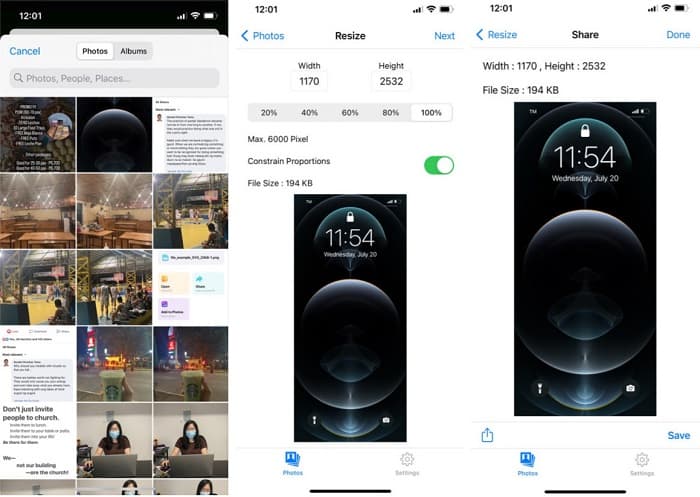
Another best app to resize an image is Image Resize. Image Resize is also free to download on your iPhone device. This app allows you to resize your image by choosing from the percentage you want for your image. In addition, you can adjust your image’s width and height with this app. What’s even fantastic about this app is its fast resizing process, which many users find very convenient.
Prós
- Ele suporta imagens HEIC, Exif e PNG.
- É um aplicativo amigável.
Contras
- Ele só pode redimensionar os quadros da sua imagem, mas não a aprimora.
Related to:
How to Easily Improve Image Quality on Windows and Mac
How to Increase the Resolution of the Image [5 Ways to Improve]
Parte 5. Perguntas frequentes sobre o melhor aplicativo de redimensionamento de fotos
Posso redimensionar uma foto sem perder a qualidade?
Redimensionar uma imagem não significa necessariamente que irá arruinar a qualidade da sua imagem. Embora afete o tamanho da sua imagem, na maioria das vezes, os aplicativos podem redimensionar uma imagem sem perder qualidade.
Posso redimensionar uma imagem usando o Adobe Photoshop?
Yes. Adobe Photoshop is the most amazing photo editing application that has a feature where you can resize your image. To do this, open Adobe Photoshop, select the image you want to resize, and then go to the main menu bar > Select Image > Image Size to open the Image Size dialog box to adjust the size of your image.
Quais formatos de imagem são compatíveis com o Adobe Photoshop?
O Adobe Photoshop suporta quase todos os formatos de imagem conhecidos, como JPG, JPEG, PNG, GIF, TIFF e muito mais.
Conclusão
Now that you know the best photo resizer app, you can choose which one you prefer. There are different apps for online, offline, Android, and iPhone, and it depends on what device you are using. But if you do not want to download anything on your device, use FVC Free Image Upscaler now.
-
 Melhore a resolução da foto do iPhone com os principais aprimoradores
 Você quer precisar melhorar a resolução da foto do iPhone? Bem, neste artigo abordamos as melhores ferramentas que você pode usar e outros truques que você deve conhecer!
-
 Restauração de fotos antigas online e offline [etapas fáceis]
 Quer restaurar uma foto antiga? Com essas ferramentas, você conhecerá o processo de restauração de fotos antigas. Leia este post para aprender os métodos mais simples.
-
 Top 7 Pixels Enhancer para todos os navegadores da Web que você deve usar
 Se você quer saber os melhores intensificadores de pixel para usar, é melhor você conferir este post. Este artigo lista sete melhores aprimoradores de pixel de foto para todos os navegadores da web.
