


 Video Converter Ultimate
 Gravador de ecrã
 Reparo de vídeo
 Secure Download
Como remover imagem de fundo do PPT: desktop e online
Ao criar PPTs, muitas vezes precisamos definir vários modelos em estilos diferentes e inserir os ícones ou imagens preparados. No entanto, muitas imagens do Material têm cor de fundo. Quando há muitas cores diferentes em uma página, ela fica desorganizada. Todos os elementos são empilhados aleatoriamente e não formam um design completo.
So we must deal with it seriously and perform PPT removing the background image . PowerPoint itself has two ways to realize this operation. But if you want to experience a more brilliant background removal service, you can try the best online tools recommended in the article. We will not continue to nag; we will immediately start to see how to do it.

Parte 1. Como remover o fundo em PPT
Você pode manipular imagens no PowerPoint manualmente ao criar um PPT. Há duas ferramentas na interface que ajudarão você a remover o fundo da imagem. Vejamos como fazer isso nessas duas situações a seguir.
Remova o fundo com o recurso Definir cor transparente
O primeiro passo é adicionar um efeito de cor transparente às fotos. Este método é muito adequado para fotos com cores monocromáticas, e o efeito é imediato.
Veja como remover o fundo branco da imagem no PPT com o recurso de cor transparente.
Step 1. Open your PPT. Navigate to the image you want to edit. Please select it and choose Format in the toolbar.
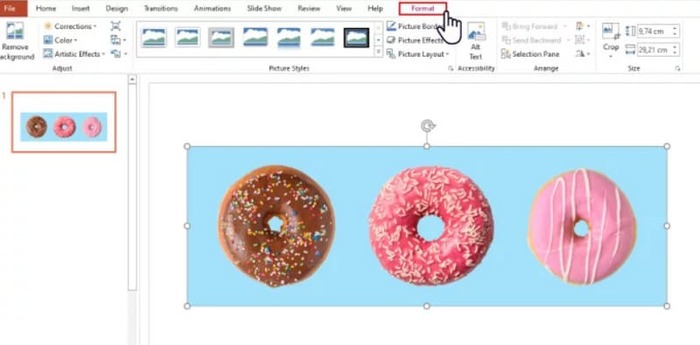
Step 2. Find Color in the top left corner. Expand the menu and choose Set Transparent Color.
Step 3. Your cursor will become a pencil. Hover it on your image and click. The background color of your image will be transparent.
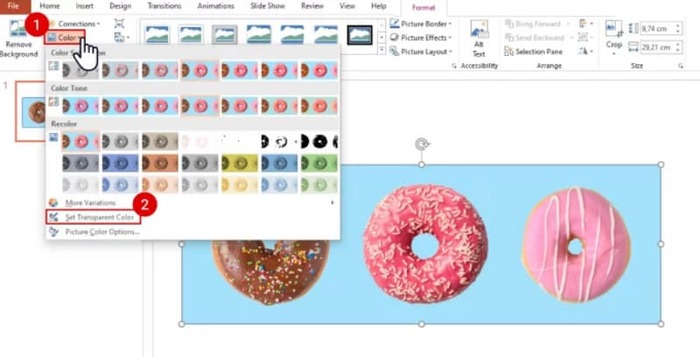
Observe que este método não funciona para imagens com sombras no fundo. Além disso, se os objetos na imagem tiverem cores muito próximas do fundo, a função Transparência pode apagar tanto o fundo quanto os objetos.
Remova o fundo com o recurso Remover fundo
Você verá um botão "Remover Plano de Fundo" no canto superior esquerdo da página do PowerPoint. Clique nele e o recurso "Remover Plano de Fundo" do PPT reconhecerá automaticamente o fundo e destacará a parte a ser removida.
Veja como remover uma imagem de fundo de um slide PPT com o recurso Remover fundo.
Step 1. After inserting your image into your slide, select it.
Step 2. Click Picture Format > Remove Background.
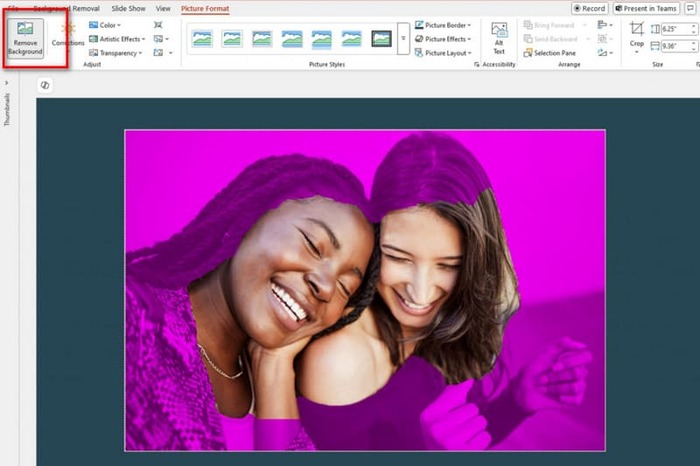
Step 3. The platform will run and detect the background automatically. The background will be highlighted in purple. You can also choose Mark Areas to Keep or Mark Areas to Remove to adjust the frame manually.
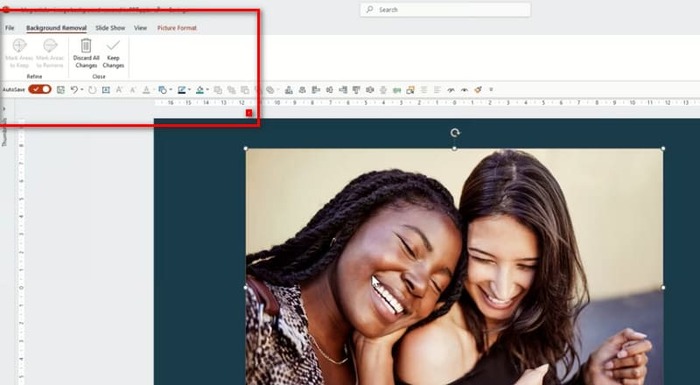
Unfortunately, there is a common problem with this feature and the Transparency Effects feature. They are both very bad at detecting the background and are likely to erase the core objects in the image. And even if you try to adjust it manually, PowerPoint will still follow its idea when executing it. If your picture background is dark or not a single color, try to find another more innovative tool to remove or add background to your image.
Parte 2. Como remover o fundo branco de uma imagem online e enviá-la para o PowerPoint
Grátis: Removedor de fundo FVC
In the above, we can find that the tools provided by PowerPoint, although simple to use, cannot be used to process pictures with complex backgrounds. If you have such tasks, we recommend using FVC Free Background Remover as an assistant. It doesn't cost you anything. All you have to do is upload the image to the platform, which can be in PNG, JPG, or JPEG format, and FVC Free Background Remover can even be used to change the background of the slide image. Upload the new background you want, or pick a solid color.
Veja como remover gráficos de fundo em PPT com o FVC Free Background Remover.
Step 1. Open FVC Free Background Remover on your browser. Click Upload Image to add your image to the slide.
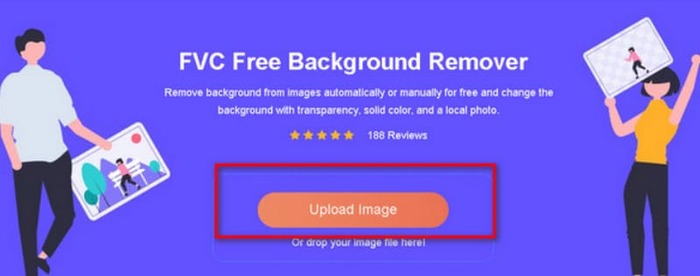
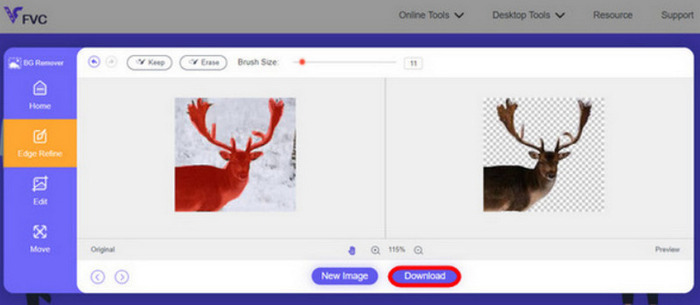
Step 2. FVC Free Background Remover will load the image and perform background removal automatically. You can edit the image and customize the settings when the process is over.
Step 3. Finally, click Download to save the edited video.
The PPT removes the image background method above, mainly for static images. If you have watermarks, logos, etc. on your image screen, find out how to remove watermarks from photos for optimal display.
Parte 3. Perguntas frequentes sobre PPT Remover imagem de fundo
Como remover um fundo branco de uma imagem no PPT?
O PowerPoint conta com os recursos Remover Fundo e Efeito de Cor Transparente para ajudar. No entanto, existe a possibilidade de que eles destruam a integridade da tela. Você pode usar o Removedor de Fundo Gratuito FVC para lidar com a imagem.
Por que não tenho cor transparente no PowerPoint?
Primeiro, você precisa garantir que selecionou a imagem de destino. Se a imagem não estiver selecionada, você não poderá adicionar um efeito de cor transparente a ela.
O que devo fazer se a ferramenta Remover plano de fundo não funcionar?
Primeiro, verifique se o formato da sua imagem é compatível com o PowerPoint, ou seja, JPG, JPEG ou PNG. Caso contrário, converta o formato primeiro. Esse problema também pode ocorrer porque o seu PowerPoint não é a versão mais recente. Atualize-o primeiro e, em seguida, reabra a operação.
Conclusão
Although PowerPoint has functions that enable PPT to remove background images, they are too basic. It is also very likely that the existing elements in the screen will be destroyed. If your picture has a simple background color or a white background, then the tools within PowerPoint may be enough. Still, if your picture has a lot of details, we recommend using a professional tool like FVC Free Background Remover. It is easy to use and doesn't require downloading additional software.
-
 Guia passo a passo para alterar o fundo da imagem de 4 maneiras
 Procurando ferramentas para alterar fundos de fotos? Neste artigo, aprenda várias ferramentas de edição de imagens que você pode usar para alterar facilmente os fundos das imagens.
-
 Remoção de fundo GIF com ferramentas eficazes e úteis
 Remover o fundo sem a ferramenta certa pode ser frustrante. Verifique esta postagem para recomendações de aplicativos sobre como tornar os fundos GIF transparentes.
-
 Como remover o fundo da imagem usando o GIMP
 Comece a usar o GIMP e o processo passo a passo de remoção de fundos de imagens. Descubra maneiras eficientes de criar imagens transparentes usando o GIMP hoje mesmo!
