


 Video Converter Ultimate
 Gravador de ecrã
 Reparo de vídeo
 Secure Download
Maneira excepcional de como remover emojis de fotos
Do you want to discover and learn how to remove emojis from pictures? Then you are on the right blog. Emojis are one of the best ways to make an attractive photo. It has more impact on the eyes of the viewers. However, there are times when these emojis become annoying to others. So, this article will show you great procedures to remove these unwanted objects from your photos using Android, iPhone, and desktop applications. Read this article and learn more detailed information.

Parte 1: Você pode remover emojis de fotos
Se você quer saber se é possível remover emojis de uma imagem, a resposta é definitivamente sim! Usando diferentes aplicativos, você pode eliminar objetos indesejados de suas fotos, como emojis, adesivos, logotipos, marcas d'água e muito mais. Se você quiser aprender os métodos mais eficazes para remover esses objetos indesejados de sua imagem, especialmente emojis, leia as seguintes partes deste artigo.
Parte 2: Excelentes ferramentas online para remover emojis de fotos
Removedor de marca d'água gratuito FVC
If you are looking for the most excellent method to remove emojis from a photo, then FVC Free Watermark Remover is the answer. It is an online tool capable of removing anything you don’t like from your photos, such as emojis, logos, watermarks, text, and more. Also, when it comes to the process of removing them, you don’t need to wait longer. This tool offers a fast removal process, which is good news to all users. It supports the most popular image formats, such as JPG, PNG, BMP, TIFF, and more. This way, you can upload any image you want to this software. In addition, aside from watermark remover tools, FVC Free Watermark Remover can offer cropping features, so if the watermarks are placed on the edge or corner of your photo, you can easily crop them.
Além disso, possui uma interface de usuário amigável e etapas simples de seguir, o que é perfeito para qualquer usuário, especialmente para iniciantes. Você pode acessar essa ferramenta baseada na Web em quase todos os navegadores b, como Google Chrome, Microsoft Edge, Mozilla Firefox e muito mais. Por fim, se você terminar de remover o emoji de sua foto, poderá obter a qualidade original de sua foto, portanto, não há necessidade de se preocupar se sua imagem ficará embaçada ou não. Siga as etapas simples abaixo para remover emojis de sua foto.
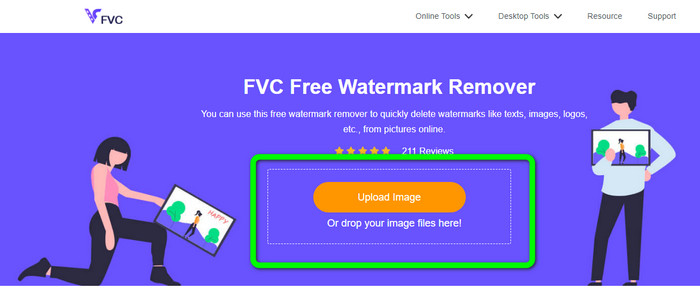
Step 1: Go and visit FVC Free Watermark Remover on your browser. Click the Upload Image button to attach your photo with an emoji you want to efface. Also, you can drop your image file directly into the box.
Step 2: When you have already attached the photo, highlight the emojis using the watermark remover tools. These tools are Brush, Lasso, and Polygonal. You can also use the + and - icon below the photo to zoom in and out the photo.
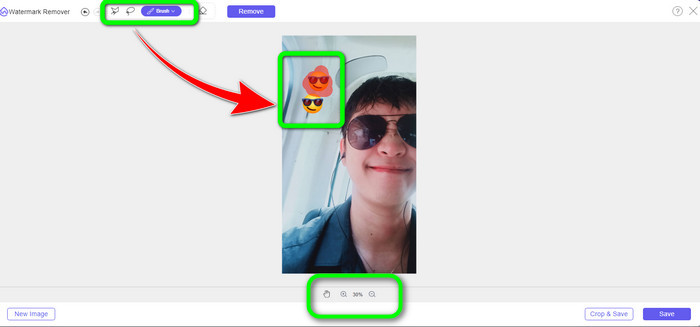
Step 3: After highlighting all the emojis from your photo, you can remove them by clicking the Remove button. After clicking, wait for the removal process.
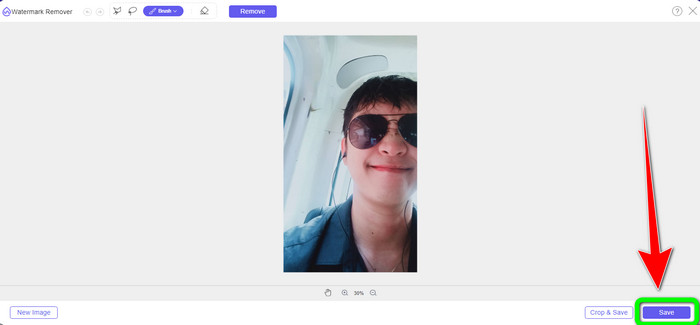
Step 4: When the emojis are deleted, save the final photo by clicking the Save button.
Beecut
BeeCut is the best online tool you can use if you want to remove emojis from photos online. Your photos and films' watermarks might be eliminated using it. It is an easy-to-use internet application that is ideal for beginners. Emojis can be easily removed from your image in just a few simple steps. Additionally, BeeCut contains a ton of editing options, including filters, timeline layers, split and combine, trim, cut, split and combine, split, and more. It also has a few simple steps. Additionally, you can include subtitles below if you are creating a video, which is useful for viewers.
No entanto, este aplicativo leva muito tempo para salvar as alterações e fazer upload de fotos. Além disso, como é um programa baseado na Web que só pode ser usado online, você não pode usar esta ferramenta se não tiver uma conexão com a Internet. Use as poucas etapas listadas abaixo para remover emojis de suas imagens usando esta ferramenta online.
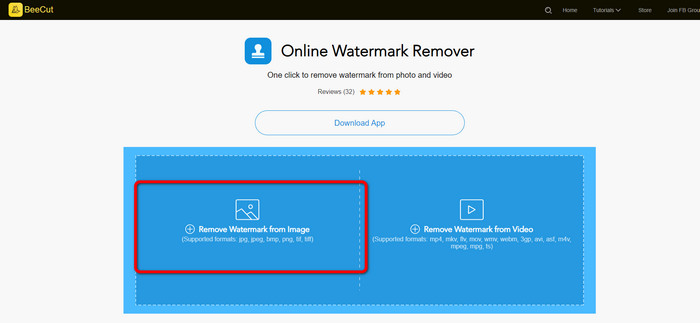
Step 1: Proceed to the official website of Beecut. Then select Remove Watermark from Image button to add the photo.
Step 2: Then, highlight the emoji you want to remove from your photo using the blue box. After that, click the Erase button and wait for the process.
Step 3: Lastly, you can already save your photo without emojis by clicking the Download button. Click here to learn how to remove emojis from videos.
Parte 3: Como Remover Emoji de Fotos no iPhone e Android
Remover emojis de fotos no iPhone
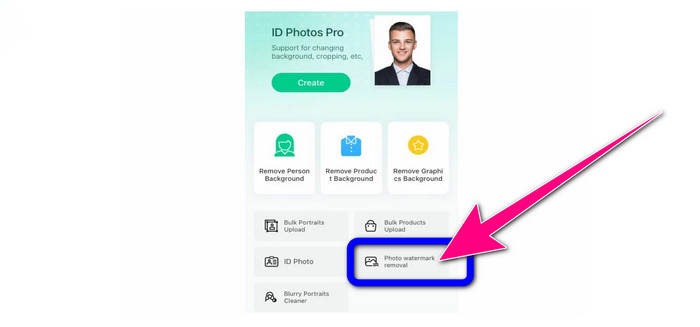
Para saber como remover um emoji de uma foto usando um iPhone, você pode baixar o Apagador de fundo da Apowersoft. É um dos removedores de fundo de fotos mais excelentes que você pode usar no seu celular. Ele pode facilmente apagar qualquer objeto indesejado de suas imagens, como logotipos, adesivos, emojis, marcas d'água, etc. Você pode usar a ferramenta Pincel para realçar o emoji manualmente. Você já pode tirar sua foto sem um emoji em apenas um segundo. No entanto, o processo de download e instalação deste aplicativo é lento, portanto, certifique-se de não estar com pressa ao usar este software. Siga as etapas abaixo para remover o emoji da sua foto.
Step 1: Launch the Apowersoft Background remover and select the Photo Watermark Removal button to upload the image with an emoji.
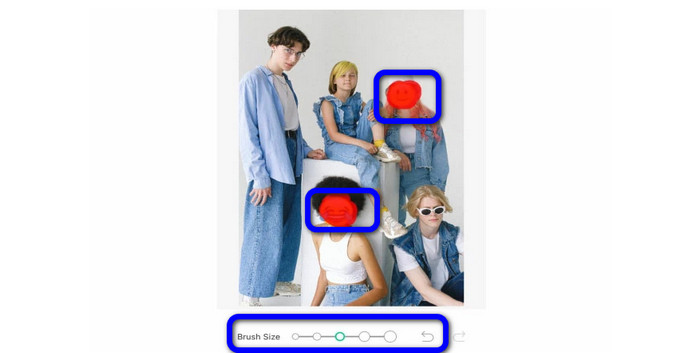
Step 2: After uploading the image, you can highlight the emoji using the Brush tool. You can also adjust or change the size of the Brush tool. Then, click the Checkmark.
Step 3: After clicking the check mark, you will see that the emoji is gone. Then, click the Save button to save your photo.

Remover emojis de fotos no Android
Can you remove emojis from pictures? This is one of the questions people always ask whenever they encounter an emoji from their photos. So, you can use Photo Retouch. This application is accessible on Android. It is also easy to utilize because it has an understandable interface. However, there are some instances that the application crashes and is not performing well. But if you want to use Photo Retouch to remove emojis from your image, follow the simple steps below.
Step 1: Download and install photo retouch on your Android. Then, launch it.
Step 2: Add the photo by tapping the album icon. Then, select the Object Removal button.
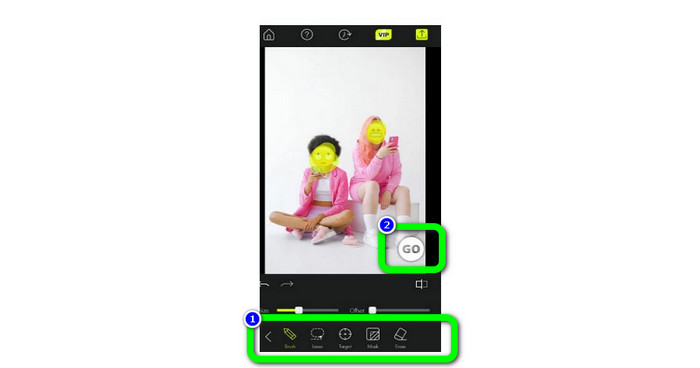
Step 3: Highlight the emoji using remover tools, such as Brush or Lasso tool. After highlighting them, select the Go button.
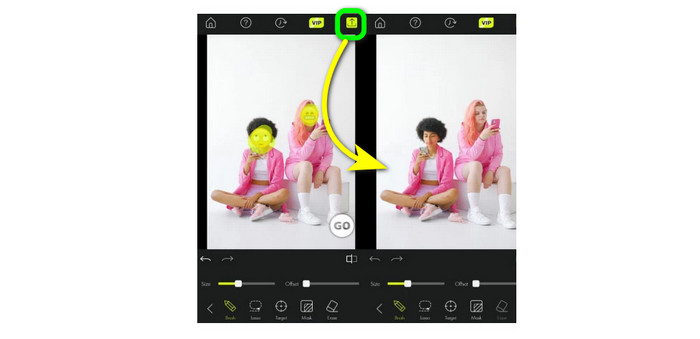
Step 4: The final procedure is to click the Save icon.
Parte 4: Perguntas frequentes sobre como remover emojis de fotos
1. Também posso excluir um emoji do meu vídeo?
Yes, of course. You can use watermark remover tools, such as Video Converter Ultimate, HitPaw, Media.io, Online Video Cutter, and more. With the help of these applications, you can easily remove emojis from a video.
2. Existe uma maneira mais rápida de remover emoji de uma foto?
Yes, there is. The best method to remove them quickly is to use FVC Free Watermark Remover. You can remove the emoji in just a second when using this app.
3. Como removo emojis de uma foto sem usar um removedor?
A melhor coisa que você pode fazer é usar uma ferramenta de corte. Quando o emoji estiver no canto ou na borda de suas fotos, cortá-los é o melhor método.
Conclusão
This article provided efficient and fast methods about how to remove emojis from pictures. Among these great applications you can use, we highly recommend FVC Free Watermark Remover. It has simple methods that are suitable for everyone.
-
 Excelentes maneiras de como remover adesivo de foto e vídeo
 Deseja remover sem esforço adesivos de vídeos e fotos? Aqui estão as maneiras eficazes, incluindo os métodos mais confiáveis e fáceis que você pode tentar
-
 Maneiras diretas de remover marca d'água de JPG online
 Vamos descobrir as melhores táticas para remover marcas d'água de JPG online usando aplicativos eficazes. Siga este artigo para aprender os procedimentos
-
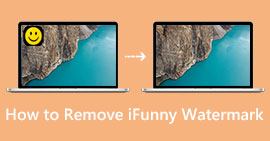 Guias completos para remover facilmente marcas d'água iFunny
 Descubra o removedor de marca d'água iFunny mais excepcional para você. Além disso, aprenda esses métodos simples para remover marcas d'água iFunny de suas fotos
