


 Video Converter Ultimate
 Gravador de ecrã
 Reparo de vídeo
 Secure Download
Como remover a marca d'água WOW Slider gratuitamente
WOW Slider is one of the most popular slideshow makers that you can use to create stunning image slideshows. This application is free to download and does not take much storage on your device. Moreover, it has an intuitive user interface, making it easy for you to make slideshows. Unlike other image platforms, WOW Slider does not use Flash and does not require any plug-ins. However, WOW Slider puts watermarks on the slideshow that you create. So, many users are searching for a method to remove the WOW Slider watermark for free. Read continually to learn how to remove the WOW Slider watermark for free.

Parte 1. Como remover a marca d'água WOW Slider sem comprar
Você pode remover a marca d'água usando o aplicativo se comprou o WOW Slider. Mas se não, você pode usar ferramentas para remover a marca d'água WOW Slider em sua apresentação de slides. Portanto, leia esta parte de forma abrangente para saber como remover o WOW Slider sem comprar.
Removedor de marca d'água gratuito FVC
FVC Free Watermark Remover is among the most popular online watermark removers accessible on all web browsers, like Google, Firefox, and Safari. This online tool is safe, free, and does not require subscriptions. Moreover, it is a beginner-friendly app because it has an intuitive user interface. Also, it supports many image formats, including PNG, JPG, JPEG, BMP, etc. What’s impressive about this tool is that you can choose from different selection tools to remove the watermark on your image. So, if you want to use this free watermark remover, follow the steps below.
Como remover a marca d'água WOW Slider usando o FVC Free Watermark Remover:
Step 1. First, open your browser and search FVC Free Watermark Remover. For quick access, click the provided link.
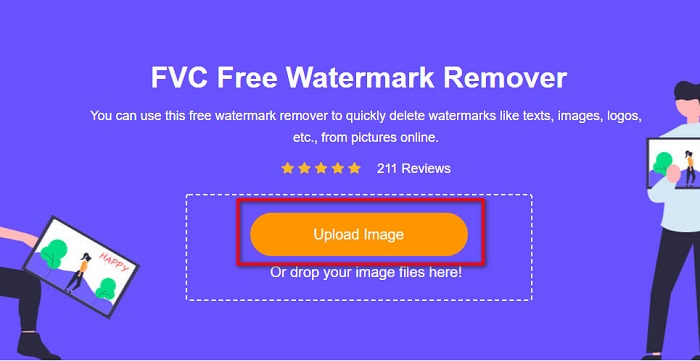
Step 2. Next, click the Upload Image button to upload the WOW Slider image you want to remove the watermark.
Step 3. After uploading your image, select the selection tool that you like to use to remove the watermark. You can choose between Lasso, Polygonal, or Brush.
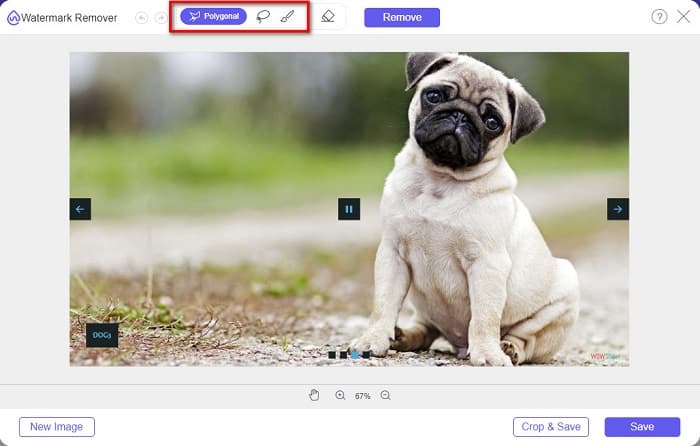
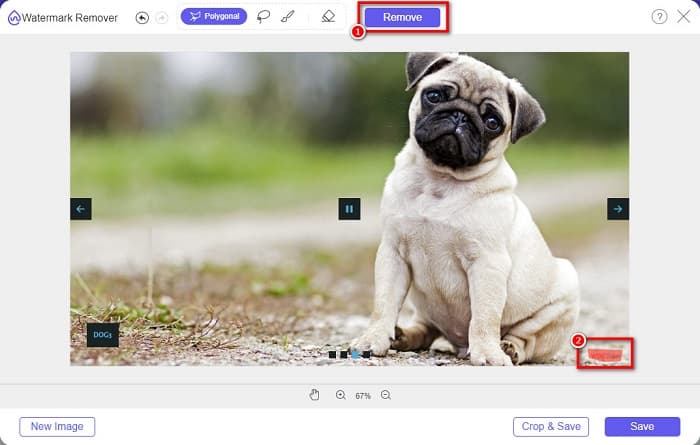
Step 4. And then, trace the area where the WOW Slider watermark is located. Then click Remove to erase the watermark on your image.
Step 5. Lastly, click the Save button to save your image on your computer.
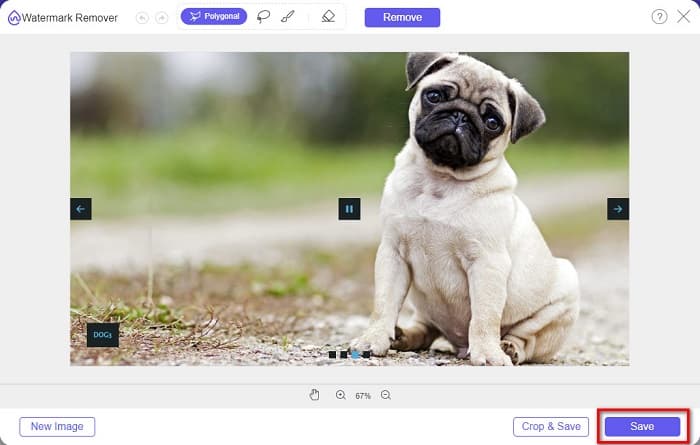
E é isso! Agora você pode visualizar sua imagem WOW Slider sem a marca d'água WOW Slider.
Especialista em marca d'água Bitwar
Bitwar Watermark Expert is a watermark remover that can remove the WOW Slider watermark on your slideshow. This offline watermark remover has a simple user interface, making it a beginner-friendly tool. Moreover, it allows you to remove or add watermarks from your images or videos. And in its VIP version, you can batch process the videos you want to remove the watermark. You can download this software application on your Windows computer. However, you need to purchase the app before accessing its other features. Nevertheless, Bitwar Watermark Expert is an excellent tool to remove watermarks on your WOW Slider slideshow.
Exclua a marca d'água WOW Slider em sua apresentação de slides usando o Bitwar Watermark Expert:
Step 1. Download the Bitwar Watermark Expert on your device, then open it after downloading.
Step 2. On the main software interface, you will see four options. Click the Photo Watermark Remover.
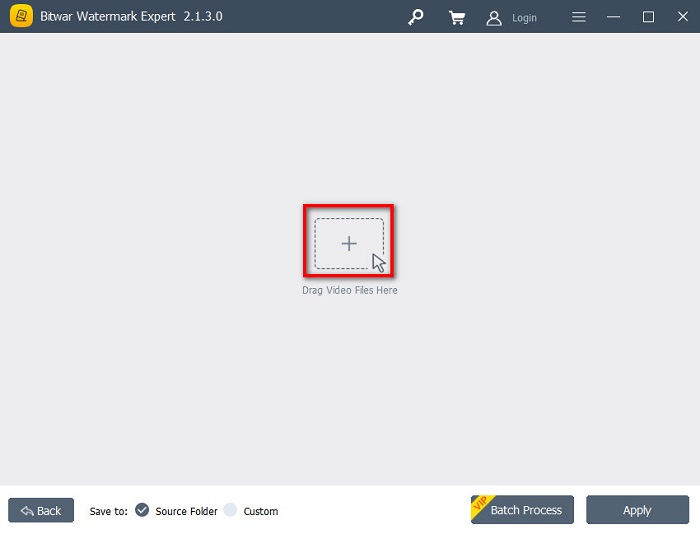
Step 3. Then, click the + sign button in the middle of your screen to upload the WOW Slider image.
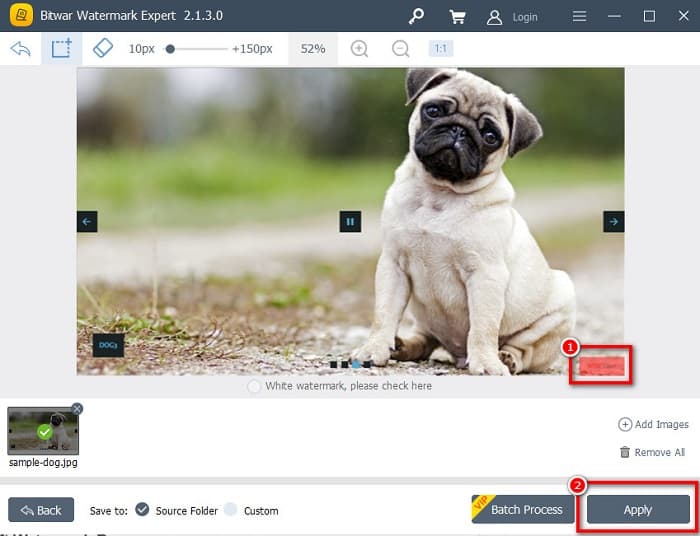
Step 4. Next, select a selection tool that you want to use to remove the watermark on your image. Then, select the watermark area on your image.
Step 5. Finally, click the Apply button to remove the watermark from your WOW Slider slideshow. Using these steps, you can remove watermarks from Placeit.
Removedor de marca d'água da Apowersoft
Another offline watermark remover that you can use is Apowersoft Watermark Remover. This watermark remover allows easy removal of any watermarks (logo, text, image) on your videos. Also, you can download it on almost all media platforms, including Windows and Mac. Moreover, it has a feature where you can remove and add watermarks to your image. It also has three watermark selection tools to remove the WOW Slider watermark on your slideshow. Furthermore, it is a user-friendly tool with an easy-to-use software interface. The drawback of this tool is that it has a few editing features.
Como remover o logotipo da marca d'água WOW Slider usando o Removedor de Marca d'água da Apowersoft:
Step 1. On your device, download the Apowersoft Watermark Remover. Follow the installation process, then open the app.
Step 2. Then, click the Remove watermark from the image option. And then, drag and drop the photo you want to remove the watermark.
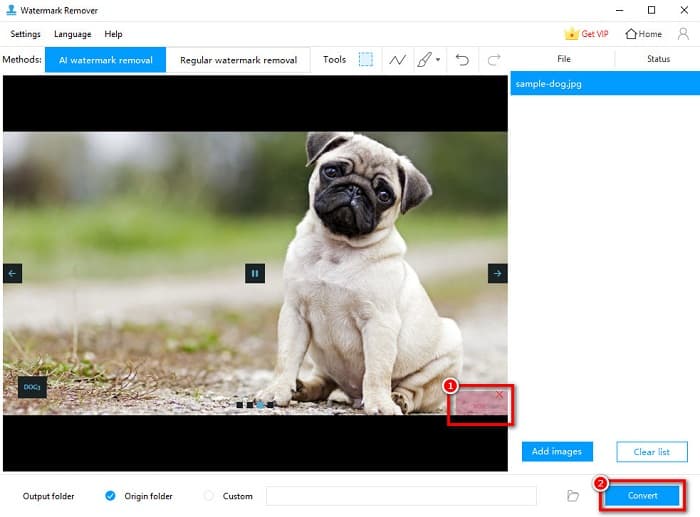
Step 3. You will see a watermark removing tools on the Tools panel. Then click the selection tool that you like to use. Then trade or select the watermark on your image.
Step 4. If you are done, click the Convert button to save your output.
Parte 2. Como remover marca d'água do controle deslizante WOW comprando
Você pode querer ler esta parte se estiver procurando como remover a marca d'água do WOW Slider.
Usando WOW Slider, você pode criar apresentações de slides incríveis com qualidade incrível. Com sua interface de software fácil de usar, você pode produzir apresentações de slides de alta qualidade que podem ser compartilhadas com seus amigos. Além disso, se você quiser criar uma lembrança para seu melhor amigo, criar uma apresentação de slides usando o WOW Slider é uma boa ideia.
The sad part about making a slideshow using WOW Slider is that it puts a watermark on your output. But if you purchased the WOW Slider app, you will no longer have to remove any watermark because your outputs will not have the WOW Slider watermark. So, we will teach you how to remove the watermark by purchasing.
Step 1. Download the WOW Slider on your device, and right after downloading it, make sure to pay and enter your licensed code to register.
Step 2. After the registration, turn off the watermark to the Menu panel > Slider > Properties.
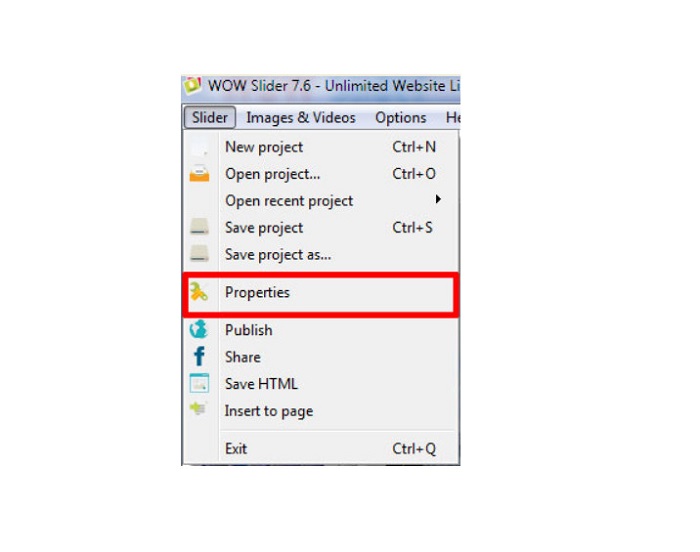
Step 3. A properties window will prompt, then click the Design opção.
Step 4. On the Design tab, you will see a checkbox that says Watermark. Uncheck the box to disable the watermark on your slideshow.
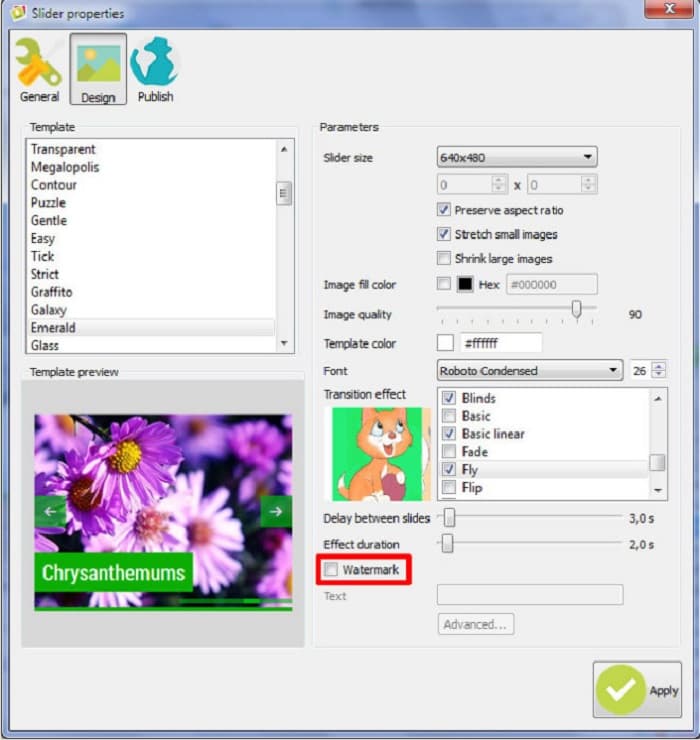
Step 5. You can publish your slideshow on your website without the WOW Slider watermark.
Parte 3. Perguntas frequentes sobre como remover a marca d'água WOW Slider
Por que o WOW Slider coloca marcas d'água nas apresentações de slides produzidas?
WOW Slider incorpora marca d'água em suas saídas de apresentação de slides para que os usuários sejam incentivados a usar a versão sem marca d'água. O aplicativo não deixará uma marca d'água em sua saída se você comprar o aplicativo.
Você pode remover várias marcas d'água do seu vídeo?
Sim. Os removedores de marca d'água permitem que você remova duas ou mais marcas d'água em seu vídeo. Se você deseja remover várias marcas d'água em seu vídeo, use o FVC Video Converter Ultimate.
Qual é o melhor removedor de marca d'água online para usar?
There are many online watermark removers that you can search on the internet. But many people recommend FVC Free Watermark Remover because it is safe and free.
Conclusão
Now that your problem about how to remove the WOW Slider watermark is solved! Using the watermark remover mentioned above, you can easily remove the WOW Slider watermark on your slideshow. But if you want a free and safe-to-use online application, use FVC Free Watermark Remover.
-
 Maneiras gratuitas de remover a marca d'água VideoShop em vídeos [sem esforço]
 Para remover a marca d'água do VideoShop, seu dispositivo precisará de um removedor de marca d'água. Para saber quais são, leia este artigo.
-
 3 abordagens para remover a marca d'água do Viva Video em vídeos [maneira mais rápida]
 Você precisará de um removedor de marca d'água dedicado para remover a marca d'água Viva Video em vídeos. Leia este artigo para saber mais sobre isso!
-
 Ferramentas finais para remover marca d'água dos vídeos exportados do Renderforest
 Para remover a marca d'água do Renderforest, você precisará de um removedor de marca d'água no seu dispositivo, todas as ferramentas que você pode usar estão aqui.
