


 Video Converter Ultimate
 Gravador de ecrã
 Reparo de vídeo
 Secure Download
Como remover facilmente a marca d'água de fotos de formatura
As marcas d'água são uma monstruosidade sempre que você as vê em qualquer foto e arruínam a qualidade da foto. Você verá marcas d'água nas fotos sempre que o criador não quiser que seu trabalho seja roubado. E se você for estudante, provavelmente verá marcas d'água em sua foto de formatura, indicando o nome do estúdio ou do fotógrafo que a tirou.
If you want to remove the watermark on your graduation picture, you need tools that will help you remove the watermark on it. In this article, we listed the top three most used watermark removers, and you will also learn the steps to remove watermarks from graduation pictures.

Parte 1. Como remover marca d'água de fotos de formatura online
Existem muitas ferramentas de remoção de marca d'água que você verá na internet. No entanto, nem todos são gratuitos e fáceis de usar. Além disso, nesta parte, você saberá como remover marcas d'água de maneira conveniente e eficiente.
FVC Free Watermark Remover is an online watermark remover that enables you to remove watermarks on your graduation pictures easily. This online tool is popular because you do not need to download anything before using it. In addition, it supports the most common image formats, such as PNG, JPG, JPEG, BMP, and more. And even if you remove the watermark on your image, it will have the same image format as before when you download it.
Usando este removedor de marca d'água, você pode escolher entre as predefinições do removedor ao selecionar a área da marca d'água. Você pode escolher entre poligonal, laço ou pincel. Além disso, você pode usar esta ferramenta para apagar outras coisas desnecessárias em sua imagem.
Prós
- Possui uma interface de software operacional rápida.
- É seguro usar.
- É 100% gratuito para uso.
- Disponível em todos os navegadores da web, incluindo Google, Firefox e Safari.
Contras
- É dependente da Internet.
Como se livrar da marca d'água em fotos de formatura usando o FVC Free Watermark Remover:
Step 1. On the browser that you use, search FVC Free Watermark Remover. You can click this link to go directly to their webpage.
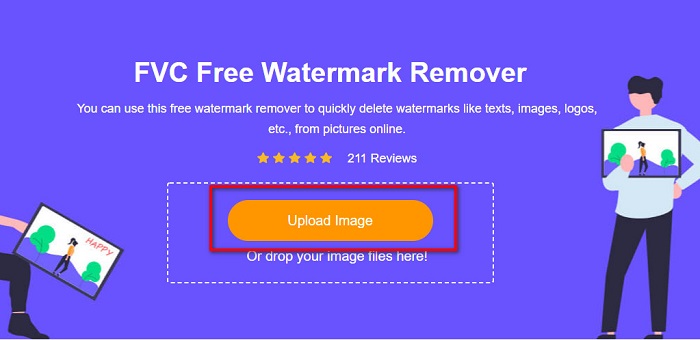
Step 2. On the software’s main interface, click the Upload Image button. Your computer folders will prompt where you will select the graduation photo and upload it.
Step 3. Next, select the remover tool that you want to use to remove the watermark. Choose between Polygonal, Lasso, or Brush. And then, select the area of the watermark you want to remove.
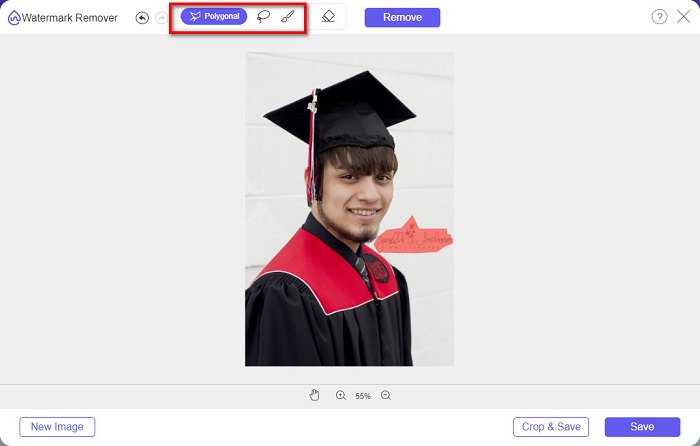
Step 4. After selecting the watermark area, click the Remove button to erase the watermark.

Step 5. You will see that the watermark is removed. Click the Save button to download the image on your device. What’s more, this watermark removal online tool is also a photobucket watermark remover.

Parte 2. Como remover marca d'água de fotos de formatura usando o Inpaint
Às vezes, as pessoas retocam a marca d'água para que a foto fique com sua aparência original. Mas como eles fazem isso? Os profissionais usam um editor de fotos e pintam o rótulo pixel por pixel, resultando em algumas horas de trabalho. No entanto, existe outra ferramenta que o ajudará a tornar sua vida mais fácil. Nesta parte, você aprenderá como usar o Inpaint e suas vantagens.
Inpaint is an online watermark remover that will also help you remove watermarks on your graduation picture. This online software application also has a downloadable version available on Windows and Mac. Moreover, it allows you to remove unwanted things on your photo, like logos, texts, objects, etc. What’s even surprising is that it has a feature where you can repair old photos and return them to their original quality. It also has remover tools to choose the watermark area you want to remove.
Prós
- Possui uma interface de software fácil de usar.
- Ele permite que você faça retoques faciais digitais.
- Permite preencher as áreas pretas dos Panoramas.
- Acessível em quase todos os navegadores da web, como Google e Firefox.
Contras
- É dependente da internet.
Como remover marca d'água da imagem de formatura usando o Inpaint:
Step 1. Search Inpaint in your browser, then go to their webpage. And then, on the software’s main interface, click the Upload Image button to upload your graduation picture.
Step 2. Next, select the remover tool you want to use to select the watermark area. Choose between marker tool, lasso tool, and polygonal lasso tool.
Step 3. Then, using the tool you want to use, select the watermark area you want to remove.

Step 4. Lastly, click the Erase button to remove the watermark on your graduation picture. And then click the Download button to download the photo.
Parte 3. Como remover marca d'água da imagem de formatura usando o Photoshop
O Adobe Photoshop é o software de edição mais famoso que muitos profissionais usam. Mas o que muitos usuários não sabem é que não é apenas um software de edição; ele também pode remover marcas d'água indesejadas em sua foto. Para saber como remover a marca d'água da sua foto, leia esta parte detalhadamente.
Adobe Photoshop is the most popular photo editing software with many editing features. Many professionals use this editing application because you can edit your image in many professional ways. It contains tools that enable you to edit your image in detail. Furthermore, it produces output with a high quality that you can share on any social media platform.
Prós
- Tem muitos recursos avançados de edição para usar.
- Ele contém muitas ferramentas para usar para edição.
- Produz saídas de alta qualidade.
- Ele permite que você edite e crie imagens impressas e na web.
Contras
- Possui uma interface de software difícil de usar.
- Você precisa comprar o aplicativo para baixá-lo.
Como remover qualquer marca d'água em sua foto usando o Adobe Photoshop:
Step 1. Download Adobe Photoshop on your device, then run the app. On the main user interface, open the image on Photoshop.
Step 2. Select the area of the watermark. You can use the Pen tool, the Quick Selection tool, or the Magic Wand tool.
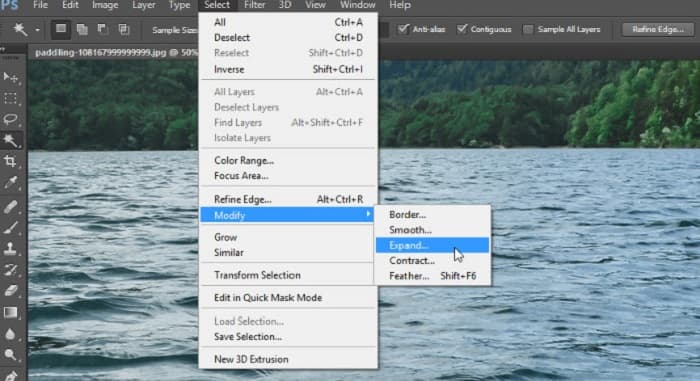
Step 3. Go to Select > Modify > Expand to incorporate the background pixel.
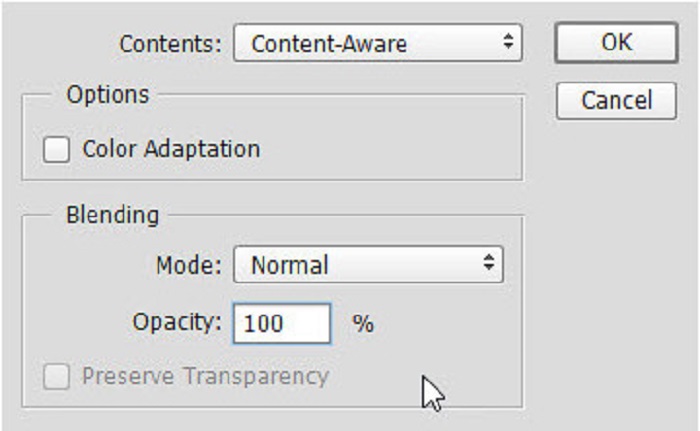
Step 4. Go to Edit > Fill, then select the Content-Aware in the Contents section.
Step 5. Next, press the CTRL+D. You will see that the watermark is filled with the background. Then, to remove the watermark outline, use the Clone Stamp Tool.
Step 6. Hold the Alt key and trace the outline of the watermark. When you are done removing the traces, you will observe that the watermark is removed.
Parte 4. Perguntas frequentes sobre como remover marca d'água da imagem de formatura
A remoção de marcas d'água das fotos de formatura prejudica a qualidade?
Remover a marca d'água das fotos de formatura não necessariamente arruinará a qualidade. No entanto, ao remover a marca d'água, algumas ferramentas ainda deixam marcas.
Você pode remover marcas d'água no Canva?
Sim. O Canva tem um recurso onde você pode remover marcas d'água gratuitamente. Basta clicar no botão Remover marcas d'água para fazer isso.
Você pode remover as marcas d'água em PDF?
Using the tools shown above, you can remove any watermarks from your PDF file.
Conclusão
Since you have learned how to remove watermarks from graduation pictures, you can now do it yourself and try the tools that are presented above. Removing the watermark is made easy using a watermark remover. However, many people recommend using FVC Free Watermark Remover because it is convenient and easy to use.
-
 Como remover a marca d'água Lumion no Windows e Mac facilmente
 Precisa remover a marca d'água Lumion para apresentá-la profissionalmente? Bem, existem ferramentas que você pode usar para ajudá-lo a se livrar da marca d'água que deixa.
-
 Como remover a marca d'água Weibo em vídeos e imagens facilmente
 Tendo problemas para remover a marca d'água Weibo em vídeo e imagem exportados? Nesse caso, você deve um removedor de marca d'água que listamos abaixo que pode ajudá-lo.
-
 Aprenda a remover a marca d'água Movavi gratuitamente $91;Obrigatório!$93;
 Exportar um vídeo ou imagem no Movavi deixará uma marca d'água, mas é possível removê-la? Para ensinar como remover a marca d'água de graça leia isso.
