


 Video Converter Ultimate
 Gravador de ecrã
 Reparo de vídeo
 Secure Download
Tutorial para remover marca d'água de PNG grátis/online/sem cadastro
Nowadays, PNG, or Portable Network Graphics, is one of the most common image formats we have. That being said, we can’t ignore the fact that no matter what image format you use, the watermark is everywhere. You can encounter watermarks on your PNG images, JPG images, etc. If that is the situation, we have the best solution for you. This article offers various methods to remove watermarks from your PNG images. So the best thing you can do this time is to focus on reading this article, absorb all the information, and apply it yourself!

Parte 1. Como remover marca d'água de PNG online gratuitamente
You can use FVC Free Watermark Remover to remove watermarks from your PNG image because it supports the PNG file format. Removing any disturbing elements from a PNG photo is easy. This tool is accessible in almost all browsers, like Google Chrome, Microsoft Edge, Mozilla Firefox, etc. In addition, this watermark remover has tools you can use to delete watermarks. You can use the Brush tool, Lasso, and Polygonal tool to highlight the watermark you want to remove. Also, if the watermarks are small, you can zoom them in and out. This way, you can see the watermarks clearly. FVC Free Watermark Remover also has a straightforward interface to utilize this application efficiently. But wait, there’s more. This online tool offers two easy ways to remove watermarks from your PNG images. You can use the watermark remover tools if the area of the watermark is in the middle or center part of the photo. On the other hand, if the watermark area is at the edge or corner of your image, you can use the cropping tool. As you can see, FVC Free Watermark Remover is convenient for all users.
Features
◆ Oferecer uma ferramenta de remoção de marca d'água para remover marcas d'água e outros objetos indesejados de uma foto.
◆ Tem uma função de ferramenta de corte.
◆ Pode exportar a qualidade original da foto.
Prós
- Adequado para um usuário não profissional.
- O software é 100% gratuito.
- Oferece duas maneiras de remover marcas d'água.
- Suporta formatos de arquivo de imagem populares, como PNG, JPG, BMP, etc.
- Nenhuma instalação e conta é necessária.
- Capaz de remover várias marcas d'água.
Contras
- É necessária uma conexão com a Internet para operar o software.
Se você quiser usar o FVC Free Watermark Remover, siga as etapas simples abaixo para remover as marcas d'água de suas imagens PNG.
Use esta ferramenta se as marcas d'água estiverem no meio da foto.
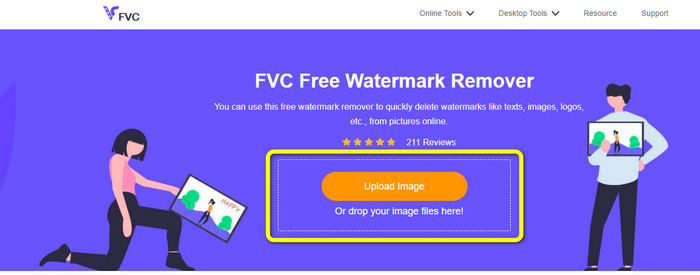
Step 1: If you want to attach your PNG image with a watermark, click the Upload Image button. Your folder will appear on your screen. Choose the PNG image.
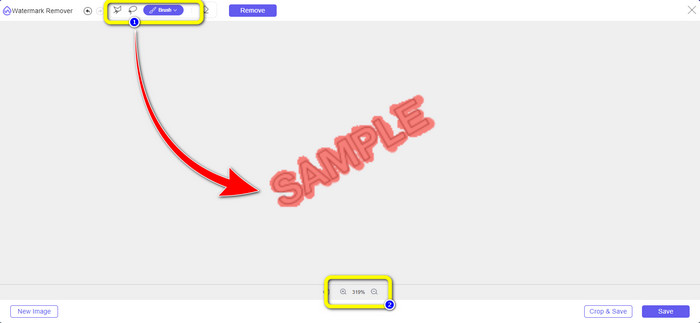
Step 2: After adding the PNG image with a watermark, you can use any of the three tools, Lasso, Polygonal, and Brush. Using the Brush tool, you can adjust the brush size. Also, you can use the + and - sign on the lower part of the interface to scale up or down the photo.
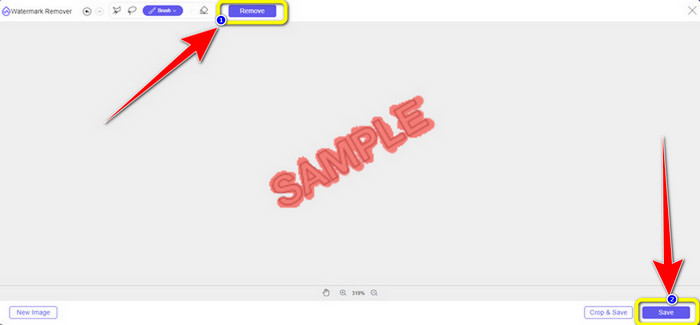
Step 3: When you are done highlighting the watermarks using the Brush tool, click the Remove button to delete the watermarks. After clicking, you can wait a second for the removal process and click Save.
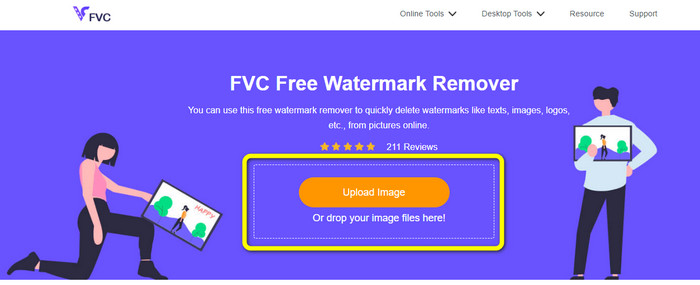
Step 4: If you want to crop a photo to remove a watermark, upload the image you want to crop by clicking the Upload Image button. You can also drop your image file inside the yellow box.
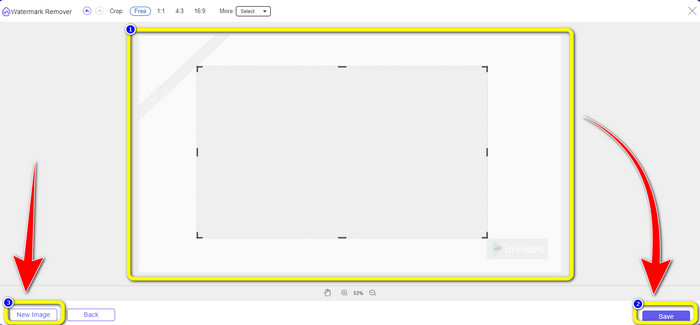
Step 5: When you are done uploading your PNG image, click the Crop button. Then you can already crop the photo with a watermark.
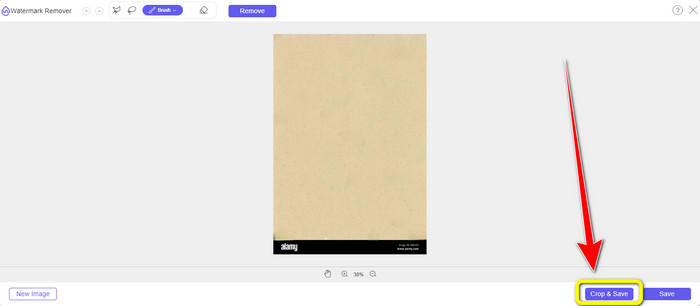
Step 6: After cropping, you can select the Save button to download your photo on your computer. In addition, if you want to crop another image, click the New image button. You also can use this tool to remove watermarks from JPG.
Parte 2. Remover marca d'água de PNG online com Watermarkremover.io
Watermark Remover.io is an online tool capable of removing watermarks from a photo. This tool also supports PNG image file format, so you can use this tool to remove watermarks from PNG images in a few seconds. Also, it only has two steps to remove watermarks, so you don’t need to struggle anymore with the process. However, Watermark Remover.io can offer limited features, especially when using the free version. In one month, you can only upload 50 images. It also has 10k basic transformation and 25Gb storage, which is not satisfying for users. You must purchase a subscription to upload 50+ images and more basic transformations.
Features
◆ Remova objetos indesejados de uma foto, como marcas d'água, logotipos, texto, adesivos, etc.
Prós
- Tem passos simples, o que é perfeito para iniciantes.
- Ele suporta vários formatos de arquivo de imagem, como PNG, JPG, WEBP, etc.
Contras
- Adquira uma assinatura para experimentar mais ótimos recursos.
- Uma conexão de internet rápida é altamente recomendada.
Step 1: Go to the Watermark Remover.io website. Then click the Upload Image button to add your PMG image with a watermark. You can paste the link of the photo by clicking the URL button.
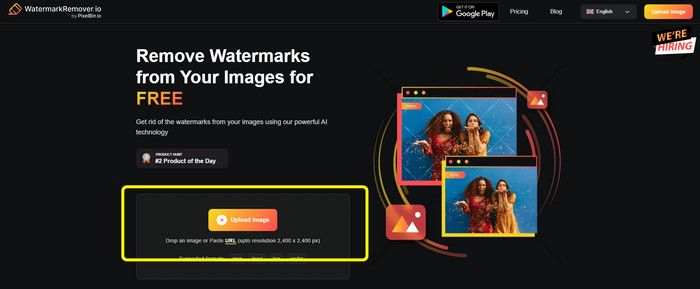
Step 2: The software will automatically remove the watermark after adding your file. After the process, you can already click the Download Image button to save your file without a watermark.

Parte 3. Exclua facilmente a marca d'água de PNG online com o Inpaint
Outra ferramenta online que você pode usar para remover marcas d'água de imagens PNG é o Inpaint. Com a ajuda deste removedor de marca d'água, você pode facilmente limpar e melhorar suas fotos. Ele também oferece três ferramentas úteis para remover marcas d'água que você pode usar. Essas ferramentas são Marker, Lasso e Polygonal. Usando essas ferramentas, você pode destacar as marcas d'água irritantes e apagá-las. Além disso, você pode restaurar suas fotos antigas e torná-las novas. Você pode fazer muitas coisas se tentar usar este software online. No entanto, usar o Inpaint online tem muitas limitações. Você só pode enviar uma imagem com um tamanho máximo de arquivo de 10 Mb. Ele também tem uma resolução máxima de 4,2 megapixels. Se você deseja uma resolução maior e tamanho de arquivo ilimitado, deve usar a versão para download do Inpaint.
Features
◆ Elimine elementos desnecessários das fotos, como marcas d'água, logotipos, texto, etc.
Prós
- Suporta WEBP, PNG e JPG.
- Perfeito para iniciantes.
Contras
- A versão gratuita tem muitas limitações.
- Baixe a versão para desktop do Inpaint para experimentar mais recursos.
- Ele não funcionará sem uma conexão com a Internet.
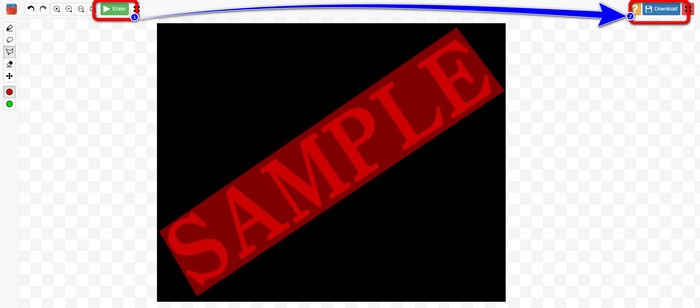
Step 1: Visit the website of Inpaint. Then click the Upload Image button to import your PNG image within a watermark.

Step 2: On the left side of your interface, you can click any watermark remover tools to highlight the watermarks, such as Polygonal, Marker, and Lasso tools.
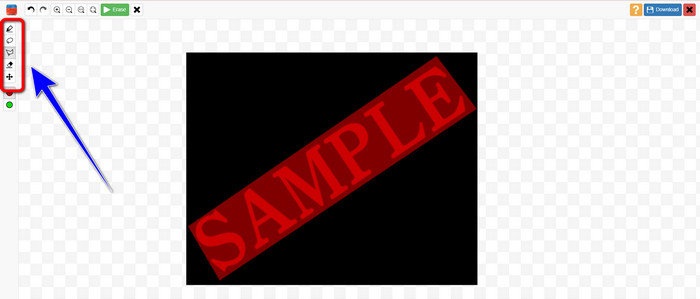
Step 3: You can click the Erase button at the upper left part after highlighting all the watermarks. Wait for the removal process and select the Download button at the upper right part of the screen.
Parte 4. Como remover marca d'água de PNG no Photoshop
Depois de aprender os métodos acima para remover marcas d'água online, você também deve considerar usar o Photoshop, especializado em edição de imagens, e uma boa opção para apagar marcas d'água. Essa ferramenta é cara, mas você pode usar a ferramenta caneta para localizar com precisão a marca d'água que deseja remover.
Features
• Suporta camadas, máscaras, filtros, modos de mesclagem e edição não destrutiva.
• Crie logotipos, pôsteres, gráficos para a web, mockups de interface do usuário e muito mais.
• Ferramentas como Pincel de Recuperação, Carimbo e Preenchimento com reconhecimento de conteúdo.
• Inclui seleção automática de objetos, substituição de céu e filtros neurais.
Prós
- Padrão da indústria para edição profissional de imagens
- Extremamente poderoso e versátil
- Atualizações regulares com novos recursos
- Ampla variedade de tutoriais e suporte da comunidade
- Integração perfeita com outros aplicativos da Adobe (como Illustrator, Lightroom, Premiere Pro)
Contras
- Preços caros baseados em assinatura
- Curva de aprendizado íngreme para iniciantes
- Pode consumir muitos recursos em computadores mais antigos
Veja como usar o Photoshop para eliminar uma marca d'água:
Step 1: Select the Remove Tool from the left.
Step 2: Adjust the brush size and apply it over the watermark you want to erase.
Step 3: Now, you will find that the watermark has been successfully eliminated.
Parte 5. Perguntas frequentes sobre como remover marcas d'água de PNG
Qual é a maneira mais fácil de remover marcas d'água de uma imagem PNG?
The best way is to use FVC Free Watermark Remover. It doesn’t have complicated procedures, so you can effortlessly remove any watermarks from your PNG image.
Remover marcas d'água PNG é ilegal?
Se você a usa para fins comerciais ou públicos, a resposta é sim. Se você não for o proprietário da imagem ou não tiver permissão, remover marcas d'água geralmente é ilegal e viola direitos autorais. Você só pode remover marcas d'água de suas próprias imagens ou se a licença permitir.
Qual é a melhor maneira de remover marcas d'água de um PNG sem desfocar?
A melhor maneira de remover marcas d'água de um PNG sem desfocar é usar ferramentas como o Preenchimento com reconhecimento de conteúdo ou o Carimbo clone do Photoshop, que mesclam a área da marca d'água suavemente com os pixels ao redor. Ferramentas online baseadas em IA, como o FVC Free Watermark Remover, também oferecem resultados rápidos e precisos.
Conclusão
Removing watermarks from PNG images can be challenging, but this post provides four easy methods to help you do so. Whether you want to use a professional solution like Photoshop or a reliable, free tool that also performs well, like FVC Image Upscaler, they can all yield a satisfying result. Among these options, we recommend using the FVC Free Watermark Remover because it is more accessible and suitable for beginners.
-
 Guias completos para remover facilmente marcas d'água iFunny
 Descubra o removedor de marca d'água iFunny mais excepcional para você. Além disso, aprenda esses métodos simples para remover marcas d'água iFunny de suas fotos
-
 Métodos online e offline sobre como remover marcas d'água Alamy
 Se você deseja encontrar um excelente removedor de marcas d'água Alamy, leia este post para aprender sobre os três métodos eficientes para apagar marcas d'água Alamy.
-
 Revisão honesta do removedor e alternativa de marca d'água Inpaint
 Você quer saber como usar o Inpaint para remover uma marca d'água? Ler este artigo é a escolha certa. Você também aprenderá as melhores alternativas que pode usar.
