


 Video Converter Ultimate
 Gravador de ecrã
 Reparo de vídeo
 Secure Download
Uma revisão passo a passo sobre o removedor de marca d'água Inpaint
Are you willing to learn how to use Inpaint to remove a watermark? Well, we got you! If you are reading this guide, you could be looking for the best method to remove watermarks from your images. Then you are free from having to bother yourself. This post will give you honest reviews of the programs you need to use, such as Inpaint Watermark Remover. You will learn enough about each tool, including its features, pros, cons, and cost. Also, we will offer you the best alternative to Inpaint in removing watermarks from your photo. This way, you will have another option for what watermark remover you might use. Let's read this article to discover additional useful information.

Parte 1: Visão geral do Inpaint
The great and reliable software called Inpaint is dedicated to removing undesired elements from images, such as watermarks, logos, texts, stamps, etc. There are numerous sophisticated photo-editing programs available. Inpaint is not included. You'll like Inpaint's simplicity and speed if you're a casual photographer, a beginner, or a busy user who doesn't always have the time to use sophisticated picture editing software like Photoshop. In addition, Windows and Mac users can use Inpaint. You can download the apps, and you can use them directly online. Lastly, the intelligent marker tool from Inpaint makes removing undesirable objects a breeze. Additionally, Inpaint can assist you in perfectly restoring any damaged old photos. However, you must purchase a subscription if you want to save your image with a high resolution. It can only offer low quality when using the free version.
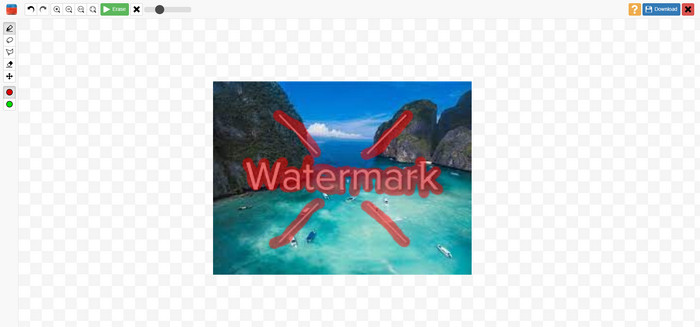
Recursos, prós e contras do Inpaints
Features
◆ Remova elementos indesejados de uma foto.
◆ Repare fotos antigas.
◆ Capaz de retoque facial
Prós
- Oferece uma interface intuitiva, fácil de usar.
- Ele pode remover marcas d'água instantaneamente. Pode remover marcas d'água instantaneamente.
Contras
- Não funciona bem em fotos com planos de fundo complicados.
- Adquira uma assinatura para experimentar ótimos recursos.
Como usar o Inpaint para remover uma marca d'água
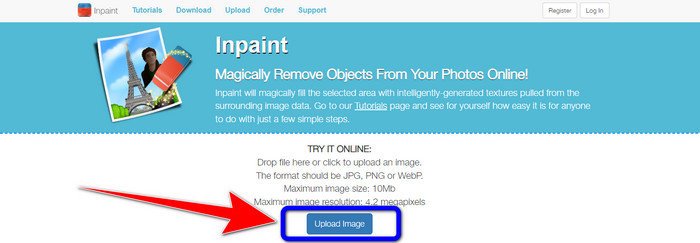
Step 1: Visit the website of Inpaint. Then, click the Upload Image button to add your photo with a watermark you want to remove.
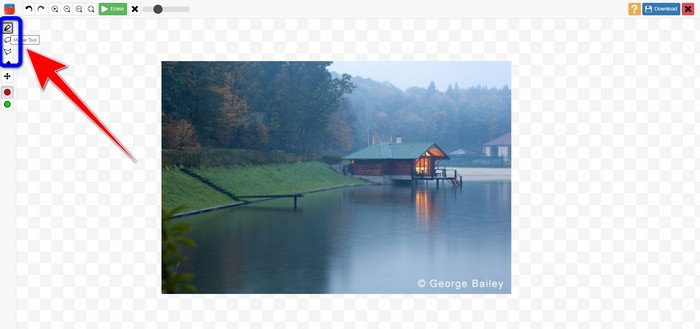
Step 2: After adding your photo, you must highlight the watermarks using the watermark remover tools. These tools are Marker, Polygonal, and Lasso.
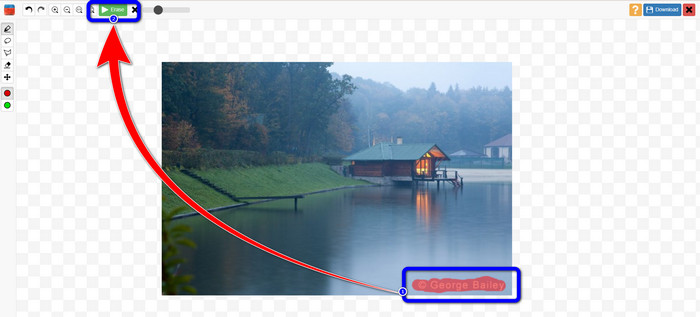
Step 3: When you are done highlighting the watermarks from your photos, click the Erase button on the upper left part of your screen and wait for the removal process.
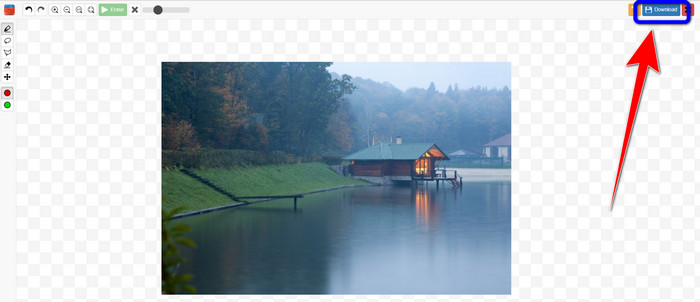
Step 4: When the watermark is gone, click the Download button and save your output on your desktop.
Parte 2: Melhor alternativa ao Inpaint para remover marcas d'água de fotos online
Depois de conhecer o método eficaz de como usar o Inpaint para remover uma marca d'água, aqui está a melhor alternativa que você pode usar para remover marcas d'água de suas fotos.
Removedor de marca d'água gratuito FVC
The best online tool you can use aside from Inpaint is FVC Free Watermark Remover. This online software lets you eliminate all unnecessary elements from your images, such as watermarks, logos, texts, signatures, and more. You can use many remover tools, like Brush, Polygonal, and Lasso. But wait, there’s more. This online software has a Cropping feature, which means you can eliminate any watermarks by cropping your photo. It has a fast removal process, so you don’t need to consume more time. After removing watermarks, you can save your final output in the same format. It also supports various image formats, such as JPG, PNG, BMP, and more. In addition, this watermark remover has an understandable interface with simple steps to follow, which is suitable for non-professional users.
Features
◆ Capaz de recortar imagens para eliminar marcas d'água.
◆ Exportar imagens com a qualidade original.
◆ Remova elementos desagradáveis das fotos usando as ferramentas Laço, Pincel e Poligonal.
Prós
- Perfeito para usuários não profissionais.
- Possui uma interface de usuário compreensível.
- Totalmente gratuito.
- Tem um processo de remoção rápido.
- Garanta a privacidade de cada usuário.
- Não há necessidade de instalar o aplicativo.
Contras
- Para operar o aplicativo, é necessária uma conexão com a internet.
Using Watermark Remover Tools
Como a área da marca d'água está no centro da foto, usaremos a ferramenta de remoção de marca d'água em vez da ferramenta de corte. Siga estas etapas simples abaixo para remover marcas d'água de suas fotos usando o FVC Free Watermark Remover.
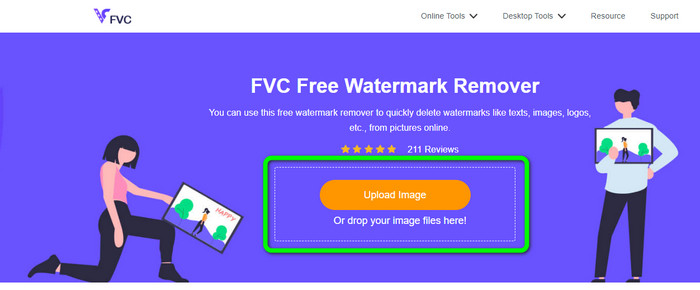
Step 1: Go to the FVC Free Watermark Remover website. Click the Upload Image button to upload your image with a watermark. You can also directly drag your file.
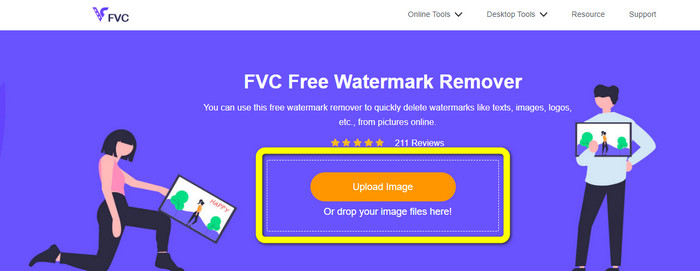
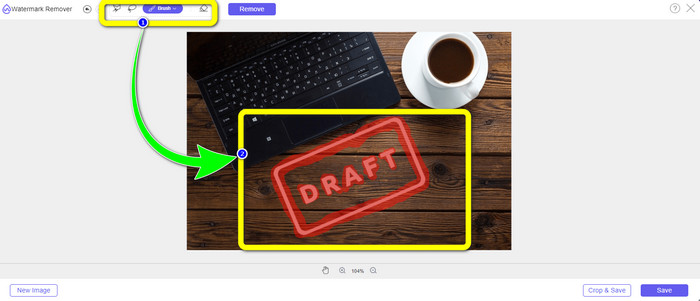
Step 2: Highlight the watermarks using the remover tools you can see at the upper part of the interface.
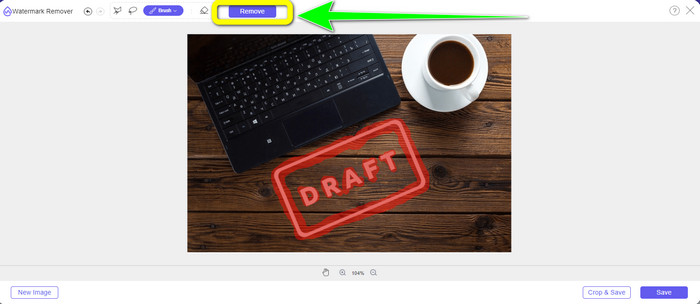
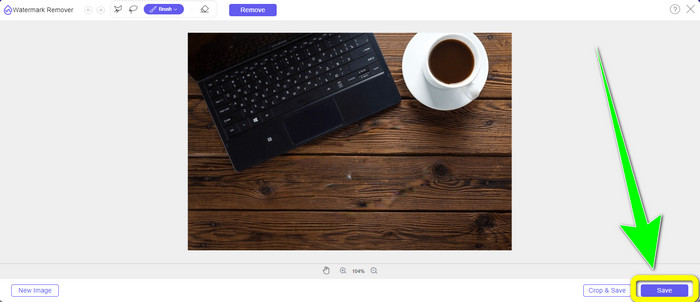
Step 3: When you are done highlighting the watermark from your image, click the Remove button to remove the watermark and wait for the fast removal process.
Step 4: After completely removing the watermark from your photo, click the Save button to download the photo without the watermark.
Using Cropping Tool
Nesse método, você precisa considerar a área da marca d'água da sua foto. Se a marca d'água estiver no canto ou na borda da imagem, você poderá usar a ferramenta de corte. Siga os passos simples abaixo para aprender como recortar uma foto para eliminar uma marca d'água.
Step 1: Click the Upload Image button to insert your photo with a watermark.
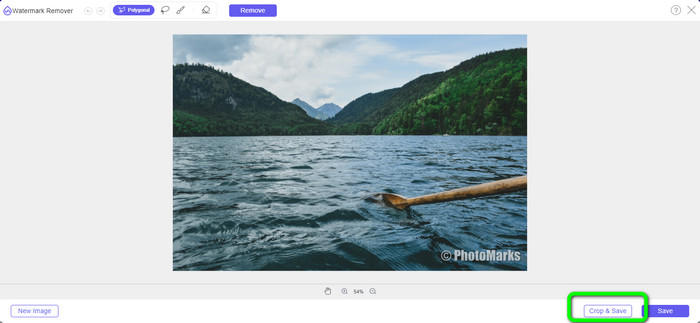
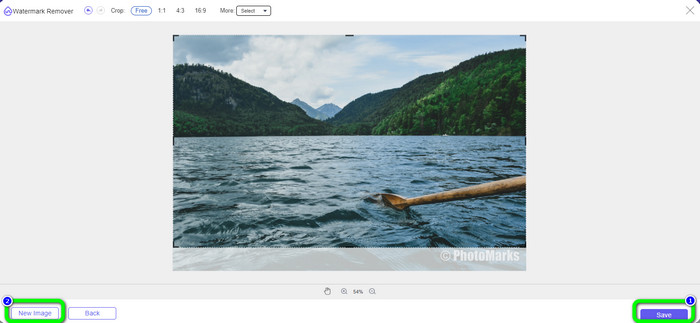
Step 2: After inserting the photo, click the Crop & Save button on the lower right part of the interface.
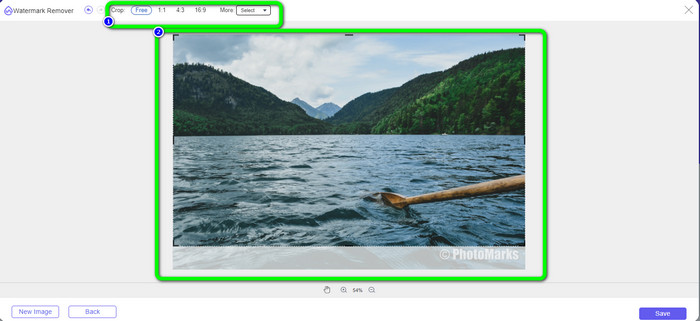
Step 3: On the upper part of the interface, there are cropping options you can choose. These options will help you to crop your photo. But if you want to crop the photo manually, click the Free option.
Step 4: After removing the watermark by cropping the photo, hit the Save button on the lower right part of the interface to download your photo without a watermark. Then, if you still want to crop another photo, you click the New Image button on the lower left part of the interface.
Related to:
Ways on How to Easily Remove Reddit Watermarks from Images
How to Remove Watermark in Lightroom Mobile [Solved]
Parte 3: Perguntas frequentes sobre o Inpaint Watermark Remover
Quando devo usar Inpaint?
Você pode usar o Inpaint para eliminar elementos indesejados de suas fotos, como pessoas, marcas d'água, logotipos, adesivos e muito mais. Com esta ferramenta, você pode tornar sua foto mais fantástica e agradável aos olhos de seus espectadores.
Posso usar o Inpaint no meu computador?
Sim você pode! Você pode baixar o Inpaint porque ele oferece uma versão para desktop. Este aplicativo para download tem mais recursos excelentes do que a versão online. Você pode anexar imagens sem limitações e fornece maior qualidade de restauração com um melhor algoritmo de pintura interna.
O Inpaint é um removedor de marca d'água melhor?
Inpaint is reliable in removing watermarks from a photo. However, there are limitations. It has a file size and resolution limit, which is not good for users. You can use the FVC Free Watermark Remover if you want a better watermark remover. It has no limitations, and you can remove watermarks from a photo for free.
Conclusão
As you can see, this post provided you with an honest review about Inpaint Watermark Remover. Moreover, it offers the best alternatives you can use to remove watermarks from your photos. If you want a 100% free watermark remover, you can use FVC Free Watermark Remover.
-
 Como remover marcas d'água de vídeos no After Effects facilmente
 Este artigo ajudará a remover marcas d'água do vídeo usando o After Effects. Além disso, fornecerá as melhores alternativas para eliminar objetos perturbadores.
-
 Guias passo a passo sobre como remover emojis do vídeo
 Sentindo-se irritado com emojis em seus vídeos? Este post trará para você os melhores procedimentos para remover instantaneamente emojis de seus vídeos usando ótimas ferramentas.
-
 Excelentes maneiras de como remover adesivo de foto e vídeo
 Deseja remover sem esforço adesivos de vídeos e fotos? Aqui estão as maneiras eficazes, incluindo os métodos mais confiáveis e fáceis que você pode experimentar.
