


 Video Converter Ultimate
 Gravador de ecrã
 Reparo de vídeo
 Secure Download
Upscale imagem para 4k usando o melhor upscaler no mercado
Upscale image to 4k became in demand on many software, whether professional or not. Users believe a higher resolution like 4k will make their picture detailed, sharp, clear, and better. Yet, you can enjoy the 4k images if you use them for advertising outdoors, printing high-quality tarpaulin, viewing them on large digital screens, most digital cinematography, and more. The PPI or image resolution purpose is to project a precise number of pixels depending on the width and height of the image. Do you want to know how to turn your photo into a 3840 x 2160? Or do you prefer the DCI 4k, which is 4069 x 2160? This article includes the information you’ll need to know to achieve the UHD resolution known as 4k.

Parte 1. Como aumentar a imagem para 4k grátis com a melhor solução [Serviço da Web]
FVC Free Image Upscaler is the most simplistic 4k image upscaler you can use to achieve the 4k resolution. This tool doesn’t only upscale your image, but it also corrects the PPI on your photo to make it match the resolution of your choice. It is an upscaler, which means the image you upload here will never be stretched out or lose some quality, all thanks to the best AI tech the FVC ads on it. Do you need a demonstration of how to use this? If so, follow the complete steps we add below and start upscaling the image you want.
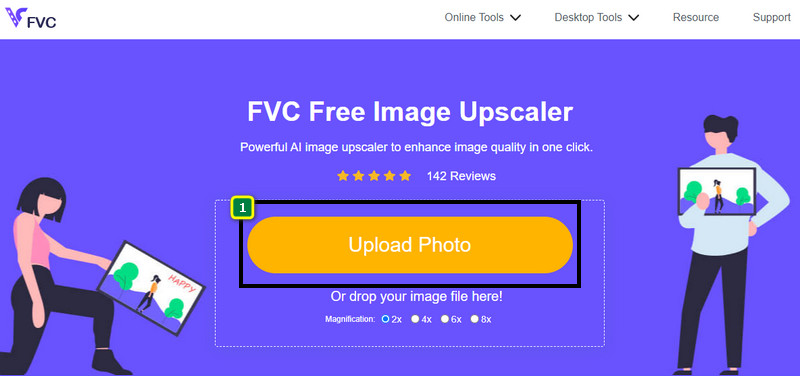
Step 1. You must click this link to open the tool on a new tab. It will direct you to the official tool you’ll use to change the upscale image you want.
Step 2. Hit the Upload Photo to add the JPG, JPEG, PNG, GIF, BMP, or SVG you want to upscale into a 4k resolution.
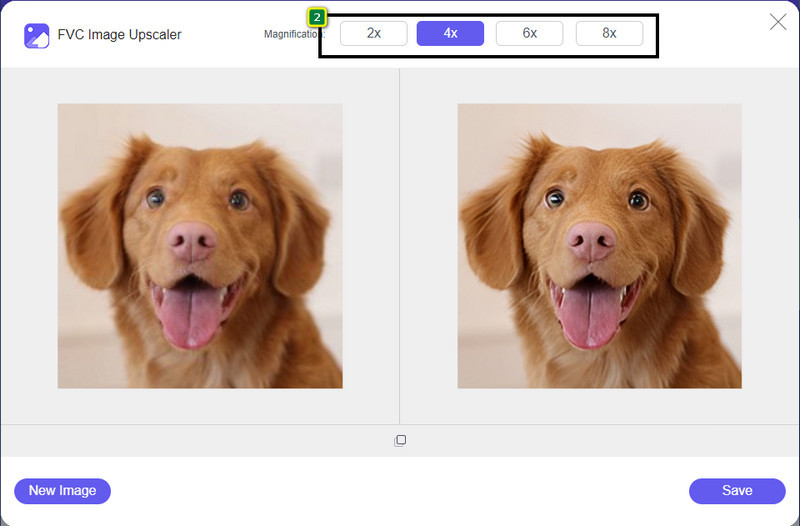
Step 3. After that, the image you upload will load up to the tool. Then, choose the options from 2x, 4x, 6x, and 8x above to achieve the 4k resolution.
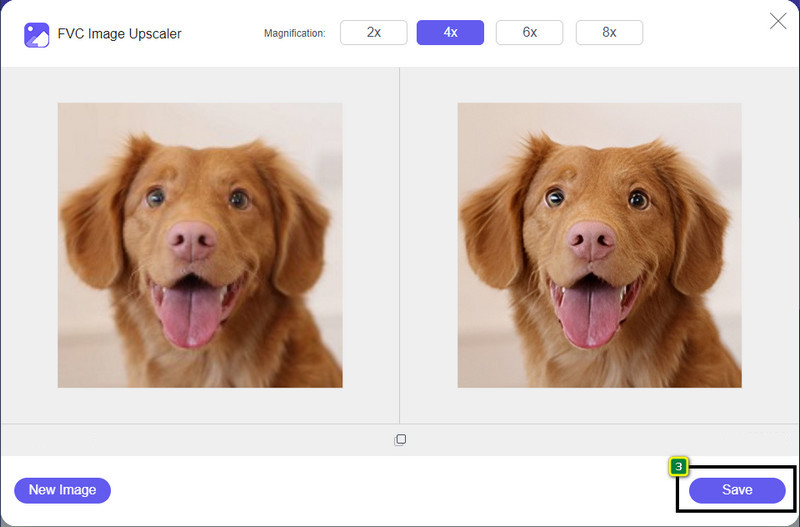
Step 4. To export the 4k image you improve here, click the Save button; it will automatically be saved to your file folder.
Parte 2. Como aumentar a imagem para 4k offline no editor gráfico padrão do Windows [Grátis]
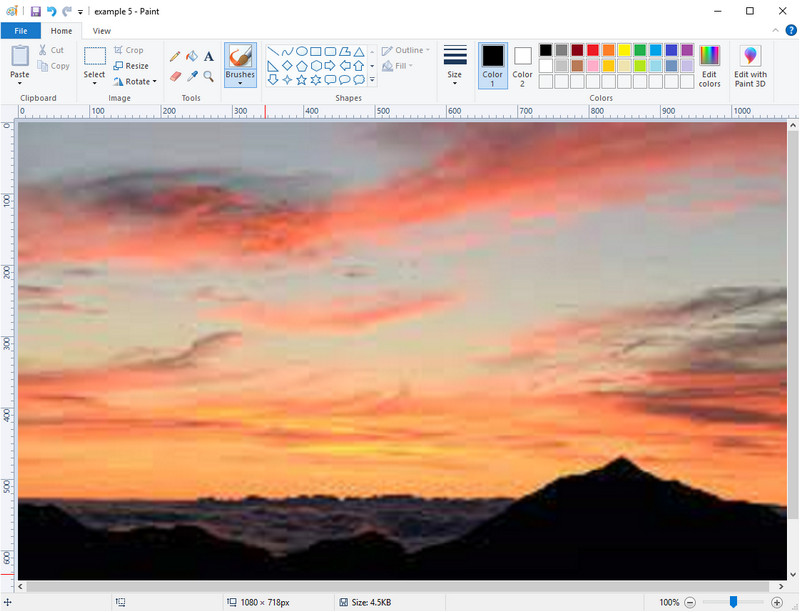
Paint is a default graphics editor you can use on your Windows to upscale an image to 4k by changing its dimension. This software became popular among many Windows users because of what you can do here. You can start a blank canvas and paint it like you usually do on a canvas, but this is digital. It has a lock-in feature so that when you adjust the height of the image, the width of it will follow or vice versa. Also, you can use percentages to tweak the dimension of your image.
Embora você possa usar essa ferramenta como seu editor, ela ainda é insuficiente em outras áreas de edição. Por exemplo, ele não oferece suporte ao modo de escala de cinza. Portanto, se você quiser usar essa ferramenta, siga as etapas que adicionamos.
Step 1. Click the Window icon on your screen and type the tool's name, Paint.
Step 2. After you open it, click the File, then Open, and add the image file you want to upscale here. You can drag and drop the image into this tool if you want to.
Step 3. Go to the Resize option and click the Pixel. Change the measurement of the height or width to the standard 4k.
É melhor se você alterar uma única medida; não importa se é uma altura ou largura e sempre marque a proporção principal para ajustá-la. Algumas imagens são esticadas se você as redimensionar para 4k.
Step 4. With that, click the Save button to download the image you upscale here.
Parte 3. Como fazer upscale de imagem para 4k usando software profissional no Windows e Mac [pago]
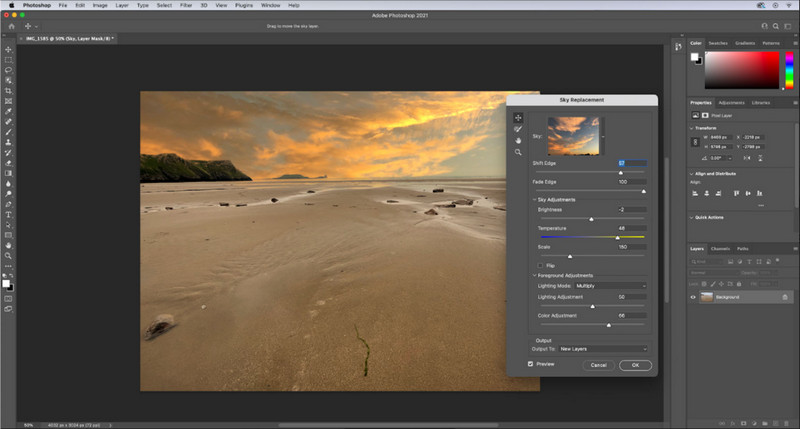
Adobe Photoshop allows its user to experience a new height of image editing and upscaling, but for now we will be more detailed with its upscaling function. We can’t argue that it's an expert choice of software because of how immersive this tool is in image editing. Also, this tool creates new PPI data to the image once you upscale them in here with the help of the algorithm that is accumulated on your file. You can change the resolution to 4k without making it stretched out or pixelated.
No entanto, você precisará adquirir o plano se já tiver consumido a avaliação gratuita que este aplicativo oferece. Embora você precise pagar, o geral deste software é excelente para ser usado por editores profissionais e de nível médio. Para iniciantes, você pode aprender como fazer o upscale da imagem para 4k com as instruções abaixo.
Step 1. Download the official version of this software on Adobe, but if you already have the app, you can open it directly to start using it.
Step 2. To upload the image you want to upscale, click File then Open, and a folder will show on your screen. Select the image file name and press Open to upload the image.
Step 3. On the upper section, click the Image option and select the Image Size.
Step 4. A dialogue box will adjust the measurement for your image's height, width, and resolution.
For a smoother result, you will need to tick the box of Resample and click the drop-down button. Instead of selecting automatic click, the Bicubic Enlargement for it is a method that allows you to make the image enlargement result better. Click OK to save the adjustment you’ve changed.
Step 5. To download the image you upscale into 4k, click the File and go to Save.
Related:
Simple Guide on How to Add Watermark to a Video in Photoshop Quickly
Improve Image Quality Using These Quick and Easy Methods
Parte 4. Perguntas frequentes sobre como aumentar a imagem para 4k
Existem restrições no upscaling de imagens para 4k?
Existem restrições que você precisa seguir. Por exemplo, se o seu monitor só puder processar 1080p, é melhor usar o tamanho padrão de 1080p em vez de 4k, porque o upscaling que você adicionará não terá efeito.
Minha imagem ficará melhor após o upscaling para 4k?
Não espere que um milagre aconteça, mas você verá que haverá um resultado se você abrir a imagem na tela correta, como as TVs 4k, por exemplo.
Por que minhas imagens ficam desfocadas depois de visualizá-las na TV 4k?
As imagens tendem a ser esticadas quando a dimensão e o PPI não atendem ao padrão de televisão digital que você está usando, especialmente 4k. Você evita isso se aumentar a imagem para uma resolução de 4k com o aplicativo que adicionamos aqui.
Conclusão
Geralmente, você precisará de um upscaler de imagem de 4k para ajustar a imagem para uma resolução de 4k. Você pode fazer isso facilmente com as ferramentas que adicionamos aqui e o tutorial. Você pode começar a usar o serviço online para aprimorar a imagem desejada e ficará surpreso com o resultado.
-
 Restauração de fotos antigas online e offline [etapas fáceis]
 Quer restaurar uma foto antiga? Com essas ferramentas, você conhecerá o processo de restauração de fotos antigas. Leia este post para aprender os métodos mais simples.
-
 Top 7 Pixels Enhancer para todos os navegadores da Web que você deve usar
 Se você quer saber os melhores intensificadores de pixel para usar, é melhor você conferir este post. Este artigo lista sete melhores aprimoradores de pixel de foto para todos os navegadores da web.
-
 Melhor aplicativo de redimensionamento de fotos online, offline, Android e iPhone
 Quais são os melhores aplicativos de redimensionamento de fotos? Clique na página para conhecer os cinco principais aplicativos de redimensionamento de fotos mais poderosos que você pode usar para aprimorar ou redimensionar seu arquivo.
