


 Video Converter Ultimate
 Gravador de ecrã
 Reparo de vídeo
 Secure Download
Incrivelmente Converta MOV para DivX gratuitamente usando os melhores conversores
Many file formats have emerged nowadays, and it is hard to choose what type of file you will use on your platform. And every file has different functions, codecs, file size. This article will focus on knowing these two files and how you can convert your MOV file to a DivX file format. So, read this article until the end to convert MOV to DivX for free on Mac and Windows.

Parte 1. Por que converter MOV para DivX
O arquivo MOV é um formato de arquivo de mídia salvo no formato de arquivo QuickTime (QTFF). É um formato comumente usado porque pode armazenar filmes, programas de TV e videoclipes. Além disso, a Apple desenvolveu esse formato de arquivo, tornando-o reproduzível em todos os players de mídia compatíveis com o Mac. Portanto, se você deseja tornar seu arquivo MOV reproduzível em outros players de mídia do sistema operacional Windows, você precisa converter o formato de arquivo MOV para DivX.
Parte 2. Como converter MOV para DivX no Mac usando o Ultimate Converter
One of the most used and probably the best offline converters you will find on the market is FVC Video Converter Ultimate. This converter has fantastic features that you can use like, adding effects on your file, cropping and rotating, and has a 3D maker. Moreover, this converter supports a vast amount of file formats like MOV, DivX, XviD, AVI, MP4, MKV, FLV, WMV, and 1000+ file formats. Although this converter can convert MOV to DivX file with professional-like output, it has an easy-to-use interface, making it a user-friendly tool. Read the descriptions below to know more about FVC Video Converter Ultimate.
Features:
◆ Ele pode converter arquivos com um processo de conversão extremamente rápido.
◆ Suporta mais de 1000 formatos de arquivo, incluindo MOV, DivX, XviD, MP4, AVI, WebM, M4V e muitos mais.
◆ Oferece conversão em lote para mesclar vários formatos de arquivo em um.
◆ Possui recursos avançados como edição, aprimoramento e compactação de seu arquivo.
◆ Disponível para download em todas as plataformas de mídia cruzada, incluindo Mac e Windows.
Aqui estão os passos simples para converter MOV para DivX usando o FVC Video Converter Ultimate.
Step 1. Kindly download FVC Video Converter Ultimate by clicking the Download button below for Mac. And then follow the installation process.
Free DownloadFor Windows 7 or laterSecure Download
Free DownloadFor MacOS 10.7 or laterSecure Download
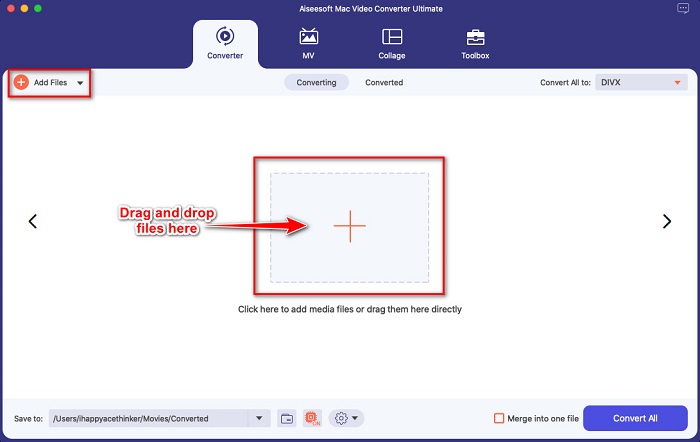
Step 2. Then on the software’s main interface, click the Add Files button or drag and drop your MOV file on the + sign button.
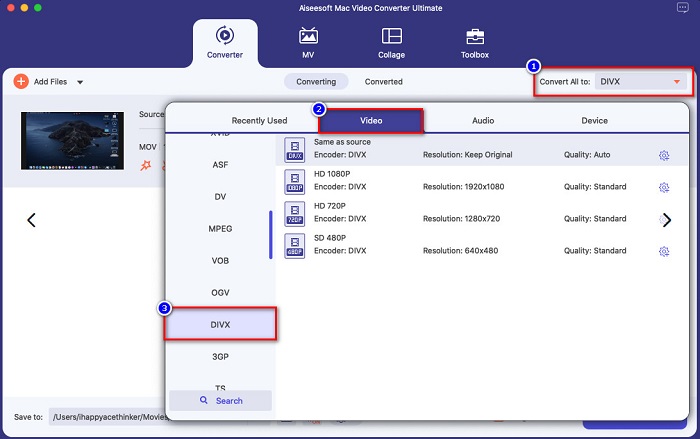
Step 3. Then choose your output file format by clicking the Convert All to button, then select the Divx file format.
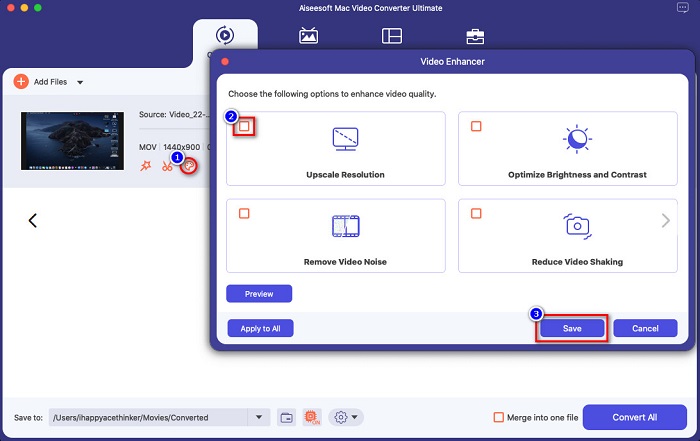
Optional. If you want to enhance your video file, click the paint-like icon. And then, tick the box of each option you want to enhance on your file. Click Save to apply. But if you do not wish to do so, proceed to the next part.
Step 4. Lastly, click the Convert All button to start transcoding your MOV to DivX file format.
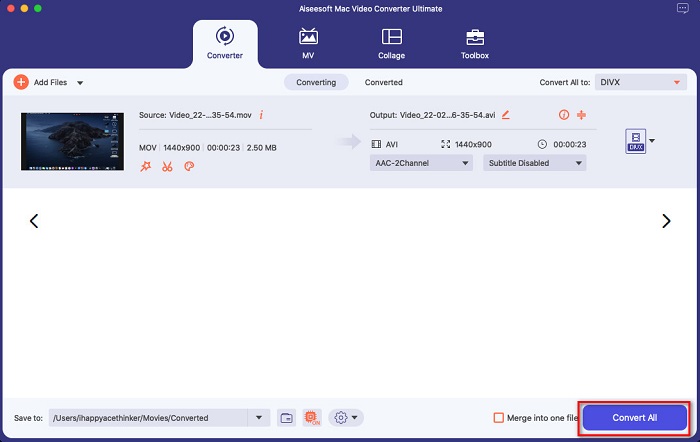
Aguarde alguns segundos e pronto! Você pode converter seu arquivo MOV para um arquivo DivX tão simples quanto ABC.
Parte 3. 2 Opções para Converter MOV para DivX Online
Se você não deve baixar nada ao converter seu arquivo MOV para DivX, temos duas opções para você usar. Tentamos conversores famosos que podem ser encontrados na web e escolhemos os dois melhores entre eles.
Opção 1. Conversão
Probably, you will see this converter on the search page result when you search MOV to DivX converters. Convertio is an online converter that allows you to convert MOV to DivX for free online. It supports many file formats like MOV, DivX, MPG, WebM, M4V, and more. Moreover, it has an easy-to-use software interface, making it a beginner-friendly tool. However, since it is an internet-reliant tool, you may experience having a slow conversion process.
Step 1. Search Convertio on your browser. On the main interface of the tool, click the Choose Files button. Your computer files will appear, then select your MOV file.

Step 2. Next, click the drop-down button to select the file output format that you want. Click on the Video panel, then click the DivX file format.

Step 3. Click the Convert button to start the conversion process for the last step.

Opção 2. Evano
You probably have seen this online converter if you are a Mac user. Evano is an online converter that allows you to convert MOV to DivX. This online converter has a simple user interface and supports various audio and video formats. Moreover, it does not contain any ads, unlike other online converters.
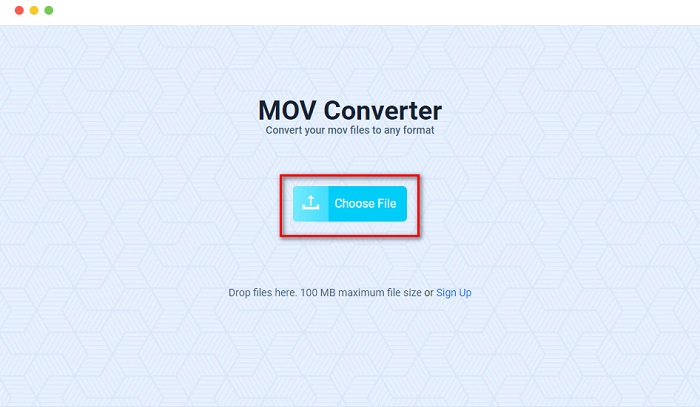
Step 1. On your trusted browser, search Evano online converter. And on the software's main interface, click the Choos File button, then your computer folders will appear where you will select your MOV folder to upload.
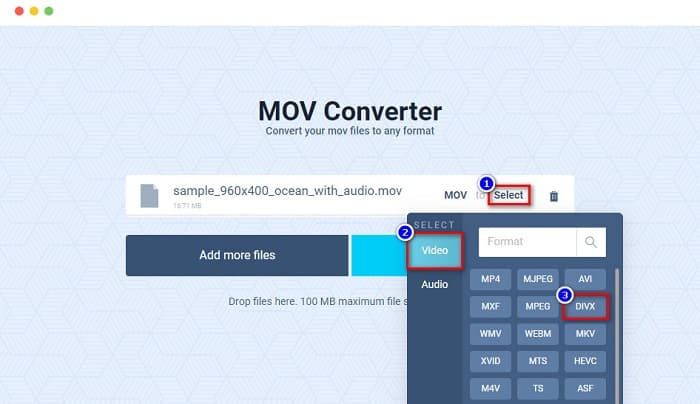
Step 2. After uploading your file, click the Select option to choose the file output format that you want. And then click the DivX format.
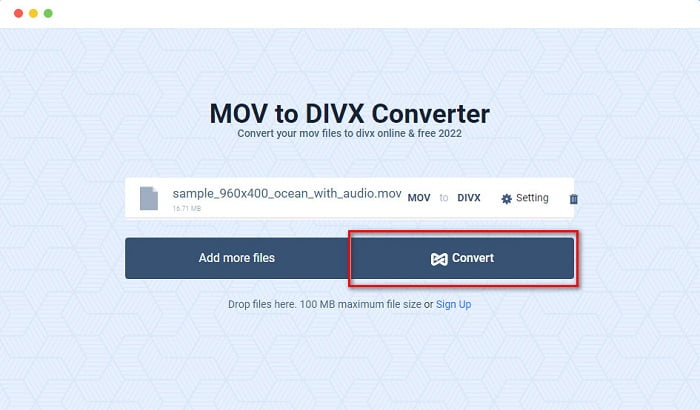
Step 3. And then, click the Convert button to convert MOV to DivX.
Parte 4. Como converter usando um conversor de freeware
Another way to convert your MOV file to a DivX file is by using a freeware converter. One of the most used freeware converters is Prism Video File Converter. This converter is free to download and available on Windows and Mac. It is also safe to use, so many people convert files using this app. However, other people have difficulty using this converter because its interface is somehow hard to understand. Nonetheless, it is still an excellent way to convert MOV to DivX for free.
Step 1. Download Prism Video File Converter on your Mac device. Follow the installation process, then open the app. Click the Add File(s) button to upload your MOV file on the software's main interface.
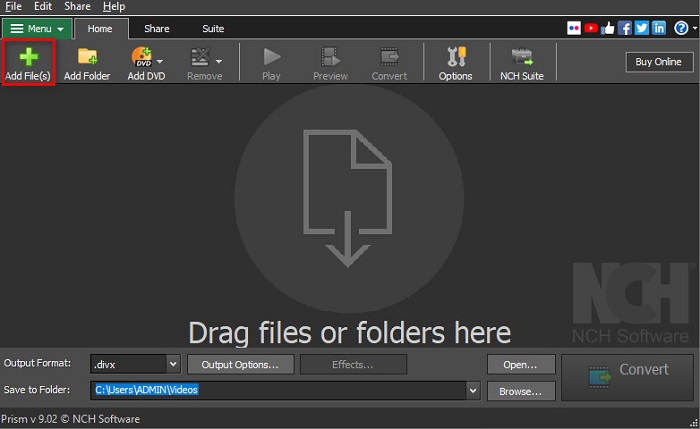
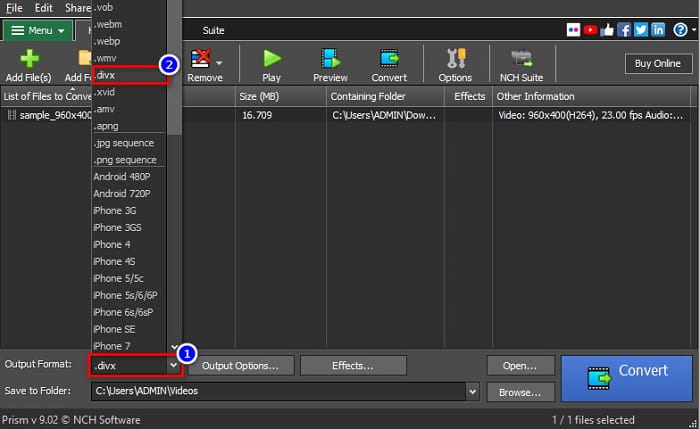
Step 2. Then on the drop-down button beside Output Format, click the DivX file format.
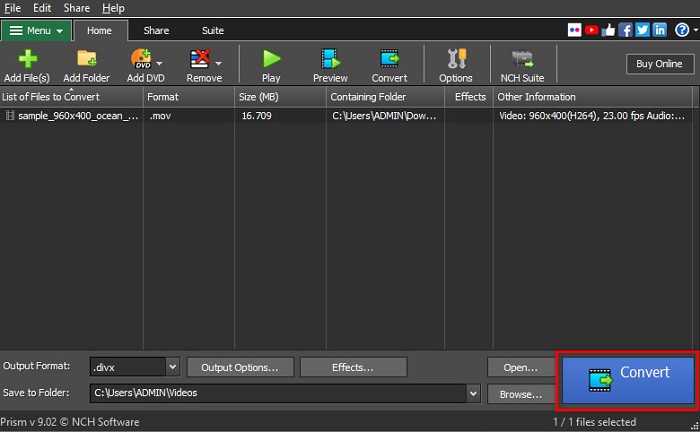
Step 3. To finish, click the Convert button located at the bottom right corner of the software’s interface.
Parte 5. Comparação de MOV e DivX
| MOV | VS | DivX |
| Compatível apenas com dispositivos Apple | Dispositivo compatível | Suportado por quase todos os dispositivos, incluindo Mac e Windows |
| Descompactado | Comprimido/Descomprimido | Comprimido |
| Contém tamanho de arquivo grande | Tamanho do arquivo | Tem tamanho de arquivo pequeno |
| MOV é o melhor uso para edição de vídeo | Melhor uso para | DivX é o melhor uso para compactar o tamanho do arquivo até o décimo segundo do tamanho do arquivo original |
| Vídeo | Codec | Vídeo |
Parte 6. Perguntas frequentes sobre como converter MOV para DivX
Você pode reproduzir MOV no Windows Media Player?
Unfortunately, no. Windows Media Player cannot support MOV file formats. But if you want to play a MOV file to Windows Media Player, you can convert MOV to WMV format. To know more about converting MOV to WMV, click this link.
A conversão de MOV para DivX afeta o tamanho do arquivo?
sim. O tamanho do arquivo ficará menor, pois o arquivo DivX pode compactar até doze avos do tamanho original.
O QuickTime suporta arquivos DivX?
No. QuickTime is a built-in media player for mac that does not support DivX file formats. However, you can convert DivX files to MKV, which QuickTime supports.
Conclusão
Well, that’s it! You do not need to search for solutions to convert MOV to DivX because that is all you need. The offline, online, and freeware converters shown above are the best ways to convert your MOV file to DivX. It is in your hands on what converter you will use, but if you want to use the top-performing converter, download FVC Video Converter Ultimate now.
-
 2 maneiras fáceis de converter arquivos MOV para FLV no Windows / Mac
 Como converter MOV para FLV gratuitamente? Aqui estão os melhores conversores de vídeo para desktop e online para converter seu arquivo MOV para FLV em segundos, sem pagar um centavo.
-
 MOV para GIF - Como converter MOV para GIF animado no Mac, PC e online gratuitamente
 O que é um GIF? Como converter vídeo em GIF? Como mudar MOV para GIF animado online? Esta postagem mostra 3 maneiras de converter MOV em GIF online, no Mac / PC.
-
 4 maneiras eficientes de converter MOV em AVI no PC e Mac [2021]
 Você quer saber qual é o melhor conversor de MOV para AVI da web? E por que o FVC Ultimate Video Converter pode ser a pessoa certa para você.
