


 Video Converter Ultimate
 Gravador de ecrã
 Reparo de vídeo
Aprenda as maneiras de converter arquivos MTV para o formato MOV sem perda de qualidade
MTV is a replacement for MP4 on Chinese portable media player devices. Although this format has the exact likeness of .amv, still, when you're about to transfer the file to your device like iOS, iPod or iPad, and Mac. The .mtv file will send, but it won't open on your default media player. Want to know how to fix this? Then read this article to explain the converters you can use to convert MTV to MOV and play it on your iOS, iPod or iPad, and Mac.

Parte 1. Introdução para MTV e MOV
Os formatos MTV podem ser reproduzidos com os MP4 players criados na China. Este formato de arquivo oferece suporte à reprodução de vídeo em um MP4 player de baixo custo fabricado por chineses. Embora seja um MP4 Player ainda reproduzindo vídeos na extensão de arquivo .mp4, ele não é compatível aqui. Especialmente se você transferir o arquivo em alguns produtos Apple, o formato não pode ser reproduzido devido à compatibilidade. Além disso, autoriza o fabricante a criar mais jogadores com menos custos de royalties de licença.
MOV é um dos formatos de mídia padrão de desenvolvimento feito pela Apple. Este formato de mídia é uma das melhores escolhas se você deseja editar vídeos detalhadamente. Além disso, este formato usa um codificador MPEG-4 para tornar o arquivo menor sem prejudicar a qualidade. Em termos de qualidade, compatibilidade e compactação, o MOV é melhor do que a MTV em todos os recursos mencionados.
MTV e MOV são contêineres para arquivos de mídia ou dados como vídeo, áudio e texto. Mas o MOV tem muito suporte em todos os dispositivos Apple. Portanto, se você deseja transferir seus arquivos MTV em seu reprodutor de mídia MP4 para um Mac, iOS, iPad ou iPod, você deve primeiro converter o arquivo. Quer saber como converter arquivos MTV para o formato MOV? Sem mais atrasos, vamos prosseguir para os conversores MTV que você pode usar, disponíveis no PC, Mac e Online.
Parte 2. Maneira rápida e fácil de converter MTV em MOV no Mac
FVC Video Converter Ultimate is the phenomenal converter used by millions of users to convert their format into a compatible one. This lightweight and intuitive software can make your conversion unbelievably fast and without losing some of the files. Also, it supports hardware acceleration to boost and perform well on your desktop. Moreover, it also offers a multi-functional Toolbox used to edit, merge, audio boost, 3D and GIF maker, and more. Want to know what are the features of this tool? Then read this list of key features you can get once you download it.

FVC Video Converter Ultimate
Mais de 5.689.200 downloads- Converta MKV para MOV, AVI, MP4, MKV e mais de 200 formatos sem perder a qualidade.
- Converta simultaneamente vários arquivos com um formato diferente.
- Recursos avançados de edição, mesclagem, corte, aumento e muito mais.
- Converta seu formato 30x mais rápido com a tecnologia de aceleração de hardware.
- Disponível em todos os sistemas operacionais como Windows ou macOS.
Free DownloadFor Windows 7 or laterSecure Download
Free DownloadFor MacOS 10.7 or laterSecure Download
E agora que conhecemos os principais recursos do conversor MKTV, vamos prosseguir agora sobre como converter MKV em MOV lendo e seguindo as etapas. Não precisa se preocupar porque todas as etapas escritas aqui garantirão o sucesso na conversão.
Step 1. Tick the download button and start downloading it on your Mac. Once downloading is finished, click the file to install, next click Start Now to start running the software.
Free DownloadFor Windows 7 or laterSecure Download
Free DownloadFor MacOS 10.7 or laterSecure Download
Step 2. Once the tool is running, it is now the time to add the file by clicking the + button. Find the .mtv file on the folder that will show on your screen, then click Open.
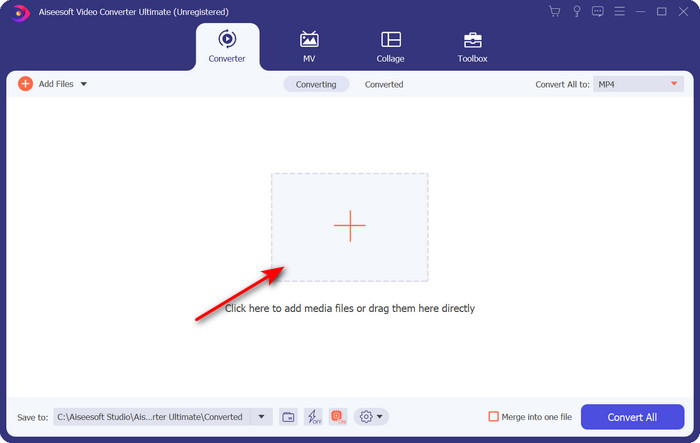
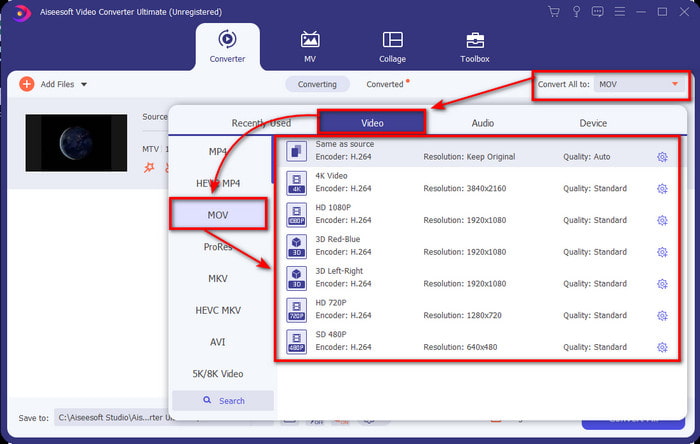
Step 3. By clicking the Convert All to, you can now locate the MOV format there.
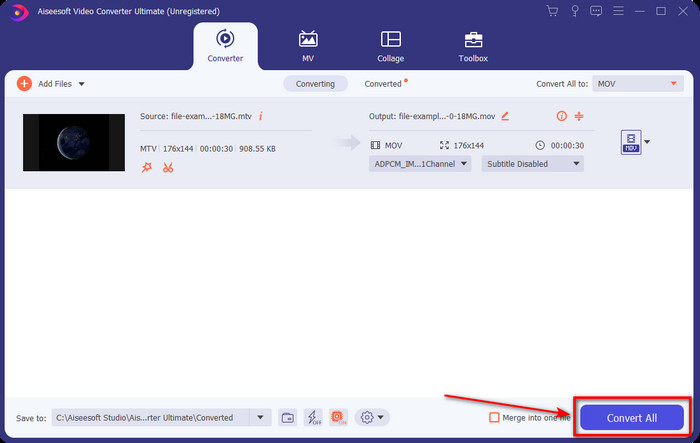
Step 4. Click the Convert All to begin the process of converting your MTV files into MOV format.
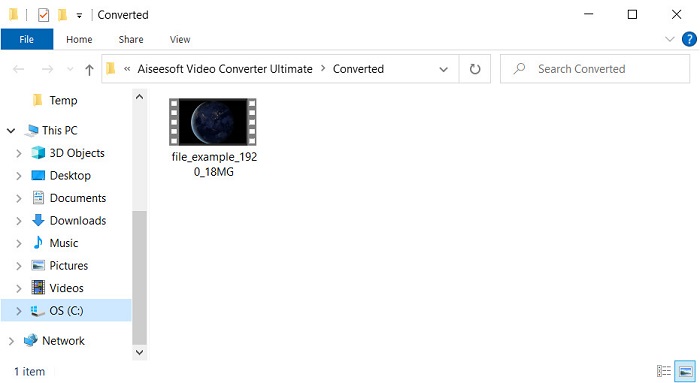
Step 5. Converting files will take an ample of your time; once done, a folder will pop up on your screen with the newly converted .mov format. If you want to watch the file, click it.
Parte 3. Online e de forma gratuita para converter MTV em MOV
Don't want to download the MTV converter on your device because you want to solve the problem online? If so, use the FVC Free Video Converter Online. Unlike the first mentioned software, you can access this tool on your favorite browser without downloading it. Also, you can convert here without limitation in size, convert anytime or anywhere in the world. One of the drawbacks of this tool is that it is internet dependent; this is useless if you don't have an internet connection. But, if you have internet connectivity in your area and don't have time to download the software above. Then follow the procedure on how to convert MKV files to MOV.
Step 1. If you want to use this web tool, then click the link provided.
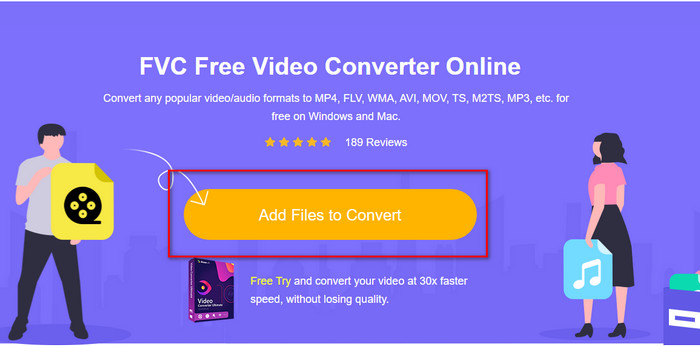
Step 2. After clicking the link, a website will show; click Add Files to Convert, and a file folder will show on your screen. Locate the file on the folder, then hit Open to upload it.
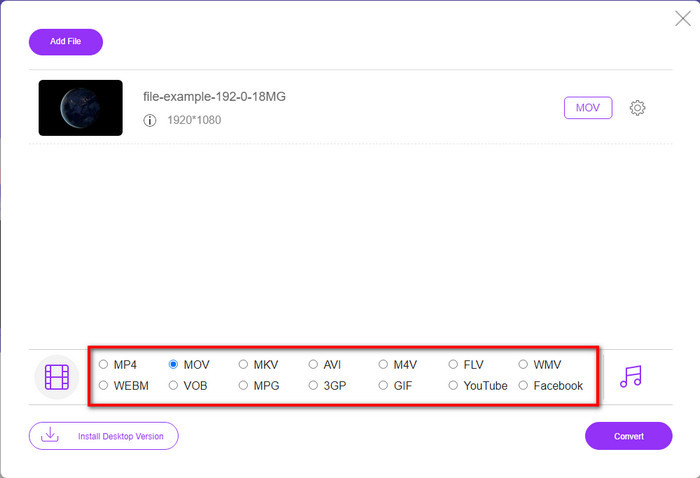
Step 3. Once the file is uploaded, choose the MOV format available on the list below.
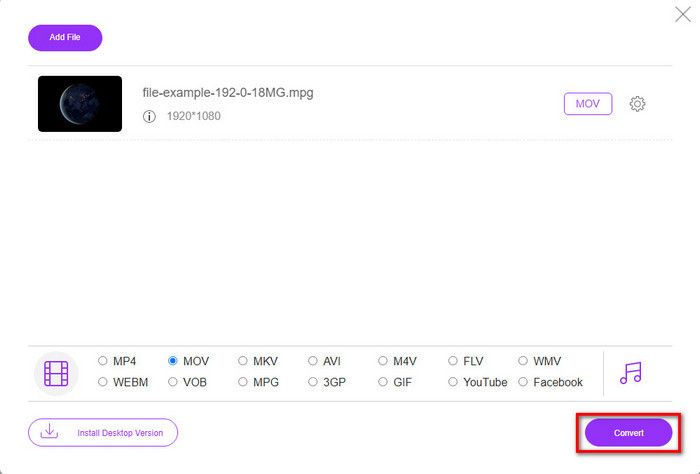
Step 4. Press Convert for the process to take place.
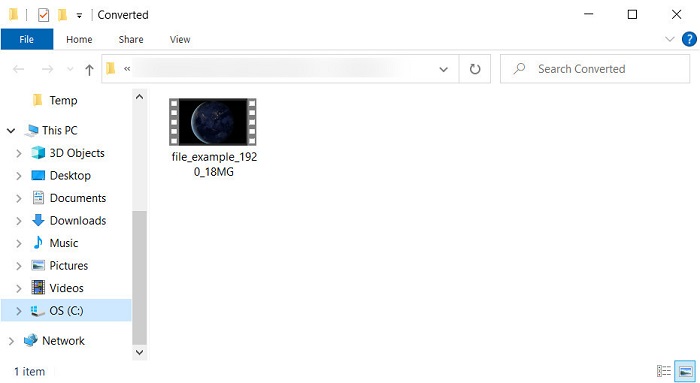
Step 5. The folder will show with the MOV file saved here.
Prós
- Disponível em todos os navegadores a serem usados.
- Conversor e interface amigável.
- Sem anúncios irritantes ou login para usar.
Contras
- Internet necessária para usá-lo.
- Conversor de médio alcance disponível
Parte 4. Perguntas frequentes sobre conversão de MTV e MOV
Posso converter arquivos MTV em AVI?
Of course, you can convert your MTV files into AVI, want to know how to do it? In that case, let's discover the three methods you can use to convert MTV to AVI.
O Quicktime Player é compatível com o arquivo .mtv?
Quicktime is a native media player on all Apple devices, but this player doesn't support .mtv files. But you can read this article and know the QuickTime replacement you can use to play the .mtv file.
Por que os vídeos da MTV estão borrados?
Uma das razões pelas quais os vídeos neste formato são desfocados é porque ele oferece suporte à baixa resolução. Para economizar espaço e fazer upload de muitos arquivos de mídia nos reprodutores MP4 portáteis chineses e diminuir a carga de processamento.
Conclusão
And now that we know how to convert our .mtv file and later send it on our Apple device, it is now the right time to choose. Whatever options you're going to use are the best in line with converting files online or offline. So, if you want to have an expert converter that provides excellence and ultimate power in converting, go with the FVC Video Converter Ultimate. But suppose you don't want to download a software on your device and want an efficient and effective converter online. In that case, FVC Free Video Converter Online is the choice.
-
 [Online e grátis] 3 métodos para converter MTV em AVI sem complicações
 Você já ouviu falar de um formato de vídeo como o MTV? Como você não sabe tudo sobre esse formato e deseja converter um vídeo MTV para AVI, leia este artigo com atenção para saber mais sobre o assunto.
-
 Melhor conversor de GIF para converter GIF animado para o formato MOV [2025]
 Converta seu GIF para o formato MOV sem esforço, sem afetar a qualidade do arquivo de vídeo. Com etapas e ferramentas diferentes também.
-
 Como converter AVI em MOV com etapas e ferramentas fáceis
 Você quer saber como converter AVI em um MOV jogável? Você deve seguir este artigo para saber como fazê-lo e dicas para ter uma conversão bem-sucedida.
