


 Video Converter Ultimate
 Gravador de ecrã
 Reparo de vídeo
Conversor XviD fácil de acessar: como converter arquivos XviD para o formato MOV
XviD file is the most known codec used to compete against DivX. Also, this codec uses the MPEG-4 ASP that contains features like b-frames, lumi masking, global and quarter pixel motion compensation, trellis quantization, custom quantization matrices, and H.263. And just by that, XviD became a more popular encoder than the DivX. Supposedly, you transfer a file that uses an XviD codec on your iOS. If the file does not play, don't be shocked because the codec doesn't support mobile devices like iOS and other devices. Although it looks unsolvable, there is always a solution to every problem; we provide a solution by converting the file under XviD to AVI format. If you want to know how to convert XviD files to MOV, then follow this article.

Parte 1. Introdução ao XviD e MOV
As we said earlier, your file can become smaller if you use the XviD to compress it without damaging its quality and decompress it quickly. Although Xvid is a non-proprietary compressor, this codec compatibility is limited to portable devices and especially editing. So, if you want to watch or edit the video with the XviD codec, it is a must to convert the file into MOV. Why MOV? Because this format can contain metadata, media files like audio, video, and text or subtitles. Not only that, this format can play videos on iOS devices and other devices as well. So now, to solve your problem on your XviD file, let's find out how to convert XviD to MOV with the help of this tool available below.
Parte 2. Melhor conversor para converter XviD para MOV no Windows e Mac
FVC Video Converter Ultimate
Are you looking for the best XviD to MOV converter that can convert the file within a blink of an eye? Then FVC Video Converter Ultimate is the only tool you are looking for. Besides its 30x faster conversion provided to the customers, you can edit, merge, cut, and do more to your video to look more phenomenal than the other. Although the tool provides advanced features still, you won't need to build a supercomputer to download and use this tool.
Além disso, este software também inclui aceleração de hardware e conversão rápida para tornar sua experiência de conversão mais rápida e melhor. E agora, se você quiser aprender a converter arquivos Xvid para MOV com a ajuda desta ferramenta, vamos ao tutorial abaixo.
Steps on How to Convert Xvid to MOV with the FVC Video Converter Ultimate;
Step 1. This software is downloadable on any PC or Mac OS, so you will need to press the download button below. After downloading the software, click the file to install, do the setup real quick, and click Start Now to open the tool immediately.
Free DownloadFor Windows 7 or laterSecure Download
Free DownloadFor MacOS 10.7 or laterSecure Download
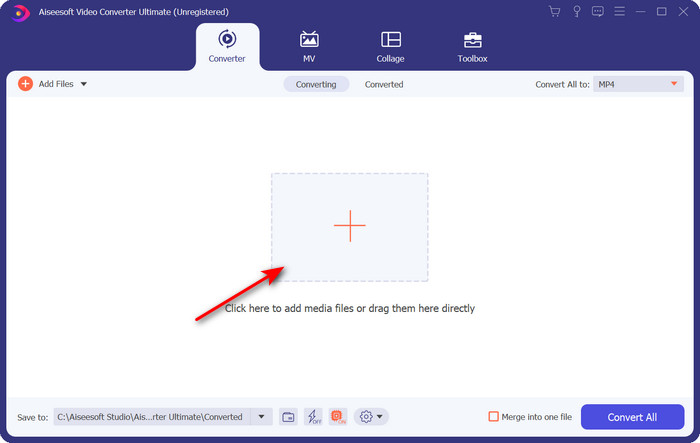
Step 2. To insert the .xvid file, you must click the + button, locate it on the folder, and click Open. However, if the .xvid file is more than two, we suggest that you drag and drop the files to the interface.
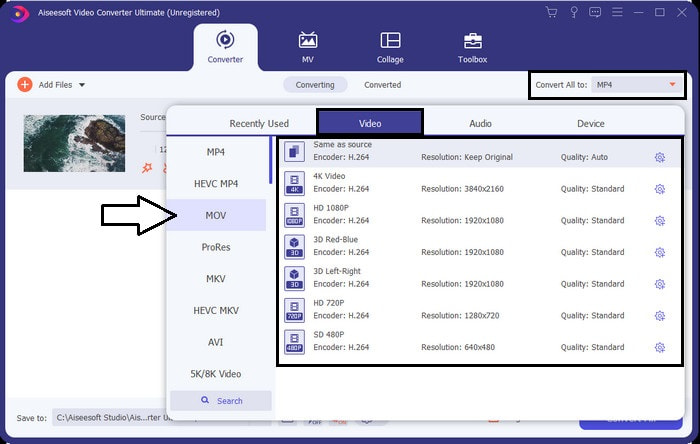
Step 3. Click the drop-down button at the upper right of the interface and locate the MOV format on the list.
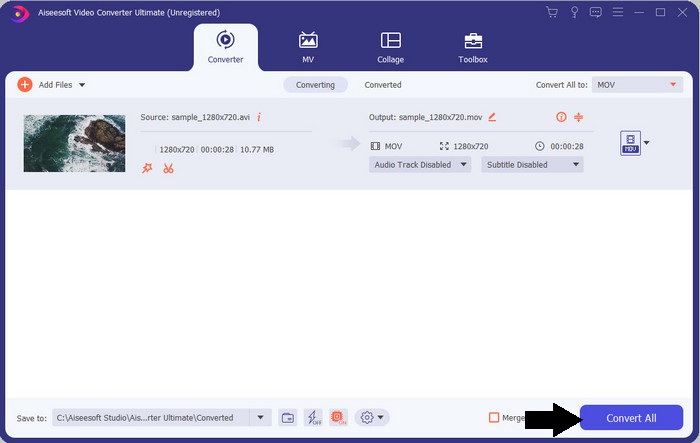
Step 4. Let's start transforming your XviD files to MOV by clicking Convert All.
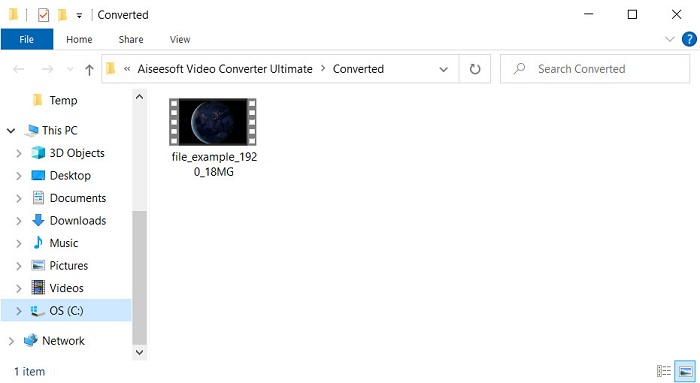
Step 5. Wait for a matter of seconds for the process to finish. A file folder will appear on your screen with the .mov file; click the file to play it on your local media player and enjoy.
Parte 3. Melhor Conversor Online para Converter Xvid para MOV
FVC Free Video Converter Online
Don't want to get in trouble downloading the software on your drive because your storage is full and you want to convert a single file online? FVC Free Video Converter Online is available in all web browsers. Converting the XviD file with the help of this tool will be done within a minute. Also, this tool doesn't need you to put your account to access it or even ads on the interface. This tool is the neatest online converter you can access on the web. However, you can't access this if you don't have an internet connection because this tool is network-dependent. Also, this tool supports a medium range of formats you can choose and use. Moreover, if you don't want to download a converter, you must use this XviD to MOV converter online.
Steps on How to Convert XviD Files to MOV Format Online with the Help of FVC Free Video Converter Online;
Step 1. To go to the main webpage of the online converter, you must click this link.
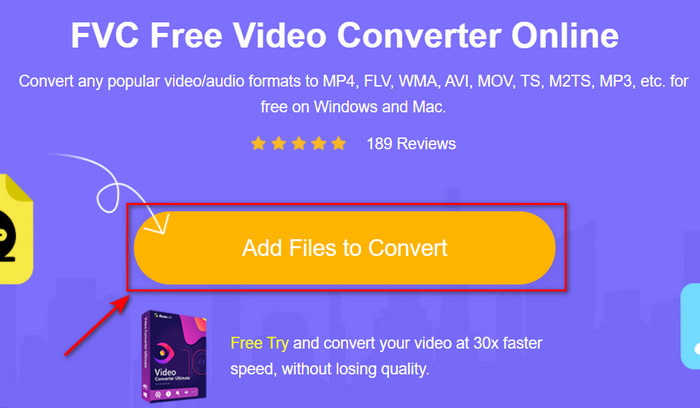
Step 2. Press Add Files to Convert to launch the tool, then a folder will show where you can find the XviD file you want to convert, and click Open to proceed.
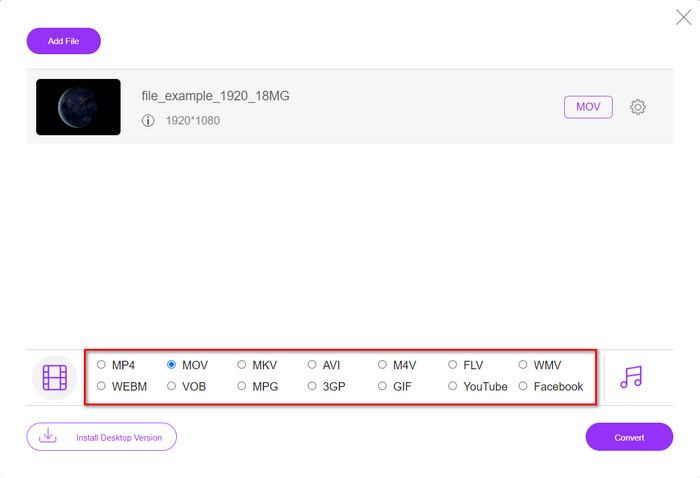
Step 3. A new interface will show after you insert the XviD file, choose the MOV format or the other format you want below.
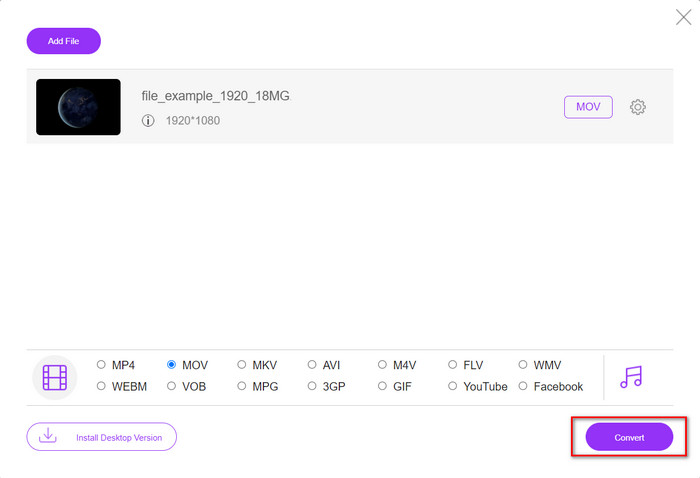
Step 4. To start the changing of format, click Convert.
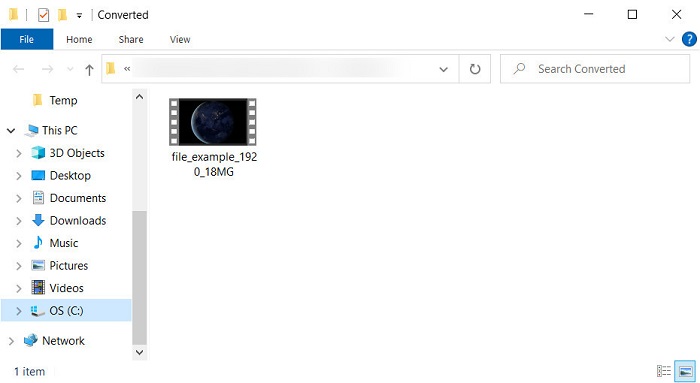
Step 5. Converting the file will take less of your time than the other online converter; after that, a folder will show with the converted file you've made.
Parte 4. Perguntas frequentes sobre a conversão de XviD para MOV
Onde posso assistir a vídeos XviD?
You can use the VLC Media player to play the XviD files for you. If you don't want to download, use the Windows Media Player available in all Windows. For Mac users, use Quicktime. But if you want to watch a high-definition XviD video, read this article as we compile all the possible XviD players you can use to watch XviD files.
O XviD é gratuito ou não?
O XviD é gratuito e está disponível para qualquer pessoa que queira usar e compactar seu arquivo para transferência rápida pela web ou economizar espaço. É tudo graças à licença de software livre GPL, por isso foi feito para ser gratuito.
Por que não consigo editar vídeos XviD?
Um dos principais motivos pelos quais você não pode editar vídeos com esse tipo de codec é que ele não é compatível. Nesse caso, os editores de vídeo mínimos suportam apenas esse tipo de codec devido à sua complexidade. Então, suponha que você queira editar um vídeo neste formato, você deve considerar convertê-lo primeiro. Nesse caso, é obrigatório ter um conversor multifuncional que possa converter arquivos XviD em MP4, AVI, MOV ou similares. Depois de converter o arquivo, carregue-o em seguida no editor para fazer a edição que desejar.
Conclusão
After reading this article, our knowledge about XviD expands, and now we can see the different perspectives of XviD. So now, if you want to save or play a video on your iOS device, you must convert the file first into MOV. As discussed earlier, these two mentioned converters perform well in converting the file into a MOV format. Although both tools look perfectly great, the speed and performance of the FVC Video Converter Ultimate are unrivaled and better than any desktop or web tool available. But if you want a free and safe conversion online, go with the FVC Free Video Converter Online.
-
 Como converter AVI em MOV com etapas e ferramentas fáceis
 Você quer saber como converter AVI em um MOV jogável? Você deve seguir este artigo para saber como fazê-lo e dicas para ter uma conversão bem-sucedida.
-
 Importar e converter AVI para formato compatível com o iMovie [2021]
 Está tendo um problema porque não consegue importar seu arquivo AVI no iMovie? Se você leu este artigo, então já escolheu a solução certa para esse problema.
-
 Como converter TS para AVI / MKV / MOV / WMV online e gratuitamente no Win / Mac
 Quer converter arquivos TS para AVI / MKV / MOV / WMV rapidamente? Este artigo mostra conversores de vídeo online e offline com guia completo. Talvez você possa obter o melhor conversor TS grátis aqui.
