


 Video Converter Ultimate
 Gravador de ecrã
 Reparo de vídeo
 Secure Download
Como converter AIFC para MP3 usando os melhores conversores de áudio
AIFC, abreviação de Audio Interchange File Format, é um formato de áudio inicialmente desenvolvido pela Apple Inc. É um padrão para armazenar dados de áudio e você pode encontrar arquivos AIFF comumente em sistemas Mac. AIFC é uma extensão do AIFF, onde as variantes compactadas são identificadas com uma extensão de arquivo .aifc.
The challenge with AIFC files lies in their limited compatibility with various devices and media players. Furthermore, when it comes to editing AIFC files, compatibility issues can pose significant problems if the editor doesn't support this format. To address this, we have gathered some effective methods to assist you in converting AIFC files to the widely supported MP3 format. Converting your AIFC files to MP3 ensures better compatibility across devices and seamless editing opportunities. Let's explore these conversion methods to overcome compatibility hurdles with your audio files.

Parte 1. 5 maneiras de converter AIFC em MP3
1. Video Converter Ultimate
Video Converter Ultimate is a reliable and professional AIFC to MP3 converter tool designed to convert AIFC format to MP3 and various other formats seamlessly. This software empowers you to transform your video and audio files effortlessly and securely, enhancing your offline entertainment experience while ensuring optimum compatibility. Please take advantage of its impressive capabilities by downloading the software for a free trial today.
Free DownloadFor Windows 7 or laterSecure Download
Free DownloadFor MacOS 10.7 or laterSecure Download
Siga estas etapas fáceis para converter seus arquivos AIFC para MP3 usando Video Converter Ultimate:
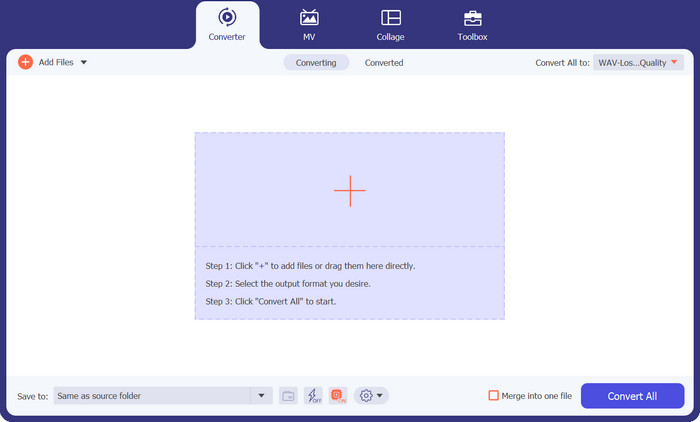
Step 1. Import AIFC files
Launch the software after installing Video Converter Ultimate on your Windows or Mac machine. Tick the Add Files button located on the top ribbon and import the AIFC files you wish to convert.
Step 2. Select MP3 as the output format
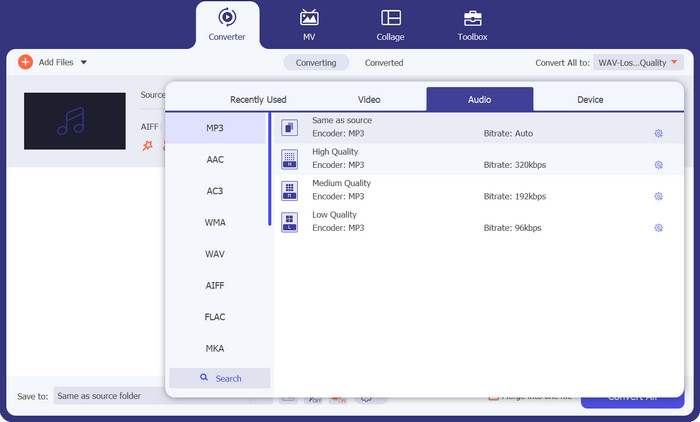
Locate the AIFC audio file in the library and click on the Convert All to dropdown positioned on the right side. Choose the Audio tab and select MP3 as the desired output format. Then, click the dropdown button at the bottom to browse and designate a folder for storing the converted MP3 files.
Step 3. Convert AIFC to MP3
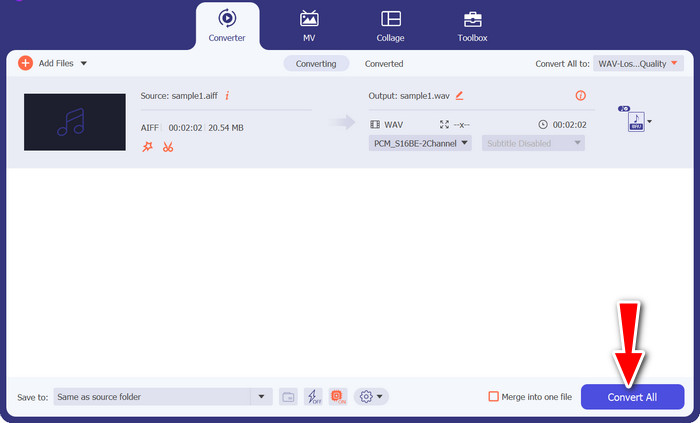
Once you've configured the output settings, select all the AIFC files you want to convert in the library area. Click the Convert All button situated at the bottom right corner to commence the process of conversion, transforming your AIFC files into MP3 format. After conversion, you can easily transfer and enjoy your MP3 files on any compatible device.
2. iTunes
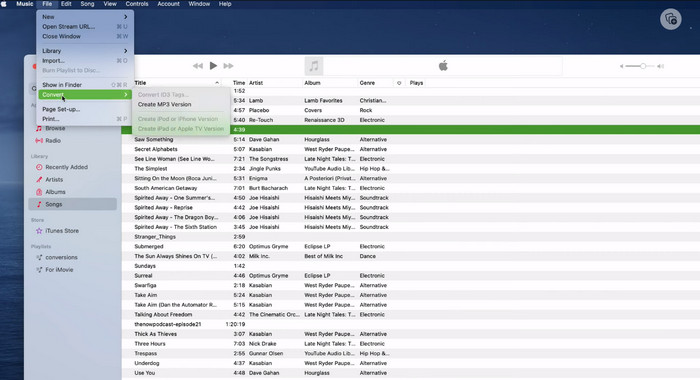
O iTunes é uma plataforma versátil para reproduzir, gerenciar e baixar músicas e vídeos no Mac OS X e Windows OS. Além disso, possui um recurso integrado para converter arquivos de áudio AIFC. Abaixo, você encontrará guias passo a passo completos sobre como converter AIFC para MP3 com eficiência no Mac usando o iTunes.
Step 1. Open iTunes on your computer. On a Mac, access iTunes by selecting iTunes > Preferences from the menu bar at the top screen.
Step 2. In the iTunes preferences window, navigate to General and then click on Import Settings at the bottom. In the Import Settings dialog, click on the dropdown menu next to Import Using and select MP3 Encoder. Click OK to confirm the selection. If you are using a Mac, hold the Option key, click File > Convert > Convert to MP3 and choose the folder containing the AIFC songs you want to convert.
Step 3. Once you've completed the conversion process, the songs will be converted to MP3 format and appear in your iTunes library, ready for playback or transfer to your devices. After this, you should have learned to convert AIFC to MP3 on Mac.
3. Conversor de MP3 gratuito on-line
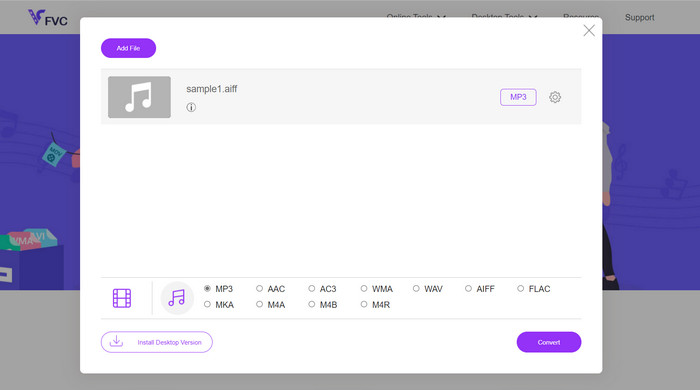
The easiest and most convenient solution is to use a trustworthy AIFC to MP3 online converter, and my personal favorite is Free MP3 Converter Online. This web-based service doesn't require any login or email address, allowing users to add files for direct conversion hassle-free. One remarkable feature worth mentioning is its extensive support for various formats.
Step 1. Begin by visiting the official page of the program. Click on the Add Files to Convert button and select the desired AIFC file from your computer's hard drive.
Step 2. Once the file is added, access the format menu and choose the MP3 output format as the desired file format.
Step 3. Finally, click the Convert button to initiate the conversion process. Within a few seconds, the file will be successfully converted to MP3 format and saved directly to your computer for easy access.
4. Zamzar
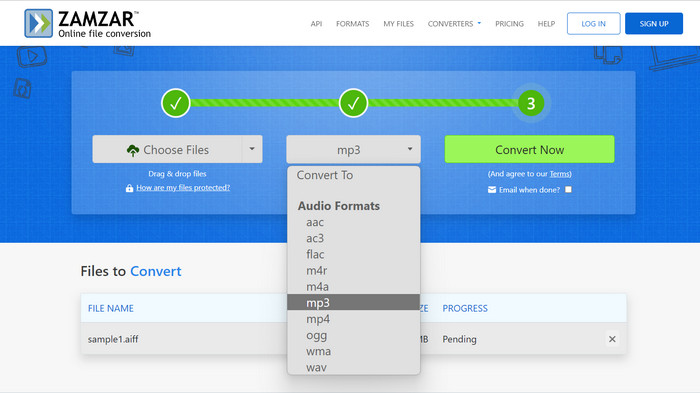
A opção por aplicativos de conversão de áudio baseados na web apresenta uma alternativa atraente para converter AIFC em MP3. Sem necessidade de instalação, esses aplicativos realizam com eficiência a tarefa de conversão de áudio. Para ilustrar o processo, usaremos Zamzar como exemplo.
Step 1. Access the AIFC to MP3 conversion page in your web browser. Upload your AIFC files from your computer's hard drive, a URL, or directly from your cloud storage account.
Step 2. To modify the output format, click on the dropdown menu for format and select MP3 as the desired format.
Step 3. Once you've configured the settings, click the Convert Now button to initiate the conversion process. Wait for the conversion to complete, and then download the converted MP3 files to your computer for immediate use.
5. Convertio
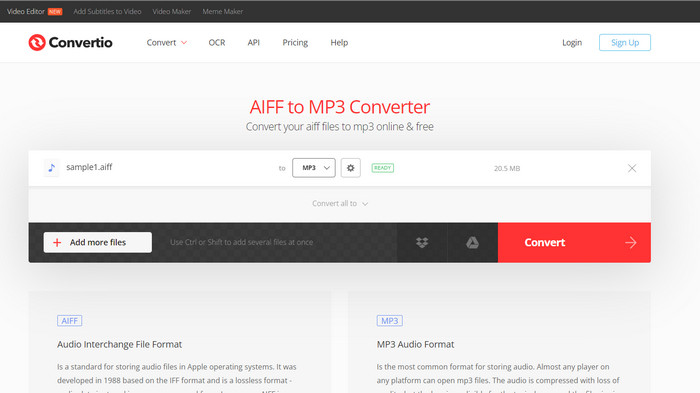
O Convertio não se limita apenas à conversão de AIFC para MP3. Na verdade, oferece uma ampla gama de possibilidades para converter arquivos AIFC para vários outros formatos populares, incluindo WAV, WMA, AAC, AC3, FLAC, OGG, RA e muito mais. Com o Convertio, você pode transformar facilmente seus arquivos AIFC para o formato de áudio de sua preferência, tornando-o uma ferramenta versátil e valiosa para conversões de áudio.
Step 1. Visit the Convertio website (https://convertio.co/aifc-mp3/) in your web browser.
Step 2. Click on the Choose Files button to upload your AIFC files from your computer. Alternatively, you can also drag and drop the files directly onto the website.
Step 3. After uploading the AIFC files, click on the dropdown menu for the output format. Select MP3 from the list of available audio formats.
Step 4. Click the Convert button to start the AIFC to MP3 conversion process. Wait for the conversion to complete.
Further Reading:
Review of Best AIF to WAV Conversion Programs [2023]
FLAC vs. MP3: Which Audio File Format Reigns Supreme
Parte 2. Perguntas frequentes sobre conversão de AIFC para MP3
O QuickTime converte AIFC para MP3?
Embora o QuickTime possa ler arquivos AIFC, ele não tem a capacidade de converter AIFC em MP3.
O AIFC é melhor que o AIFF?
AIFC é uma variante popular do AIFF que emprega compactação, resultando em tamanhos de arquivo menores em comparação com o AIFF. No entanto, esta compressão também leva a uma qualidade de áudio inferior à do formato AIFF original.
O que é melhor, MP3 ou AIFC?
AIFC é um formato com perdas e sua qualidade é determinada pela taxa de bits selecionada. A modificação da taxa de bits pode afetar se o AIFC supera ou fica atrás do MP3 na qualidade de áudio. Apesar disso, o MP3 possui ampla compatibilidade de dispositivos. A melhor opção entre MP3 e AIFC depende de seus requisitos e preferências específicas.
Posso converter arquivos AIFC para MP3 no meu dispositivo móvel?
Sim, alguns aplicativos móveis ou conversores online oferecem conversão de AIFC para MP3 diretamente no seu dispositivo móvel para sua conveniência.
Como posso garantir a melhor qualidade de áudio durante o processo de conversão?
Para obter a melhor qualidade de áudio, use uma taxa de bits mais alta durante a conversão. No entanto, lembre-se de que tamanhos de arquivo maiores resultarão em taxas de bits mais altas.
Conclusão
Converting AIFC to MP3 offers flexibility and wider device compatibility, making it a popular choice for audio conversion. While AIFC may provide better quality at higher bitrates, MP3 remains a practical and widely accepted option for everyday use.
-
 As 4 melhores maneiras de converter AIFF para MP3 em Mac e PC
 Está tendo dificuldades porque os arquivos AIFF são muito grandes para serem salvos? Portanto, você deve continuar lendo enquanto explicamos como consertar isso convertendo AIFF para o formato MP3.
-
 Download do MP3 Player - 10 melhores players de música MP3 gratuitos de 2023
 Qual é o melhor reprodutor de música MP3? Como coloco música em um MP3 player? Como fazer o download do reprodutor de música MP3? Esta postagem oferece uma análise detalhada dos 10 melhores reprodutores de MP3 gratuitos para Windows PC e Mac.
-
 5 cortadores de MP3 para cortar qualquer áudio facilmente [2023 atualizado]
 Você precisa de um cortador de MP3 para cortar o áudio? Nesse caso, leia este artigo porque fornecemos as ferramentas nas quais você pode confiar que facilitam o corte do áudio.
