


 Video Converter Ultimate
 Gravador de ecrã
 Reparo de vídeo
Aprenda a arte de converter arquivos para converter AMR para o formato MP3
AMR is an audio container used to store data about human voices or speech. And so, if you are taking a phone call and want to record it, this is the best format to record it. Although the file size of this format container is small, still most of the media players don't support this format. So, instead of installing a media player, why don't you try and convert it into a new format? The best way to convert AMR to MP3 is in the list below. Moreover, choose your converter that supports the conversion effectively and efficiently.

Parte 1. AMR vs. MP3: Qual é o melhor?
AMR e MP3 são um dos melhores formatos de áudio que você pode usar para armazenar seu áudio enquanto preserva sua qualidade. Mas eles também têm diferenças, então estamos aqui para determinar quais são e saber qual é o melhor.
AMR
Como mencionado anteriormente, este formato é usado para armazenar arquivos de áudio gravados por meio de chamadas telefônicas. Fora isso, este formato foi compactado e desenvolvido pela Ericsson para se tornar pequeno. No entanto, esse formato não é adequado para armazenamento de música devido à compactação que ele fornece.
MP3
É conhecido como o formato de áudio universal para armazenar gravações de áudio e música em ambas as formas. Além disso, esse formato é conhecido universalmente, portanto, você pode ouvir o formato de arquivo com o nome de extensão .mp4 em qualquer reprodutor de mídia. Mas se você usar isso para armazenar chamadas de gravação, o tamanho do arquivo será muito maior e a qualidade será menor do que AMR.
So, if you want to record and save it in the format of AMR or MP3 then try to use this FVC Screen Recorder. As it boasts Audio Recorder to record audio with small size and having a crystal-clear recording. So, record your jamming sessions, podcasts or more here.
Free DownloadFor Windows 7 or laterSecure Download
Free DownloadFor MacOS 10.7 or laterSecure Download
Além disso, vamos prosseguir e escolher o melhor conversor para converter AMR para MP3 com as etapas detalhadas fornecidas abaixo. Todas as ferramentas mencionadas abaixo já foram testadas cuidadosamente por nossa equipe para fornecer apenas fatos sobre o assunto.
Parte 2. Aprenda como converter AMR para MP3 online e offline
1. FVC Video Converter Ultimate
The phenomenal converter is here in our town, FVC Video Converter Ultimate. Every problem has a different solution but if you have this multi-purpose converter, editor, enhancer, booster and more. Then why need to find another tool to fix your conversion problem? if this tool has it all. Also, most converters are ineffective and inefficient to do conversion. Although this tool is paid but no need to panic, because this is inexpensive, which means even if you have a couple dollars you can still learn how to convert AMR to MP3. So, to impress someone you can use this converter by following these simple steps provided only for you.
Step 1. Download the software to your drive by clicking the download button. Then install, set it up, and click finish to save the settings.
Free DownloadFor Windows 7 or laterSecure Download
Free DownloadFor MacOS 10.7 or laterSecure Download
Step 2. Then to add the AMR audio file, click the plus sign to locate the file in your folder.
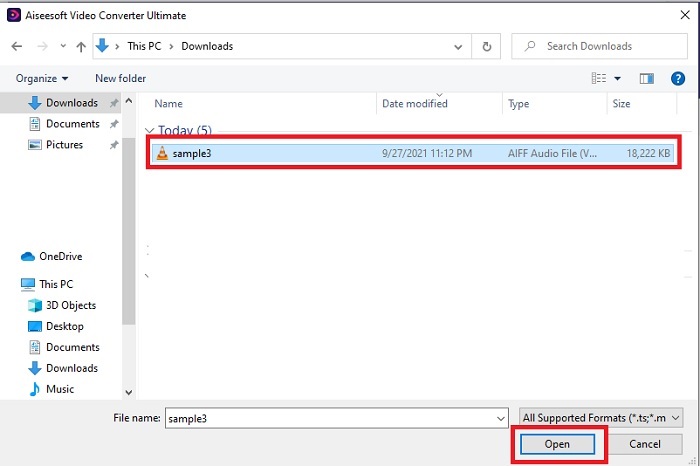
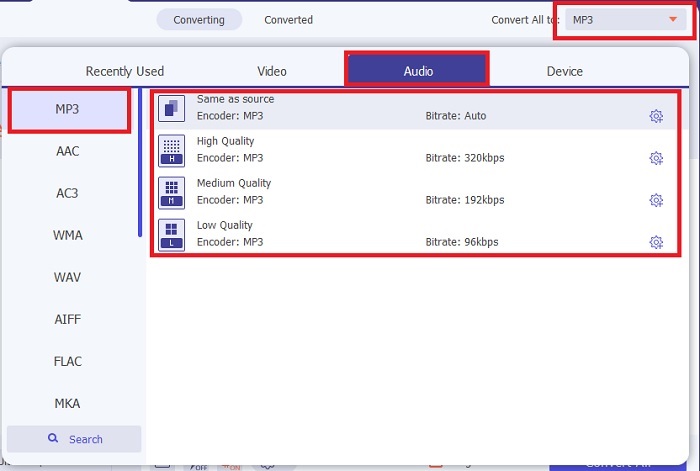
Step 3. Press the Convert All to option to change the AMR to MP3 or any audio file format you want it to be.
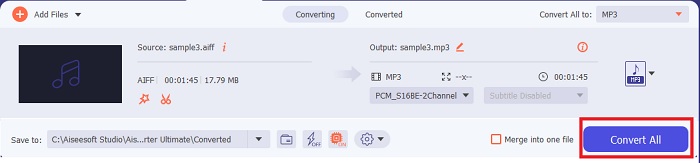
Step 4. To start the conversion process, press the Convert All.
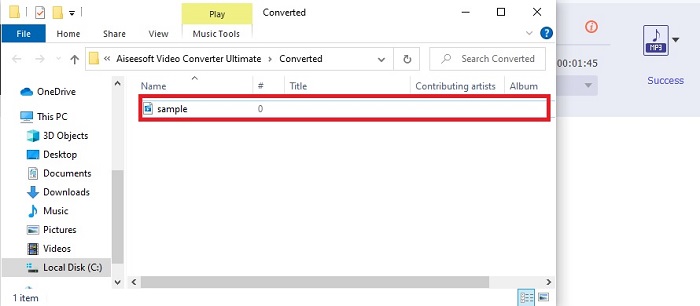
Step 5. If the process is done, a file folder will be shown to your screen. And click the first file to listen to the new converted AMR audio file.
2. FVC Free Audio Converter
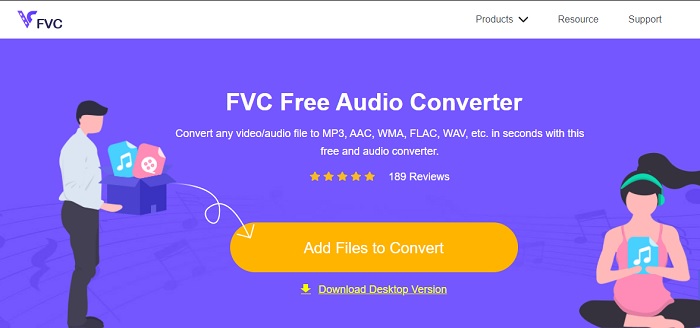
If you are not a fan of downloading the software to your drive then you can use this AMR audio to MP3 converter online, the FVC Free Audio Converter. This webtool has been developed by FVC, to those who don't want to spend their money on converting. Thus, this tool can only be accessed via online, which means you can’t use this tool if there is no internet in your area. Also, major editing features aren't in this webtool but you can change the bitrate, fps, and resolution of the final output. Not only that, the format available here is very limited but the conversion you can do here is unlimited. Which means convert all your files without limit but individually. Moreover, to know how this web tool functions you must follow the steps presented below.
Step 1. To open the FVC Free Audio Converter, click the hyperlink that addresses the main webpage.
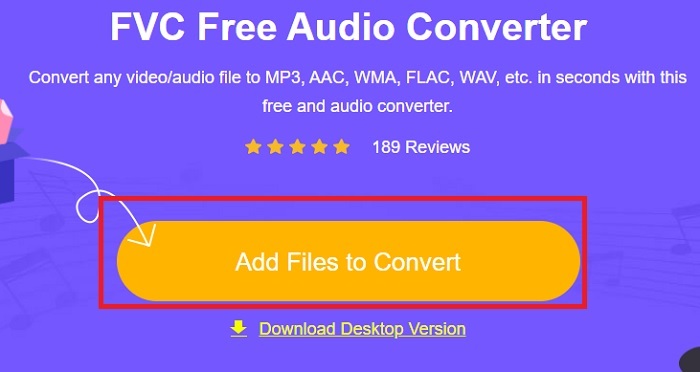
Step 2. Then press the Add Files to Convert to start the tool.
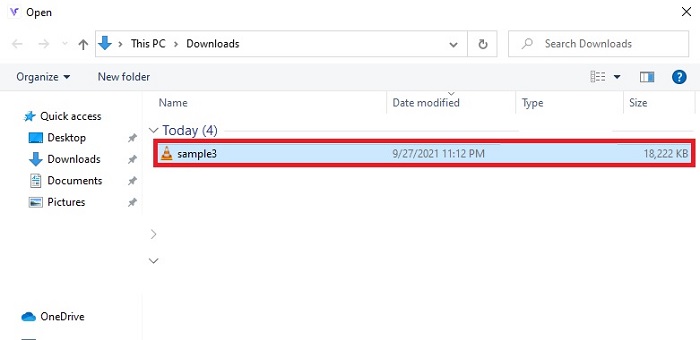
Step 3. After starting the tool, it is now the right time to insert your AMR file. After locating the file, click open to upload them to the tool.
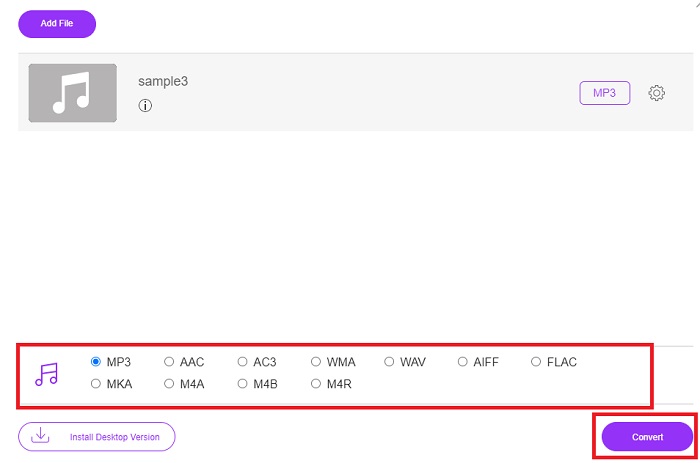
Step 4. Select what audio format you want it to be in here. If you already selected the new format, click the Convert button to start the process.
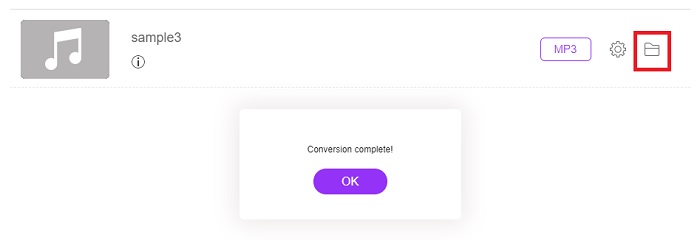
Step 5. If the conversion is done, click the folder to locate the finished conversion you did earlier.
3. VLC Media Player
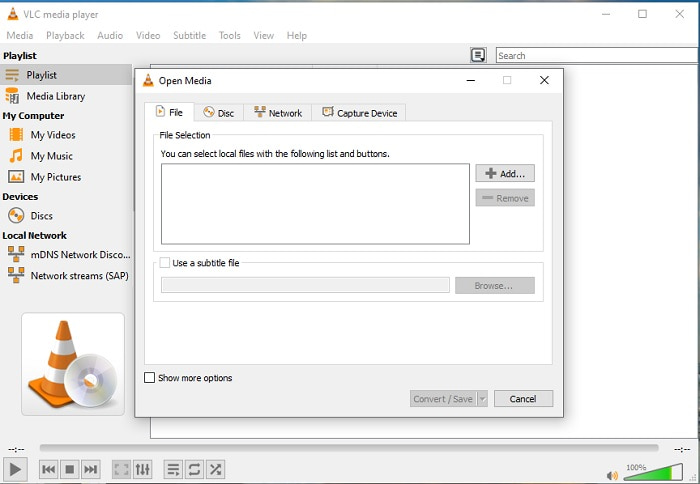
You can use this AMR file to MP3 converter software and it is free to download on your PC or Mac. But the VLC supports fewer formats and enhances features to add it to your media file. Also, to convert the files in here is a bit harder than playing the media file. So, if you are trying to convert here expect nothing much because it is not the best to use in converting. Although you can try it for yourself by following these steps below.
Step 1. Download, install, and open the VLC on your desktop.
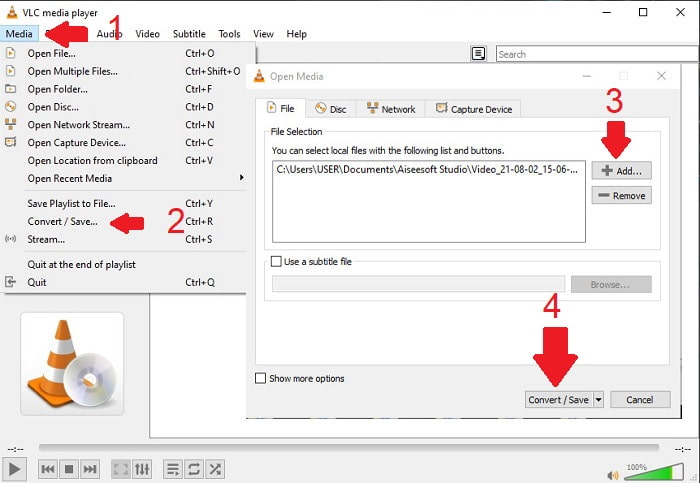
Step 2. Click the Media above of the interface, then Convert/Save. In the new interface, click the Add to insert the file then Convert/Save to proceed.
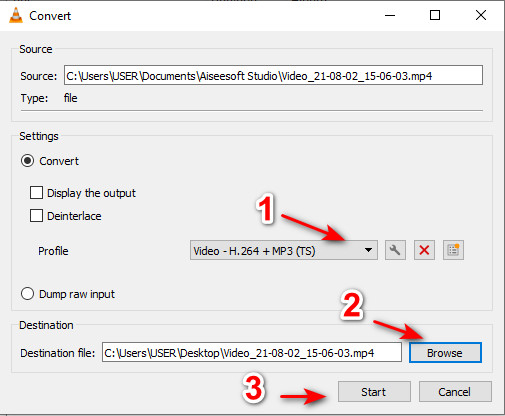
Step 3. Choose the format you want on the Profile, set the Destination file, and click Start.
4. Windows Media Player
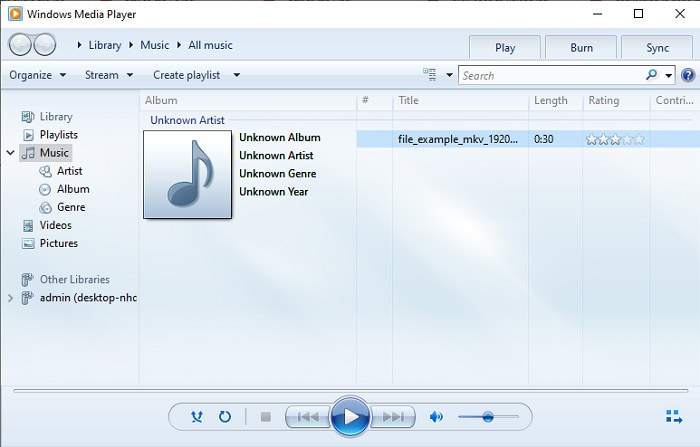
Unlike VLC this Windows Media Player is the native media player you can use on every Windows program desktop. Although the AMR format can’t be played here due to the technicality of its compression. So, if you want to play your .amr files in here you must follow how to convert AMR to MP3 on Windows Media Player. Technically, this is not your typical converter but it is more likely a ripper that changes the format to be saved after.
Step 1. Open the Windows Media Player on your desktop.
Step 2. Click the Organize and select Options. Then press Change to alter the destination, choose the Format, and adjust the Audio quality into your desire. Click Apply and OK to proceed.
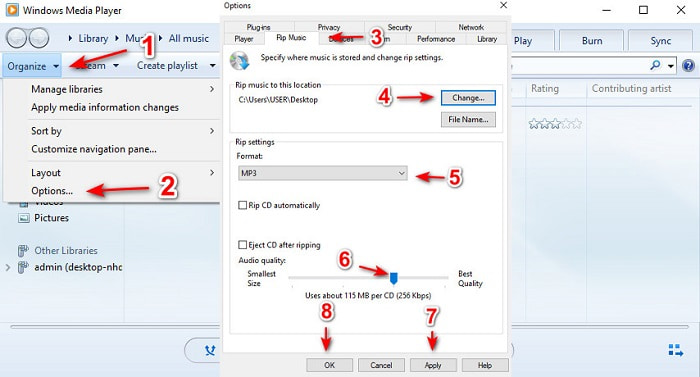
Step 3. Insert the DVD, CD, or Blu-ray discs you want to rip and be converted as well. After inserting the process will automatically begin.
Further Reading
Parte 3. Perguntas frequentes sobre AMR para MP3
Por que não consigo reproduzir meus arquivos .amr?
If you updated your operating system, there is a chance that the .amr files can't be played properly. Most of the time, the .amr file is already broken or corrupted so you can't play it either. But you can at least try and download this AMR player to listen and try to retrieve some of the data in your .amr file. Download Blu-ray Player on PC Download Blu-ray Player on Mac
Qual é o codec usado para armazenar dados para arquivos AMR?
Os arquivos AMR usam codecs de 8 fontes para definir as frequências de amostra de 8 kHz ou 13 bits que são usadas na otimização de dados de discursos verbais humanos. Além disso, é codificado com a banda estreita entre 200 e 3400 hertz.
Posso reproduzir arquivos AMR no meu iPhone?
Although .amr files are still in use on Android devices but iOS program doesn't support this type of format because of the data complexity. So, the best way to save AMR on iOS you must consider is to convert AMR to MP3 on iPhone. You can use the tool above and later transfer it on your iPhones.
Conclusão
To end the discussion, it is now easier to understand what AMR format is and what the files it covers. Although the converters that are presented in here can do the conversion of AMR to MP3 and yet the phenomenal converter did its best to stand out still. The FVC Video Converter Ultimate showcases a lot of potential not only in converting but in other tracks as well. So, if you want to experience a new height of converting media files it is a must to use the ultimate converter.
Free DownloadFor Windows 7 or laterSecure Download
Free DownloadFor MacOS 10.7 or laterSecure Download
-
 Como converter M4A para MP3 com 4 conversores de áudio grátis
 Não consegue reproduzir M4A e precisa convertê-lo para MP3? Existe alguma maneira gratuita de converter M4A para MP3 online? Esta postagem compartilha 4 maneiras gratuitas de ajudá-lo a converter M4A em MP3 com o iTunes, conversores de áudio online e profissionais.
-
 Como converter WMA em MP3 no Mac / Windows / Online
 É possível converter WMA em MP3 com o Windows Media Player? Como converter WMA para MP3 grátis? Este post compartilha 4 métodos simples para ajudá-lo a fazer a conversão de áudio de WMA para MP3 no Mac, Windows PC e online.
-
 As 5 melhores ferramentas de gravador AMR disponíveis para todos os sistemas operacionais
 Quer saber o que é um formato AMR e qual é o melhor gravador AMR que você deve escolher e que proporcionará uma gravação incrível.
